-
JDBC总结
目录
jdbc管理事务(Connection接口中定义了3个对应的方法)
jdbc概念
jdbc:(java database connectivity)java数据库连接,其就是使用java语言来操作数据库的一套API,其定义了操作所有关系型数据库的一套规则。
注意:jdbc定义了一套接口,通过这套接口就可以操作不同的关系型数据库

jdbc本质
- 官方(sun公司)定义的一套操作所有关系型数据库的规则,即接口
- 各个数据库厂商去实现这套接口,提供数据库驱动jar包
- 我们可以使用这套接口(jdbc)编程,真正执行的代码是驱动jar包中的实现类
jdbc好处
- 各个数据库厂商使用相同的接口,java代码不需要针对不同数据库分别开发
- 可以随时替换底层的数据库,访问数据库的java代码基本不变
jdbc操作数据库
过程:
- 在java代码里定义好sql语句
- 将sql法给mysql数据库
- mysql数据库执行完sql之后给我们返回结果
使用前提:导入对应数据库的驱动jar包(实现类)
表用例-db数据库的emp表
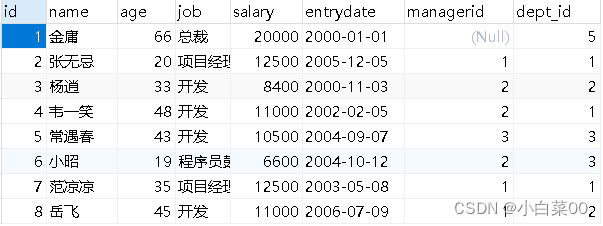
- public class JDBCDemo {
- public static void main(String[] args) throws Exception {
- //注册驱动——加载driver类至内存(可以省略不写)
- Class.forName("com.mysql.jdbc.Driver");
- //连接的数据库地址——协议、域名、端口号、要连接的数据库
- String url="jdbc:mysql://127.0.0.1:3306/db";
- //数据库设的用户名
- String u="root";
- //为数据库设的密码
- String p="root";
- //获取数据库连接
- Connection connection = DriverManager.getConnection(url, u, p);
- //定义sql语句
- String sql="update emp set salary=8500 where id=3";
- //获取执行sql的对象(传输器)statement
- Statement statement = connection.createStatement();
- //执行sql——返回的i为影响行数
- int i = statement.executeUpdate(sql);
- //处理结果
- System.out.println(i);
- //释放资源
- statement.close();
- connection.close();
- }
- }
DriverManager(驱动管理类)
作用:
- 注册驱动
- 获取数据库连接
注意:DriverManager是一个工具类,里面很多静态方法
注册驱动
注册驱动:Class.forName("com.mysql.jdbc.Driver");
- //Driver类内
- static {
- try {
- //注册驱动
- DriverManager.registerDriver(new Driver());
- } catch (SQLException var1) {
- throw new RuntimeException("Can't register driver!");
- }
- }
提示:
- mysql 5之后的驱动包,可以省略注册驱动的步骤(Class.forName("com.mysql.jdbc.Driver"))
- 自动加载jar包中META-INF/services/java.sql.Driver文件中的驱动类
获取数据库连接

参数
- url:连接路径
- user:用户名
- password:密码
关于url

Connection
作用:
- 获取执行sql的对象
- 管理事务
获取sql执行的对象
普通执行sql对象:Statement createStatement()
预编译sql的sql执行对象:PreparedStatement prepareStatement(sql)
执行存储过程的对象:CallableStatement prepareCall(sql)
事务管理
mysql管理事务

jdbc管理事务(Connection接口中定义了3个对应的方法)

- public class JDBCDemo {
- public static void main(String[] args) throws Exception {
- Connection connection = DriverManager.getConnection("jdbc:mysql://127.0.0.1:3306/db","root","root");
- String sql1="update emp set salary=8500 where id=3";
- String sql2="update emp set salary=8500 where id=4";
- Statement statement = connection.createStatement();
- try {
- //开启事务-手动提交
- connection.setAutoCommit(false);
- int i1 = statement.executeUpdate(sql1);
- int i2 = statement.executeUpdate(sql2);
- System.out.println(i1+""+i2);
- //提交事务
- connection.commit();
- }catch (Exception e){
- //回滚事务
- connection.rollback();
- //打印异常信息
- e.printStackTrace();
- }
- statement.close();
- connection.close();
- }
- }
Statement
作用:执行sql语句
int executeUpdate(sql):用来执行DML、DDL语句
返回值
- DML语句执行完会返回影响行数,影响行数不为0则成功
- DDL语句执行完,执行成功也会返回0
RestultSet executeQuery(sql):用于执行DQL语句
返回值:ResultSet结果集对象
- @Test
- public void testdb() throws Exception {
- Connection connection = DriverManager.getConnection("jdbc:mysql://127.0.0.1:3306/db","root","root");
- String sql1="update emp set salary=8400 where id=3";
- String sql2="drop database db1";
- Statement statement = connection.createStatement();
- //执行DML语句,返回影响行数
- int i1 = statement.executeUpdate(sql1);
- //执行DDL语句,DDL语句执行完一般不报异常就ok
- int i2 = statement.executeUpdate(sql2);
- System.out.println(i1>0?"执行成功":"执行失败");
- System.out.println(i2);
- statement.close();
- connection.close();
- }
ResultSet
作用:封装了DQL查询语句的结果集对象

获取查询结果
获取整个行

获取行中的每个元素
xxx getXxx(参数):获取列数据,最终返回列数据
xxx:数据类型=>与对应列的数据类型保持一致
eg:
- int getInt(1):获取该行第一列(该列字段为int类型)的数据
- String getString(2):获取该行第二列(该列字段为String类型)的数据
- Object getObject(3):获取该行第三列(该列字段为随意类型)的数据
参数:
- int类型的列数(列数从1开始)=>表示该行第几列的元素
- String类型的列名=>表示该行的特定列名的元素
ResultSet过程

ResultSet会将上面查询的表数据都封装起来,内部有个游标(一个箭头)此游标默认指向当前数据行的上一行,获取数据则游标会向下移动一行,移动一行后,要判断当前行是不是有效行(有数据就是有效行),如果是有效行就开始可以从头一个一个的获取数据了,获取完之后再想获取第二行则游标再往下移动一行,如此循环往复
ResultSet使用步骤
- 游标向下移动一行,判断该行是否有数据:next()
- 获取数据:getxxx(参数)

- @Test
- public void testRes() throws Exception {
- Connection connection = DriverManager.getConnection("jdbc:mysql://127.0.0.1:3306/db","root","root");
- String sql="select * from emp where id<4";
- Statement statement = connection.createStatement();
- ResultSet resultSet = statement.executeQuery(sql);
- //处理返回结果
- //光标向下移动一行,并且判断当前行是否有数据
- while (resultSet.next()){
- //获取数据
- //获取该行第一列的字段值为int类型的元素
- System.out.println(resultSet.getInt(1));
- //获取该行第二列字段值为String类型的元素
- System.out.println(resultSet.getString(2));
- //获取该行第三列字段值为任意类型的元素
- System.out.println(resultSet.getObject(3));
- //获取该行字段名为entrydate对应的字段值
- System.out.println(resultSet.getObject("entrydate"));
- }
- statement.close();
- connection.close();
- }
sql注入
sql注入:通过操作输入来修改事先定义好的sql语句,用来达到执行代码对服务器进行攻击的方法
sql注入测试用例-user表

- public static void main(String[] args) throws Exception {
- Connection connection = DriverManager.getConnection("jdbc:mysql://127.0.0.1:3306/db","root","root");
- System.out.println("请输入您的姓名:");
- String u = new Scanner(System.in).nextLine();
- System.out.println("请输入您的密码");
- String p = new Scanner(System.in).nextLine();
- //select * from user where username="lili" and password=123;因为username字段为varchar类型,需加双引号,password为int类型不需要加双引号(当然加了也可以)
- String sql="select * from user where username='"+u+"'and password="+p;
- Statement statement = connection.createStatement();
- ResultSet resultSet = statement.executeQuery(sql);
- //只要resultSet里面有数据就成功
- if(resultSet.next()){
- System.out.println("登录成功");
- }else {
- System.out.println("登录失败");
- }
- statement.close();
- connection.close();
- }
验证sql注入:在输入姓名的后面直接写“lili'#”将后面的密码部分注释了进而登录成功
PreparedStatement
作用:预编译sql语句并执行,预防sql注入问题
使用
获取PreparedStatement对象:
String sql="select * from where username=? and password=?"
PreparedStatement p=connection.prepareStatement(sql);
注意:以上sql为sql骨架,里面的?为占位符
设置参数值
给?赋值:p.setXxx(参数1,参数2);
xxx:代表该字段值的数据类型(用Object覆盖所有类型)
参数
- 参数1:?的位置编号(从1开始)
- 参数2:对应?的值
执行sql
executeUpdate();/executeQuery();
注意:此次执行不需要再次传递sql
解决sql注入
- public static void main(String[] args) throws Exception {
- Connection connection = DriverManager.getConnection("jdbc:mysql://127.0.0.1:3306/db","root","root");
- System.out.println("请输入您的姓名:");
- String u = new Scanner(System.in).nextLine();
- System.out.println("请输入您的密码");
- String p = new Scanner(System.in).nextLine();
- //预防sql注入
- String sql="select * from user where username=? and password=?";
- PreparedStatement preparedStatement = connection.prepareStatement(sql);
- preparedStatement.setString(1,u);
- //用object代表所有类型
- preparedStatement.setObject(2,p);
- ResultSet resultSet = preparedStatement.executeQuery();
- if(resultSet.next()){
- System.out.println("登录成功");
- }else {
- System.out.println("登录失败");
- }
- preparedStatement.close();
- connection.close();
- }
注意:PreparedStatement本质上是把sql骨架和sql参数分开执行,遇到了#只是当作一个普通文本而不是注释符号了(将敏感字符进行转义)
PreparedStatement好处
- 预编译sql,性能更高
- 防止sql注入:将敏感字符进行转义
注意:
- PreparedStatement的预编译功能默认是关闭的
- 开启预编译功能:useServerPrepStmts=true(加到url?后面)
如何理解预编译
- 首先来说statement,就是我们写好的sql发给mysql服务器,服务器进行sql语法检查,sql编译(编译成可执行的函数),后执行sql语句。
- 对于PreparedStatement来说,他会先检查sql骨架的语法,检查完后编译,将来我们设置完值的时候就可以直接执行
数据库连接池
简介
- 数据库连接池是一个容器,负责分配,管理数据库连接
- 他允许应用程序重复使用一个现有的数据库连接,而不是重新建立一个
- 释放空闲时间超过最大空闲时间的数据库连接来避免因为没有释放数据库连接而引起的数据库连接遗漏
好处:
- 资源重用
- 提升系统响应速度
- 避免数据库连接遗漏
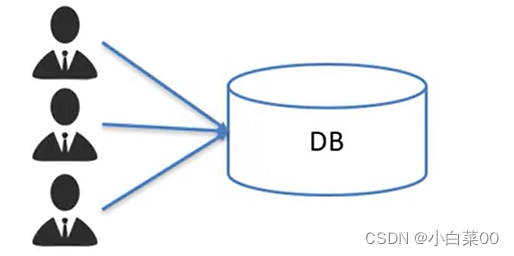
不使用数据库连接池
有很多用户访问这个数据库,来个用户就会现给他开一个数据库连接为该用户服务,服务结束后,连接关闭,再来一个用户再开一个连接为其服务,服务完关闭连接,循环往复,但是:开启数据库连接是一个非常耗时的工作(开启数据库连接就必须建立系统底层的资源,耗时间)而且用完之后关闭连接,关闭连接也耗费资源,不能做到资源的复用
使用数据库连接池
在系统启动之前初始化一个容器,然后在容器里面提前申请许多数据库连接(连接提前创建好)创建好之后将来有用户访问这个数据库,那么就会先从容器里面取出一个数据库连接给该用户使用,用户用完该连接,那么该连接会归还到数据库连接池容器里
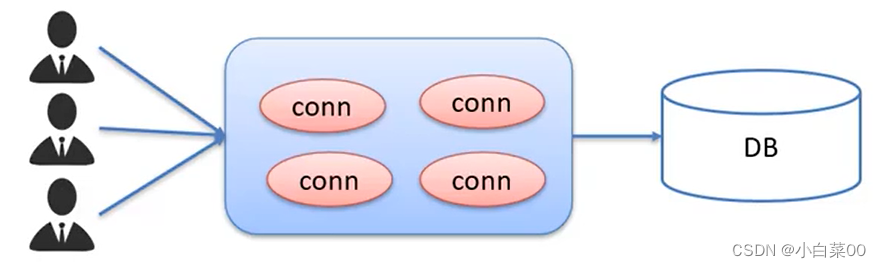
连接池的连接实现
标准接口:DataSource
官方sun提供的数据库连接池标准接口,由第三方组织实现此接口
功能:获取连接=>Connection getConnection()
注意:每一个数据库连接池中都有这样一个方法,继承自DataSource接口,用来获取连接对象
常见的数据库连接池
- DBCP
- C3P0
- Druid
Druid(德鲁伊)
- 德鲁伊连接池是阿里巴巴开源的数据库连接池项目
- 功能强大,性能优秀,是java语言最好的数据库连接池之一
Driud使用步骤
- 导入jar包-druid-1.1.12.jar
- 定义配置文件
- 加载配置文件
- 获取数据库连接池对象
- 获取连接
配置文件
- #项目的src目录下放该druid.properties文件
- driverClassName=com.mysql.jdbc.Driver
- url=jdbc:mysql:///db?useSSL=false&userServerPrepStmts=true
- username=root
- password=root
- #初始化配置
- initialSize=5
- #最大连接数
- maxActive=10
- #最大等待时间——ms
- maxWait=3000
表用例-emp
- public class DruidDemo {
- public static void main(String[] args) throws Exception {
- //加载配置文件
- Properties prop=new Properties();
- prop.load(new FileInputStream("jdbc-demo/src/druid.properties"));
- //获取连接池对象——里面的参数为prop对象
- DataSource dataSource = DruidDataSourceFactory.createDataSource(prop);
- //获取对应的数据库连接
- Connection connection = dataSource.getConnection();
- String name="金庸";
- Integer age=43;
- String sql="select * from emp where name=? or age=?";
- PreparedStatement preparedStatement = connection.prepareStatement(sql);
- preparedStatement.setObject(1, name);
- preparedStatement.setObject(2, age);
- ResultSet resultSet = preparedStatement.executeQuery();
- while (resultSet.next()){
- //这里的i表示该行的列数
- for (int i=1;i<9;i++){
- System.out.println(resultSet.getObject(i));;
- }
- }
- }
- }
-
相关阅读:
hash:哈希表 哈希桶
jQuery成功之路——jQuery动画效果和遍历效果概述
概率密度函数,概率分布函数
关于HarmonyOS元服务的主题演讲与合作签约
项目实战总结
【web后端】C#类与继承、随机数写法、虚函数、例题
Linux之安全最佳做法(未完成)
外卖项目(SpringBoot)--- 数据表设计、创建项目工程、登录模块
[激光原理与应用-109]:南京科耐激光-激光焊接-焊中检测-智能制程监测系统IPM介绍 - 12 - 焊接工艺之影响焊接效果的因素
渗透测试-命令执行漏洞
- 原文地址:https://blog.csdn.net/m0_60027772/article/details/125988429
