-
【C#】试卷批改系统
简介
实现语言:C#
项目名称:试卷批改系统
项目类型:Windows 窗体应用(.NET Framework)
开发环境:Visual Studio 2022 Community 17.2.5
目标框架:.NET Framework 4.8
项目介绍
为了缓解老师们的疲劳,
让我们更快乐得玩耍,我做了这个试卷批改的系统,能帮老师快速地批改选择题、判断题和有唯一答案的填空题,并且让我们有充分的时间玩耍,简直一举(没)两得(用)啊!好了,回到正题,其实是我一个老师用C++做了一个简单的试卷批改系统,但每次的答案都需手动输入,也不能一键批改,我就做了这么一个项目,支持直接导入老师文件(答案)与分数文件(每道题对应的分值写在这个文件中)与一键导入学生文件。
更新历史
- 2022-7-19:1.0.0正式版
--忽略分数文件中的换行--
--忽略老师文件和学生文件中的大小写--
- 2022-7-18:1.0.0测试版
--忽略老师文件和学生文件中的空格与换行--
- 2022-7-16:创建项目
运行截图

先准备若干个个文本文档(由一个老师文档即答案、一个分数文件和若干个学生文件组成),内容如下:
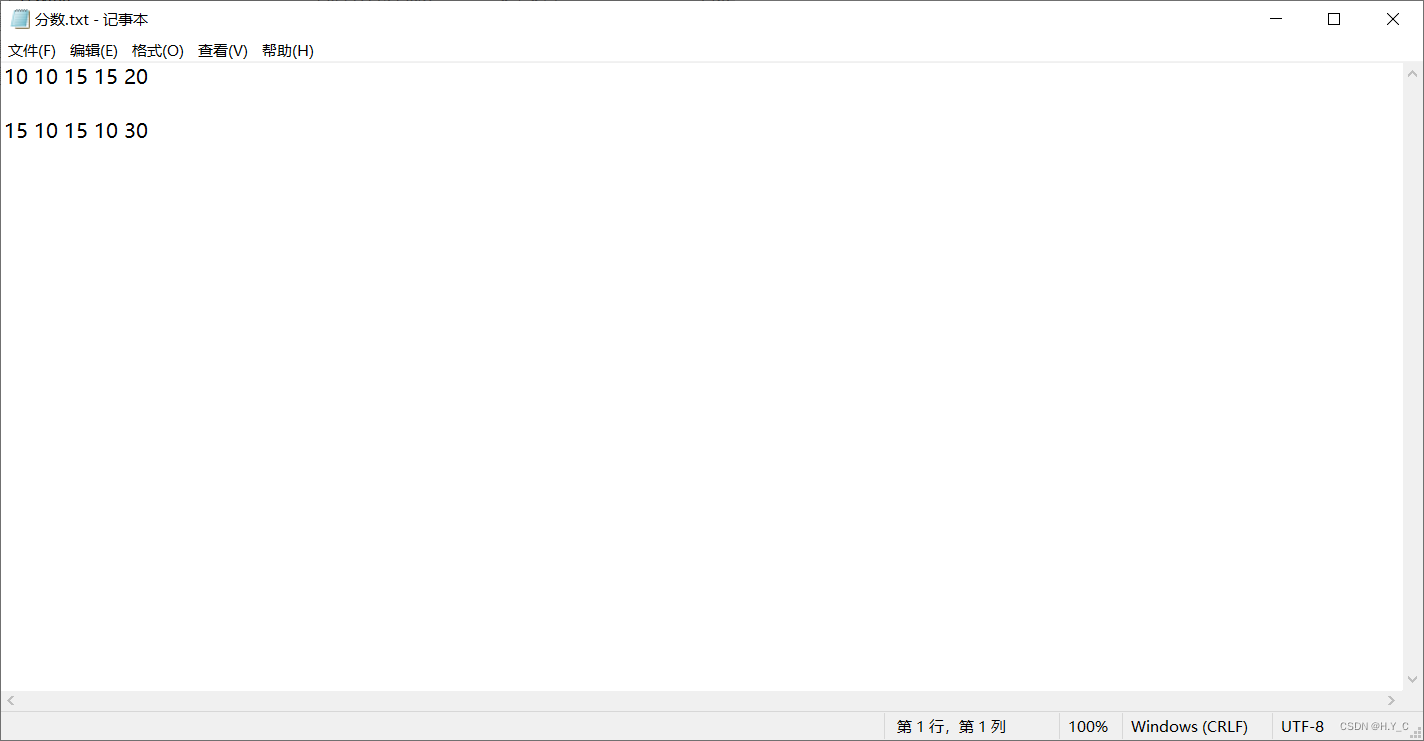
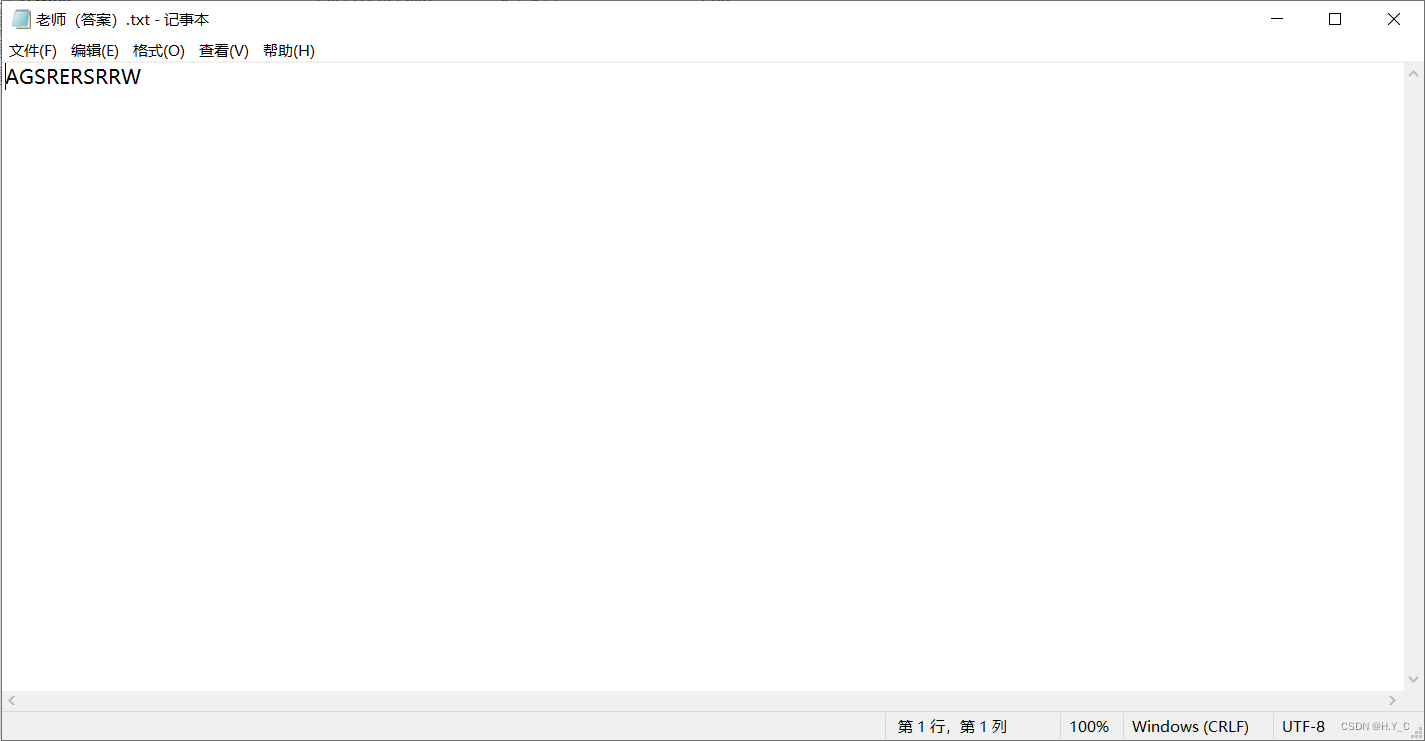
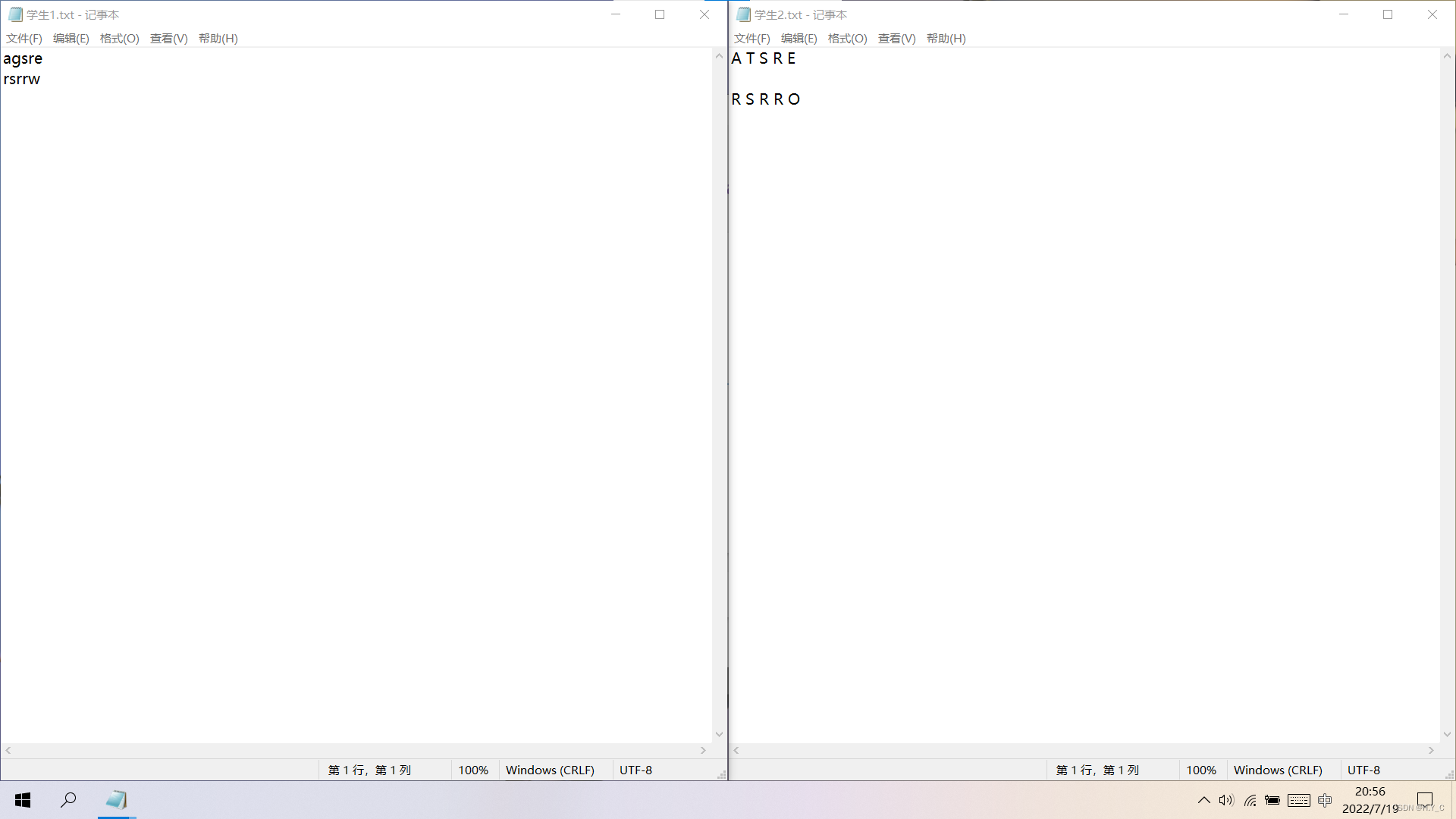
运行程序,选择“批改试卷”并按提示依次选择文件


然后会弹出结果:
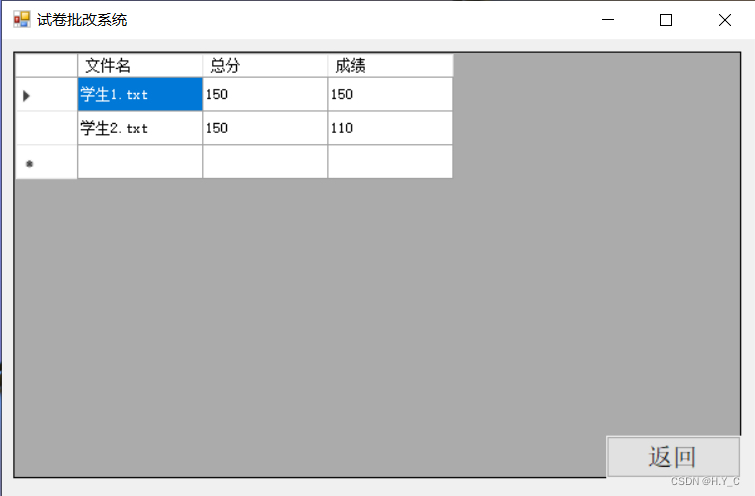
然后我们在人工检验一下:
- 学生1所有答案正确,忽略大小写和换行,应为满分即150分。
- 学生2第二个答案和最后一个答案错误,忽略空格和换行,共减去40分,应得110分。
由此看来程序运行无误。
代码
Form1.cs
- using System;
- using System.IO;
- using System.Windows.Forms;
- namespace 试卷批改系统
- {
- public partial class Form1 : Form
- {
- public Form1()
- {
- InitializeComponent();
- }
- private void button1_Click(object sender, EventArgs e)
- {
- label1.Visible = false;
- label2.Visible = true;
- button1.Visible = false;
- button2.Visible = false;
- button3.Visible = false;
- button4.Visible = true;
- string TeacherPath = "", ScorePath = "", TeacherAnswer = "", StringScore = "";
- string[] StudentPath = new string[100], StudentAnswers = new string[100];
- int StudentNum = 0, index = 0, temp = 0;
- int[] Score = new int[1000], StudentScore = new int[100];
- OpenFileDialog dialog = new OpenFileDialog();
- dialog.Multiselect = false;
- label2.Text = "请选择老师文件(答案):";
- dialog.Title = "选择老师文件(答案)";
- dialog.Filter = "文本文件(*.txt)|*.txt";
- if (dialog.ShowDialog() == DialogResult.OK)
- {
- TeacherPath = dialog.FileName;
- label2.Text = TeacherPath;
- }
- else
- {
- label2.Text = "文件路径为空!";
- return;
- }
- dialog.Multiselect = true;
- label2.Text = "请选择学生文件:";
- dialog.Title = "选择学生文件";
- if (dialog.ShowDialog() == DialogResult.OK)
- {
- try
- {
- StudentPath = dialog.FileNames;
- StudentNum = StudentPath.Length;
- }
- catch (OverflowException)
- {
- label2.Text = "人数过多!";
- return;
- }
- }
- else
- {
- label2.Text = "文件路径为空!";
- return;
- }
- dialog.Multiselect = false;
- label2.Text = "请选择分数文件:";
- dialog.Title = "选择分数文件";
- if (dialog.ShowDialog() == DialogResult.OK)
- {
- ScorePath = dialog.FileName;
- }
- else
- {
- label2.Text = "文件路径为空!";
- return;
- }
- label2.Text = "";
- StreamReader sr = new StreamReader(TeacherPath);
- TeacherAnswer = sr.ReadToEnd();
- TeacherAnswer = TeacherAnswer.Replace(" ", "");
- TeacherAnswer = TeacherAnswer.Replace("\r\n", "");
- TeacherAnswer = TeacherAnswer.ToUpper();
- sr = new StreamReader(ScorePath);
- StringScore= sr.ReadToEnd();
- StringScore = StringScore.Replace("\r\n", " ");
- StringScore = StringScore + " ";
- for (int i = 0; index < StringScore.Length; i++)
- {
- Score[i] = 0;
- while (StringScore[index] != ' ' && index < StringScore.Length)
- {
- Score[i] *= 10;
- Score[i] += StringScore[index++] - '0';
- }
- if (Score[i] == 0) i--;
- else temp += Score[i];
- index++;
- }
- for (int i = 0; i < StudentNum; i++)
- {
- sr = new StreamReader(StudentPath[i]);
- StudentAnswers[i] = sr.ReadToEnd();
- StudentAnswers[i] = StudentAnswers[i].Replace(" ", "");
- StudentAnswers[i] = StudentAnswers[i].Replace("\r\n", "");
- StudentAnswers[i] = StudentAnswers[i].ToUpper();
- index = 0;
- for (int j = 0, k = 0; j < TeacherAnswer.Length && k < StudentAnswers[i].Length; index++)
- {
- if(TeacherAnswer[j] == StudentAnswers[i][k])
- {
- StudentScore[i] += Score[index];
- }
- j++;
- k++;
- }
- StudentPath[i] = StudentPath[i].Substring(StudentPath[i].LastIndexOf(@"\") + 1);
- }
- sr.Close();
- dataGridView1.Visible = true;
- dataGridView1.Rows.Clear();
- dataGridView1.ColumnCount = 3;
- dataGridView1.Columns[0].Name = "文件名";
- dataGridView1.Columns[1].Name = "总分";
- dataGridView1.Columns[2].Name = "成绩";
- for(int i = 0; i < StudentNum; i++)
- {
- dataGridView1.Rows.Add(StudentPath[i], temp, StudentScore[i]);
- }
- }
- private void button2_Click(object sender, EventArgs e)
- {
- label1.Visible = false;
- label2.Visible = true;
- button1.Visible = false;
- button2.Visible = false;
- button3.Visible = false;
- button4.Visible = true;
- label2.Text = "注意:\n" +
- "1、该程序在对比老师文件(答案)与学生文件时只会忽略空格和换行,因此,学生一定要注意自己TXT文档的格式,不要键入无用信息!\n" +
- "2、“分数文件”指的是每道题的分数,应与老师文件(答案)里的信息一一对应!";
- }
- private void button3_Click(object sender, EventArgs e)
- {
- _ = MessageBox.Show("试卷批改系统\n1.0.0正式版\n", "关于", MessageBoxButtons.OK, MessageBoxIcon.Information);
- }
- private void button4_Click(object sender, EventArgs e)
- {
- label1.Visible = true;
- label2.Visible = false;
- button1.Visible = true;
- button2.Visible = true;
- button3.Visible = true;
- button4.Visible = false;
- dataGridView1.Visible = false;
- }
- }
- }
Form1.Designer.cs
- namespace 试卷批改系统
- {
- partial class Form1
- {
- ///
- /// 必需的设计器变量。
- ///
- private System.ComponentModel.IContainer components = null;
- ///
- /// 清理所有正在使用的资源。
- ///
- /// 如果应释放托管资源,为 true;否则为 false。
- protected override void Dispose(bool disposing)
- {
- if (disposing && (components != null))
- {
- components.Dispose();
- }
- base.Dispose(disposing);
- }
- #region Windows 窗体设计器生成的代码
- ///
- /// 设计器支持所需的方法 - 不要修改
- /// 使用代码编辑器修改此方法的内容。
- ///
- private void InitializeComponent()
- {
- this.label1 = new System.Windows.Forms.Label();
- this.button1 = new System.Windows.Forms.Button();
- this.button2 = new System.Windows.Forms.Button();
- this.button3 = new System.Windows.Forms.Button();
- this.label2 = new System.Windows.Forms.Label();
- this.button4 = new System.Windows.Forms.Button();
- this.dataGridView1 = new System.Windows.Forms.DataGridView();
- ((System.ComponentModel.ISupportInitialize)(this.dataGridView1)).BeginInit();
- this.SuspendLayout();
- //
- // label1
- //
- this.label1.Anchor = ((System.Windows.Forms.AnchorStyles)((System.Windows.Forms.AnchorStyles.Left | System.Windows.Forms.AnchorStyles.Right)));
- this.label1.AutoSize = true;
- this.label1.Font = new System.Drawing.Font("宋体", 42F, System.Drawing.FontStyle.Regular, System.Drawing.GraphicsUnit.Point, ((byte)(134)));
- this.label1.Location = new System.Drawing.Point(184, 70);
- this.label1.Name = "label1";
- this.label1.Size = new System.Drawing.Size(450, 70);
- this.label1.TabIndex = 0;
- this.label1.Text = "试卷批改系统";
- //
- // button1
- //
- this.button1.Anchor = ((System.Windows.Forms.AnchorStyles)((System.Windows.Forms.AnchorStyles.Left | System.Windows.Forms.AnchorStyles.Right)));
- this.button1.Font = new System.Drawing.Font("宋体", 15F, System.Drawing.FontStyle.Regular, System.Drawing.GraphicsUnit.Point, ((byte)(134)));
- this.button1.Location = new System.Drawing.Point(337, 233);
- this.button1.Name = "button1";
- this.button1.Size = new System.Drawing.Size(144, 42);
- this.button1.TabIndex = 1;
- this.button1.Text = "批改试卷";
- this.button1.UseVisualStyleBackColor = true;
- this.button1.Click += new System.EventHandler(this.button1_Click);
- //
- // button2
- //
- this.button2.Anchor = ((System.Windows.Forms.AnchorStyles)((System.Windows.Forms.AnchorStyles.Left | System.Windows.Forms.AnchorStyles.Right)));
- this.button2.Font = new System.Drawing.Font("宋体", 15F);
- this.button2.Location = new System.Drawing.Point(337, 281);
- this.button2.Name = "button2";
- this.button2.Size = new System.Drawing.Size(144, 42);
- this.button2.TabIndex = 2;
- this.button2.Text = "帮助";
- this.button2.UseVisualStyleBackColor = true;
- this.button2.Click += new System.EventHandler(this.button2_Click);
- //
- // button3
- //
- this.button3.Anchor = ((System.Windows.Forms.AnchorStyles)((System.Windows.Forms.AnchorStyles.Left | System.Windows.Forms.AnchorStyles.Right)));
- this.button3.Font = new System.Drawing.Font("宋体", 15F);
- this.button3.Location = new System.Drawing.Point(337, 329);
- this.button3.Name = "button3";
- this.button3.Size = new System.Drawing.Size(144, 42);
- this.button3.TabIndex = 3;
- this.button3.Text = "关于";
- this.button3.UseVisualStyleBackColor = true;
- this.button3.Click += new System.EventHandler(this.button3_Click);
- //
- // label2
- //
- this.label2.AutoSize = true;
- this.label2.Location = new System.Drawing.Point(4, 3);
- this.label2.MaximumSize = new System.Drawing.Size(795, 445);
- this.label2.MinimumSize = new System.Drawing.Size(0, 15);
- this.label2.Name = "label2";
- this.label2.Size = new System.Drawing.Size(0, 15);
- this.label2.TabIndex = 4;
- this.label2.Visible = false;
- //
- // button4
- //
- this.button4.Anchor = ((System.Windows.Forms.AnchorStyles)((System.Windows.Forms.AnchorStyles.Left | System.Windows.Forms.AnchorStyles.Right)));
- this.button4.Font = new System.Drawing.Font("宋体", 15F);
- this.button4.Location = new System.Drawing.Point(644, 396);
- this.button4.Name = "button4";
- this.button4.Size = new System.Drawing.Size(144, 42);
- this.button4.TabIndex = 5;
- this.button4.Text = "返回";
- this.button4.UseVisualStyleBackColor = true;
- this.button4.Visible = false;
- this.button4.Click += new System.EventHandler(this.button4_Click);
- //
- // dataGridView1
- //
- this.dataGridView1.Anchor = ((System.Windows.Forms.AnchorStyles)((System.Windows.Forms.AnchorStyles.Left | System.Windows.Forms.AnchorStyles.Right)));
- this.dataGridView1.ColumnHeadersHeightSizeMode = System.Windows.Forms.DataGridViewColumnHeadersHeightSizeMode.AutoSize;
- this.dataGridView1.Location = new System.Drawing.Point(12, 12);
- this.dataGridView1.Name = "dataGridView1";
- this.dataGridView1.ReadOnly = true;
- this.dataGridView1.RowHeadersWidth = 51;
- this.dataGridView1.RowTemplate.Height = 27;
- this.dataGridView1.Size = new System.Drawing.Size(776, 426);
- this.dataGridView1.TabIndex = 6;
- this.dataGridView1.Visible = false;
- //
- // Form1
- //
- this.AutoScaleDimensions = new System.Drawing.SizeF(8F, 15F);
- this.AutoScaleMode = System.Windows.Forms.AutoScaleMode.Font;
- this.ClientSize = new System.Drawing.Size(800, 450);
- this.Controls.Add(this.button4);
- this.Controls.Add(this.label2);
- this.Controls.Add(this.button3);
- this.Controls.Add(this.button2);
- this.Controls.Add(this.button1);
- this.Controls.Add(this.label1);
- this.Controls.Add(this.dataGridView1);
- this.MaximumSize = new System.Drawing.Size(818, 497);
- this.MinimumSize = new System.Drawing.Size(818, 497);
- this.Name = "Form1";
- this.Text = "试卷批改系统";
- ((System.ComponentModel.ISupportInitialize)(this.dataGridView1)).EndInit();
- this.ResumeLayout(false);
- this.PerformLayout();
- }
- #endregion
- private System.Windows.Forms.Label label1;
- private System.Windows.Forms.Button button1;
- private System.Windows.Forms.Button button2;
- private System.Windows.Forms.Button button3;
- private System.Windows.Forms.Label label2;
- private System.Windows.Forms.Button button4;
- private System.Windows.Forms.DataGridView dataGridView1;
- }
- }
Program.cs
- using System;
- using System.Windows.Forms;
- namespace 试卷批改系统
- {
- internal static class Program
- {
- ///
- /// 应用程序的主入口点。
- ///
- [STAThread]
- static void Main()
- {
- Application.EnableVisualStyles();
- Application.SetCompatibleTextRenderingDefault(false);
- Application.Run(new Form1());
- }
- }
- }
好了,是不是意想不到呀?我还会C#呢!好了,不多说了,拜拜!
-
相关阅读:
第2篇 机器学习基础 —(1)机器学习概念和方式
数据处理时代,数据质量建设才是企业的生存之道
ES中 Nested 类型的原理和使用
一阶和二阶电路的时域分析
MySQL MHA高可用切换
粮食保供稳价 丰收节贸促会-国稻种芯:化肥农资国际传导风险
【VictoriaMetrics】单机版配置
Android Studio 六大基础布局详解
vulnhub靶场之VIKINGS: 1
Java内卷,仅凭这份10w字Java面试合集我已拿下15个offer
- 原文地址:https://blog.csdn.net/qq_43546083/article/details/125879870
