-
【SpringBoot】配置文件.properties和.yml
作用
配置文件的作用:
- 数据库的连接信息(用户名,密码)
- 项目的启动端口
- 第三方系统的密钥信息
- 发现和定位问题的普通日志和异常日志
之前我们都是通过类来实现这些问题的,但是其实这样的做法并不方便修改,也不方便部署。
正规的做法应该是使用配置文件进行这些信息的存储的种类
类型
主要分两大类:
- 系统的配置信息
- 用户自己定义的
格式
- .properties(老版本)
- .yml(新版本)
上面的两种版本都可以起到同样的效果
可以同时存在,但是不推荐
如果同时出现了,以.properties的版本为主
另外,SpringBoot支持.yml的自动补全,但是不支持.properties的自动补全,得下载Spring Tool工具才可以
![![[Pasted image 20220719195405.png]]](https://1000bd.com/contentImg/2022/07/27/223720574.png)
配置信息:
https://docs.spring.io/spring-boot/docs/current/reference/html/application-properties.html#appendix.application-properties.core上面这个网址详细描述了所有的配置信息
properties
写
- key和value之间使用等号连接,注意等号和value的周围都不要加空格
- 使用#来表示注释信息
# 系统资源配置 server.port=9090 spring.datasource.url=jdbc:mysql://127.0.0.1:3306/test?characterEncoding=utf8; spring.datasource.root=root spring.datasource.password=1234 # 用户资源配置 hello=777- 1
- 2
- 3
- 4
- 5
- 6
- 7
因为这个properties对于中文的支持不好,不支持utf8.所以我们最好配置一下设置:
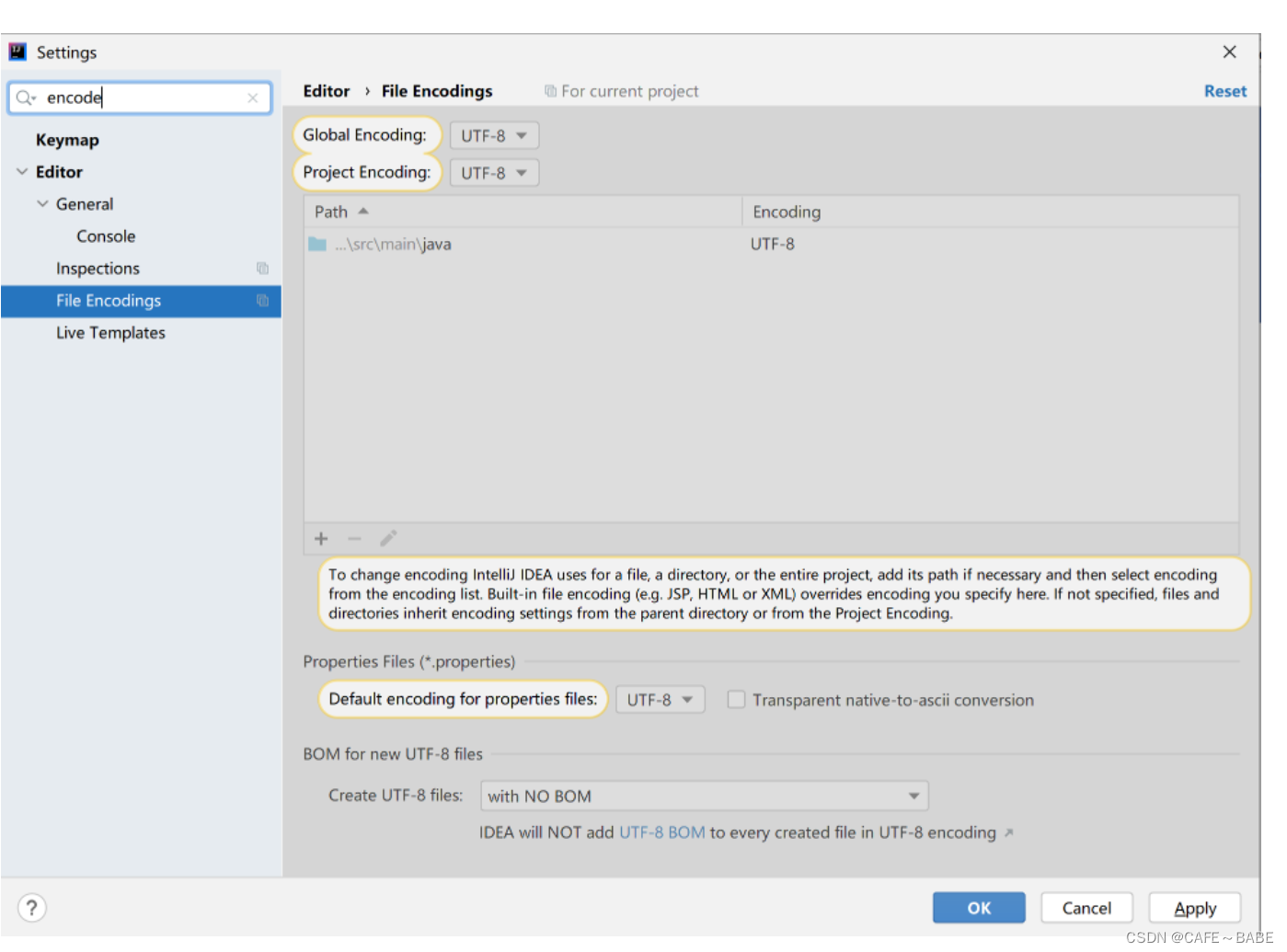
同样设置一下new project setting
另外,还有可能虽然设置了两个内容,但是还是乱码,因为当前文件创建的时候不是utf8,再重新创建一个才可以是utf8
只有经过上面三个步骤,才可以保证新创建的文件就是
读
使用
@Value("${}")
是以$开头的字符串@Controller public class TestController { @Value("${hello}") private String hello; @ResponseBody//表示返回的是body @RequestMapping("/print")//路由,对应网址 public String print(){ return hello; } }- 1
- 2
- 3
- 4
- 5
- 6
- 7
- 8
- 9
- 10
- 11
- 12
yml
yml的优点:
- 可跨平台,跨语言
- 语法简洁,写法简单
- 支持更多的数据类型
key: value
还是key value关键字
key和value之间使用:和空格进行分隔
key: value
千万要记住,空格不可以省略spring: datasource: url: jdbc:mysql://127.0.0.1:3306 name: root password: 1234 myconfig: cx- 1
- 2
- 3
- 4
- 5
- 6
- 7
我们可以清楚的看到,上面的写法可以省略很多内容,方便写
正常value读取
@Value(“${}”)
还是使用value的方式进行读取,以$为开头
多种类型
可以表示多种类型
null类型可以使用~进行表示# 字符串 string1: "hhhhhhhhhh" string2: hhhhhhhhhhh # 浮点数.整数 numberInt: 123 numberFloat: 78.0 # 布尔类型 Bool: false # null类型使用~表示 null: ~- 1
- 2
- 3
- 4
- 5
- 6
- 7
- 8
- 9
- 10
- 11
- 12
- 13
- 14
字符串转义
下面我们来看一看,对于字符串类型如果不加符号,加单引号,加双引号
这三种有什么样的区别string1: hello \n yaml string2: 'hello \n yaml' string3: "hello \n yaml" string4: "hello \\n yaml"- 1
- 2
- 3
- 4
我们读取这四个字符的时候,结果是不是相同的呢?
答案是:不相同
hello \n yaml hello \n yaml hello yaml hello \n yaml- 1
- 2
- 3
- 4
- 5
- 6
当不加引号的时候,和加单引号的时候,yaml会自动的进行字符的转义,将\n 转义为\n,所以输出的时候不会换行
当加双引号的时候,不会进行自动转义,所以按照原来的语义进行输出构造对象
可以有两种方式的写法:
一个是有格式的写法,
一个是大括号的写法student: id: 1 name: cx age: 19 student2: {id: 2,name: lx,age: 30}- 1
- 2
- 3
- 4
- 5
- 6
读对象
我们想要将配置文件中的对象的值读取出来.
新创建一个student类,并设置里面的属性和配置文件中的属性一样.
要加上三个注解:
1.Data 自动进行属性的赋值
2.ConfigurationProperties 表示读取配置文件中的哪一个对象
3.Component 加上五大类注解,一会我们会采取Autowired的方式读取对象@Data//包含了getter和setter @ConfigurationProperties("student")//表示读取配置文件中的哪一个对象 @Component//五大类注解,一定要有,表示将它放入spring容器中,后续好使用Autowired读取 public class student { private int id; private String name; private int age; }- 1
- 2
- 3
- 4
- 5
- 6
- 7
- 8
- 9
在TestController类中
对于对象的读取,就不可以使用value了,而是要使用Autowired
@Controller public class TestController { //使用Autowired获取类 @Autowired private Student student; @ResponseBody//表示返回的是body @RequestMapping("/print")//路由,对应网址 public String print(){ return student.toString(); } }- 1
- 2
- 3
- 4
- 5
- 6
- 7
- 8
- 9
- 10
- 11
- 12
- 13
- 14
构造集合
写集合
这个集合是一个大集合,集合的里面有多个小集合,小集合里面的元素的属性前面是以- 开头的
有两种方式:可以写成非行式或行式
school: student: - cx - lx - xs teacher: - zly - zly - cyx school2: {student: [11,22,33],teacher: [111,222,333]}- 1
- 2
- 3
- 4
- 5
- 6
- 7
- 8
- 9
- 10
- 11
读集合
- 新建一个类.这个类的类名是大集合的名字,里面的属性是小集合的名字.
- 通过ConfigurationProperties来选取大集合的名字.其余的注解都和类的读取相同
@Data @ConfigurationProperties(prefix = "school2") @Component public class School { List<String> student;//要和集合中的属性相同 List<String> teacher; }- 1
- 2
- 3
- 4
- 5
- 6
- 7
在控制类中通过Autowired注入大集合类School
@Controller public class TestController { //使用Autowired获取类 @Autowired private School school; @ResponseBody//表示返回的是body @RequestMapping("/print")//路由,对应网址 public String print(){ return school.toString(); } }- 1
- 2
- 3
- 4
- 5
- 6
- 7
- 8
- 9
- 10
- 11
- 12
- 13
- 14
读取指定配置文件
@PropertySource表示读取哪一个指定的配置文件,但是只限于.properties文件
@PropertySource(value = "application.properties")- 1
properties和yml的区别
- 语法不同,properties使用key=value.yml使用key: value
- 简洁性不同 yml语法更加简单,properties复杂
- 通用性不同 yml的使用性更广:go,python,java
-
相关阅读:
【数字电路与系统】【北京航空航天大学】实验:时序逻辑设计——三色灯开关(三)、功能仿真测试
【设计模式-04】原型模式
32-Java数据结构与算法实战
javaWeb录入数据异常,mysql显示错误
Es集群部署
初识EasyAR
数据结构 优先级队列(堆)
shell中的条件控制语句
北斗导航 | 载波相位差分定位技术与载波相位观测值的相关性(差分定位方法三)
MySQL索引在关联查询中的作用
- 原文地址:https://blog.csdn.net/weixin_51574797/article/details/125911848