1.酷鲨商城
1.1酷鲨商城项目步骤
- 准备工作:
- 创建新工程coolshark 打3个√ 将微博工程中application.properties里面的内容复制到新工程,并且将数据库名称weibo改成cs
- 从老师的工程中把static文件夹下的4个html页面和一个imgs文件夹复制到自己的工程, 然后ReBuild static文件夹
- 关闭其它工程, 启动新工程, 访问首页测试,如果显示首页内容即测试成功!
- 建库建表
create database cs charset=utf8;
create table user(id int primary key auto_increment,username varchar(50),password varchar(50),nick varchar(50));
insert into user values(null,'admin','123456','管理员');
1.1.1登录功能步骤:
- 在login.html页面中,在页面中先引入axios框架, 通过双向绑定得到用户输入的用户名和密码, 给按钮添加点击事件, 点击时向/login发出请求同时把用户的信息提交到服务器
- 创建UserController,User实体类和UserMapper
- 在Controller里面添加login方法 处理/login请求, 接收传递过来的用户信息,在方法中调用mapper的selectByUsername方法查询返回User对象.........
- 实现mapper的selectByUsername方法
1.1.2首页展示分类步骤
- 建分类表和插入数据
-
create table category(id int primary key auto_increment,name varchar(30));
insert into category values(null,'精彩活动'),(null,'当季女装'),(null,'品牌男装'),(null,'环球美食'),(null,'医药健康');
- 创建Category实体类
- 创建CategoryMapper 里面提供select方法
- 创建CategoryController
- 在首页index.html中添加axios框架的引入, 在Vue里面添加created方法,在里面向/category/select发出请求, 获取所有分类的信息, 把得到的数据给到categoryArr数组
- 在CategoryController 里面创建select方法处理/select请求调用mapper里面的select方法把得到的数据响应给客户端
1.1.3首页展示轮播图步骤:
- 建表并插入数据
-
create table banner(id int primary key auto_increment,url varchar(200));
insert into banner values(null,'/imgs/b2.jpg'),(null,'/imgs/b3.jpg'),(null,'/imgs/b4.jpg');
- 创建Banner实体类
- 创建BannerMapper 提供select方法
- 创建BannerController添加select方法处理 /banner/select请求,方法中调用mapper的select方法把得到的数据响应给客户端
- 在首页的created方法中 向/banner/select发出异步请求获取所有轮播图数据, 把得到的数据给到bannerArr数组, 数组内容由原来装字符串变成了装banner对象 所以页面中遍历bannerArr数组部分的代码需要改动
1.1.4后台管理页面分类和轮播图展示
- 在admin.html页面添加created方法, 在里面发请求获取所有分类,把得到的数据赋值给categoryArr数组, 发请求获取所有轮播图把得到的数据赋值给bannerArr数组
1.1.5添加分类步骤:
- 在admin.html页面中 点击添加分类时 弹出文本输入框获取输入的分类名然后 向/category/insert发出添加分类的请求
- 在CategoryController中添加insert方法处理请求,然后调用mapper的insert方法
- 实现mapper里面的insert方法
1.1.6删除分类步骤:
- 在admin.html页面中给删除按钮添加点击事件
- 在事件方法中 向/category/delete发出请求 响应之后把数组中的数据删除 页面自动发生改变
- 在Controller里面添加delete方法处理/category/delete请求, 调用mapper里面的删除方法
- 实现mapper中的方法
- 把删除按钮 改成 气泡确认框
1.1.7删除轮播图步骤:
- 在admin.html页面中给删除按钮添加点击事件
- 在事件方法中 向/banner/delete发出请求 响应之后把数组中的数据删除 页面自动发生改变
- 在Controller里面添加delete方法处理/banner/delete请求, 调用mapper里面的删除方法
- 实现mapper中的方法
- 把删除按钮 改成 气泡确认框
1.1.8添加轮播图步骤:
- 创建insertBanner.html页面 使用上传图片的组件,
- 在页面中向/banner/insert发出请求
- 在Controller里面添加insert方法 处理/banner/insert请求 ,方法中调用mapper的insert方法
- 实现mapper里面insert方法
1.1.9商品分类相关
- 在添加商品页面中的form表单里面增加一行,获取用户选择的分类, 在data里面的p对象中添加categoryId的属性

- 在页面的created方法中发请求获取所有分类信息,赋值给arr数组

- 给Product实体类添加categoryId属性

- 给product表添加category_id字段

- 在Mapper里面的insert方法中添加和分类id相关的内容

1.1.10删除商品
- 在admin.html页面中给删除按钮添加点击事件

- 在事件方法中 向/product/delete发出请求 响应之后把数组中的数据删除 页面自动发生改变

- 在productController里面添加delete方法处理/product/delete请求, 方法中删除图片,调用mapper里面的删除方法

- 实现mapper中的方法;

- 把删除按钮 改成 气泡确认框

1.1.11排行榜展示
- 在首页的created方法中发出获取排行榜信息的请求

- ProductController处理请求 掉mapper中的selectTop方法获取排行榜数据

- 实现mapper中的方法

1.1.12查看详情页面步骤:
- 给首页的商品标题和商品图片添加超链接 点击时跳转到详情页面

- 在详情页面添加 created方法, 在方法中通过地址栏里面的id向/product/selectById 地址发出请求 把得到的商品信息赋值给data里面的product

- 在ProductController中创建selectById方法处理/product/selectById请求, 调用mapper的selectById方法,把查询到的Product对象直接响应给客户端

- 实现mapper里面的selectById方法

1.1.13点击分类查看分类相关商品
- 创建result.html页面, 复制首页粘贴改名, 把轮播图和排行榜删除
- 在首页中给el-menu标签添加@select事件 调用handleSelect方法, 方法中跳转到result.html页面 同时 把得到的分类id传递到结果页面

- 在result.html页面中的created方法里面向/product/selectByCid发出请求

- ProductController里面添加selectByCid方法处理/product/selectByCid, 调用mapper里面的selectByCid方法把查询到的集合返回给客户端
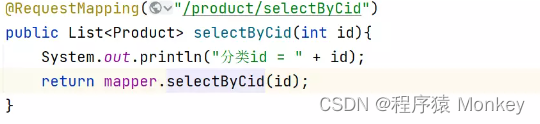
- 实现mapper里面的selectByCid方法

1.1.14结果页面中点击分类时的步骤:
- 给result.html页面中的el-menu添加@Select事件 调用handleSelect方法,在方法中直接向/product/selectByCid发请求 把得到的数据给到productArr数组
1.1.15搜索功能步骤:
- 在首页中给文本框添加双向绑定,给搜索按钮添加点击事件, 点击时跳转到result.html结果页面,同时把搜索的文本内容做为参数传递过去

- 在result.html页面中的created方法里面 判断location.search里面是否包含wd,如果包含则向/product/selectByWd发出请求
- 在ProductController里面添加selectByWd方法处理/product/selectByWd请求,调用mapper里面selectByWd方法,把查询到的List集合返回给客户端
- 实现mapper里面的selectByWd方法
1.2项目目录展示

1.3代码展示
1.3.1BannerController.java(轮播图控制层)
package cn.tedu.coolshark.controller;
import cn.tedu.coolshark.entitu.Banner;
import cn.tedu.coolshark.mapping.BannerMapper;
import org.springframework.beans.factory.annotation.Autowired;
import org.springframework.web.bind.annotation.RequestMapping;
import org.springframework.web.bind.annotation.RestController;
public class BannerController {
@RequestMapping("/banner/select")
public List selectBanner(){
return mapper.selectBanner();
@RequestMapping("/banner/delete")
public void deleteBanner(int id){
String url = mapper.selectBannerById(id);
new File("E:/files"+url).delete();
@RequestMapping("/banner/insert")
public void insertBanner(String url){
mapper.insertBanner(url);
1.3.2CategoryController.java(商品分类控制层)
package cn.tedu.coolshark.controller;
import cn.tedu.coolshark.entitu.Category;
import cn.tedu.coolshark.mapping.CategoryMapping;
import org.springframework.beans.factory.annotation.Autowired;
import org.springframework.web.bind.annotation.RequestMapping;
import org.springframework.web.bind.annotation.RestController;
public class CategoryController {
@RequestMapping("/category/select")
public List selectCategory(){
return mapping.selectCategory();
@RequestMapping("/category/insert")
public void insertCategory(String name){
mapping.insertCategory(name);
@RequestMapping("/category/delete")
public void deleteCategory(int id){
mapping.deleteCategoryById(id);
1.3.3ProductController.java(商品控制层)
package cn.tedu.coolshark.controller;
import cn.tedu.coolshark.entitu.Product;
import cn.tedu.coolshark.mapping.ProductMapper;
import org.springframework.beans.factory.annotation.Autowired;
import org.springframework.web.bind.annotation.RequestBody;
import org.springframework.web.bind.annotation.RequestMapping;
import org.springframework.web.bind.annotation.RestController;
public class ProductController {
@RequestMapping("/product/insert")
public void insertProduct(@RequestBody Product product){
System.out.println("product = " + product);
mapper.insertProduct(product);
@RequestMapping("/product/select/admin")
public List
selectProductAdmin(){ return mapper.selectProduct();
@RequestMapping("/product/delete")
public void deleteProduct(int id){
String url = mapper.selectProductUrlById(id);
new File("E:/files"+url).delete();
mapper.deleteProductById(id);
@RequestMapping("/product/select/index")
public List
selectProductIndex(){ return mapper.selectProductIndex();
@RequestMapping("/product/select/top")
public List
selectProductTop(){ return mapper.selectProductTop();
@RequestMapping("/product/selectById")
public Product selectProductById(int id){
System.out.println("id = " + id);
mapper.updateProductViewCountById(id);
return mapper.selectProductById(id);
@RequestMapping("/product/selectByCid")
public List
selectProductByCid(int id){ return mapper.selectProductByCid(id);
@RequestMapping("/product/selectByName")
public List
selectProductByName(String title){ return mapper.selectProductByName(title);

1.3.4UploadController.java(文件上传)
package cn.tedu.coolshark.controller;
import org.springframework.web.bind.annotation.RequestMapping;
import org.springframework.web.bind.annotation.RestController;
import org.springframework.web.multipart.MultipartFile;
import java.io.IOException;
public class UploadController {
@RequestMapping("/upload")
public String upload(MultipartFile picFile) throws IOException {
String fileName = picFile.getOriginalFilename();
String suffix = fileName.substring(fileName.lastIndexOf("."));
fileName = UUID.randomUUID()+suffix;
String dirPath = "E:/files";
File dirFile = new File(dirPath);
String filePath = dirPath+"/"+fileName;
picFile.transferTo(new File(filePath));
@RequestMapping("/remove")
public void remove(String url){
String filePath = "E:/files"+url;
new File(filePath).delete();
1.3.5UserController.java(用户控制层)
package cn.tedu.coolshark.controller;
import cn.tedu.coolshark.entitu.User;
import cn.tedu.coolshark.mapping.UserMapping;
import org.springframework.beans.factory.annotation.Autowired;
import org.springframework.web.bind.annotation.RequestBody;
import org.springframework.web.bind.annotation.RequestMapping;
import org.springframework.web.bind.annotation.RestController;
import javax.servlet.http.HttpSession;
public class UserController {
@RequestMapping("/login")
public int login(@RequestBody User user, HttpSession session){
User u = mapping.selectUserByName(user.getUsername());
if (u.getPassword().equals(user.getPassword())){
session.setAttribute("user",u);
1.3.6Banner.java(轮播图对象)
package cn.tedu.coolshark.entitu;
public String toString() {
public void setId(Integer id) {
public void setUrl(String url) {
1.3.7Category.java(商品分类对象)
package cn.tedu.coolshark.entitu;
public String toString() {
", name='" + name + '\'' +
public void setId(Integer id) {
public String getName() {
public void setName(String name) {
1.3.8Product.java(商品对象)
package cn.tedu.coolshark.entitu;
private Integer saleCount;
private Integer viewCount;
private Integer categoryId;
public String toString() {
", title='" + title + '\'' +
", oldPrice=" + oldPrice +
", saleCount=" + saleCount +
", viewCount=" + viewCount +
", categoryId=" + categoryId +
public void setId(Integer id) {
public String getTitle() {
public void setTitle(String title) {
public Double getPrice() {
public void setPrice(Double price) {
public Double getOldPrice() {
public void setOldPrice(Double oldPrice) {
this.oldPrice = oldPrice;
public Integer getNum() {
public void setNum(Integer num) {
public Integer getSaleCount() {
public void setSaleCount(Integer saleCount) {
this.saleCount = saleCount;
public void setUrl(String url) {
public Integer getViewCount() {
public void setViewCount(Integer viewCount) {
this.viewCount = viewCount;
public Integer getCategoryId() {
public void setCategoryId(Integer categoryId) {
this.categoryId = categoryId;
1.3.9User.java(用户对象)
package cn.tedu.coolshark.entitu;
public String toString() {
", username='" + username + '\'' +
", password='" + password + '\'' +
", nick='" + nick + '\'' +
public void setId(Integer id) {
public String getUsername() {
public void setUsername(String username) {
this.username = username;
public String getPassword() {
public void setPassword(String password) {
this.password = password;
public String getNick() {
public void setNick(String nick) {
1.3.10BannerMapper.java(跟轮播图有关的数据库操作)
package cn.tedu.coolshark.mapping;
import cn.tedu.coolshark.entitu.Banner;
import org.apache.ibatis.annotations.Delete;
import org.apache.ibatis.annotations.Insert;
import org.apache.ibatis.annotations.Mapper;
import org.apache.ibatis.annotations.Select;
public interface BannerMapper {
@Select("select * from banner")
@Delete("delete from banner where id = #{id}")
void deleteBanner(int id);
@Insert("insert into banner values(null,#{url})")
void insertBanner(String url);
@Select("select url from banner where id = #{id}")
String selectBannerById(int id);
1.3.11CategoryMapping.java(跟导航菜单栏有关的数据库操作)
package cn.tedu.coolshark.mapping;
import cn.tedu.coolshark.entitu.Category;
import org.apache.ibatis.annotations.Delete;
import org.apache.ibatis.annotations.Insert;
import org.apache.ibatis.annotations.Mapper;
import org.apache.ibatis.annotations.Select;
public interface CategoryMapping {
@Select("select * from category")
@Insert("insert into category values(null,#{name})")
void insertCategory(String name);
@Delete("delete from category where id = #{id}")
void deleteCategoryById(int id);
1.3.12ProductMapper.java(跟商品有关的数据库操作)
package cn.tedu.coolshark.mapping;
import cn.tedu.coolshark.entitu.Product;
import org.apache.ibatis.annotations.*;
public interface ProductMapper {
@Insert("insert into product values(null,#{title},#{url},#{price},#{oldPrice},0,#{num},#{saleCount},#{categoryId})")
void insertProduct(Object product);
@Select("select id,title,price,old_price,sale_count,url from product")
@Select("select url from product where id = #{id}")
String selectProductUrlById(int id);
@Delete("delete from product where id = #{id}")
void deleteProductById(int id);
@Select("select id,title,url,price,old_price,sale_count from product")
List
selectProductIndex(); @Select("select id,title,sale_count from product order by sale_count desc limit 0,6")
@Select("select id,title,url,price,old_price,sale_count,view_count from product where id = #{id}")
Product selectProductById(int id);
@Update("update product set view_count = view_count+1 where id = #{id}")
void updateProductViewCountById(int id);
@Select("select id,title,url,price,old_price,sale_count from product where category_id = #{id}")
List
selectProductByCid(int id); @Select("select id,title,url,price,old_price,sale_count from product where title like concat('%',#{title},'%')")
List
selectProductByName(String title);
1.3.13UserMapping.java(跟用户有关的数据库操作)
package cn.tedu.coolshark.mapping;
import cn.tedu.coolshark.entitu.User;
import org.apache.ibatis.annotations.Mapper;
import org.apache.ibatis.annotations.Select;
public interface UserMapping {
@Select("select id,password,nick from user where username = #{username}")
User selectUserByName(String username);
1.3.14admin.html(商品后天管理页面)
<link rel="stylesheet" href="https://unpkg.com/element-ui/lib/theme-chalk/index.css">
<el-header style="background-color: #0095d7">
<h1 style="color: white;font-size: 22px">CoolShark商城后台管理系统
<span style="float: right">欢迎xxx回来! <a href="">退出登录a>span>
<el-menu @select="handleSelect" :default-openeds="['1']">
<i class="el-icon-s-flag"> 分类管理i>
<el-menu-item index="1-1">分类列表el-menu-item>
<el-menu-item index="1-2">添加分类el-menu-item>
<i class="el-icon-picture"> 轮播图管理i>
<el-menu-item index="2-1">轮播图列表el-menu-item>
<el-menu-item index="2-2">添加轮播图el-menu-item>
<i class="el-icon-shopping-cart-2"> 商品管理i>
<el-menu-item index="3-1">商品列表el-menu-item>
<el-menu-item index="3-2">添加商品el-menu-item>
<el-table v-if="selectedIndex=='1-1'" :data="categoryArr" style="width: 100%">
<el-table-column type="index" label="编号" width="280">
<el-table-column prop="name" label="名字" width="280">
<el-table-column label="操作">
<template slot-scope="scope">
@confirm="categoryDelete(scope.$index, scope.row)"
<el-button slot="reference" size="mini" type="danger">删除el-button>
<el-table v-if="selectedIndex=='2-1'" :data="bannerArr" style="width: 100%">
<el-table-column type="index" label="编号" width="280">
<el-table-column label="轮播图" width="280">
<template slot-scope="scope">
<img :src="scope.row.url" width="100%" alt="">
<el-table-column label="操作">
<template slot-scope="scope">
@confirm="bannerDelete(scope.$index, scope.row)"
<el-button slot="reference" size="mini" type="danger">删除el-button>
<el-table v-if="selectedIndex=='3-1'" :data="productArr" style="width: 100%">
<el-table-column type="index" label="编号" width="100">
<el-table-column prop="title" label="商品标题" width="200">
<el-table-column prop="price" label="价格" width="100">
<el-table-column prop="oldPrice" label="原价" width="100">
<el-table-column prop="saleCount" label="销量" width="100">
<el-table-column label="商品图片" width="100">
<template slot-scope="scope">
<img :src="scope.row.url" width="100%" alt="">
<el-table-column label="操作">
<template slot-scope="scope">
@confirm="productDelete(scope.$index, scope.row)"
<el-button slot="reference" size="mini" type="danger">删除el-button>
<script src="https://cdn.staticfile.org/vue/2.6.14/vue.min.js">script>
<script src="https://cdn.bootcdn.net/ajax/libs/axios/0.21.1/axios.min.js">script>
<script src="https://unpkg.com/element-ui/lib/index.js">script>
categoryArr: [{id: 1, name: "精彩活动"}, {id: 2, name: "当季女装"},
{id: 3, name: "品牌男装"}, {id: 4, name: "环球美食"}, {id: 5, name: "医药健康"},
{id: 6, name: "美妆彩妆"}, {id: 7, name: "母婴产品"}
productArr:[{title:"森马牛仔裤女宽松慢跑裤运动风2022春季新款显瘦束脚长裤复古",price:233,oldPrice:598,url:"imgs/a.jpg",saleCount:2342},
{title:"茵曼马甲连衣裙两件套春季新款娃娃领色织格长袖背心裙套装",price:233,oldPrice:598,url:"imgs/b.jpg",saleCount:2342},
{title:"雪中飞墨绿色短袖t恤女夏2022新款纯棉半袖打底体恤夏季上衣潮ins",price:233,oldPrice:598,url:"imgs/c.jpg",saleCount:2342},
{title:"【佟丽娅同款】鸭鸭明星同款羽绒服2021年冬季新款时尚连帽外套冬",price:233,oldPrice:598,url:"imgs/d.jpg",saleCount:2342},
{title:"BEASTER小恶魔鬼脸明星同款夹克毛绒保暖加厚字母印花宽松外套ins",price:233,oldPrice:598,url:"imgs/e.jpg",saleCount:2342},
{title:"香影毛呢外套女中长款2021年冬季新款气质韩版娃娃领紫色呢子大衣",price:233,oldPrice:598,url:"imgs/f.jpg",saleCount:2342},
{title:"SEMIR森马商场同款打底针织毛衣纯色高领新品显瘦",price:233,oldPrice:598,url:"imgs/g.jpg",saleCount:2342},
{title:"美特斯邦威女MTEE 贺岁系列中长款风衣736598",price:233,oldPrice:598,url:"imgs/h.jpg",saleCount:2342},
{title:"imone2021秋款黑色小西装外套女韩版学生宽松学院风外套jk外套",price:233,oldPrice:598,url:"imgs/i.jpg",saleCount:2342},
{title:"BEASTER 小恶魔明星同款保暖长袖街头潮流连帽卫衣情侣上衣",price:233,oldPrice:598,url:"imgs/j.jpg",saleCount:2342},
{title:"憨厚皇后100%绵羊皮2021秋海宁真皮皮衣女长款修身绵羊皮风衣外",price:233,oldPrice:598,url:"imgs/k.jpg",saleCount:2342},
{title:"美特斯邦威高腰牛仔裤女宽松小脚新款春秋彩色潮流女士牛仔",price:233,oldPrice:598,url:"imgs/a.jpg",saleCount:2342}]
productDelete(index,product){
axios.get("/product/delete?id="+product.id).then(function () {
v.productArr.splice(index,1);
categoryDelete(index,category){
axios.get("/category/delete?id="+category.id).then(function () {
v.categoryArr.splice(index,1)
bannerDelete(index,banner){
axios.get("/banner/delete?id="+banner.id).then(function () {
v.bannerArr.splice(index,1)
let name = prompt("请输入分类名称");
if (name == null || name.trim()==""){
axios.get("/category/insert?name="+name).then(function () {
}else if(index == "2-2"){
location.href = "/insertBanner.html";
}else if(index == "3-2"){
location.href = "/insertProduct.html";
axios.get("/category/select").then(function (response) {
v.categoryArr = response.data;
axios.get("/banner/select").then(function (response) {
v.bannerArr = response.data;
axios.get("/product/select/admin").then(function (response) {
v.productArr = response.data;
1.3.15detail.html(商品详情页面)
<link rel="stylesheet" href="https://unpkg.com/element-ui/lib/theme-chalk/index.css">
.el-menu.el-menu--horizontal {
.el-table .el-table__cell{
<div style="width: 1200px;margin: 0 auto">
<img src="imgs/logo.png" style="width: 300px;vertical-align: middle" alt="">
<a href="">首页a><el-divider direction="vertical">el-divider>
<a href="">热点咨询a><el-divider direction="vertical">el-divider>
<a href="">商家入驻a><el-divider direction="vertical">el-divider>
<a href="">社会招聘a><el-divider direction="vertical">el-divider>
<a href="">校园招聘a><el-divider direction="vertical">el-divider>
<div style="background-color: #82c8ec">
<el-menu style="width: 1200px;margin: 0 auto"
background-color="#82c8ec"
active-text-color="#fff">
<el-menu-item v-for="c in categoryArr" :index="c.id">{{c.name}}el-menu-item>
<div style="float: right;margin-top: 10px">
<el-input v-model="title" placeholder="请输入搜索内容">
<el-button slot="append" icon="el-icon-search" @click="handleSelectLink(title)">el-button>
<el-main style="width: 1200px;margin: 0 auto">
<img :src="product.url" width="100%" alt="">
<p style="font-size: 25px">{{product.title}}p>
<p style="font-size: 15px;color: #666">
销量:{{product.saleCount}} 浏览量:{{product.viewCount}}p>
<p style="font-size: 25px;font-weight: bold">¥{{product.price}}
<span style="font-size: 15px;color: #666">原价:
<s>{{product.oldPrice}}s>
<el-row :gutter="20" style="text-align: center">
<img src="imgs/ewm.jpg" width="100%" alt="">
<img src="imgs/ewm.jpg" width="100%" alt="">
<img src="imgs/ewm.jpg" width="100%" alt="">
<div style="height: 95px;background-image: url('imgs/wave.png');margin-bottom: -30px">div>
<div style="height: 100px;background-color: #3f3f3f;
padding: 30px;text-align: center;color: #b1b1b1">
<p>Copyright © 北京达内金桥科技有限公司版权所有 京ICP备12003709号-3 京公网安备 11010802029572号p>
<p>涵盖20余门课程体系,致力于打造权威的IT职业教育学习平台p>
<p>达内在线WWW.TMOOC.CN 专注于IT职业技能培训p>
<script src="https://cdn.staticfile.org/vue/2.6.14/vue.min.js">script>
<script src="https://cdn.bootcdn.net/ajax/libs/axios/0.21.1/axios.min.js">script>
<script src="https://unpkg.com/element-ui/lib/index.js">script>
categoryArr: [{id: 1, name: "精彩活动"}, {id: 2, name: "当季女装"},
{id: 3, name: "品牌男装"}, {id: 4, name: "环球美食"}, {id: 5, name: "医药健康"},
{id: 6, name: "美妆彩妆"}, {id: 7, name: "母婴产品"}
axios.get("/category/select").then(function (response) {
v.categoryArr = response.data;
axios.get("/product/selectById"+location.search).then(function (response) {
location.href = "/result.html?title="+title;
1.3.16index.html(商品首页)
<link rel="stylesheet" href="https://unpkg.com/element-ui/lib/theme-chalk/index.css">
.el-menu.el-menu--horizontal {
.el-table .el-table__cell{
box-shadow: 0 0 10px 5px grey;
<div style="width: 1200px;margin: 0 auto">
<img src="imgs/logo.png" style="width: 300px;vertical-align: middle" alt="">
<a href="">首页a><el-divider direction="vertical">el-divider>
<a href="">热点咨询a><el-divider direction="vertical">el-divider>
<a href="">商家入驻a><el-divider direction="vertical">el-divider>
<a href="">社会招聘a><el-divider direction="vertical">el-divider>
<a href="">校园招聘a><el-divider direction="vertical">el-divider>
<div style="background-color: #82c8ec">
<el-menu style="width: 1200px;margin: 0 auto"
background-color="#82c8ec"
active-text-color="#fff">
<el-menu-item v-for="c in categoryArr" :index="c.id">{{c.name}}el-menu-item>
<div style="float: right;margin-top: 10px">
<el-input v-model="title" placeholder="请输入搜索内容">
<el-button slot="append" icon="el-icon-search" @click="handleSelectLink(title)">el-button>
<el-main style="width: 1200px;margin: 0 auto">
<el-carousel trigger="click" height="430px">
<el-carousel-item v-for="item in bannerArr">
<img :src="item.url" width="100%" alt="">
<el-card style="height: 430px">
<i style="font-weight: bold" class="el-icon-trophy">销量最高i>
<el-table :data="topArr" style="width: 100%">
<el-table-column type="index" label="排名" width="50">
<el-table-column prop="title" label="商品名" width="80">
<el-table-column prop="saleCount" label="销量" width="80">
<el-col :span="6" v-for="p in productArr" style="margin-top: 20px">
<a :href="'/detail.html?id='+p.id">
<img class="p_img" :src="p.url" width="100%" height="233" alt="">
<a style="text-decoration: none;color: #333;" :href="'/detail.html?id='+p.id">
<p style="font-size: 15px;height: 40px;margin-top: 0">{{p.title}}p>
<div style="color: #666">
<s style="font-size: 12px">{{p.oldPrice}}s>
<span style="float: right">销量:{{p.saleCount}}span>
<div style="height: 95px;background-image: url('imgs/wave.png');margin-bottom: -30px">div>
<div style="height: 100px;background-color: #3f3f3f;
padding: 30px;text-align: center;color: #b1b1b1">
<p>Copyright © 北京达内金桥科技有限公司版权所有 京ICP备12003709号-3 京公网安备 11010802029572号p>
<p>涵盖20余门课程体系,致力于打造权威的IT职业教育学习平台p>
<p>达内在线WWW.TMOOC.CN 专注于IT职业技能培训p>
<script src="https://cdn.staticfile.org/vue/2.6.14/vue.min.js">script>
<script src="https://cdn.bootcdn.net/ajax/libs/axios/0.21.1/axios.min.js">script>
<script src="https://unpkg.com/element-ui/lib/index.js">script>
topArr:[{title:"小米手机",saleCount:988},
{title:"李宁球鞋",saleCount:708},
{title:"毛巾",saleCount:653},
{title:"安踏拖鞋",saleCount:553},
{title:"阿迪袜子",saleCount:438},
{title:"耐克上衣",saleCount:88}],
productArr:[{title:"森马牛仔裤女宽松慢跑裤运动风2022春季新款显瘦束脚长裤复古",price:233,oldPrice:598,url:"imgs/a.jpg",saleCount:2342},
{title:"茵曼马甲连衣裙两件套春季新款娃娃领色织格长袖背心裙套装",price:233,oldPrice:598,url:"imgs/b.jpg",saleCount:2342},
{title:"雪中飞墨绿色短袖t恤女夏2022新款纯棉半袖打底体恤夏季上衣潮ins",price:233,oldPrice:598,url:"imgs/c.jpg",saleCount:2342},
{title:"【佟丽娅同款】鸭鸭明星同款羽绒服2021年冬季新款时尚连帽外套冬",price:233,oldPrice:598,url:"imgs/d.jpg",saleCount:2342},
{title:"BEASTER小恶魔鬼脸明星同款夹克毛绒保暖加厚字母印花宽松外套ins",price:233,oldPrice:598,url:"imgs/e.jpg",saleCount:2342},
{title:"香影毛呢外套女中长款2021年冬季新款气质韩版娃娃领紫色呢子大衣",price:233,oldPrice:598,url:"imgs/f.jpg",saleCount:2342},
{title:"SEMIR森马商场同款打底针织毛衣纯色高领新品显瘦",price:233,oldPrice:598,url:"imgs/g.jpg",saleCount:2342},
{title:"美特斯邦威女MTEE 贺岁系列中长款风衣736598",price:233,oldPrice:598,url:"imgs/h.jpg",saleCount:2342},
{title:"imone2021秋款黑色小西装外套女韩版学生宽松学院风外套jk外套",price:233,oldPrice:598,url:"imgs/i.jpg",saleCount:2342},
{title:"BEASTER 小恶魔明星同款保暖长袖街头潮流连帽卫衣情侣上衣",price:233,oldPrice:598,url:"imgs/j.jpg",saleCount:2342},
{title:"憨厚皇后100%绵羊皮2021秋海宁真皮皮衣女长款修身绵羊皮风衣外",price:233,oldPrice:598,url:"imgs/k.jpg",saleCount:2342},
{title:"美特斯邦威高腰牛仔裤女宽松小脚新款春秋彩色潮流女士牛仔",price:233,oldPrice:598,url:"imgs/a.jpg",saleCount:2342}],
axios.get("/category/select").then(function (response) {
v.categoryArr = response.data;
axios.get("/banner/select").then(function (response){
v.bannerArr = response.data;
axios.get("/product/select/index").then(function (response) {
v.productArr=response.data;
axios.get("/product/select/top").then(function (response){
v.topArr = response.data;
location.href = "/result.html?id="+index;
location.href = "/result.html?title="+name;
1.3.17insertBanner.html(添加轮播图页面)
<link rel="stylesheet" href="https://unpkg.com/element-ui/lib/theme-chalk/index.css">
<el-page-header style="background-color:#0095d7;color:white;line-height: 60px" @back="goBack" content="添加轮播图页面">
:on-preview="handlePictureCardPreview"
:on-success="handleSuccess"
:on-remove="handleRemove">
<i class="el-icon-plus">i>
<el-dialog :visible.sync="dialogVisible">
<img width="100%" :src="dialogImageUrl" alt="">
<el-button @click="insert()">添加轮播图el-button>
<script src="https://cdn.staticfile.org/vue/2.6.14/vue.min.js">script>
<script src="https://unpkg.com/element-ui/lib/index.js">script>
<script src="https://cdn.bootcdn.net/ajax/libs/axios/0.21.1/axios.min.js">script>
handleRemove(file, fileList) {
console.log(file, fileList);
axios.get("/remove?url="+url).then(function () {
handlePictureCardPreview(file) {
this.dialogImageUrl = file.url;
this.dialogVisible = true;
handleSuccess(response,file,fileList){
axios.get("/banner/insert?url="+v.url).then(function () {
location.href = "/admin.html";
1.3.18insertProduct.html(添加商品页面)
<link rel="stylesheet" href="https://unpkg.com/element-ui/lib/theme-chalk/index.css">
<el-page-header style="background-color:#0095d7;color:white;line-height: 60px" @back="goBack" content="添加商品页面">
<el-card style="width: 600px;height: 700px;margin: 0 auto;
background-color: rgba(255,255,255,0.3)">
<el-form style="width: 500px;margin: 50px auto" label-width="80px">
<el-form-item label="商品标题">
<el-input type="text" v-model="p.title" placeholder="请输入商品标题">el-input>
<el-form-item label="商品价格">
<el-input type="text" v-model="p.price" placeholder="请输入商品价格">el-input>
<el-form-item label="商品原价">
<el-input type="text" v-model="p.oldPrice" placeholder="请输入商品原价">el-input>
<el-form-item label="销量">
<el-input type="text" v-model="p.saleCount" placeholder="请输入销量">el-input>
<el-form-item label="库存">
<el-input type="text" v-model="p.num" placeholder="请输入库存">el-input>
<el-form-item label="商品分类">
<el-select placeholder="请选择" v-model="p.categoryId">
<el-option v-for="c in arr" :label="c.name" :value="c.id">el-option>
<el-form-item label="商品图片">
:on-preview="handlePictureCardPreview"
:on-success="handleSuccess"
:on-remove="handleRemove">
<i class="el-icon-plus">i>
<el-dialog :visible.sync="dialogVisible">
<img width="100%" :src="dialogImageUrl" alt="">
<el-button type="primary" @click="insert()">添加商品el-button>
<script src="https://cdn.staticfile.org/vue/2.6.14/vue.min.js">script>
<script src="https://unpkg.com/element-ui/lib/index.js">script>
<script src="https://cdn.bootcdn.net/ajax/libs/axios/0.21.1/axios.min.js">script>
axios.get("/category/select").then(function (response) {
handleRemove(file, fileList) {
console.log(file, fileList);
axios.get("/remove?url="+url).then(function () {
handlePictureCardPreview(file) {
this.dialogImageUrl = file.url;
this.dialogVisible = true;
handleSuccess(response,file,fileList){
axios.post("/product/insert",v.p).then(function () {
location.href="/admin.html";
1.3.19login.html(登录页面)
<link rel="stylesheet" href="https://unpkg.com/element-ui/lib/theme-chalk/index.css">
background-image: url("imgs/bg.jpg");
<img src="imgs/shark.png" alt="">
<el-card style="width: 600px;height: 300px;margin: 0 auto;
background-color: rgba(255,255,255,0.3)">
<el-form style="width: 400px;margin: 50px auto" label-width="60px">
<el-form-item label="用户名">
<el-input type="text" v-model="user.username" placeholder="请输入用户名">el-input>
<el-form-item label="密码">
<el-input type="password" v-model="user.password" placeholder="请输入密码">el-input>
<el-button style="position: relative;right: 30px" type="primary" @click="login()">登录el-button>
<script src="https://cdn.staticfile.org/vue/2.6.14/vue.min.js">script>
<script src="https://cdn.bootcdn.net/ajax/libs/axios/0.21.1/axios.min.js">script>
<script src="https://unpkg.com/element-ui/lib/index.js">script>
axios.post("/login",v.user).then(function (response) {
}else if(response.data == 2){
v.$message.error("该用户不存在")
1.3.20result.html(查询分类结果页面)
<link rel="stylesheet" href="https://unpkg.com/element-ui/lib/theme-chalk/index.css">
.el-menu.el-menu--horizontal {
.el-table .el-table__cell{
box-shadow: 0 0 10px 5px grey;
<div style="width: 1200px;margin: 0 auto">
<img src="imgs/logo.png" style="width: 300px;vertical-align: middle" alt="">
<a href="/">首页a><el-divider direction="vertical">el-divider>
<a href="">热点咨询a><el-divider direction="vertical">el-divider>
<a href="">商家入驻a><el-divider direction="vertical">el-divider>
<a href="">社会招聘a><el-divider direction="vertical">el-divider>
<a href="">校园招聘a><el-divider direction="vertical">el-divider>
<div style="background-color: #82c8ec">
<el-menu style="width: 1200px;margin: 0 auto"
:default-active="currentIndex"
background-color="#82c8ec"
active-text-color="#fff">
<el-menu-item v-for="c in categoryArr" :index="c.id">{{c.name}}el-menu-item>
<div style="float: right;margin-top: 10px">
<el-input v-model="title" placeholder="请输入搜索内容">
<el-button slot="append" icon="el-icon-search" @click="handleSelectLink(title)">el-button>
<el-main style="width: 1200px;margin: 0 auto">
<el-col :span="6" v-for="p in productArr" style="margin-top: 20px">
<a :href="'/detail.html?id='+p.id">
<img class="p_img" :src="p.url" width="100%" height="233" alt="">
<a style="text-decoration: none;color: #333;" :href="'/detail.html?id='+p.id">
<p style="font-size: 15px;height: 40px;margin-top: 0">{{p.title}}p>
<div style="color: #666">
<s style="font-size: 12px">{{p.oldPrice}}s>
<span style="float: right">销量:{{p.saleCount}}span>
<div style="height: 95px;background-image: url('imgs/wave.png');margin-bottom: -30px">div>
<div style="height: 100px;background-color: #3f3f3f;
padding: 30px;text-align: center;color: #b1b1b1">
<p>Copyright © 北京达内金桥科技有限公司版权所有 京ICP备12003709号-3 京公网安备 11010802029572号p>
<p>涵盖20余门课程体系,致力于打造权威的IT职业教育学习平台p>
<p>达内在线WWW.TMOOC.CN 专注于IT职业技能培训p>
<script src="https://cdn.staticfile.org/vue/2.6.14/vue.min.js">script>
<script src="https://cdn.bootcdn.net/ajax/libs/axios/0.21.1/axios.min.js">script>
<script src="https://unpkg.com/element-ui/lib/index.js">script>
axios.get("/category/select").then(function (response) {
v.categoryArr = response.data;
let uri = location.search.split("=")[0];
if (location.search.indexOf("id")!=-1){
axios.get("/product/selectByCid"+location.search).then(function (response) {
v.productArr = response.data;
this.currentIndex = location.search.split("=")[1];
}else if (location.search.indexOf("title")!=-1){
axios.get("/product/selectByName"+location.search).then(function (response) {
v.productArr = response.data;
axios.get("/product/selectByCid?id="+index).then(function (response) {
v.productArr = response.data;
axios.get("/product/selectByName"+location.search).then(function (response) {
v.productArr = response.data;
1.3.21application.properties(配置文件)
spring.datasource.url=jdbc:mysql:
spring.datasource.username=root
spring.datasource.password=root
spring.servlet.multipart.max-file-size=10MB
spring.web.resources.static-locations=file:E:/files,classpath:static
#自动处理表字段名_命名规范和Java实体类中驼峰命名时的映射关系
mybatis.configuration.map-underscore-to-camel-case=true