-
【深度学习】【Python】【CCPD2019】 YOLOv5训练CCPD2019数据集 数据转化
数据集
CCPD: Chinese City Parking Dataset 链接:https://pan.baidu.com/s/17JQL6-ckiNK9eZzDb1rWZA?pwd=r2az 提取码:r2az- 1
- 2
- 3
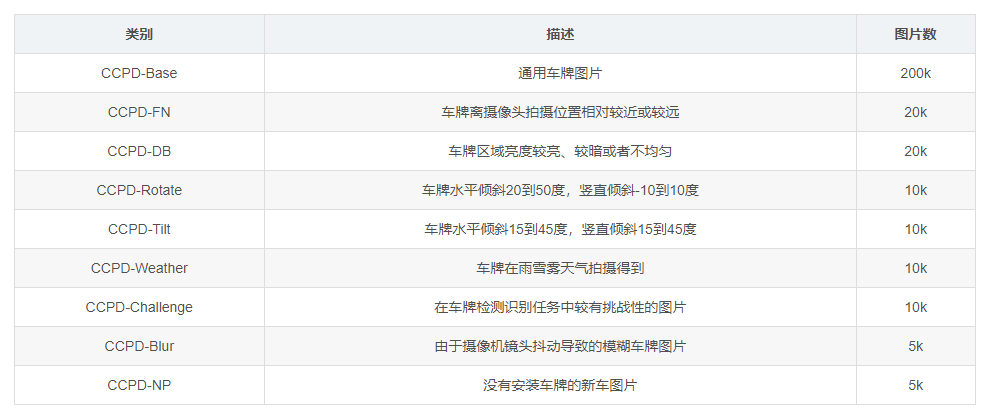
-
ccpd_base.zip: contains 1000 pictures which are taken from different perspectives and different distances, under different illuminations and in different.
-
ccpd_blur.zip: 模糊 contains 1000 pictures where pictures are blurred largely.
-
ccpd_challenge.zip: 挑战 contains 1000 pictures which is the most difficult benchmark for LPDR algorithm.
-
ccpd_characters.zip: 没看到是啥 contains numerical and character images which is designed for training neural networks to recognize segmented character images.
-
ccpd_db.zip: 很亮或者很暗的环境 contains 1000 pictures where illuminations on the LP area are dark or extremely bright.
-
ccpd_fn.zip: 很近或者很远的环境 contains 1000 pictures where the distance from the LP to the shooting location is relatively far or very near.
-
ccpd_np.zip: 有车缺没有车牌 contains 1000 pictures where the car in the picture dose not own a LP.
-
ccpd_rotate.zip: contains 1000 pictures with great horizontal tilt degree.
-
ccpd_tilt.zip: contains 1000 pictures with both relatively great horizontal tilt degree and vertical tilt degree.
-
ccpd_weather.zip: contains 1000 pictures which are taken in rainy weather.
CCPD2019数据格式转到YOLO格式
图片名就是标签:

转化程序:# coding:utf-8 import os import os.path import re import shutil import cv2 from tqdm import tqdm def listPathAllfiles(dirname): result = [] for maindir, subdir, file_name_list in os.walk(dirname): for filename in file_name_list: apath = os.path.join(maindir, filename) result.append(apath) return result if __name__ == '__main__': data_path = r'E:\train_data\number_plate' # 数据集在哪里需要填写 save_path = r'E:\detection\15carplate\ccpd' # 程序会存到这个路径需要填写 images_save_path = os.path.join(save_path, "images") labels_save_path = os.path.join(save_path, "labels") if not os.path.exists(images_save_path): os.makedirs(images_save_path) if not os.path.exists(labels_save_path): os.makedirs(labels_save_path) images_files = listPathAllfiles(data_path) cnt = 1 for name in tqdm(images_files): if name.endswith(".jpg") or name.endswith(".png"): img = cv2.imread(name) height, width = img.shape[0], img.shape[1] str1 = re.findall('-\d+\&\d+_\d+\&\d+-', name)[0][1:-1] str2 = re.split('\&|_', str1) x0 = int(str2[0]) y0 = int(str2[1]) x1 = int(str2[2]) y1 = int(str2[3]) x = round((x0 + x1) / 2 / width, 6) y = round((y0 + y1) / 2 / height, 6) w = round((x1 - x0) / width, 6) h = round((y1 - y0) / height, 6) txtfile = os.path.join(labels_save_path, "plate_" + str(cnt).zfill(6) + ".txt") imgfile = os.path.join(images_save_path, "plate_" + str(cnt).zfill(6) + "." + os.path.basename(name).split(".")[-1]) open(txtfile, "w").write(" ".join(["0", str(x), str(y), str(w), str(h)])) shutil.move(name, imgfile) # 移动文件到别的位置,且重命名 cnt += 1- 1
- 2
- 3
- 4
- 5
- 6
- 7
- 8
- 9
- 10
- 11
- 12
- 13
- 14
- 15
- 16
- 17
- 18
- 19
- 20
- 21
- 22
- 23
- 24
- 25
- 26
- 27
- 28
- 29
- 30
- 31
- 32
- 33
- 34
- 35
- 36
- 37
- 38
- 39
- 40
- 41
- 42
- 43
- 44
- 45
- 46
- 47
- 48
- 49
- 50
- 51
- 52
- 53
- 54
- 55
- 56
- 57
- 58
- 59
检查yolo labels对不对
import os import cv2 import matplotlib.pyplot as plt import numpy as np ASSETS_DIRECTORY = "assets" plt.rcParams["savefig.bbox"] = "tight" def listPathAllfiles(dirname): result = [] for maindir, subdir, file_name_list in os.walk(dirname): for filename in file_name_list: apath = os.path.join(maindir, filename) result.append(apath) return result if __name__ == '__main__': labelspath = r'E:\detection\15carplate\ccpd\labels' imagespath = r'E:\detection\15carplate\ccpd\images' labelsFiles = listPathAllfiles(labelspath) for lbf in labelsFiles[::-1]: labels = open(lbf, "r").readlines() labels = list(map(lambda x: x.strip().split(" "), labels)) imgfileName = os.path.join(imagespath, os.path.basename(lbf)[:-4] + ".jpg") img = cv2.imdecode(np.fromfile(imgfileName, dtype=np.uint8), 1) # img是矩阵 for lbs in labels: lb = list(map(float, lbs))[1:] x1 = int((lb[0] - lb[2] / 2) * img.shape[1]) y1 = int((lb[1] - lb[3] / 2) * img.shape[0]) x2 = int((lb[0] + lb[2] / 2) * img.shape[1]) y2 = int((lb[1] + lb[3] / 2) * img.shape[0]) cv2.rectangle(img, (x1, y1), (x2, y2), (0, 0, 255), 5) ratio = 600 / min(img.shape[0:2]) img = cv2.resize(img, dsize=(int(img.shape[1] * ratio), int(img.shape[0] * ratio))) cv2.imshow("1", img) cv2.waitKey() cv2.destroyAllWindows()- 1
- 2
- 3
- 4
- 5
- 6
- 7
- 8
- 9
- 10
- 11
- 12
- 13
- 14
- 15
- 16
- 17
- 18
- 19
- 20
- 21
- 22
- 23
- 24
- 25
- 26
- 27
- 28
- 29
- 30
- 31
- 32
- 33
- 34
- 35
- 36
- 37
- 38
- 39
- 40
- 41
- 42
- 43
- 44
- 45
- 46
训练yolov5
写data yaml
path: E:\detection\15carplate # dataset root dir train: ccpd val: ccpd # Classes nc: 1 # number of classes names: [ 'plate' ] # class names- 1
- 2
- 3
- 4
- 5
- 6
- 7
- 8

开始训练:
python train.py --batch-size 4 --data ccpd.yaml --img 640 --epochs 10 --weight weights/yolov5m.pt- 1
- 2
-
相关阅读:
C语言经典面试题目(十二)
K8s 之 Helm 部署 MySQL 5.7
进程间通信-信号概述
卷积神经网络(入门)
数据库同步有哪些方式?【怎么保障目标和源数据一致性】
[附源码]Python计算机毕业设计Django少儿节目智能推荐系统
《单片机原理及应用》-片外拓展
gitea的简单介绍
Softing TCS:高效的诊断模拟解决方案
智通利API文档-ZtlApi
- 原文地址:https://blog.csdn.net/x1131230123/article/details/125897933
