-
【JavaWeb - 网页编程】五 书城项目

第一阶段 登录注册的验证(表单验证)
创作日期:2021-12-23
技术方法:
- 使用 jQuery 技术对登录中的用户名、密码进行非空验证
- 使用 jQuery 技术和正则表达式对注册中的用户名、密码、确认密码、邮箱进行格式验证,对验证码进行非空验证
实现要求:
- 验证用户名:必须由字母,数字下划线组成,并且长度为 5 到 12 位
- 验证密码:必须由字母,数字下划线组成,并且长度为 5 到 12 位
- 验证确认密码:和密码相同
- 邮箱验证:xxxxx.@xxx.com
- 验证码:需要验证用户已输入
1.1 新建项目工程和模块
- 新建 JavaWeb 项目工程,命名为:JavaWeb
- 新建工程模块,命名为:book_static

1.2 导入项目静态资源
将 pages,static,index.html 等静态资源文件拷贝到 JavaWeb [book_static] 工程模块下


创建新目录文件,命名为:script ,将 jquery.js 拷贝其中

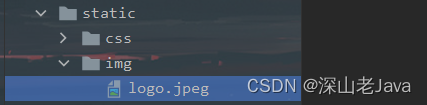
将 logo.jpeg 图片资源导入到文件 static 目录下 -> img 文件中

1.4 页面搭建
1.4.1 书城会员注册页面(regist.html)
11.4.n 页面样式(style.css)
在 static 目录下 -> img 文件 中创建 style.css 页面样式文件

- /* style.css */
- @CHARSET "UTF-8";
- body {
- overflow: hidden;
- }
- * {
- margin: 0;
- font-family:"Microsoft Yahei";
- color: #666;
- }
- div{
- margin: auto;
- margin-bottom: 10px;
- margin-top: 10px;
- }
- #header {
- height: 82px;
- width: 1200px;
- }
- #main {
- height: 460px;
- width: 1200px;
- border: 1px black solid;
- overflow: auto;
- }
- #bottom {
- height: 30px;
- width: 1200px;
- text-align: center;
- }
- #book{
- width: 100%;
- height: 90%;
- margin: auto;
- }
- .b_list{
- height:300px;
- width:250px;
- margin: 20px;
- float: left;
- margin-top:0px;
- margin-bottom:0px;
- border: 1px #e3e3e3 solid;
- }
- #page_nav{
- width: 100%;
- height: 10px;
- margin: auto;
- text-align: center;
- }
- #pn_input {
- width: 30px;
- text-align: center;
- }
- .img_div{
- height: 150px;
- text-align: center;
- }
- .book_img {
- height:150px;
- width:150px;
- }
- .book_info {
- text-align: center;
- }
- .book_info div{
- height: 10px;
- width: 300px;
- text-align: left;
- }
- .wel_word{
- font-size: 60px;
- float: left;
- }
- .logo_img{
- float: left;
- }
- #header div a {
- text-decoration: none;
- font-size: 20px;
- }
- #header div{
- float: right;
- margin-top: 55px;
- }
- .book_cond{
- margin-left: 500px;
- }
- .book_cond input{
- width: 50px;
- text-align: center;
- }
- /*登录页面CSS样式 */
- #login_header{
- height: 82px;
- width: 1200px;
- }
- .login_banner{
- height:475px;
- background-color: #39987c;
- }
- .login_form{
- height:310px;
- width:406px;
- float: right;
- margin-right:50px;
- margin-top: 50px;
- background-color: #fff;
- }
- #content {
- height: 475px;
- width: 1200px;
- }
- .login_box{
- margin: 20px;
- height: 260px;
- width: 366px;
- }
- h1 {
- font-size: 20px;
- }
- .msg_cont{
- background: none repeat scroll 0 0 #fff6d2;
- border: 1px solid #ffe57d;
- color: #666;
- height: 18px;
- line-height: 18px;
- padding: 3px 10px 3px 40px;
- position: relative;
- border: none;
- }
- .msg_cont b {
- background: url("../img/pwd-icons-new.png") no-repeat scroll -104px -22px rgba(0, 0, 0, 0);
- display: block;
- height: 17px;
- left: 10px;
- margin-top: -8px;
- overflow: hidden;
- position: absolute;
- top: 50%;
- width: 16px;
- }
- .form .itxt {
- border: 0 none;
- float: none;
- font-family: "宋体";
- font-size: 14px;
- height: 18px;
- line-height: 18px;
- overflow: hidden;
- padding: 10px 0 10px 10px;
- width: 220px;
- border: 1px #e3e3e3 solid;
- }
- #sub_btn{
- background-color: #39987c;
- border: none;
- color: #fff;
- width: 360px;
- height: 40px;
- }
- #l_content {
- float: left;
- margin-top: 150px;
- margin-left: 300px;
- }
- #l_content span {
- font-size: 60px;
- color: white;
- }
- .tit h1 {
- float: left;
- margin-top: 5px;
- }
- .tit a {
- float: right;
- margin-left: 10px;
- margin-top: 10px;
- color: red;
- text-decoration: none;
- }
- .tit .errorMsg {
- float: right;
- margin-left: 10px;
- margin-top: 10px;
- color: red;
- }
- .tit {
- height: 30px;
- }
- /*购物车*/
- #main table{
- margin: auto;
- margin-top: 80px;
- border-collapse: collapse;
- }
- #main table td{
- width: 120px;
- text-align:center;
- border-bottom: 1px #e3e3e3 solid;
- padding: 10px;
- }
- .cart_info{
- width: 700px;
- text-align: right;
- }
- .cart_span {
- margin-left: 20px;
- }
- .cart_span span{
- color: red;
- font-size: 20px;
- margin: 10px;
- }
- .cart_span a , td a{
- font-size: 20px;
- color: blue;
- }
- #header div span {
- margin: 10px;
- }
- #header div .um_span{
- color: red;
- font-size: 25px;
- margin: 10px;
- }
- #header div a {
- color: blue;
- }
上一节:
下一节: -
相关阅读:
强化学习 DQN 速成
Dash 2.15版本新特性介绍
文章分类管理接口
【我不熟悉的javascript】commonjs和commonjs2的区别,module.exports和exports的关系
[Linux]Windows使用ssh连接Linux虚拟机(mininet)
Shader Graph的用法初探
【Linux入门指北】Linux磁盘扩容
别再用QQ的破数字邮箱了,你其实还有注册姓名全拼微软邮箱的机会
LabVIEW学习记录4-局部变量、全局变量、共享变量
css flex实现同行div根据内容高度自适应且保持一致
- 原文地址:https://blog.csdn.net/woailuo8214/article/details/125895881
