-
maven仓库与jar查找
简介
maven上手非常容易,是因为maven提供了很多默认配置,不过有时候,面对一些稍微复杂的情况,需要我们自己配置,我们就需要了解一点maven的原理。
例如,公司有一个私服,但是很多子公司在使用,每个公司的repository不一样,有时候有些jar只放在他们自己的repository中,所以需要访问他们的repository,同时也需要访问自己的repository,这时应该如何配置呢?
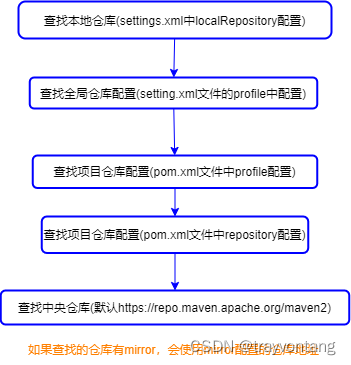
查找jar包顺序
- 查找本地仓库(maven配置文件settings.xml中localRepository配置)
- 查找全局仓库配置(setting.xml文件的profile中配置)
- 查找项目仓库配置(pom.xml文件中profile配置)
- 查找项目仓库配置(pom.xml文件中repository配置)
- 查找中央仓库(默认https://repo.maven.apache.org/maven2)
匹配到仓库之后,如果这个仓库如果有镜像(mirror),就会使用mirror配置的仓库地址。
配置本地仓库
maven的conf目录下settings.xml中localRepository配置
<settings xmlns="http://maven.apache.org/SETTINGS/1.0.0" xmlns:xsi="http://www.w3.org/2001/XMLSchema-instance" xsi:schemaLocation="http://maven.apache.org/SETTINGS/1.0.0 http://maven.apache.org/xsd/settings-1.0.0.xsd"> <localRepository>D:\repositorylocalRepository> settings>- 1
- 2
- 3
- 4
- 5
- 6
- 7
全局仓库配置
maven的conf目录下settings.xml中profile配置,如果私服规划比较好,基本不会变,就可以使用全局配置,这样可以避免在每个项目中配置。
<settings xmlns="http://maven.apache.org/SETTINGS/1.0.0" xmlns:xsi="http://www.w3.org/2001/XMLSchema-instance" xsi:schemaLocation="http://maven.apache.org/SETTINGS/1.0.0 http://maven.apache.org/xsd/settings-1.0.0.xsd"> <profiles> <profile> <id>aliyun-repositoryid> <repositories> <repository> <id>aliyunid> <url>http://maven.aliyun.com/nexus/content/groups/public/url> <releases> <enabled>trueenabled> <updatePolicy>dailyupdatePolicy> <checksumPolicy>ignorechecksumPolicy> releases> <snapshots> <enabled>trueenabled> snapshots> repository> repositories> profile> <profile> <id>owner-repositoryid> <repositories> <repository> <id>ownerid> <name>自己组织的代码库name> <url>http://192.168.5.5:7777/nexus/content/groups/publicurl> <releases> <enabled>trueenabled> releases> <snapshots> <enabled>trueenabled> snapshots> repository> repositories> profile> <profile> <id>other-repositoryid> <repositories> <repository> <id>otherid> <name>公司内部其他组织的仓库name> <url>http://192.168.5.5:7777/nexus/content/groups/group-shareurl> <releases> <enabled>trueenabled> releases> <snapshots> <enabled>trueenabled> snapshots> repository> repositories> profile> profiles> <activeProfiles> <activeProfile>aliyun-repositoryactiveProfile> <activeProfile>owner-repositoryactiveProfile> <activeProfile>other-RepositoryactiveProfile> activeProfiles> settings>- 1
- 2
- 3
- 4
- 5
- 6
- 7
- 8
- 9
- 10
- 11
- 12
- 13
- 14
- 15
- 16
- 17
- 18
- 19
- 20
- 21
- 22
- 23
- 24
- 25
- 26
- 27
- 28
- 29
- 30
- 31
- 32
- 33
- 34
- 35
- 36
- 37
- 38
- 39
- 40
- 41
- 42
- 43
- 44
- 45
- 46
- 47
- 48
- 49
- 50
- 51
- 52
- 53
- 54
- 55
- 56
- 57
- 58
- 59
- 60
- 61
- 62
- 63
- 64
- 65
- 66
- 67
- 68
- 69
- 70
多个激活的repository,会按顺序依次查找。
为什么有个默认的中央仓库central会生效,是因为Maven安装目录下/lib/maven-model-builder-${version}.jar中的org\apache\maven\model\pom-4.0.0.xml中配置了:
<repositories> <repository> <id>centralid> <name>Central Repositoryname> <url>https://repo.maven.apache.org/maven2url> <layout>defaultlayout> <snapshots> <enabled>falseenabled> snapshots> repository> repositories>- 1
- 2
- 3
- 4
- 5
- 6
- 7
- 8
- 9
- 10
- 11
项目仓库配置
项目配置在项目的pom.xml中,项目配置仓库基本都是用的是repositories
如果,项目要访问一些特殊的仓库,就需要单独配置项目仓库,例如,很多商用库就通过这种方式配置
<repositories> <repository> <id>maven-publicid> <name>私服公用仓库地址name> <url>http://192.168.5.5:7777/nexus/content/groups/publicurl> repository> <repository> <id>maven-thirdpartyid> <name>私服第三方包仓库地址name> <url>http://192.168.5.5:7777/nexus/content/repositories/thirdparty/url> repository> repositories>- 1
- 2
- 3
- 4
- 5
- 6
- 7
- 8
- 9
- 10
- 11
- 12
镜像
镜像配置:
<settings xmlns="http://maven.apache.org/SETTINGS/1.0.0" xmlns:xsi="http://www.w3.org/2001/XMLSchema-instance" xsi:schemaLocation="http://maven.apache.org/SETTINGS/1.0.0 http://maven.apache.org/xsd/settings-1.0.0.xsd"> <mirrors> <mirror> <id>aliyunid> <name>阿里云仓库地址name> <url>http://maven.aliyun.com/nexus/content/groups/publicurl> <mirrorOf>centralmirrorOf> mirror> mirrors> settings>- 1
- 2
- 3
- 4
- 5
- 6
- 7
- 8
- 9
- 10
- 11
- 12
- 13
- 14
- 15
- id:用于标识mirror
- name:更像是mirror的说明
- url:这个mirror的仓库地址
- mirrorOf:哪个仓库的镜像
mirror是镜像,也意味着,只会查找第一个匹配到的mirror,查找顺序是按mirror的id字典序查找,而不是配置文件中的先后顺序(这操作比较迷,一是不直观,二是我为了顺序得去改id,相当于id有2个职责了)
只会找第一个匹配的mirror的前提是mirror可以访问,所以更准确的说是找第一个可以访问的mirror。
例如,central中央仓库配置了2个mirror,id分别是A和B,现在要找一个org.meeet.helper.jar包,如果A的url能ping通,就只会在这个url仓库查找,哪怕没有找到,都不会去B的url仓库找。只有当A的url不能ping通的时候,才会去B的url仓库查找。
mirrorOf匹配规则:
- *:匹配所有远程仓库
- external:*:匹配所有外部仓库(除了使用:localhost、file://协议的远程仓库)
- repo1,repo2:匹配仓库repo1和repo2,使用逗号分隔多个远程仓库
- *,!repo:匹配除repo外的所有远程仓库(感叹号将仓库从匹配中排除)
要分清mirror和repository,mirror只是repository的镜像,很多初学的朋友总想通过mirror来配置repository仓库,所以会出现根本不生效、或者一些奇怪复杂的配置。
所以,mirror尽量就只配置一个私服仓库,如公司的私服或者阿里云的仓库来作为central中央仓库的镜像,用于加快访问。
如果,需要访问多个仓库,尽量通过前面介绍的profile和repository来配置,如果自己的Nexus私服还可以通过配置group来处理。
Nexus
Nexus是Maven仓库管理器,前面我们提到了私服(私有仓库),就可以使用Nexus,它能简化内部仓库的维护和外部仓库的访问。
例如,公司内部,我们就可以使用Nexus搭建私服,大家都配置私服地址,然后由Nexus去读取外部的库,当然也可以管理发布内部的库。
Nexus有4种仓库类型:
- hosted:本地仓库,主要用于内部项目的发布(maven-releases、maven-snapshots)
- proxy:代理仓库,外部仓库代理,例如中央仓库(maven-central)
- group:组仓库,逻辑库,可以配置多个hosted与proxy(maven-public)
- virtual:虚拟仓库,适配maven1

私服发布配置
<distributionManagement> <snapshotRepository> <id>snapshotid> <url>http://192.168.5.5:7777/repository/maven-snapshots/url> snapshotRepository> <repository> <id>releaseid> <url>http://192.168.5.5:7777/repository/maven-releases/url> repository> distributionManagement>- 1
- 2
- 3
- 4
- 5
- 6
- 7
- 8
- 9
- 10
- 11
- 12
配置私服用户密码
<settings xmlns="http://maven.apache.org/SETTINGS/1.0.0" xmlns:xsi="http://www.w3.org/2001/XMLSchema-instance" xsi:schemaLocation="http://maven.apache.org/SETTINGS/1.0.0 http://maven.apache.org/xsd/settings-1.0.0.xsd"> <servers> <server> <id>releaseid> <username>adminusername> <password>123456password> server> <server> <id>snapshotid> <username>adminusername> <password>123456password> server> servers> settings>- 1
- 2
- 3
- 4
- 5
- 6
- 7
- 8
- 9
- 10
- 11
- 12
- 13
- 14
- 15
- 16
- 17
- 18
打包插件:
<plugin> <groupId>org.apache.maven.pluginsgroupId> <artifactId>maven-release-pluginartifactId> <version>2.5.3version> <configuration> <tagBase>${project.artifactId}-${project.version}tagBase> <tagNameFormat>v@{project.version}tagNameFormat> <autoVersionSubmodules>trueautoVersionSubmodules> <generateReleasePoms>falsegenerateReleasePoms> <arguments>-DskipTestsarguments> <goals>deploygoals> configuration> plugin>- 1
- 2
- 3
- 4
- 5
- 6
- 7
- 8
- 9
- 10
- 11
- 12
- 13
- 14
- 15
-
相关阅读:
一文彻底搞懂Mysql索引优化
Docker篇-(1)-Docker简介
榕树贷款元数据接入支持 T+1 和近实时两种方式
配置OSPFv3引入外部路由及路由过滤 华为实验
合宙Air724UG LuatOS-Air LVGL API控件-图片 (Image)
x264 编码器亚像素处理流程
【云原生】3.3 Kubernetes 中间件部署实战
SQL必需掌握的100个重要知识点:组合查询
【无标题】
极智开发 | Ant Design 组件库之步骤条
- 原文地址:https://blog.csdn.net/trayvontang/article/details/125892705
