-
MAUI 框架安卓入门开发04 内容模板加载
1.根据界面初稿设计,可以把界面拆分成不同折子项。每个子项再分别定义不同的模板来进行呈现效果
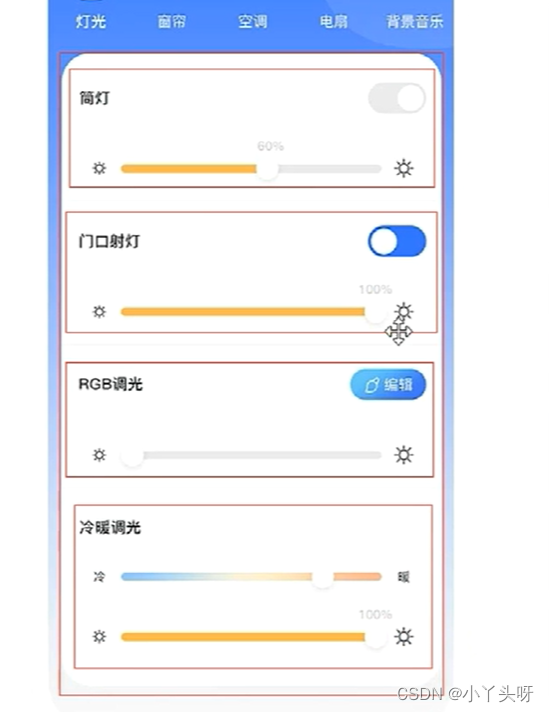
图片是盗用别人的,主要是为了更直观点。
1.2 每个模板有固定的内容格式,头部标题,开头按钮,调值控件。接下来定义属性

ICommand 主要处理页面点击事件,看过前面MVVM 模式的应该知道是什么回事
1.3 因为有多个子项模板,需要用集合来存放。接着定义集合 并初始化集合

2. 属性设计完成,到页面设计
使用CollectionView 控件做为其他子控件的容器,该控件有一个 ItemsSource 属性,把它绑定到定义的子项数据源

2.1 绑定好数据源后,需要通过数据模板,使用数据模板就是让不同的子项显示不同的数据和控件样式

3. 定义好模板后,进行模板样式数据处理,通过模板选择器来处理
3.1 模板选择器处理,首先需要定义一个选择器对象,需要继承自DataTemplateSelector并实现接口

3.2 接着定义数据模型,根据传过来的item数据模型,返回对应的数据模型。首先定义模型属性

4.定义新增加属性后,根据传过来的自定义ItemType 属性,处理返回不同的模型数据,然后前端根据不同的值显示不同的前端模型。
4.1 首先,前端页面定义不同的Item类型模板

4.2 把前端定义好的模型传过来,然后后端根据传过去的Item值,返回不同的模板内容

4.3 定义好上面的内容模板后,再把集合数据子项跟对应模板做关联。
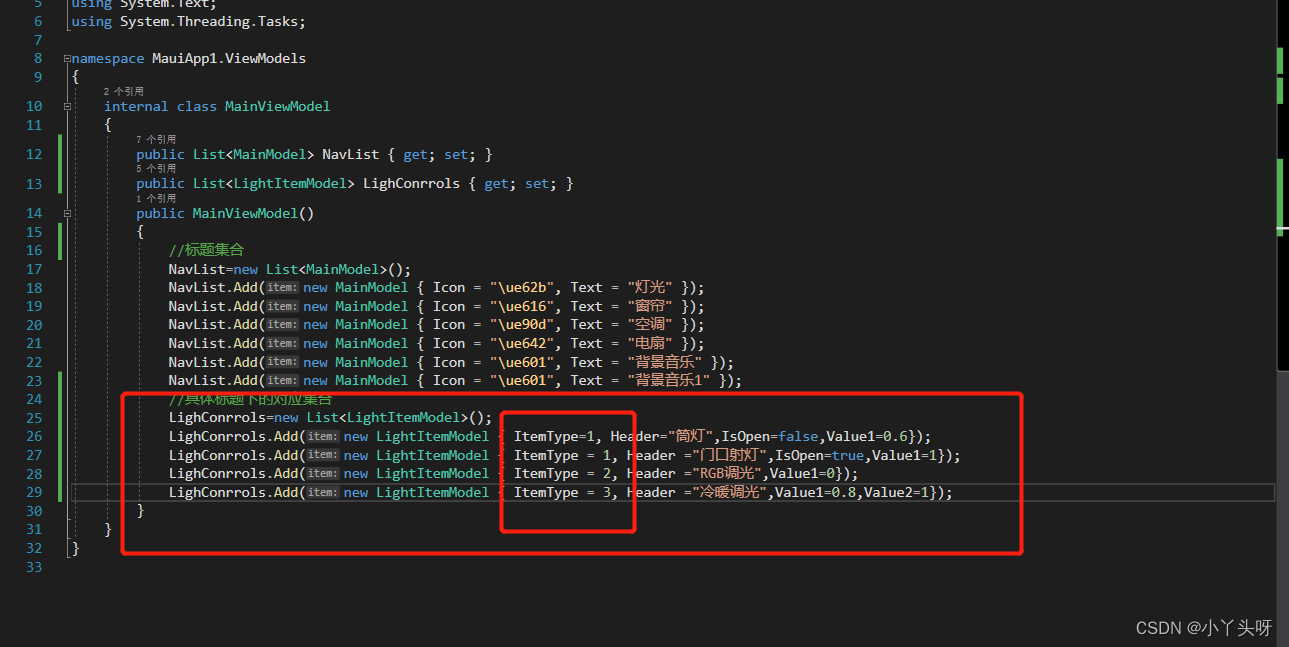
5. 页面使用模板
5.1 第一步,页面使用到刚才定义的 LightItemTemplateSelector 模板,需要把它的命名空间导入到前端页面

5.2 然后就可以用过s.对象属性,来进行使用到定义的模板

它会根据传进去的item ,返回DataTemplate 回来页面,所以就把占位的DataTemplate 去掉。
5.3 接着传入DI,返回定义模板对象

以上处理完成后,当页面调用这个模板选择器的时候,就会去页面找到定义模板并呈现内容出来。
6. 效果如下,下一章节再接着调样式

7.前端页面代码
- <ContentPage xmlns="http://schemas.microsoft.com/dotnet/2021/maui"
- xmlns:x="http://schemas.microsoft.com/winfx/2009/xaml"
- xmlns:s="clr-namespace:MauiApp1.Models"
- x:Class="MauiApp1.MainPage" Background="LightGray">
- <ContentPage.Resources>
- <Style TargetType="RadioButton" x:Key="NavButtonStyle">
- <Setter Property="WidthRequest" Value="70"/>
- <Setter Property="HeightRequest" Value="90"/>
- <Setter Property="TextColor" Value="White"/>
- <Setter Property="Margin" Value="5,10"/>
- <Setter Property="FontSize" Value="40"/>
- <Setter Property="VerticalOptions" Value="Center"/>
- <Setter Property="HorizontalOptions" Value="Center"/>
- <Setter Property="ControlTemplate">
- <ControlTemplate>
- <Grid>
- <Grid.RowDefinitions>
- <RowDefinition />
- <RowDefinition Height="30" />
- Grid.RowDefinitions>
- <Rectangle Fill="Yellow"
- Stroke="#8de9ff" StrokeThickness="1"
- RadiusX="20" RadiusY="20" WidthRequest="50" HeightRequest="50"
- IsVisible="{TemplateBinding IsVisible}"/>
- <Label Text="{TemplateBinding Value}" FontFamily="Iconfont" FontSize="30"
- TextColor="{TemplateBinding TextColor}"
- HorizontalOptions="Center"
- VerticalOptions="Center">Label>
- <Label Text="{TemplateBinding Content}" Grid.Row="1"
- HorizontalOptions="Center"
- VerticalOptions="Center"
- TextColor="White"
- FontSize="13">Label>
- Grid>
- ControlTemplate>
- Setter>
- <Style.Triggers>
- <Trigger TargetType="RadioButton" Property="IsChecked" Value="True">
- <Setter Property="TextColor" Value="Blue"/>
- Trigger>
- Style.Triggers>
- Style>
- <DataTemplate x:Key="DI1">
- <Label Text="{Binding Header}" TextColor="Red"/>
- DataTemplate>
- <DataTemplate x:Key="DI2">
- <Label Text="{Binding Header} " TextColor="Yellow"/>
- DataTemplate>
- <DataTemplate x:Key="DI3">
- <Label Text="{Binding Header}" TextColor="Green"/>
- DataTemplate>
- ContentPage.Resources>
- <Grid Margin="0,30,0,0">
- <Grid.RowDefinitions>
- <RowDefinition Height="40"/>
- <RowDefinition Height="120"/>
- <RowDefinition />
- Grid.RowDefinitions>
- <Grid Margin="10">
- <Label Text="" FontFamily="Iconfont" VerticalOptions="Center" TextColor="White"/>
- <HorizontalStackLayout VerticalOptions="Center" HorizontalOptions="Center">
- <Label Text="一楼客厅" TextColor="White"/>
- <Label Text="" FontFamily="Iconfont" TextColor="White" VerticalOptions="Center" FontSize="10"/>
- HorizontalStackLayout>
- Grid>
- <ScrollView HorizontalScrollBarVisibility="Never" Grid.Row="1">
- <CollectionView ItemsSource="{Binding NavList}" >
- <CollectionView.ItemsLayout>
- <LinearItemsLayout Orientation="Horizontal"/>
- CollectionView.ItemsLayout>
- <CollectionView.ItemTemplate>
- <DataTemplate>
- <RadioButton Content="{Binding Text}" Value="{Binding Icon}" Style="{StaticResource NavButtonStyle}">RadioButton>
- DataTemplate>
- CollectionView.ItemTemplate>
- CollectionView>
- ScrollView>
- <CollectionView Grid.Row="2" ItemsSource="{Binding LighConrrols}">
- <CollectionView.ItemTemplate>
- <s:LightItemTemplateSelector DI1="{StaticResource DI1}" DI2="{StaticResource DI2}" DI3="{StaticResource DI3}" />
- CollectionView.ItemTemplate>
- CollectionView>
- Grid>
- ContentPage>
出自:全网首发.NET MAUI框架入门 已完结 附企业级WPF实战(C#/blazor/xamarin/停车场项目+通用框架+数据采集与监控/数据库)B0858_哔哩哔哩_bilibili
仅个人学习记录
-
相关阅读:
caspase-2 酶抑制剂有望治疗非酒精性脂肪肝
IO模型复习
luffy-(13)
Nacos是怎样实现配置动态更新的?如何动态更新bean?
windows 下使用 nvm use version 时报错 exit status 1
PHP入门教程5:会话管理和数据库操作
react框架安全设计
纯科普:亚马逊常见认证要求汇总
题目0068-小朋友排队
路径规划算法:基于世界杯优化的机器人路径规划算法- 附Python代码
- 原文地址:https://blog.csdn.net/weixin_39237340/article/details/125882251
