-
Github每日精选(第4期):Swift 下的数据存储CoreStore
CoreStore
CoreStore是Swift的 缓存框架,文档说明也比较全面,开发之前先阅读好文档,还有专门demo进行参考,github的地址在这里
使用CoreStore
CoreStore它强制执行安全方便的核心数据,我们经常在开发数据相关应用程序时,碰到了数据存储的问题,CoreStore根据这些问题总结了一套相应的方法,同时也是业界鼓励的最佳做法。版本要求
- Swift 5.5: iOS 11+ / macOS 10.13+ / watchOS 4.0+ / tvOS 11.0+
- 以前 Swift 版本: Swift 5.4, Swift 5.3, Swift 5.1, Swift 5.0, Swift 4.2, Swift 3.2
配置
初始化 CoreStore 的最简单方法是将默认存储添加到默认堆栈:
try CoreStoreDefaults.dataStack.addStorageAndWait()- 1
这个单线执行以下操作:
CoreStoreDefaults.dataStack使用默认值触发延迟初始化DataStack- 设置堆栈
NSPersistentStoreCoordinator、根保存NSManagedObjectContext和只读主NSManagedObjectContext SQLiteStore在“Application Support/”目录(或tvOS 上的“Caches/”目录)中添加一个文件名为“[App bundle name].sqlite”的文件NSPersistentStore在成功或NSError失败时创建并返回实例
对于大多数情况,这种配置就足够了。但是对于更多的核心设置,请参阅这个广泛的示例:
let dataStack = DataStack( xcodeModelName: "MyModel", // loads from the "MyModel.xcdatamodeld" file migrationChain: ["MyStore", "MyStoreV2", "MyStoreV3"] // model versions for progressive migrations ) let migrationProgress = dataStack.addStorage( SQLiteStore( fileURL: sqliteFileURL, // set the target file URL for the sqlite file configuration: "Config2", // use entities from the "Config2" configuration in the .xcdatamodeld file localStorageOptions: .recreateStoreOnModelMismatch // if migration paths cannot be resolved, recreate the sqlite file ), completion: { (result) -> Void in switch result { case .success(let storage): print("Successfully added sqlite store: \(storage)") case .failure(let error): print("Failed adding sqlite store with error: \(error)") } } ) CoreStoreDefaults.dataStack = dataStack // pass the dataStack to CoreStore for easier access later on- 1
- 2
- 3
- 4
- 5
- 6
- 7
- 8
- 9
- 10
- 11
- 12
- 13
- 14
- 15
- 16
- 17
- 18
- 19
- 20
- 21
💡如果您从未听说过“配置”,您会在
.xcdatamodeld文件 中找到它们: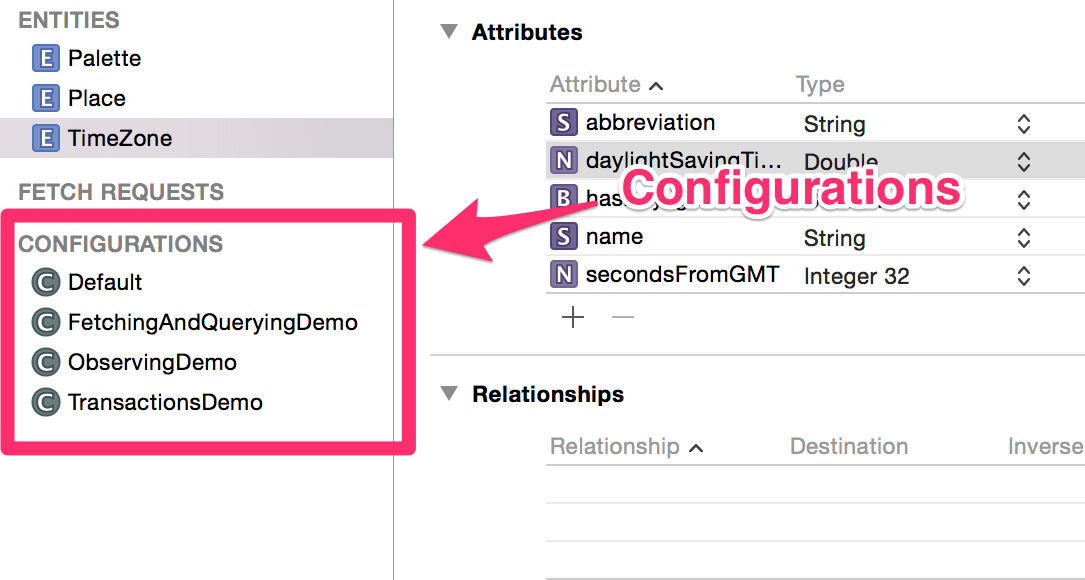
在我们上面的示例代码中,请注意您不需要执行该
CoreStoreDefaults.dataStack = dataStack行。您也可以保留对以下DataStack类似内容的引用并直接调用其所有实例方法:class MyViewController: UIViewController { let dataStack = DataStack(xcodeModelName: "MyModel") // keep reference to the stack override func viewDidLoad() { super.viewDidLoad() do { try self.dataStack.addStorageAndWait(SQLiteStore.self) } catch { // ... } } func methodToBeCalledLaterOn() { let objects = self.dataStack.fetchAll(From<MyEntity>()) print(objects) } }- 1
- 2
- 3
- 4
- 5
- 6
- 7
- 8
- 9
- 10
- 11
- 12
- 13
- 14
- 15
💡默认情况下,
CoreStore将从.xcdatamodeldNSManagedObject文件初始化s ,但您可以使用s 和完全从源代码创建模型。要使用此功能,请参阅Type-safe s。CoreStoreObjectCoreStoreSchemaCoreStoreObject请注意,在我们前面的示例中,
addStorageAndWait(_:)两者addStorage(_:completion:)都接受InMemoryStore或SQLiteStore。这些实现了StorageInterface协议。内存存储
最基本的
StorageInterface具体类型是InMemoryStore,它只是将对象存储在内存中。由于InMemoryStores总是以新的空数据开始,因此它们不需要任何迁移信息。try dataStack.addStorageAndWait( InMemoryStore( configuration: "Config2" // optional. Use entities from the "Config2" configuration in the .xcdatamodeld file ) )- 1
- 2
- 3
- 4
- 5
- 6
- 7
异步变体:
try dataStack.addStorage( InMemoryStore( configuration: "Config2 ), completion: { storage in // ... } )- 1
- 2
- 3
- 4
- 5
- 6
- 7
- 8
(此方法的反应式编程变体在“DataStack组合发布者”部分中有详细说明)
-
相关阅读:
基于SpringBoot的课程答疑系统
中断机制-interrupt和isInterrupted源码分析、中断协商案例
计算机毕业设计(附源码)python在线音乐网站
开学季哪些数码产品值得一看?开学季推荐五款值得入手的好物
html网页如何获取后台数据库的数据(html + ajax + php + mysql)
Canonical标签在SEO中重要作用
监控与运维,主流it运维监控工具
300行代码模拟cdn
Nvidia显卡基础概念介绍
2022UUCTF--WEB
- 原文地址:https://blog.csdn.net/weixin_40425640/article/details/125865198
