-
【jQuery】jQuery中如何发送ajax请求以及解决跨域问题_10
目录
🆙【前文回顾】👉 如何添加自定义函数及封装自定义插件_09

❣️ ajax
1. $.ajax({
url:"服务器端接口地址",
type:"get或post",
data:{ 参数名: 参数值, ... ... }, // 要发送给服务器的参数
dataType:"json", // 自动调用JSON.parse()
success:function(result){ // 等效于之前的onreadystatechange
// 仅在成功收到响应结果后自动执行!
// 今后,只要希望在ajax获得数据后才自动执行的代码,必须都要放在success中!
// result会自动获得ajax接收到的响应结果,被JSON.parse()转换后的直接可用的数组或对象!
}
})
2. 示例:使用$.ajax()函数一句话向服务器发送请求接收响应

15_$_ajax.html
- html>
- <html lang="en">
- <head>
- <meta charset="UTF-8">
- <meta name="viewport" content="width=device-width, initial-scale=1.0">
- <title>Documenttitle>
- <script src="js/jquery-1.11.3.js">script>
- head>
- <body>
- <script>
- //从新浪云服务器获取首页6个商品
- $.ajax({
- url:"http://xzserver.applinzi.com/index",
- type:"get",
- dataType:"json",
- // 响应结果
- // ↓
- success:function(result){
- console.log(result);
- }
- });
- //从新浪云服务器获取5号商品的详细信息
- $.ajax({
- url:"http://xzserver.applinzi.com/details",
- type:"get",
- data:{lid:5},
- dataType:"json",
- // 响应结果
- // ↓
- success:function(result){
- console.log(result);
- }
- })
- //去新浪云服务器验证当前用户是否能登录成功
- $.ajax({
- url:"http://xzserver.applinzi.com/users/signin",
- type:"post",
- data:{uname:"dingding", upwd:"123456"},
- dataType:"json",
- // 响应结果
- // ↓
- success:function(result){
- console.log(result);
- }
- })
- script>
- body>
- html>
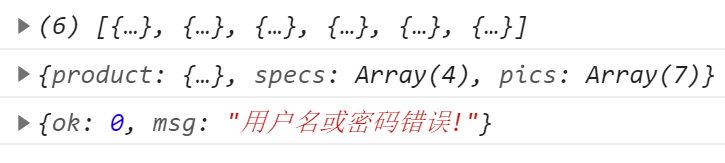
运行结果:
❣️ 跨域
1. 什么是跨域: 一个网站下的网页,使用了另一个网站的资源
2. 包括: 5种:
(1). 域名不同: http://www.a.com -> http://www.b.com
(2). 子级域名不同:
http://oa.tedu.cn -> http://hr.tedu.cn
(3). 端口不同:
http://localhost:5050 -> http://localhost:3000
(4). 协议不同:
http://12306.cn -> https://12306.cn
(5). 即使同一台主机,同一个域名,IP与主机名互访也算跨域:
http://localhost:3000 -> http://127.0.0.1:3000
主机名 IP
3. 可以随意跨域的元素: