-
如何在HarmonyOS应用中集成App Linking服务
简介
App Linking是一种不管应用是否已经安装都可以按照所需方式工作的跨平台链接,链接的目标内容可以是您想要推广的产品优惠活动,也可以是用户之间可以互相分享的应用原生内容。您可以在创建App Linking后将链接地址直接发送给用户,或者由用户在应用中动态生成App Linking并分享给其他用户,接收到App Linking的用户点击链接后即可跳转到链接指定的内容。
当用户点击App Linking时:
-
在Harmony平台上如果应用已经安装,打开App Linking会直接跳转的您应用的原生内容,如果应用没有安装,则会引导用户安装应用并跳转到链接的内容。
-
在桌面浏览器上打开App Linking会转到网站上的同等内容。
配置开发环境
开通App Linking
-
在AppGallery Connect页面点击“我的项目”,在项目的应用列表中选择需要开通App Linking的应用,导航选择“增长 > App Linking”。如果是首次使用App Linking服务,请点击“立即开通”开通服务。

-
如果产品数据处理位置未设置,需要选择该产品的数据处理位置,具体操作请参见设置数据处理位置。
集成SDK
-
在AppGallery Connect页面点击“我的项目”,在项目的应用列表中选择需要开通App Linking的应用。
-
在项目设置的“常规”页签下,单击“应用”栏下的“agconnect-services.json”下载配置文件。
-
将“agconnect-services.json”文件拷贝到项目entry模块目录下。

-
打开entry模块下的build.gradle文件,添加如下代码集成App Linking SDK。
- dependencies {
- ...
- implementation 'com.huawei.agconnect:agconnect-applinking-harmony:1.1.0.300'
- ...
- }
-
点击界面上的“Sync Now”同步已经完成的配置。
界面设计
本次Codelab中您可以在您的DevEco Studio工程中创建一个布局页面,参照下图进行UI设计,具备简单的创建App Linking及分享App Linking按钮即可。

布局代码如下:
- <?xml version="1.0" encoding="utf-8"?>
- <DirectionalLayout
- xmlns:ohos="http://schemas.huawei.com/res/ohos"
- ohos:height="match_parent"
- ohos:width="match_parent"
- ohos:alignment="top"
- ohos:orientation="vertical">
- <Text
- ohos:id="$+id:AppLinking"
- ohos:height="match_content"
- ohos:width="match_content"
- ohos:layout_alignment="horizontal_center"
- ohos:top_margin="100"
- ohos:text_size="80"
- ohos:left_margin="60"
- ohos:right_margin="60"
- ohos:multiple_lines="true"
- ohos:text="AppLinking"
- />
- <Button
- ohos:id="$+id:createButton"
- ohos:height="match_content"
- ohos:width="match_content"
- ohos:layout_alignment="horizontal_center"
- ohos:top_margin="30vp"
- ohos:text_size="80"
- ohos:background_element="$graphic:background_ability_main"
- ohos:text="Create link"
- />
- <Text
- ohos:height="match_content"
- ohos:width="match_content"
- ohos:left_margin="60"
- ohos:right_margin="60"
- ohos:multiple_lines="true"
- ohos:text_size="60"
- ohos:text="Short link"
- />
- <Text
- ohos:id="$+id:shortlink"
- ohos:height="match_content"
- ohos:width="match_content"
- ohos:left_margin="60"
- ohos:right_margin="60"
- ohos:multiple_lines="true"
- ohos:text_size="40"
- />
- <Text
- ohos:height="match_content"
- ohos:width="match_content"
- ohos:top_margin="20"
- ohos:left_margin="60"
- ohos:right_margin="60"
- ohos:multiple_lines="true"
- ohos:text_size="60"
- ohos:text="Long link"
- />
- <Text
- ohos:id="$+id:longlink"
- ohos:height="match_content"
- ohos:width="match_content"
- ohos:top_margin="20"
- ohos:left_margin="60"
- ohos:right_margin="60"
- ohos:multiple_lines="true"
- ohos:text_size="40"
- />
- <Button
- ohos:id="$+id:shareLongButton"
- ohos:height="match_content"
- ohos:width="match_content"
- ohos:top_margin="30vp"
- ohos:layout_alignment="horizontal_center"
- ohos:text_size="80"
- ohos:background_element="$graphic:background_ability_main"
- ohos:text="Share long link"
- />
- <Button
- ohos:id="$+id:shareShortButton"
- ohos:height="match_content"
- ohos:width="match_content"
- ohos:top_margin="30vp"
- ohos:layout_alignment="horizontal_center"
- ohos:text_size="80"
- ohos:background_element="$graphic:background_ability_main"
- ohos:text="Share short link"
- />
- </DirectionalLayout>
配置控制台链接前缀
-
登录AppGallery Connect网站,点击“我的项目”。
-
在项目列表中找到您的项目,在项目下的应用列表中选择您的应用。
-
在“增长”栏下找到“App Linking”,选择“链接前缀”页签,点击“添加链接前缀”,在“设置域名”中输入本次Codelab所使用的网址前缀。

-
完成输入并且点击“下一步”,系统将自动验证该链接前缀是否可用。

设置链接前缀与DeepLink
在应用客户端创建App Linking时,需要有指定的链接前缀与DeepLink地址。本次Codelab中我们使用提前配置好的链接前缀与DeepLink地址。
开发App Linking
1、在MainAbilitySlice中导入相关类。
- import com.huawei.agconnect.applinking.AppLinking;
- import com.huawei.agconnect.applinking.ResourceTable;
- import ohos.aafwk.ability.AbilitySlice;
- import ohos.aafwk.content.Intent;
- import ohos.aafwk.content.Operation;
- import ohos.agp.components.Button;
- import ohos.agp.components.Component;
- import ohos.agp.components.Text;
- import ohos.hiviewdfx.HiLog;
- import ohos.hiviewdfx.HiLogLabel;
- import ohos.utils.net.Uri;
2、在onStart方法定义相关界面元素。
- Button createButton = (Button) findComponentById(ResourceTable.Id_createButton);
- Button shareLongButton = (Button) findComponentById(ResourceTable.Id_shareLongButton);
- Button shareShortButton = (Button) findComponentById(ResourceTable.Id_shareShortButton);
- createButton.setClickedListener(new Component.ClickedListener() {
- @Override
- public void onClick(Component component) {
- createLinking();
- }
- });
- shareLongButton.setClickedListener(new Component.ClickedListener() {
- @Override
- public void onClick(Component component) {
- shareLink(longLink.getText());
- }
- });
- shareShortButton.setClickedListener(new Component.ClickedListener() {
- @Override
- public void onClick(Component component) {
- shareLink(shortLink.getText());
- }
- });
3、初始化App Linking对象实例。
AGConnectAppLinking.getInstance();4、创建App Linking。
- public void createLinking(){
- AppLinking.Builder builder =
- AppLinking.newBuilder()
- .setIsShowPreview(true)
- .setUriPrefix(DOMAIN_URI_PREFIX)
- .setDeepLink(Uri.parse(DEEP_LINK))
- .setHarmonyLinkInfo(
- AppLinking.HarmonyLinkInfo.newBuilder()
- .setHarmonyDeepLink("agckit://helloWorld")
- .build())
- .setCampaignInfo(
- AppLinking.CampaignInfo.newBuilder()
- .setName("HDC")
- .setSource("Huawei")
- .setMedium("App")
- .build())
- //展示预览页详情
- .setPreviewType(AppLinking.LinkingPreviewType.SocialInfo)
- .setSocialCardInfo(
- AppLinking.SocialCardInfo.newBuilder()
- .setDescription("HDC")
- .setTitle("Huawei")
- .setImageUrl("https://ss2.bdstatic.com/70cFvnSh_Q1YnxGkpoWK1HF6hhy/it/u=3862731350,3483076630&fm=26&gp=0.jpg")
- .build());
- LongUri = builder.buildAppLinking().getUri().toString();
- longLink.setText(LongUri);
- HiLog.info(hiLogLabel,"this is LongUri: " + LongUri);
- builder.buildShortAppLinking().addOnSuccessListener(shortAppLinking ->
- {
- ShortUri = shortAppLinking.getShortUrl().toString();
- shortLink.setText(ShortUri);
- HiLog.info(hiLogLabel,"this is ShortLink: " + ShortUri);
- }).addOnFailureListener(e -> {
- });
- }
5、分享已创建的App Linking。
- public void shareLink(String appLinking){
- if (appLinking != null) {
- Intent intent = new Intent();
- Operation operation = new Intent.OperationBuilder().withUri(Uri.parse(appLinking)).build();
- intent.setOperation(operation);
- startAbility(intent);
- }
- }
接收App Linking
1、在接收App Linking前,需要在HarmonyOS工程的config.json配置文件中添加Ability的skills字段,用于指定处理哪些App Linking。当前,支持使用Deep Link来接收信息,您需要在处理App Linking的Ability下添加如下配置。
- "skills": [
- {
- "entities": [
- "entity.system.home",
- "android.intent.action.VIEW"
- ],
- "actions": [
- "action.system.home",
- "entity.system.default",
- "entity.system.browsable"
- ],
- "uris": [
- {
- "scheme": "agckit",
- "host": "www.example.com"
- }
- ]
- }
- ]
2、在需要接收App Linking的Ability中调用AGConnectAppLinking.getInstance()初始化AGConnectAppLinking实例。
- AGConnectAppLinking.getInstance()
- .getAppLinking(getAbility())
- .addOnSuccessListener(
- resolvedLinkData -> {
- if(resolvedLinkData != null){
- StringBuilder stringBuffer = new StringBuilder();
- if(resolvedLinkData.getDeepLink() != null){
- stringBuffer.append(resolvedLinkData.getDeepLink().toString());
- //解析出deeplink后跳转到实际页面
- Intent intents = new Intent();
- intents.setUri(Uri.parse(resolvedLinkData.getDeepLink().toString()));
- startAbility(intents);
- }
- }
- })
- .addOnFailureListener(
- e -> {
- AGCLogger.e("ApplinkingAbilitySlice", "getAppLinking:onFailure", e);
- });
打包测试
1、在DevEco Studio上点击运行按钮,在手机或模拟器上运行应用。点击“Create link”,您可以看到SDK生成的短链接和长链接。
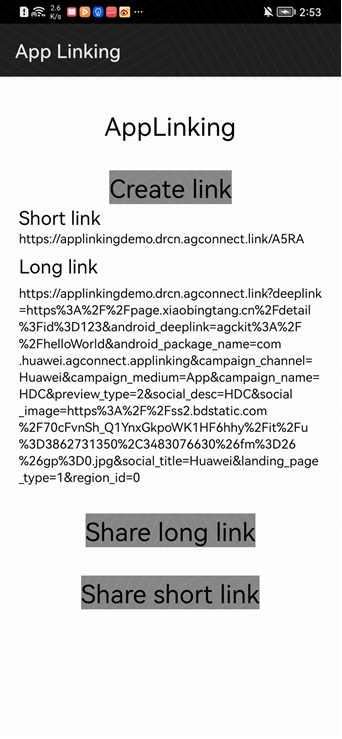
2、点击“Share long link”按钮,将链接分享至手机浏览器,浏览器将复制长链接并打开地址,加载出配置的App Linking内容。点击打开或下载应用按钮,即可跳转至应用市场进行下载,说明您通过SDK生成的链接可以打开对应的应用。短链接测试方法也相同。

参考文件
详细的App Linking开发指南请参见App Linking服务开发指南。
App Linking的相关API请参见API参考。
本Codelab中所用Demo源码下载地址如下源码下载。
欲了解更多更全技术文章,欢迎访问https://developer.huawei.com/consumer/cn/forum/?ha_source=zzh
-
-
相关阅读:
进入IT行业:选择前端开发还是后端开发?
开源网络协议栈onps诞生记
emqx5.0.6 开启redis认证,配置acl规则,离线监听(保姆级图文实战教程)
网络编程-IP、TCP、UDP1(第二十一天)
Spring框架系列(9) - Spring AOP实现原理详解之AOP切面的实现
C#基础语法--运算符
模块打包器Webpack详解!
【Matplotlib绘制图像大全】(十六):Matplotlib绘制虚线折线图
Google验证码,扫描绑定,SpringBoot+ vue
先进制造aps专题九 中国aps行业分析
- 原文地址:https://blog.csdn.net/weixin_44708240/article/details/125634619