-
如何给16进制的色值设置透明度
遇见要给16进制设置透明度的需求时,我之前的做法是把16进制转换为rab,进而通过rgba设置透明度,可能有人会有疑问为什么不直接使用rgba呢,并非是我不想,实在是接口返回的是16进制, 偶然之间我发现了这种写法,原来16进制的设置是可以直接设置透明度的,一下是效果展示
demo展示

<div style="background: #ff000000; width: 25px; height: 25px"></div> <div style="background: #ff000010; width: 25px; height: 25px"></div> <div style="background: #ff000020; width: 25px; height: 25px"></div> <div style="background: #ff000030; width: 25px; height: 25px"></div> <div style="background: #ff000040; width: 25px; height: 25px"></div> <div style="background: #ff000050; width: 25px; height: 25px"></div> <div style="background: #ff000060; width: 25px; height: 25px"></div> <div style="background: #ff000070; width: 25px; height: 25px"></div> <div style="background: #ff000080; width: 25px; height: 25px"></div> <div style="background: #ff000090; width: 25px; height: 25px"></div> <div style="background: #ff0000a0; width: 25px; height: 25px"></div> <div style="background: #ff0000b0; width: 25px; height: 25px"></div> <div style="background: #ff0000c0; width: 25px; height: 25px"></div> <div style="background: #ff0000d0; width: 25px; height: 25px"></div> <div style="background: #ff0000e0; width: 25px; height: 25px"></div> <div style="background: #ff0000f0; width: 25px; height: 25px"></div> <div style="background: #ff0000ff; width: 25px; height: 25px"></div>- 1
- 2
- 3
- 4
- 5
- 6
- 7
- 8
- 9
- 10
- 11
- 12
- 13
- 14
- 15
- 16
- 17
写法解读
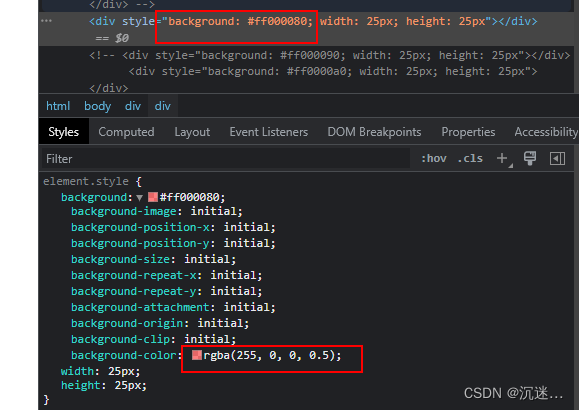
#ff000080拿这个半透明说明一下,#ff0000为正常的16进制设置,后面的80则为透明度
透明度的取值范围0~255 例如 10进制的128 转换为16进制为80 所以 半透明度为80scss写法
<style lang="scss" scoped> $boxColor: #ff0000; .box { width: 40px; height: 40px; background-color: #{$boxColor}80; } </style>- 1
- 2
- 3
- 4
- 5
- 6
- 7
- 8
以下为1%~100% 设置对照表
0% (00)
1% (03) 2% (05) 3% (08) 4% (0A) 5% (0D)
6% (0F) 7% (12) 8% (14) 9% (17) 10% (1A)
11% (1C) 12% (1F) 13% (21) 14% (24) 15% (26)
16% (29) 17% (2B) 18% (2E) 19% (30) 20% (33)
21% (36) 22% (38) 23% (3B) 24% (3D) 25% (40)
26% (42) 27% (45) 28% (47) 29% (4A) 30% (4D)
31% (4F) 32% (52) 33% (54) 34% (57) 35% (59)
36% (5C) 37% (5E) 38% (61) 39% (63) 40% (66)
41% (69) 42% (6B) 43% (6E) 44% (70) 45% (73)
46% (75) 47% (78) 48% (7A) 49% (7D) 50% (80)
51% (82) 52% (85) 53% (87) 54% (8A) 55% (8C)
56% (8F) 57% (91) 58% (94) 59% (96) 60% (99)
61% (9C) 62% (9E) 63% (A1) 64% (A3) 65% (A6)
66% (A8) 67% (AB) 68% (AD) 69% (B0) 70% (B3)
71% (B5) 72% (B8) 73% (BA) 74% (BD) 75% (BF)
76% (C2) 77% (C4) 78% (C7) 79% (C9) 80% (CC)
81% (CF) 82% (D1) 83% (D4) 84% (D6) 85% (D9)
86% (DB) 87% (DE) 88% (E0) 89% (E3) 90% (E6)
91% (E8) 92% (EB) 93% (ED) 94% (F0) 95% (F2)
96% (F5) 97% (F7) 98% (FA) 99% (FC) 100%(FF) -
相关阅读:
详解链表oJ<反转链表,链表的中间节点及链表的回文>
2024湖南师范大学计算机考研分析
zookeeper的安装与配置
Linux【vim】
国内云计算厂商那个有学生云服务器,该选择哪家比较好?
LeetCode50天刷题计划(Day 5—— 最长回文子串 10.50-13:00)
MySQL(十四)分析查询语句Explain 七千字总结
多曲面卡片
带你快速概览MySQL 整体架构
java学习笔记
- 原文地址:https://blog.csdn.net/weixin_42343307/article/details/125627927