-
SpringMVC入门宝典(七)SpringMVC文件上传(下)
目录
一.异步上传
之前的上传方案,在上传成功后都会跳转页面。而在实际开发中,很多情况下上传后不进行跳转,而是进行页面的局部刷新 ,比如: 上传头像成功后将头像显示在网页中。这时候就需要使用异步文件 上传。11.编写 JSP 页面,引入 jQuery 和 jQuery 表单上传工具jquery.form.js
- <%@ page contentType="text/html;charset=UTF-8" language="java" %>
- <html>
- <head>
- <title>上传</title>
- <script src="/js/jquery-2.1.1.min.js"></script>
- <script src="/js/jquery.form.js"></script>
- </head>
- <body>
- <h3>文件上传</h3>
- <form id="ajaxForm" enctype="multipart/form-data">
- 选择文件:<input type="file" name="file">
- <%-- 按钮类型不能是submit,否则会刷新页面 --%>
- <input type="button" value="上传头像" id="btn">
- </form>
- <%-- 头像预览图 --%>
- <img src="/" width="100" id="header" />
- <script>
- $(function (){
- $("#btn").click(function (){
- // 异步提交表单
- $("#ajaxForm").ajaxSubmit({
- url:"/fileUpload4",
- type:"post",
- success:function (data){
- $("#header").attr("src",data);
- }
- })
- })
- })
- </script>
- </body>
- </html>
2.编写控制器接收异步上传请求- // MultipartFile参数名必须和JSP文件空间的name属性一致
- @RequestMapping("/fileUpload4")
- @ResponseBody
- public String upload4(MultipartFile file,HttpServletRequest request) throws IOException {
- // 创建文件夹,存放上传文件
- String realPath = request.getSession().getServletContext().getRealPath("/upload");
- File dir = new File(realPath);
- if(!dir.exists()){
- dir.mkdirs();
- }
- // 将上传的数据写到文件夹的文件中
- // 1.拿到上传的文件名
- String filename = file.getOriginalFilename();
- filename = UUID.randomUUID()+"_"+filename;
- // 2.创建空文件
- File newFile = new File(dir,filename);
- // 3.将数据写入空文件中
- file.transferTo(newFile);
- // 返回文件路径,赋给img标签的src属性
- return "/upload/"+filename;
- }

点击上传头像,实现了异步更新与上传(页面没有跳转)


二.跨服务器上传
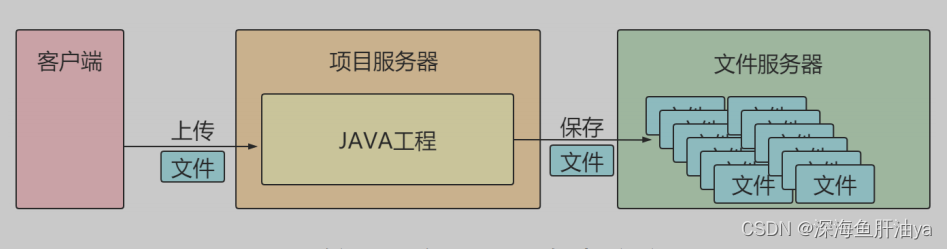 由于文件占据磁盘空间较大,在实际开发中往往会将文件上传到其他服务器中,此时需要使用跨服务器上传文件。11.准备一个文件服务器:解压 tomcat(使用之前学服务器时安装的tomcat即可) 作为图片服务器,在 tomcat 的 webapps 下创建 upload 目录作为文件上传目录。22.修改 tomcat 的 conf/web.xml 文件,支持跨服上传。即关闭只读,使可以往服务器上传输文件。
需添加内容(即红框部分):
- <init-param>
- <param-name>readonly</param-name>
- <param-value>false</param-value>
- </init-param>
3. 修改 tomcat 的 conf/server.xml 文件,修改 tomcat 端口,修改完开启 tomcat 服务器(bin下的startup.bat)- <Connector port="8081" protocol="HTTP/1.1"
- connectionTimeout="20000"
- redirectPort="8443" />
修改端口号为8081
4.编写 JSP 上传表单upload5.jsp- <%@ page contentType="text/html;charset=UTF-8" language="java" %>
- <html>
- <head>
- <title>上传</title>
- <script src="/js/jquery-2.1.1.min.js"></script>
- <script src="/js/jquery.form.js"></script>
- </head>
- <body>
- <h3>文件上传</h3>
- <form id="ajaxForm" enctype="multipart/form-data">
- 选择文件:<input type="file" name="file">
- <%-- 按钮类型不能是submit,否则会刷新页面 --%>
- <input type="button" value="上传头像" id="btn">
- </form>
- <%-- 头像预览图 --%>
- <img src="/" width="100" id="header" />
- <script>
- $(function (){
- $("#btn").click(function (){
- // 异步提交表单
- $("#ajaxForm").ajaxSubmit({
- url:"/fileUpload5",
- type:"post",
- success:function (data){
- $("#header").attr("src",data);
- }
- })
- })
- })
- </script>
- </body>
- </html>
5.添加跨服上传依赖- <!-- 跨服上传 -->
- <dependency>
- <groupId>com.sun.jersey</groupId>
- <artifactId>jersey-core</artifactId>
- <version>1.18.1</version>
- </dependency>
- <dependency>
- <groupId>com.sun.jersey</groupId>
- <artifactId>jersey-client</artifactId>
- <version>1.18.1</version>
- </dependency>
6.创建控制器方法,该方法在接受到上传请求后将文件保存到其他服务器上。
- @RequestMapping("/fileUpload5")
- @ResponseBody
- public String upload5(MultipartFile file,HttpServletRequest request) throws IOException{
- // 设置跨服上传的服务器路径
- String path = "http://localhost:8081/upload/";
- // 获取上传的文件名
- String filename = file.getOriginalFilename();
- filename = UUID.randomUUID()+"_"+filename;
- // 跨服上传
- // 1.创建客户端对象
- Client client = Client.create();
- // 2.使用客户端对象连接图片服务器
- WebResource resource = client.resource(path + filename);
- // 3.数据传输(以字节的形式)
- resource.put(file.getBytes());
- // 返回文件路径
- return path+filename;
- }
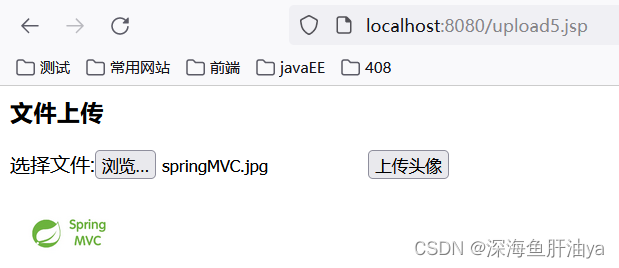
在idea中开启项目服务器,访问http://localhost:8080/upload5.jsp
查看图片服务器(咱们上面启动的那个tomcat)

三.文件下载
下面是从当前项目服务器下载。
将文件上传到服务器后,有时我们需要让用户下载上传的文件,接下来我们编写文件下载功能:查询所有可下载的文件1.编写控制器方法,查询所有可下载的文件,并跳转到下载页面- package com.first.controller;
- import org.springframework.stereotype.Controller;
- import org.springframework.ui.Model;
- import org.springframework.web.bind.annotation.RequestMapping;
- import javax.servlet.http.HttpServletRequest;
- import java.io.File;
- @Controller
- public class DownLoadController {
- // 查询可下载的文件
- @RequestMapping("/showFiles")
- public String showFileDown(HttpServletRequest request, Model model){
- //1.获取下载文件路径集合。注:跨服务器上传中,网络路径无法获取文件列表。
- String path = request.getSession().getServletContext().getRealPath("/upload");
- System.out.println(path);
- File file = new File(path);
- String[] files = file.list();
- //2.将路径放入模型中,跳转到JSP页面
- model.addAttribute("files",files);
- return "download";
- }
- }
2. 添加 JSTL 依赖- <!-- JSTL -->
- <dependency>
- <groupId>org.apache.taglibs</groupId>
- <artifactId>taglibs-standard-spec</artifactId>
- <version>1.2.5</version>
- </dependency>
- <dependency>
- <groupId>org.apache.taglibs</groupId>
- <artifactId>taglibs-standard-impl</artifactId>
- <version>1.2.5</version>
- </dependency>
3. 编写下载页面- <%@ page contentType="text/html;charset=UTF-8" language="java" %>
- <%@ taglib prefix="c" uri="http://java.sun.com/jsp/jstl/core" %>
- <html>
- <head>
- <title>下载</title>
- </head>
- <body>
- <h3>文件下载</h3>
- <%-- 遍历文件集合 --%>
- <c:forEach items="${files}" var="file">
- <a href="/download?fileName=${file}">${file}</a><br />
- </c:forEach>
- </body>
- </html>
编写下载控制器- package com.first.controller;
- import org.apache.commons.io.FileUtils;
- import org.springframework.stereotype.Controller;
- import org.springframework.ui.Model;
- import org.springframework.web.bind.annotation.RequestMapping;
- import javax.servlet.ServletOutputStream;
- import javax.servlet.http.HttpServletRequest;
- import javax.servlet.http.HttpServletResponse;
- import java.io.File;
- import java.io.IOException;
- @Controller
- public class DownLoadController {
- // 查询可下载的文件
- @RequestMapping("/showFiles")
- public String showFileDown(HttpServletRequest request, Model model){
- //1.获取下载文件路径集合。注:跨服务器上传中,网络路径无法获取文件列表。
- String path = request.getSession().getServletContext().getRealPath("/upload");
- File file = new File(path);
- String[] files = file.list();
- //2.将路径放入模型中,跳转到JSP页面
- model.addAttribute("files",files);
- return "download";
- }
- // 文件下载
- @RequestMapping("/download")
- public void fileDown(HttpServletRequest request, HttpServletResponse response,String fileName) throws IOException {
- // 设置响应头
- response.setHeader("Content-Disposition","attachment;filename="+fileName);
- // 获取文件路径
- String path = request.getSession().getServletContext().getRealPath("/upload");
- File file = new File(path,fileName);
- // 获取字节输出流
- ServletOutputStream os = response.getOutputStream();
- // 使用输出流写出文件
- os.write(FileUtils.readFileToByteArray(file));
- os.flush();
- os.close();
- }
- }

点击链接即可弹出下载窗口。
-
相关阅读:
C - Matrix Reducing
Sumo中Traci.trafficlight详解(上)
MySQL 增删改查获取资料等使用方法
06-`Linux`的用户和用户组管理
四象限时间管理有多好用?
Hadoop编程——第三章:(3)Linux常用命令
经典c程序100例==31--40
多网络设备存在时,如何配置其上网优先级?
Maven环境搭建以及eclipse-maven3-plugin插件安装
SCS【10】单细胞转录组之差异表达分析 (Monocle 3)
- 原文地址:https://blog.csdn.net/weixin_44593822/article/details/125606112