-
XML解析
目录
首先我们需要勾选下面选项(上一篇博客勾选的两个也需要),不然没法运行


我们先来重温一下io流
IO流:
拿文件的时候会报错,因为这个文件可能会不存在,如下图:
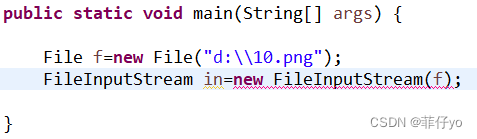
解决方法:直接抛出异常

将图片复制出去的地址并取名字
- File target=new File("D:\\cions02\\hh.png");
- FileOutputStream out=new FileOutputStream(target);
如果想直接拿到原名
- String name=f.getName();
- File target=new File("D:\\cions02\\"+name);
- FileOutputStream out=new FileOutputStream(target);
复制和关闭
- //byte[] 数组 1024 每次复制的大小
- byte[] tmp=new byte[1024];
- while (in.read(tmp)!=-1) {
- out.write(tmp);
- }
- //关闭
- in.close();
- out.flush();
- out.close();
- System.out.println("ok");
JAVA中配置文件的三种配置位置及读取方式
同包:Demo1.class.getResourceAsStream("db.properties");
根路径:Demo1.class.getResourceAsStream("/db.properties");
WIN-INF:context.getResourceAsStream("/WEB-INF/db.properties");
需要的包

第一个:更好的处理反射机制
第二个:日志(可以看到报错)
第三个:帮助我们解析xml文件的
第四个:使用XPath以简化dom4j查找节点时必须导入jaxen-1.1-beta-6.jar,否则会出现异常:NoClassDefFoundError: org/jaxen/JaxenException
第五个:一种语言规范,他把复杂的jsp函数封装成简单的<>标签形式,在写jsp页面的时候更方便一些。不用也能写页面,更方便而已。
第六个:连接MySQL的
第七个:容器服务(JSTL)
dom4j的使用
方法 描述 selectNodes 拿到多个节点 selectSingleNode 拿到单个节点 attributeValue 返回指定属性值,如果属性不存在,返回空字符串
getText 拿到元素文本 getRootElemnent 拿到根元素 新建一个放源码的包

将源码放进去

- <?xml version="1.0" encoding="UTF-8"?>
- <!--
- config标签:可以包含0~N个action标签
- -->
- <config>
- <!--
- action标签:可以饱含0~N个forward标签
- path:以/开头的字符串,并且值必须唯一 非空
- type:字符串,非空
- -->
- <action path="/regAction" type="test.RegAction">
- <!--
- forward标签:没有子标签;
- name:字符串,同一action标签下的forward标签name值不能相同 ;
- path:以/开头的字符串
- redirect:只能是false|true,允许空,默认值为false
- -->
- <forward name="failed" path="/reg.jsp" redirect="false" />
- <forward name="success" path="/login.jsp" redirect="true" />
- </action>
- <action path="/loginAction" type="test.LoginAction">
- <forward name="failed" path="/login.jsp" redirect="false" />
- <forward name="success" path="/main.jsp" redirect="true" />
- </action>
- </config>
xml解析代码如下:
- package com.pf.mvcdemo;
- import java.io.InputStream;
- import java.util.List;
- import org.dom4j.Document;
- import org.dom4j.Element;
- import org.dom4j.io.SAXReader;
- public class XmlReader {
- public static void main(String[] args) throws Exception {
- InputStream in = XmlReader.class.getResourceAsStream("/config.xml");
- SAXReader reader=new SAXReader();
- Document doc=reader.read(in);
- Element root = doc.getRootElement();//根元素
- List<Element> actions = root.selectNodes("action");
- for (Element e : actions) {
- String path=e.attributeValue("path");
- String type=e.attributeValue("type");
- System.out.println("action path"+path);
- System.out.println("action type"+type);
- List<Element> forwards=e.selectNodes("forward");
- for (Element f : forwards) {
- String name = f.attributeValue("name");
- String fpath = f.attributeValue("path");
- String redirect=e.attributeValue("redirect");
- System.out.println("forward name"+name);
- System.out.println("forward fpath"+fpath);
- System.out.println("forward redirect"+redirect);
- }
- System.out.println("---------------------------------");
- }
- }
- }
效果图如下:
 如何找到官网?
可以在下面网站查找dom4j
必应必应可帮助你将理论付诸实践,使得搜索更加方便快捷,从而达到事半功倍的效果。
https://cn.bing.com/

我们就可以找到官网

官网中有版本还有方法的使用

xpath的使用
语法
/ :定位路径
@ :属性
-
相关阅读:
Python中的matplotlib与Pygal的安装、使用与实例
3.物联网射频识别,(高频)RFID应用ISO14443-2协议,(校园卡)Mifare S50卡
一篇文章让你认识React的Mobx!
pytorch 数据载入
ardupilot 日志分析《xKF1信息》
Linux 将 /home 目录与 / 根目录磁盘合并
AT7456E集成了EEPROM的显示器芯片
最新ChatGPT网站系统源码+支持GPT4.0+支持AI绘画Midjourney绘画+支持国内全AI模型
柯西变异和自适应权重优化的蝴蝶算法-附代码
【每日一题】2760. 最长奇偶子数组-2023.11.16
- 原文地址:https://blog.csdn.net/m0_67331668/article/details/125608443