-
第十一章 JavaScript操作DOM对象
第十一章 JavaScript操作DOM对象
DOM:Document Object Model(文档对象模型)
![[外链图片转存失败,源站可能有防盗链机制,建议将图片保存下来直接上传(img-2zKaDNLi-1656925895765)(D:\课件\笔记\第十二章 JavaScript操作DOM对象.assets\image-20220617082108752.png)]](https://1000bd.com/contentImg/2022/07/05/063604217.png)
使用getElement系列方法访问指定节点
getElementById()、getElementsByName()、getElementsByTagName()根据层次关系访问节点
firstElementChild 返回节点的第一个子节点,最普遍的用法是访问该元素的文本节点 lastElementChild 返回节点的最后一个子节点 parentNode 返回节点的父节点 childNodes 返回子节点集合,childNodes[i] #TEXT其实就是里面有文本 firstChild 返回节点的第一个子节点,最普遍的用法是访问该元素的文本节点 lastChild 返回节点的最后一个子节点 nextSibling 下一个节点 previousSibling 上一个节点 <!DOCTYPE html> <html> <head> <meta charset="utf-8" /> <title></title> </head> <body> <ul id="u1"> <li id="li1"><a href="#" id="a1">aaa</a></li> <li id="li2"><a href="#">asd</a></li> <li><a href="#">234</a></li> <li><a href="#">dfg</a></li> <li><a href="#">hjkfcg</a></li> <li><a href="#">asdf</a></li> <li ><a href="#">yhjsxd</a></li> </ul> <script> //改变父节点颜色 document.getElementById("li1").parentNode.style.background="yellowgreen"; document.getElementById("li1").parentNode.parentNode.style.background="#999"; //所有子节点 var nos=document.getElementById("u1").childNodes; // for (i in nos) { // nos[i].innerHTML="**123**"; // } //下一个节点 document.getElementById("li1").nextSibling.nextSibling.style.color="red"; </script> </body> </html>- 1
- 2
- 3
- 4
- 5
- 6
- 7
- 8
- 9
- 10
- 11
- 12
- 13
- 14
- 15
- 16
- 17
- 18
- 19
- 20
- 21
- 22
- 23
- 24
- 25
- 26
- 27
- 28
- 29
- 30
- 31
- 32
节点信息
nodeName:节点名称
nodeValue:节点值
nodeType:节点类型元素element 1 属性attr 2 文本text 3 注释comments 8 文档document 9 alert(document.getElementById("li1").nodeName+"**" +document.getElementById("li1").nodeValue+"**" +document.getElementById("li1").nodeType );- 1
- 2
- 3
- 4
操作节点
操作节点的属性
getAttribute("属性名") setAttribute("属性名","属性值")- 1
- 2
<!DOCTYPE html> <html> <head> <meta charset="utf-8"> <title></title> <script> function a(num){ if(num==1){ document.getElementById("img1").setAttribute("src","img/dog.jpg") }else{ document.getElementById("img1").setAttribute("src","img/mai.jpg") } } </script> </head> <body> <p> <input type="radio" name="a" value="狗" onclick="a(1)"/>狗 <input type="radio" name="a" value="灰霾" onclick="a(2)"/>灰霾 </p> <img id="img1" src=""/> </body> </html>- 1
- 2
- 3
- 4
- 5
- 6
- 7
- 8
- 9
- 10
- 11
- 12
- 13
- 14
- 15
- 16
- 17
- 18
- 19
- 20
- 21
- 22
- 23
创建新节点
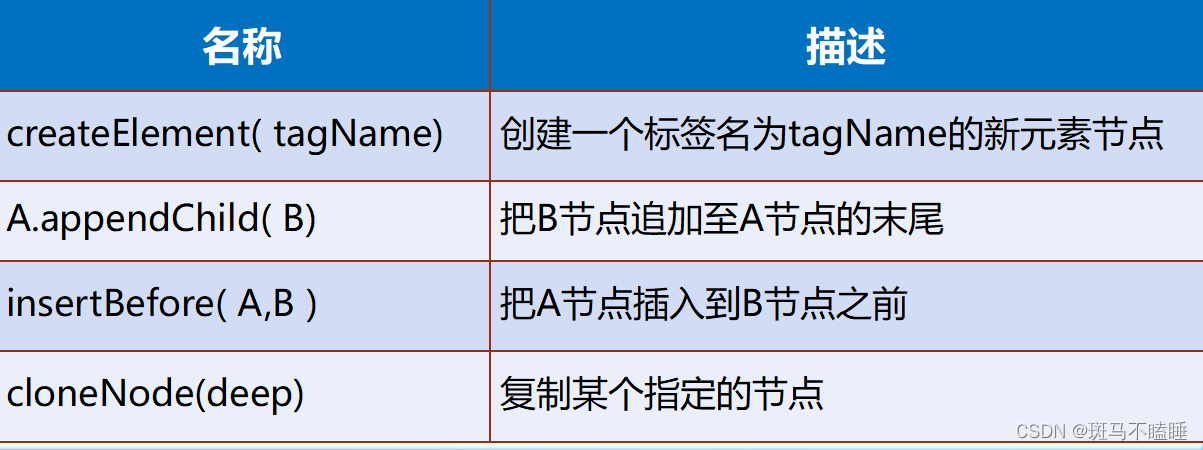
<!DOCTYPE html> <html> <head> <meta charset="utf-8"> <title></title> <script> function a(num){ //获取div var d=document.getElementById("d1"); //创建一个图片节点 var img=document.createElement("img"); //追加 d.append(img); if(num==1){ img.setAttribute("src","img/dog.jpg"); }else{ img.setAttribute("src","img/mai.jpg"); } } </script> </head> <body> <p> <input type="radio" name="a" value="狗" onclick="a(1)"/>狗 <input type="radio" name="a" value="灰霾" onclick="a(2)"/>灰霾 </p> <div id="d1"> </div> </body> </html>- 1
- 2
- 3
- 4
- 5
- 6
- 7
- 8
- 9
- 10
- 11
- 12
- 13
- 14
- 15
- 16
- 17
- 18
- 19
- 20
- 21
- 22
- 23
- 24
- 25
- 26
- 27
- 28
- 29
- 30
- 31
删除和替换节点
名称 描述 removeChild( node) 删除指定的节点 replaceChild( newNode, oldNode)属性attr 用其他的节点替换指定的节点 <!DOCTYPE html> <html> <head> <meta charset="utf-8"> <title></title> <script> function a(num){ //获取div var d=document.getElementById("d1"); if(num==1){ if(document.getElementById("img2")!=null){ d.removeChild(document.getElementById("img2")) } var imgs=document.createElement("img"); imgs.setAttribute("src","img/dog.jpg"); imgs.setAttribute("id","img1"); d.append(imgs); }else{ if(document.getElementById("img1")!=null){ d.removeChild(document.getElementById("img1")) } var imgs=document.createElement("img"); imgs.setAttribute("src","img/mai.jpg"); imgs.setAttribute("id","img2"); d.append(imgs); } } </script> </head> <body> <p> <input type="radio" name="a" value="狗" onchange="a(1)"/>狗 <input type="radio" name="a" value="灰霾" onchange="a(2)"/>灰霾 </p> <div id="d1"> </div> </body> </html>- 1
- 2
- 3
- 4
- 5
- 6
- 7
- 8
- 9
- 10
- 11
- 12
- 13
- 14
- 15
- 16
- 17
- 18
- 19
- 20
- 21
- 22
- 23
- 24
- 25
- 26
- 27
- 28
- 29
- 30
- 31
- 32
- 33
- 34
- 35
- 36
- 37
- 38
- 39
-
相关阅读:
【复旦邱锡鹏教授《神经网络与深度学习公开课》笔记】卷积
c语言分层理解(动态通讯录的实现)
DeFi借贷重新洗牌 透过协议变化能找到哪些新趋势?
会话与终端
生成GAN模型工具箱MMGeneration安装及使用示例
HDFS 动态扩容、动态缩容以及黑白名单
Python中的单元测试框架:使用unittest进行有效测试
Llama2-Chinese项目:4-量化模型
springboot - 2.7.3版本 - (二)整合Redis
音视频PTS、DTS
- 原文地址:https://blog.csdn.net/qq_36827283/article/details/125604460