-
SSM框架学习——MyBatis
1. MyBatis简介
- mybatis 是一个优秀的基于java的持久层框架,它内部封装了jdbc,使开发者只需要关注sql语句本身,而不需要花费精力去处理加载驱动、创建连接、创建statement等繁杂的过程。
- mybatis通过xml或注解的方式将要执行的各种 statement配置起来,并通过java对象和statement中sql的动态参数进行映射生成最终执行的sql语句。
- 最后mybatis框架执行sql并将结果映射为java对象并返回。采用ORM思想解决了实体和数据库映射的问题,对jdbc 进行了封装,屏蔽了jdbc api 底层访问细节,使我们不用与jdbc api打交道,就可以完成对数据库的持久化操作。
2. MyBatis快速入门
2.1 MyBatis开发步骤
①导入MyBatis的坐标和其他相关坐标
<dependencies> <dependency> <groupId>mysql</groupId> <artifactId>mysql-connector-java</artifactId> <version>5.1.32</version> </dependency> <dependency> <groupId>org.mybatis</groupId> <artifactId>mybatis</artifactId> <version>3.5.6</version> </dependency> <dependency> <groupId>junit</groupId> <artifactId>junit</artifactId> <version>4.12</version> <scope>test</scope> </dependency> <dependency> <groupId>log4j</groupId> <artifactId>log4j</artifactId> <version>1.2.17</version> </dependency> </dependencies>- 1
- 2
- 3
- 4
- 5
- 6
- 7
- 8
- 9
- 10
- 11
- 12
- 13
- 14
- 15
- 16
- 17
- 18
- 19
- 20
- 21
- 22
- 23
② 创建user数据表

③ 编写User实体类public class User { private int id; private String username; private String password; //省略get、set、toString方法 }- 1
- 2
- 3
- 4
- 5
- 6
- 7
④ 编写映射文件UserMapper.xml
<?xml version="1.0" encoding="UTF-8" ?> <!DOCTYPE mapper PUBLIC "-//mybatis.org//DTD Mapper 3.0//EN" "http://mybatis.org/dtd/mybatis-3-mapper.dtd"> <mapper namespace="userMapper"> <select id="findAll" resultType="com.lenyoo.domain.User"> select * from user </select> </mapper>- 1
- 2
- 3
- 4
- 5
- 6
- 7
⑤ 编写核心文件SqlMapConfig.xml
<?xml version="1.0" encoding="UTF-8" ?> <!DOCTYPE configuration PUBLIC "-//mybatis.org//DTD Config 3.0//EN" "http://mybatis.org/dtd/mybatis-3-config.dtd"> <configuration> <!--数据源环境--> <environments default="development"> <environment id="development"> <transactionManager type="JDBC"></transactionManager> <dataSource type="POOLED"> <property name="driver" value="com.mysql.jdbc.Driver"/> <property name="url" value="jdbc:mysql://localhost:3306/test"/> <property name="username" value="root"/> <property name="password" value="WLY755414220"/> </dataSource> </environment> </environments> <!--加载映射文件--> <mappers> <mapper resource="com/lenyoo/mapper/UserMapper.xml"></mapper> </mappers> </configuration>- 1
- 2
- 3
- 4
- 5
- 6
- 7
- 8
- 9
- 10
- 11
- 12
- 13
- 14
- 15
- 16
- 17
- 18
- 19
- 20
- 21
- 22
- 23
⑥ 编写测试类
public class MyBatisTest { @Test public void test1() throws IOException { // 获得核心配置文件 InputStream resourceAsStream = Resources.getResourceAsStream("sqlMapConfig.xml"); // 获得sqlSession工厂对象 SqlSessionFactory sqlSessionFactory = new SqlSessionFactoryBuilder().build(resourceAsStream); // 获得sqlSession会话对象 SqlSession sqlSession = sqlSessionFactory.openSession(); // 执行操作 参数:namespace + id List<User> userList = sqlSession.selectList("userMapper.findAll"); // 打印数据 System.out.println(userList); // 释放资源 sqlSession.close(); } }- 1
- 2
- 3
- 4
- 5
- 6
- 7
- 8
- 9
- 10
- 11
- 12
- 13
- 14
- 15
- 16
- 17
- 18
3. MyBatis的映射文件概述

4. MyBatis的增删改查操作
4.1 MyBatis的插入数据操作
① 编写UserMapper映射文件
<mapper namespace="userMapper"> <!--插入操作--> <insert id="save" parameterType="com.lenyoo.domain.User"> insert into user values(#{id},#{username},#{password}) </insert> </mapper>- 1
- 2
- 3
- 4
- 5
- 6
②编写插入实体User的代码
@Test public void test2() throws IOException { // 模拟user对象 User user = new User(); user.setUsername("tom"); user.setPassword("abc"); // 获得核心配置文件 InputStream resourceAsStream = Resources.getResourceAsStream("sqlMapConfig.xml"); // 获得sqlSession工厂对象 SqlSessionFactory sqlSessionFactory = new SqlSessionFactoryBuilder().build(resourceAsStream); // 获得sqlSession会话对象 SqlSession sqlSession = sqlSessionFactory.openSession(); // 执行操作 参数:namespace + id sqlSession.insert("userMapper.save",user); // mybatis执行更新操作 提交事务 sqlSession.commit(); // 释放资源 sqlSession.close(); }- 1
- 2
- 3
- 4
- 5
- 6
- 7
- 8
- 9
- 10
- 11
- 12
- 13
- 14
- 15
- 16
- 17
- 18
- 19
- 20
- 21
- 22
注意:
- 插入语句使用insert标签
- 在映射文件中使用parameterType属性指定要插入的数据类型
- Sql语句中使用#{实体属性名}方式引用实体中的属性值
- 插入操作使用的API是sqlSession.insert(“命名空间.id”,实体对象);
- 插入操作涉及数据库数据变化,所以要使用sqlSession对象显示的提交事务,
即sqlSession.commit()
4.2 MyBatis的修改数据操作
① 编写UserMapper映射文件
<mapper namespace="userMapper"> <!--修改操作--> <update id="update" parameterType="com.lenyoo.domain.User"> update user set username=#{username},password=#{password} where id=#{id} </update> </mapper>- 1
- 2
- 3
- 4
- 5
- 6
②编写插入实体User的代码
@Test // 修改操作 public void test3() throws IOException { // 模拟user对象 User user = new User(); user.setId(7); user.setUsername("lucy"); user.setPassword("123"); // 获得核心配置文件 InputStream resourceAsStream = Resources.getResourceAsStream("sqlMapConfig.xml"); // 获得sqlSession工厂对象 SqlSessionFactory sqlSessionFactory = new SqlSessionFactoryBuilder().build(resourceAsStream); // 获得sqlSession会话对象 SqlSession sqlSession = sqlSessionFactory.openSession(); // 执行操作 参数:namespace + id sqlSession.update("userMapper.update",user); // mybatis执行更新操作 提交事务 sqlSession.commit(); // 释放资源 sqlSession.close(); }- 1
- 2
- 3
- 4
- 5
- 6
- 7
- 8
- 9
- 10
- 11
- 12
- 13
- 14
- 15
- 16
- 17
- 18
- 19
- 20
- 21
- 22
- 23
- 24
注意:
- 修改语句使用update标签
- 修改操作使用的API是sqlSession.update(“命名空间.id”,实体对象);
4.3 MyBatis的删除数据操作
① 编写UserMapper映射文件
<mapper namespace="userMapper"> <!--删除操作--> <delete id="delete" parameterType="java.lang.Integer"> delete from user where id=#{id} </delete> </mapper>- 1
- 2
- 3
- 4
- 5
- 6
②编写删除数据的代码
@Test // 删除操作 public void test4() throws IOException { // 获得核心配置文件 InputStream resourceAsStream = Resources.getResourceAsStream("sqlMapConfig.xml"); // 获得sqlSession工厂对象 SqlSessionFactory sqlSessionFactory = new SqlSessionFactoryBuilder().build(resourceAsStream); // 获得sqlSession会话对象 SqlSession sqlSession = sqlSessionFactory.openSession(); // 执行操作 参数:namespace + id sqlSession.delete("userMapper.delete",7); // mybatis执行更新操作 提交事务 sqlSession.commit(); // 释放资源 sqlSession.close(); }- 1
- 2
- 3
- 4
- 5
- 6
- 7
- 8
- 9
- 10
- 11
- 12
- 13
- 14
- 15
- 16
- 17
- 18
- 19
注意:
- 删除语句使用delete标签
- Sql语句中使用#{任意字符串}方式引用传递的单个参数
- 删除操作使用的API是sqlSession.delete(“命名空间.id”,Object);
5. MyBatis核心配置文件概述
5.1 MyBatis常用配置解析
5.1.1 environments标签
数据库环境的配置,支持多环境配置

事务管理器(transactionManager)类型有两种:- JDBC:这个配置就是直接使用了JDBC 的提交和回滚设置,它依赖于从数据源得到的连接来管理事务作用域。
- MANAGED:这个配置几乎没做什么。它从来不提交或回滚一个连接,而是让容器来管理事务的整个生命周期(比如JEE应用服务器的上下文)。 默认情况下它会关闭连接,然而一些容器并不希望这样,因此需要将closeConnection 属性设置为 false 来阻止它默认的关闭行为。
数据源(dataSource)类型有三种:
• UNPOOLED:这个数据源的实现只是每次被请求时打开和关闭连接。
• POOLED:这种数据源的实现利用“池”的概念将 JDBC 连接对象组织起来。
• JNDI:这个数据源的实现是为了能在如 EJB 或应用服务器这类容器中使用,容器可以集中或在外部配置数据源,然后放置一个 JNDI 上下文的引用。5.1.2 mappers标签
该标签的作用是加载映射的,加载方式有如下几种:
• 使用相对于类路径的资源引用,例如:<mapper resource="org/mybatis/builder/AuthorMapper.xml"/>
• 使用完全限定资源定位符(URL),例如:<mapper url="file:///var/mappers/AuthorMapper.xml"/>
• 使用映射器接口实现类的完全限定类名,例如:<mapper class="org.mybatis.builder.AuthorMapper"/>
• 将包内的映射器接口实现全部注册为映射器,例如<package name="org.mybatis.builder"/>5.1.3 properties标签
实际开发中,习惯将数据源的配置信息单独抽取成一个properties文件,该标签可以加载额外配置的properties文件

5.1.4 typeAliases标签

上面我们是自定义的别名,mybatis框架已经为我们设置好的一些常用的类型的别名

6. MyBatis的相应API
6.1 SqlSession工厂构建器SqlSessionFactoryBuilder
常用API:SqlSessionFactory build(InputStream inputStream)
通过加载mybatis的核心文件的输入流的形式构建一个SqlSessionFactory对象// 获得核心配置文件 InputStream resourceAsStream = Resources.getResourceAsStream("sqlMapConfig.xml"); // 获得sqlSession工厂对象 SqlSessionFactory sqlSessionFactory = new SqlSessionFactoryBuilder().build(resourceAsStream);- 1
- 2
- 3
- 4
6.2 SqlSession工厂对象SqlSessionFactory
// 获得sqlSession会话对象 SqlSession sqlSession = sqlSessionFactory.openSession();- 1
- 2

6.3 SqlSession会话对象
SqlSession 实例在 MyBatis 中是非常强大的一个类。在这里会看到所有执行语句、提交或回滚事务和获取映射器实例的方法。
执行语句的方法主要有:<T> T selectOne(String statement, Object parameter) <E> List<E> selectList(String statement, Object parameter) int insert(String statement, Object parameter) int update(String statement, Object parameter) int delete(String statement, Object parameter)- 1
- 2
- 3
- 4
- 5
操作事务的方法主要有:
void commit() void rollback()- 1
- 2
7. MyBatis的Dao层实现
7.1 传统开发方式
7.2 代理开发方式
7.2.1 代理开发方式介绍
采用 Mybatis 的代理开发方式实现 DAO 层的开发,这种方式是我们后面进入企业的主流。
Mapper 接口开发方法只需要程序员编写Mapper 接口(相当于Dao 接口),由Mybatis 框架根据接口定义创建接
口的动态代理对象,代理对象的方法体同上边Dao接口实现类方法。
Mapper 接口开发需要遵循以下规范:
1、 Mapper.xml文件中的namespace与mapper接口的全限定名相同
2、 Mapper接口方法名和Mapper.xml中定义的每个statement的id相同
3、 Mapper接口方法的输入参数类型和mapper.xml中定义的每个sql的parameterType的类型相同
4、 Mapper接口方法的输出参数类型和mapper.xml中定义的每个sql的resultType的类型相同7.2.2 代理开发步骤
- 编写UserMapper接口

- 测试代理方式(
sqlSession.getMapper(UserMapper.class))
public class ServiceDemo { public static void main(String[] args) throws IOException { InputStream resourceAsStream = Resources.getResourceAsStream("sqlMapConfig.xml"); SqlSessionFactory sqlSessionFactory = new SqlSessionFactoryBuilder().build(resourceAsStream); SqlSession sqlSession = sqlSessionFactory.openSession(); UserMapper mapper = sqlSession.getMapper(UserMapper.class); List<User> all = mapper.findAll(); System.out.println(all); User user = mapper.findById(1); System.out.println(user); } }- 1
- 2
- 3
- 4
- 5
- 6
- 7
- 8
- 9
- 10
- 11
- 12
- 13
- 14
- 15
- 16
8. MyBatis映射文件深入
8.1 动态SQL语句
8.1.1 动态SQL之<if>
多条件组合查询
<select id="findByCondition" parameterType="user" resultType="user"> select * from user <where> <if test="id!=0"> and id=#{id} </if> <if test="username!=null"> and username=#{username} </if> <if test="password!=null"> and password=#{password} </if> </where> </select>- 1
- 2
- 3
- 4
- 5
- 6
- 7
- 8
- 9
- 10
- 11
- 12
- 13
- 14
8.1.2 动态SQL之<foreach>
循环执行sql的拼接操作,例如:SELECT * FROM USER WHERE id IN (1,2,5)
<select id="findByIds" parameterType="list" resultType="user"> select * from user <where> <foreach collection="list" open="id in(" close=")" item="id" separator=","> #{id} </foreach> </where> </select>- 1
- 2
- 3
- 4
- 5
- 6
- 7
- 8
foreach标签的属性含义如下:
标签用于遍历集合,它的属性:
• collection:代表要遍历的集合元素,注意编写时不要写#{}
• open:代表语句的开始部分
• close:代表结束部分
• item:代表遍历集合的每个元素,生成的变量名
• sperator:代表分隔符8.2 SQL片段抽取
Sql 中可将重复的 sql 提取出来,使用时用 include 引用即可,最终达到 sql 重用的目的
<!--sql语句抽取--> <sql id="selectUser">select * from user</sql> <select id="findByCondition" parameterType="user" resultType="user"> <include refid="selectUser"></include> <where> <if test="id!=0"> and id=#{id} </if> <if test="username!=null"> and username=#{username} </if> <if test="password!=null"> and password=#{password} </if> </where> </select> <select id="findByIds" parameterType="list" resultType="user"> <include refid="selectUser"></include> <where> <foreach collection="list" open="id in(" close=")" item="id" separator=","> #{id} </foreach> </where> </select>- 1
- 2
- 3
- 4
- 5
- 6
- 7
- 8
- 9
- 10
- 11
- 12
- 13
- 14
- 15
- 16
- 17
- 18
- 19
- 20
- 21
- 22
- 23
- 24
- 25
- 26
9. MyBatis核心配置文件深入
9.1 typeHandlers标签
例如:一个Java中的Date数据类型,我想将之存到数据库的时候存成一个1970年至今的毫秒数,取出来时转换成java的Date,即java的Date与数据库的varchar毫秒值之间转换。
开发步骤:
① 定义转换类继承类BaseTypeHandler
② 覆盖4个未实现的方法,其中setNonNullParameter为java程序设置数据到数据库的回调方法,getNullableResult为查询时 mysql的字符串类型转换成 java的Type类型的方法public class DateTypeHandler extends BaseTypeHandler<Date> { @Override //将java类型 转换成 数据库需要的类型 public void setNonNullParameter(PreparedStatement preparedStatement, int i, Date date, JdbcType jdbcType) throws SQLException { long time = date.getTime(); preparedStatement.setLong(i, time); } @Override //将数据库类型 转换成 java类型 //String参数 要转换的字段名称 //ResultSet 查询出的结果 public Date getNullableResult(ResultSet resultSet, String s) throws SQLException { long aLong = resultSet.getLong(s); Date date = new Date(aLong); return date; } @Override //将数据库类型 转换成 java类型 public Date getNullableResult(ResultSet resultSet, int i) throws SQLException { long aLong = resultSet.getLong(i); Date date = new Date(aLong); return date; } @Override //将数据库类型 转换成 java类型 public Date getNullableResult(CallableStatement callableStatement, int i) throws SQLException { long aLong = callableStatement.getLong(i); Date date = new Date(aLong); return date; } }- 1
- 2
- 3
- 4
- 5
- 6
- 7
- 8
- 9
- 10
- 11
- 12
- 13
- 14
- 15
- 16
- 17
- 18
- 19
- 20
- 21
- 22
- 23
- 24
- 25
- 26
- 27
- 28
- 29
- 30
- 31
- 32
- 33
- 34
- 35
- 36
③ 在MyBatis核心配置文件中进行注册
<!--注册类型处理器--> <typeHandlers> <typeHandler handler="com.lenyoo.handler.DateTypeHandler"></typeHandler> </typeHandlers>- 1
- 2
- 3
- 4
④ 测试转换是否正确
9.2 plugins 标签
MyBatis可以使用第三方的插件来对功能进行扩展,分页助手PageHelper是将分页的复杂操作进行封装,使用简单的方式即可获得分页的相关数据
开发步骤:
① 导入通用PageHelper的坐标<dependency> <groupId>com.github.pagehelper</groupId> <artifactId>pagehelper</artifactId> <version>3.7.5</version> </dependency> <dependency> <groupId>com.github.jsqlparser</groupId> <artifactId>jsqlparser</artifactId> <version>0.9.1</version> </dependency>- 1
- 2
- 3
- 4
- 5
- 6
- 7
- 8
- 9
- 10
② 在mybatis核心配置文件中配置PageHelper插件
<!--配置分页助手插件 配置在通用mapper之前--> <plugins> <plugin interceptor="com.github.pagehelper.PageHelper"> <!--指定方言--> <property name="dialect" value="mysql"/> </plugin> </plugins>- 1
- 2
- 3
- 4
- 5
- 6
- 7
③ 测试分页数据获取
@Test public void test3() throws IOException { InputStream resourceAsStream = Resources.getResourceAsStream("sqlMapConfig.xml"); SqlSessionFactory sqlSessionFactory = new SqlSessionFactoryBuilder().build(resourceAsStream); SqlSession sqlSession = sqlSessionFactory.openSession(); UserMapper mapper = sqlSession.getMapper(UserMapper.class); //设置分页相关参数 当前页+每页显示的条数 PageHelper.startPage(2,3); List<User> userList = mapper.findAll(); for (User user : userList) { System.out.println(user); } //获得与分页相关参数 PageInfo<User> pageInfo = new PageInfo<User>(userList); System.out.println("当前页:" + pageInfo.getPageNum()); System.out.println("每页显示条数:" + pageInfo.getPageSize()); System.out.println("总条数:" + pageInfo.getTotal()); System.out.println("总页数:" + pageInfo.getPages()); System.out.println("上一页:" + pageInfo.getPrePage()); System.out.println("下一页:" + pageInfo.getNextPage()); System.out.println("是否是第一页:" + pageInfo.isIsFirstPage()); System.out.println("是否是最后一页:" + pageInfo.isIsLastPage()); sqlSession.close(); }- 1
- 2
- 3
- 4
- 5
- 6
- 7
- 8
- 9
- 10
- 11
- 12
- 13
- 14
- 15
- 16
- 17
- 18
- 19
- 20
- 21
- 22
- 23
- 24
- 25
- 26
- 27
- 28
10. MyBatis多表查询
10.1 一对一查询
10.1.1 一对一查询的模型
用户表和订单表的关系为,一个用户有多个订单,一个订单只从属于一个用户
一对一查询的需求:查询一个订单,与此同时查询出该订单所属的用户

10.1.2 一对一查询的语句
select *, o.id oid from orders o, user u where o.uid=u.id- 1

10.1.3 步骤
- 创建Order和User实体
public class Order { private int id; private Date orderTime; private double total; //表示当前订单属于哪一个用户 private User user; // 省略getter、setter和toString }- 1
- 2
- 3
- 4
- 5
- 6
- 7
- 8
- 9
- 10
- 11
public class User { private int id; private String username; private String password; private Date birthday; // 省略getter、setter和toString }- 1
- 2
- 3
- 4
- 5
- 6
- 7
- 8
- 创建OrderMapper接口
public interface OrderMapper { //查询全部的方法 public List<Order> findAll(); }- 1
- 2
- 3
- 4
- 配置OrderMapper.xml
<mapper namespace="com.lenyoo.mapper.OrderMapper"> <resultMap id="orderMap" type="order"> <!--手动指定字段与实体属性的映射关系 column:数据表的字段名称 property:实体的属性名称 --> <id column="oid" property="id"></id> <result column="ordertime" property="orderTime"></result> <result column="total" property="total"></result> <!--<result column="uid" property="user.id"></result> <result column="username" property="user.username"></result> <result column="password" property="user.password"></result> <result column="birthday" property="user.birthday"></result>--> <!-- property:当前实体(order)中的属性名称(private User user) javaType:当前实体(order)中的属性的类型(User) --> <association property="user" javaType="user"> <id column="uid" property="id"></id> <result column="username" property="username"></result> <result column="password" property="password"></result> <result column="birthday" property="birthday"></result> </association> </resultMap> <select id="findAll" resultMap="orderMap"> select *, o.id oid from orders o, user u where o.uid=u.id </select> </mapper>- 1
- 2
- 3
- 4
- 5
- 6
- 7
- 8
- 9
- 10
- 11
- 12
- 13
- 14
- 15
- 16
- 17
- 18
- 19
- 20
- 21
- 22
- 23
- 24
- 25
- 26
- 27
- 28
- 29
- 30
- 31
- 32
- 33
- 测试结果
OrderMapper mapper = sqlSession.getMapper(OrderMapper.class); List<Order> orderList = mapper.findAll(); for (Order order : orderList) { System.out.println(order); }- 1
- 2
- 3
- 4
- 5

10.2 一对多查询
10.2.1 一对多查询的模型
用户表和订单表的关系为,一个用户有多个订单,一个订单只从属于一个用户
一对多查询的需求:查询一个用户,与此同时查询出该用户具有的订单10.2.2 一对多查询的语句
SELECT *, o.id oid FROM user u, orders o WHERE u.id=o.uid- 1
查询的结果如下:

10.2.3 步骤
- 修改User实体
public class User { private int id; private String username; private String password; private Date birthday; //描述的是当前用户存在哪些订单 private List<Order> orderList; // 省略getter、setter和toString }- 1
- 2
- 3
- 4
- 5
- 6
- 7
- 8
- 9
- 10
- 11
public class Order { private int id; private Date orderTime; private double total; //表示当前订单属于哪一个用户 private User user; // 省略getter、setter和toString }- 1
- 2
- 3
- 4
- 5
- 6
- 7
- 8
- 9
- 10
- 11
- 创建UserMapper接口
public interface UserMapper { public List<User> findAll(); }- 1
- 2
- 3
- 配置UserMapper.xml
<mapper namespace="com.lenyoo.mapper.UserMapper"> <resultMap id="userMap" type="user"> <id column="uid" property="id"></id> <result column="username" property="username"></result> <result column="password" property="password"></result> <result column="birthday" property="birthday"></result> <!--配置集合信息 property:集合名称 ofType:当前集合中的数据类型 --> <collection property="orderList" ofType="order"> <!--封装order的数据--> <id column="oid" property="id"></id> <result column="ordertime" property="orderTime"></result> <result column="total" property="total"></result> </collection> </resultMap> <select id="findAll" resultMap="userMap"> SELECT *, o.id oid FROM user u, orders o WHERE u.id=o.uid </select> </mapper>- 1
- 2
- 3
- 4
- 5
- 6
- 7
- 8
- 9
- 10
- 11
- 12
- 13
- 14
- 15
- 16
- 17
- 18
- 19
- 20
- 21
- 22
- 23
- 24
- 测试结果
@Test public void test2() throws IOException { InputStream resourceAsStream = Resources.getResourceAsStream("sqlMapConfig.xml"); SqlSessionFactory sqlSessionFactory = new SqlSessionFactoryBuilder().build(resourceAsStream); SqlSession sqlSession = sqlSessionFactory.openSession(); UserMapper mapper = sqlSession.getMapper(UserMapper.class); List<User> userList = mapper.findAll(); for (User user : userList) { System.out.println(user); } sqlSession.close(); }- 1
- 2
- 3
- 4
- 5
- 6
- 7
- 8
- 9
- 10
- 11
- 12
- 13
- 14
User{id=1, username='zhangsan', password='123', birthday=null, orderList=[Order{id=1, orderTime=Fri Feb 15 14:59:37 CST 2019, total=3000.0, user=null}, Order{id=2, orderTime=Wed Oct 10 15:00:00 CST 2018, total=5800.0, user=null}, Order{id=4, orderTime=Thu Feb 21 15:00:25 CST 2019, total=2345.0, user=null}]} User{id=2, username='lisi', password='123', birthday=null, orderList=[Order{id=3, orderTime=Thu Feb 28 15:00:14 CST 2019, total=323.0, user=null}, Order{id=5, orderTime=Mon Feb 04 15:00:37 CST 2019, total=100.0, user=null}]} User{id=3, username='wangwu', password='123', birthday=null, orderList=[Order{id=6, orderTime=Thu Jun 07 15:00:52 CST 2018, total=2009.0, user=null}]}- 1
- 2
- 3
- 4
10.3 多对多查询
10.3.1 多对多查询的模型
用户表和角色表的关系为,一个用户有多个角色,一个角色被多个用户使用
多对多查询的需求:查询用户同时查询出该用户的所有角色

10.3.2 多对多查询语句
SELECT * FROM user u, sys_user_role ur, sys_role r WHERE u.id=ur.userId AND ur.roleId=r.id- 1
查询结果如下:

10.3.3 步骤
- 创建Role实体,修改User实体
public class Role { private int id; private String roleName; private String roleDesc; // 省略getter、setter和toString }- 1
- 2
- 3
- 4
- 5
- 6
- 7
- 8
public class User { private int id; private String username; private String password; private Date birthday; //描述的是当前用户存在哪些订单 private List<Order> orderList; //描述的是当前用户具备哪些角色 private List<Role> roleList; // 省略getter、setter和toString }- 1
- 2
- 3
- 4
- 5
- 6
- 7
- 8
- 9
- 10
- 11
- 12
- 13
- 14
- 添加UserMapper接口方法
public interface UserMapper { public List<User> findUserAndRoleAll(); }- 1
- 2
- 3
- 配置UserMapper.xml
<resultMap id="userRoleMap" type="user"> <!--user的信息--> <id column="userId" property="id"></id> <result column="username" property="username"></result> <result column="password" property="password"></result> <result column="birthday" property="birthday"></result> <!--user内部的roleList信息--> <collection property="roleList" ofType="role"> <id column="roleId" property="id"></id> <result column="roleName" property="roleName"></result> <result column="roleDesc" property="roleDesc"></result> </collection> </resultMap> <select id="findUserAndRoleAll" resultMap="userRoleMap"> SELECT * FROM user u, sys_user_role ur, sys_role r WHERE u.id=ur.userId AND ur.roleId=r.id </select>- 1
- 2
- 3
- 4
- 5
- 6
- 7
- 8
- 9
- 10
- 11
- 12
- 13
- 14
- 15
- 16
- 17
- 测试结果
@Test public void test3() throws IOException { InputStream resourceAsStream = Resources.getResourceAsStream("sqlMapConfig.xml"); SqlSessionFactory sqlSessionFactory = new SqlSessionFactoryBuilder().build(resourceAsStream); SqlSession sqlSession = sqlSessionFactory.openSession(); UserMapper mapper = sqlSession.getMapper(UserMapper.class); List<User> userAndRoleAll = mapper.findUserAndRoleAll(); for (User user : userAndRoleAll) { System.out.println(user); } sqlSession.close(); }- 1
- 2
- 3
- 4
- 5
- 6
- 7
- 8
- 9
- 10
- 11
- 12
- 13
- 14
User{id=1, username='zhangsan', password='123', birthday=null, roleList=[Role{id=1, roleName='院长', roleDesc='负责全面工作'}, Role{id=2, roleName='研究员', roleDesc='课程研发工作'}]} User{id=2, username='lisi', password='123', birthday=null, roleList=[Role{id=2, roleName='研究员', roleDesc='课程研发工作'}, Role{id=3, roleName='讲师', roleDesc='授课工作'}]}- 1
- 2
11. MyBatis注解开发
11.1 MyBatis的增删改查
- 在类中方法上加入注解
public interface UserMapper { @Insert("insert into user values(#{id},#{username},#{password},#{birthday})") public void save(User user); @Update("update user set username=#{username},password=#{password} where id=#{id}") public void update(User user); @Delete("delete from user where id=#{id}") public void delete(int id); @Select("select * from user where id=#{id}") public User findById(int id); @Select("select * from user") public List<User> findAll(); }- 1
- 2
- 3
- 4
- 5
- 6
- 7
- 8
- 9
- 10
- 11
- 12
- 13
- 14
- 15
- 16
- 17
- 18
- 修改MyBatis的核心配置文件,我们使用了注解替代的映射文件,所以我们只需要加载使用了注解的Mapper接口或者接口所在包即可
<mappers> <!--扫描使用注解的类所在的包--> <package name="com.lenyoo.mapper"/> </mappers>- 1
- 2
- 3
- 4
11.2 MyBatis的注解实现复杂映射开发
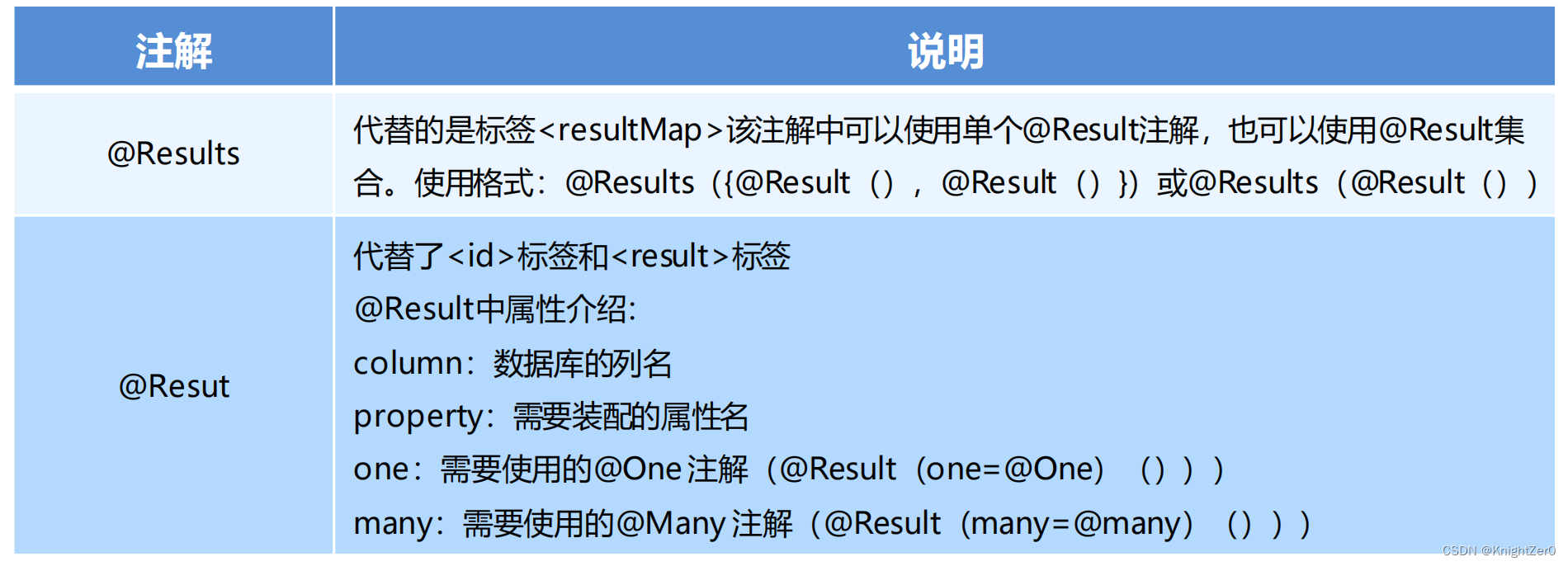
实现复杂关系映射之前我们可以在映射文件中通过配置<resultMap>来实现,使用注解开发后,我们可以使用@Results注解,@Result注解,@One注解,@Many注解组合完成复杂关系的配置

11.2.1 一对一查询
- 使用注解配置mapper
public interface OrderMapper { //方式一: @Select("select * from orders") @Results({ @Result(column = "oid",property = "id"), @Result(column = "ordertime",property = "orderTime"), @Result(column = "total",property = "total"), @Result( property = "user", //要封装的属性名称 column = "uid", //根据哪个字段去查询user表的数据 javaType = User.class, //要封装的实体类型 //select属性 代表查询哪个接口的方法获得数据 one = @One(select = "com.lenyoo.mapper.UserMapper.findById") ) }) public List<Order> findAll(); //方式二: /* @Select("select *, o.id oid from orders o, user u where o.uid=u.id") @Results({ @Result(column = "oid",property = "id"), @Result(column = "ordertime",property = "orderTime"), @Result(column = "total",property = "total"), @Result(column = "uid",property = "user.id"), @Result(column = "username",property = "user.username"), @Result(column = "password",property = "user.password") }) public List<Order> findAll();*/ }- 1
- 2
- 3
- 4
- 5
- 6
- 7
- 8
- 9
- 10
- 11
- 12
- 13
- 14
- 15
- 16
- 17
- 18
- 19
- 20
- 21
- 22
- 23
- 24
- 25
- 26
- 27
- 28
- 29
- 30
- 31
11.2.2 一对多查询
- 使用注解配置Mapper
public interface UserMapper { @Select("select * from user") @Results({ @Result(id = true, column = "id", property = "id"), @Result(column = "username", property = "username"), @Result(column = "password", property = "password"), @Result( property = "orderList", column = "id", javaType = List.class, many = @Many(select = "com.lenyoo.mapper.OrderMapper.findByUid") ) }) public List<User> findUserAndOrderAll(); }- 1
- 2
- 3
- 4
- 5
- 6
- 7
- 8
- 9
- 10
- 11
- 12
- 13
- 14
- 15
- 16
public interface OrderMapper { @Select("select * from orders where uid=#{uid}") public List<Order> findByUid(int uid); }- 1
- 2
- 3
- 4
11.2.3 多对多查询
- 使用注解配置Mapper
public interface UserMapper { @Select("select * from user") @Results({ @Result(id = true, property = "id", column = "id"), @Result(property = "username", column = "username"), @Result(property = "password", column = "password"), @Result( property = "roleList", column = "id", javaType = List.class, many = @Many(select = "com.lenyoo.mapper.RoleMapper.findByUid") ) }) public List<User> findUserAndRoleAll(); }- 1
- 2
- 3
- 4
- 5
- 6
- 7
- 8
- 9
- 10
- 11
- 12
- 13
- 14
- 15
- 16
- 17
public interface RoleMapper { @Select("SELECT * from sys_user_role ur, sys_role r WHERE ur.roleId=r.id AND ur.userId=#{uid}") public List<Role> findByUid(int uid); }- 1
- 2
- 3
- 4
- 5
-
相关阅读:
【Android内存溢出分析工具MAT的使用】
CYarp:力压frp的C#高性能http内网反代中间件
Java多线程编程- Wait等待超时控制
【LeetCode动态规划#08】完全背包问题实战与分析(零钱兑换II--求组合、组合总和IV--求排列)
【无标题】
定时获取公网ip并发送邮件提醒
对一条Linux命令的解读(sed find egrep)
Mysql InnoDB Redo log
win10安装wget,从此可以更快的下载文件 and windows10 下 zip命令行参数详解
Android移动安全攻防实战 第二章
- 原文地址:https://blog.csdn.net/weixin_44018911/article/details/125434866
