-
19-Redis及Redis集群的介绍、缓存击穿、缓存雪崩、缓存穿透及相应的解决方案
11.1 缓存Cache⭐️
11.1.1 缓存的概念
-
定义理解
- 缓存是存储在计算机上的一个原始数据复制集,以便于可以快速访问
- 将远处的数据放在离程序更近的位置(将数据存到更快的介质)
-
缓存分类
- CPU缓存
- 匹配CPU的频率
- 客户端缓存
- 减少网络访问
- 服务端本地缓存
- 减少磁盘IO
- 分布式缓存
- 减少耗时的复杂运算
- 加速DB中的热点数据访问
- CPU缓存
-
缓存原理
- 将数据副本存入速度更快的存储设备
- 将数据放到与使用者更近的位置
-
Web项目常见的缓存场景

-
缓存的操作流程

11.1.2 缓存击穿
- 理解
- 单个key失效,但是同一时间有大量的请求访问
- 对于一些设置了过期时间的key,如果这些key可能会在某些时间点被超高并发地访问,是一种非常“热点”的数据
- 缓存击穿的原因
- 缓存在某个时间点过期的时候,恰好在这个时间点对这个Key有大量的并发请求过来,该key没有命中,大量请求穿透到数据库服务器
- 案例理解
- 商品秒杀
- 抢购商品的时候单个商品查询效率非常高,如果这个时候商品的缓存失效,会导致大量的请求访问到数据库,造成缓存击穿
- 解决方案
- 对于热点数据,慎重考虑过期时间,确保热点期间key不会过期,甚至有些可以设置永不过期
- 使用互斥锁(比如Java的多线程锁机制),第一个线程访问key的时候就锁住,等查询数据库返回后,把值插入到缓存后再释放锁,这个时候缓存就已经缓存好了
11.1.3 缓存雪崩
- 理解
- 大量的key在同一时间失效,造成瞬间数据库压力过大,引起缓存雪崩
- 大量的key设置了相同的过期时间,导致在缓存在同一时刻全部失效,造成瞬时DB请求量大、压力骤增,引起雪崩
- 缓存雪崩的原因
- 大量key在同一时间失效;大量请求落到后端DB上;
- 解决方案
- 低频度的普通的key缓存,设置一个随机失效时间,让缓存失效的时间尽量均匀
- 高频度的key缓存,设置永不失效
- 使用高可用的分布式缓存集群,确保缓存的高可用性
- 做二级缓存,A1为原始缓存,A2为拷贝缓存,A1失效时,可以访问A2
11.1.4 缓存穿透
- 理解
- 访问不存在的key,绕过了缓存(缓存不起作用),会直接访问数据库,造成数据库的压力过大,引起缓存穿透
- 缓存穿透的原因
- key被高并发访问;该key没有命中,去后端DB获取;大量请求穿透到数据库服务器
- 解决方案
- 针对不存在的key也要存放一个null缓存,防止大量请求
- 设置拦截器针对一些不安全的访问进行物理隔离,如布隆过滤器
- 布隆过滤器:使用一个足够大的bitmap,用于存储可能访问的key,不存在的key直接被过滤,避免对底层数据存储系统造成压力;
11.1.5 缓存一致性
- 理解概念
- 当对数据的实时性要求很高时,需要保证缓存中的数据与数据库中的保持一致,需要节点保证缓存节点和副本中的数据也保持一致,不能出现差异现象(集群同步)
- 保证缓存和实际数据一致
- 造成缓存非一致性的原因
- 对同一个数据进行读写时可能造成非一致性的问题
- 先写MySQL 数据,再删缓存;
- 线程1 写入了MySQL数据,还没有来的急删除数据,此时线程1 突然宕机了,删除缓存没有成功,则出现缓存不一致情况。
- 先删缓存,再写MySQL数据,
- 线程1 删除了缓存,但是还没有来的急写MySQL;另外一个线程2 正好读这个缓存,没有发现,线程2去MySQL里面去读取数据,最后原来的线程1更新了数据,那么线程1读到是脏数据
11.2 Redis的介绍

11.2.1 Redis简介
-
Redis简介
- Redis 是一个开源(BSD许可)的,内存中的数据结构存储系统,它可以用作数据库、缓存和消息中间件. 它支持多种类型的数据结构,如 字符串(strings), 散列(hashes), 列表(lists), 集合(sets), 有序集合(sorted sets) 与范围查询, bitmaps, hyperloglogs 和 地理空间(geospatial) 索引半径查询. Redis 内置了 复制(replication), LUA脚本(Lua scripting), LRU驱动事件(LRU eviction), 事务(transactions) 和不同级别的 磁盘持久化(persistence), 并通过 Redis哨兵(Sentinel) 和自动 分区(Cluster)提供高可用性(high availability).
-
Redis支持的语言

-
Redis支持的数据类型
- string 、 hash 、 list 、 set 、`sorted …
11.3 Redis的安装(SingleNode)
11.3.1 安装依赖
yum -y install gcc-c++ autoconf automake- 1
11.3.2 下载并上传

11.3.3 解压
tar zxvf redis-5.0.3.tar.gz- 1
11.3.4 预编译和安装
-
切换到解压目录
- cd redis-5.0.3/
-
编译源代码
- make MALLOC=libc
-
创建redis的安装目录
- mkdir -p /opt/yjx/redis
-
如果需要指定安装路径,需要添加PREFIX参数**
- make PREFIX=/opt/yjx/redis/ install
11.3.5 服务端和客户端启动
-
服务端启动
- 前台启动,redis服务默认端口号为6379
前台启动 ./redis-server- 1
- 2
-
后台启动
- 复制redis.conf至安装路径下
## 创建一个配置文件目录 mkdir -p /opt/yjx/redis/conf ## 拷贝配置文件到目录中 cp ~/redis-5.0.3/redis.conf /opt/yjx/redis/conf- 1
- 2
- 3
- 4
- 修改安装路径下的redis.conf,将 daemonize 修改为yes

- 后台启动命令
后台启动 ./redis-server /opt/yjx/redis/conf/redis.conf- 1
- 2
-
总结
前台启动 ./redis-server 后台启动 ./redis-server /opt/yjx/redis/conf/redis.conf- 1
- 2
- 3
- 4
- 5
-
客户端启动
要在指定的目录下启动客户端(配置后的命令)
[root@basenode ~]# cd /opt/yjx/redis/bin/ [root@basenode bin]# ./redis-cli -a 123456- 1
- 2
- 注释掉 bind 127.0.0.1 可以使所有的ip访问redis,若是想指定多个ip访问,但并不是全部的ip访问,可以bind设置

- 关闭保护模式,修改为no

- 添加访问认证

- 我们可以修改默认数据库的数量 默认16,修改database 32则默认为32个数据库

- 修改后kill -9 XXXX杀死redis进程,重启redis

- 再次建立连接 -> 成功

11.4 Redis的命令
11.5 Redis持久化和事务机制
11.5.1 Redis持久化机制
定义理解
- Redis是一个内存数据库,数据保存在内存中,虽然内存的数据读取速度快,但是很容易发生丢失
- Redis还为我们提供了持久化的机制,分别是RDB(Redis DataBase)和AOF(Append Only File)
1. RDB(Redis DataBase)
-
理解
- RDB 持久化可以在指定的时间间隔内生成数据集的时间点快照,这是默认的持久化方式
-
特点
- 这种方式方式是就是将内存中数据以快照的方式写入到二进制文件中,默认的文件名为dump.rdb
-
RDB的三种触发机制
-
save触发方式
- 该命令会阻塞当前Redis服务器,执行save命令期间,Redis不能处理其他命令,直到RDB过程完成为止

-
bgsave触发模式
- 执行该命令时,Redis会在后台异步进行快照操作,快照同时还可以响应客户端请求
- Redis进程执行fork操作,创建子进程,RDB持久化过程由子进程负责,完成后自动介绍,且阻塞只发生在fork阶段,一般时间很短。

-
自动触发
- 自动触发是由我们的配置文件来完成的。
#配置文件 # after 900 sec (15 min) if at least 1 key changed # after 300 sec (5 min) if at least 10 keys changed # after 60 sec if at least 10000 keys changed save 900 1 save 300 10 save 60 10000 #配置文件的意义 服务器在 900 秒之内,对数据库进行了至少 1 次修改,就对操作保存 服务器在 300 秒之内,对数据库进行了至少 10 次修改,就对操作保存 服务器在 60 秒之内,对数据库进行了至少 10000 次修改,就对操作保存- 1
- 2
- 3
- 4
- 5
- 6
- 7
- 8
- 9
- 10
- 11
- stop-writes-on-bgsave-error
# However if you have setup your proper monitoring of the Redis server # and persistence, you may want to disable this feature so that Redis will # continue to work as usual even if there are problems with disk, # permissions, and so forth. # 默认值为yes。当启用了RDB且最后一次后台保存数据失败,Redis是否停止接收数据。 stop-writes-on-bgsave-error yes- 1
- 2
- 3
- 4
- 5
- 6
- 7
- 8
- rdbcompression
# Compress string objects using LZF when dump .rdb databases? # For default that's set to 'yes' as it's almost always a win. # If you want to save some CPU in the saving child set it to 'no' but # the dataset will likely be bigger if you have compressible values or keys. # 默认值是yes。对于存储到磁盘中的快照,可以设置是否进行压缩存储。 rdbcompression yes- 1
- 2
- 3
- 4
- 5
- 6
- 7
- 8
- rdbchecksum
# RDB files created with checksum disabled have a checksum of zero that will # tell the loading code to skip the check. # 默认值是yes。在存储快照后,我们还可以让redis使用CRC64算法来进行数据校验,但是 这样做会增加大约10%的性能消耗 rdbchecksum yes- 1
- 2
- 3
- 4
- 5
- 6
- dbfilename
# The filename where to dump the DB # 设置快照的文件名,默认是 dump.rdb dbfilename dump.rdb- 1
- 2
- 3
- dir
# The working directory. # The DB will be written inside this directory, with the filename specified # above using the 'dbfilename' configuration directive. # The Append Only File will also be created inside this directory. # Note that you must specify a directory here, not a file name. # 设置快照文件的存放路径,这个配置项一定是个目录,而不能是文件名 dir ./- 1
- 2
- 3
- 4
- 5
- 6
- 7
- 8
-
-
RDB的优势和劣势
- 优势
- RDB文件紧凑,全量备份,非常适合用于进行备份和灾难恢复
- 生成RDB文件的时候,redis主进程会fork()一个子进程来处理所有保存工作,主进程不需要进行任何磁盘IO操作
- RDB 在恢复大数据集时的速度比 AOF 的恢复速度要快
- 劣势
- 当进行快照持久化时,会开启一个子进程专门负责快照持久化,子进程会拥有父进程的内存数据,父进程后续要进行其他操作时,子进程不能将这部分数据持久化到磁盘,所以在快照持久化期间修改的数据不会被保存,可能丢失数据
- 优势
2. AOF(Append Only File)
-
对于RDB的劣势的改进
- 全量备份总是耗时的,有时候我们提供一种更加高效的方式AOF,工作机制很简单,Redis会将每一个收到的写命令都通过write函数追加到文件中。
- 通俗的理解就是日志记录

-
Rwrite策略
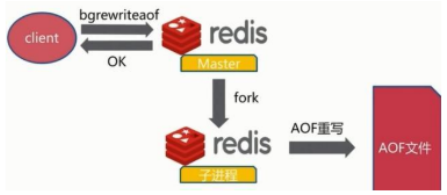
- 将内存中的数据用命令重写一遍,减少日志文件的大小,redis提供了bgrewriteaof命令
- 将内存中的数据以命令的方式保存到临时文件中,同时会fork出一条新进程来将文件重写
- 将整个内存中的数据库内容用命令的方式重写了一个新的aof文件
-
对AOF文件重写(Rwrite)的深入理解
- 客户端输入BGREWRITEAOF命令,Redis会创建一个子进程进行AOF文件的重写,并创建AOF重写缓冲区,这样子进程重写AOF文件,父进程可以继续接受客户端的命令请求,当子进程重写AOF文件完毕后,会通知父进程讲AOF重写缓冲区的内容追加到到重写之后的AOF文件中,追加过程是阻塞的,不接受客户端的命令请求
- 子进程重写AOF文件期间,父进程忽略客户端的BGREWRITEAOF命令,所有客户端的写操作会正常进行,写操作会被记录到AOF缓冲区和AOF重写缓冲区
- 每次事件循环后,AOF缓冲区的内容会被写到AOF文件中,如果子进程在重写AOF文件,那么父进程写的AOF文件是原AOF文件,是否同步到磁盘取决于appendfsync参数和no-appendfsync-on-rewrite参数,如果no-appendfsync-on-rewrite设置为no,则不会同步
-
AOF配置信息
############################## APPEND ONLY MODE ############################### # By default Redis asynchronously dumps the dataset on disk. This mode is # good enough in many applications, but an issue with the Redis process or # a power outage may result into a few minutes of writes lost (depending on # the configured save points). # # The Append Only File is an alternative persistence mode that provides # much better durability. For instance using the default data fsyncpolicy- 1
- 2
- 3
- 4
- 5
- 6
- 7
- 8
- 9
- 10
- 11
-
AOF的触发策略
- 每次修改同步策略:always
- 同步持久化 每次发生数据变更会被立即记录到磁盘 性能较差但数据完整性比较好
- 每秒同步策略:everysec
- 异步操作,每秒记录 如果一秒内宕机,有数据丢失
- 不同步策略:no
- 从不同步
- 每次修改同步策略:always
-
AOF优势和劣势
- 优势
- AOF可以更好的保护数据不丢失,一般AOF会每隔1秒,通过一个后台线程执行一次fsync操作,最多丢失1秒钟的数据。
- AOF日志文件没有任何磁盘寻址的开销,写入性能非常高,文件不容易破损。
- AOF日志文件即使过大的时候,出现后台重写操作,也不会影响客户端的读写。
- AOF日志文件的命令通过非常可读的方式进行记录,这个特性非常适合做灾难性的误删除的紧急恢复。
- 劣势
- 对于同一份数据来说,AOF日志文件通常比RDB数据快照文件更大
- AOF支持的写QPS会比RDB支持的写QPS低
- QPS:Queries Per Second意思是“每秒查询率”
- TPS:是TransactionsPerSecond的缩写,也就是事务数/秒
- 优势
3. RDB和AOF的选择和比较
-
成年人不做选择题
-
如果同时使用AOF和RDB,那么启动时以AOF为恢复数据的模板
-
选择的话,两者加一起才更好。
-
因为两个持久化机制你明白了,剩下的就是看自己的需求了,需求不同选择的也不一定,但是通常都是结合使用
-
-
两者的比较

11.6 主从复制集群
-
主从集群的产生背景
-
Redis虽然读取写入的速度都特别快,但是也会产生读压力特别大的情况。为了分担读压力,Redis支持主从复制,Redis的主从结构可以采用一主多从或者级联结构,
-
Redis主从复制可以根据是否是全量分为全量同步和增量同步

-
11.6.1 搭建主从服务器
-
在Redis主配置文件文件夹中创建配置文件
-
主节点配置文件
## 导入一个通用配置文件 include /opt/yjx/redis/conf/redis.conf ## 当前主服务器端口 port 7100 ## 设置主服务密码 requirepass 123456 ## 当前主服务进程ID pidfile /var/run/redis_7100.pid ## 当前主服务RDB文件名称 dbfilename dump7100.rdb ## 当前主服务文件存放路径 dir /opt/yjx/redis/conf/- 1
- 2
- 3
- 4
- 5
- 6
- 7
- 8
- 9
- 10
- 11
- 12
-
从节点需要配置
- 永久从节点(直接在配置文件中添加)
## 导入一个通用配置文件 include /opt/yjx/redis/conf/redis.conf ## 当前主服务器端口 port 7100 ## 当前主服务进程ID pidfile /var/run/redis_7200.pid ## 当前主服务RDB文件名称 dbfilename dump7200.rdb ## 当前主服务文件存放路径 dir /opt/yjx/redis/conf/ ## 同步master节点的网络信息(低版本必须使用slaveof,高版本推荐使用replicaof) replicaof 192.168.88.101 7100 ## 设置master节点的密码信息 masterauth 123456 ## 从节点只做读的操作,保证主从数据的一致性 slave-read-only yes- 1
- 2
- 3
- 4
- 5
- 6
- 7
- 8
- 9
- 10
- 11
- 12
- 13
- 14
- 15
- 16
- 临时从节点(在redis客户端命令行中输入)
- replicaof 192.168.88.101 7100
- config set masterauth 123456
-
结束从服务器的命运(结束)
- slaveof no one
11.6.2 数据同步机制
-
理解
- Redis的主从结构可以采用一主多从或者级联结构,Redis主从复制可以根据是否是全量分为全量同步和增量同步
- 主从刚刚连接的时候,进行全量同步;
- 全同步结束后,进行增量同步
-
全量同步
-
同步时机
- Redis全量复制一般发生在Slave初始化阶段,这时Slave需要将Master上的所有数据都复制一份
-
同步步骤
- 从服务器连接主服务器,发送SYNC命令;
- 主服务器接收到SYNC命令后,开始执行BGSAVE命令生成RDB文件并使用缓冲区记录此后执行的所有写命令;
- 主服务器BGSAVE执行完后,向所有从服务器发送快照文件,并在发送期间继续记录被执行的写命令;
- 从服务器收到快照文件后丢弃所有旧数据,载入收到的快照;
- 主服务器快照发送完毕后开始向从服务器发送缓冲区中的写命令;
- 从服务器完成对快照的载入,开始接收命令请求,并执行来自主服务器缓冲区的写命令;

-
-
增量同步
-
同步时机
- Redis增量复制是指Slave初始化后开始正常工作时,主服务器发生的写操作同步到从服务器的过程
-
同步过程
- 增量复制的过程主要是主服务器每执行一个写命令就会向从服务器发送相同的写命令,从服务器接收并执行收到的写命令
-
-
主从复制的异步特性
- 主从复制对于主Redis服务器来书是非阻塞的
- 这意味着当从服务器在进行主从复制同步过程中,主Redis仍然可以处理外界的访问请求
- 主从复制对于从Redis服务器来书是非阻塞的
- 这意味着,即使从redis在进行主从复制过程中也可以接受外界的查询请求,只不过这时候从redis返回的是以前老的数据
- 主从复制对于主Redis服务器来书是非阻塞的
11.6.3 服务器断线重连
-
断线重连
- Redis 2.8开始,如果遭遇连接断开,重新连接之后可以从中断处继续进行复制,而不必重新同步
-
重连过程
- 部分同步的实现依赖于在master服务器内存中给每个slave服务器维护了一份同步日志和同步标识
- 每个slave服务器在跟master服务器进行同步时都会携带自己的同步标识和上次同步的最后位置
- 当主从连接断掉之后,slave服务器隔断时间(默认1s)主动尝试和master服务器进行连接
- 如果从服务器携带的偏移量标识还在master服务器上的同步备份日志中
- 那么就从slave发送的偏移量开始继续上次的同步操作
- 如果slave发送的偏移量已经不再master的同步备份日志中,则必须进行一次全量更新

11.7 Redis哨兵
- 哨兵出现的原因
- Redis的主从复制模式下,一旦主节点由于故障不能提供服务,需要手动将从节点晋升为主节点,同时还要通知客户端更新主节点地址
- Sentinel哨兵是Redis官方提供的高可用方案,可以用它来监控多个Redis服务实例的运行情况
11.7.1 哨兵功能与作用
-
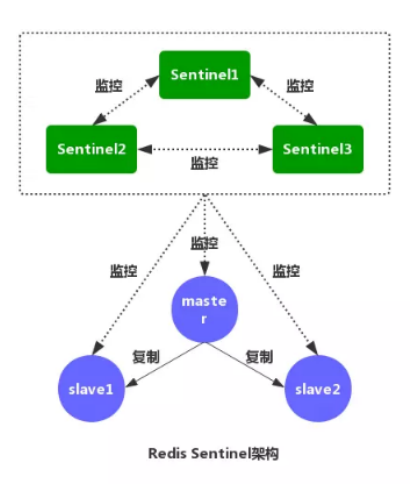
监控(monitoring):
- Sentinel会不断的检查你的主服务器和从服务器是否运作正常
- 哨兵属于多对多监控,一个哨兵可以监控所有的节点
- ZKFC属于一对一监控
- 一个数据节点也可以被多个哨兵所监控
-
提醒(Notifation):
- 当节点发生故障时,会对运维人员进行提醒
- 当被监控的某个 Redis 服务器出现问题时, Sentinel 可以通过 API 向管理员或者其他应用程序发送通知。
-
自动故障转移(Automatic failover):
-
当哨兵发现其中的节点宕机后,如果这个节点是,会自动选举备用节点成为新的主节点
-
当一个主服务器不能正常工作时, Sentinel 会开始一次自动故障迁移操作, 它会将失效主服务器的其中一个从服务器升级为新的主服务器, 并让失效主服务器的其他从服务器改为复制新的主服务器;
-
当客户端试图连接失效的主服务器时, 集群也会向客户端返回新主服务器的地址, 使得集群可以使用新主服务器代替失效服务器。
-
-
-
相关阅读:
Linux系统下的硬盘分区与挂载
SysML理论知识
JavaSE_Java复习基本搜索树的实现
ASUS华硕ZenBook灵耀X逍遥UXF3000E_UX363EA原装出厂预装Win11系统工厂模式安装包
Bash编程语法
Day 28:2748. 美丽下标对的数目
前端新手Vue3+Vite+Ts+Pinia+Sass项目指北系列文章 —— 第三章 项目创建
【微服务】微服务之Feign 与 Ribbon
Redis从入门到精通(二十一)Redis最佳实践(二)mset、pipeline、慢查询优化、内存划分
scrcpy-win64-v1.24使用
- 原文地址:https://blog.csdn.net/weixin_50627985/article/details/125610469
