• 2022年0704-Com.Java.Basis 第十四课 《File类 +IO流》简称字节的Ctrl+A Ctrl+C Ctrl+V


    2022年0704-Com.Java.Basis 第十四课 《File类 +IO流》简称字节的Ctrl+A Ctrl+C  Ctrl+V.这篇文章我无法创造出经典:但是我可以编写出自己经典的文章。十六个小案例带你走进Java的IO流

    第一部分:基础知识的积累:

    1 初识Java IO
    IO,即in和out,也就是输入和输出,指应用程序和外部设备之间的数据传递,常见的外部设备包括文件、管道、网络连接。

    Java 中是通过流处理IO 的,那么什么是流?

    流(Stream),是一个抽象的概念,是指一连串的数据(字符或字节),是以先进先出的方式发送信息的通道。

    当程序需要读取数据的时候,就会开启一个通向数据源的流,这个数据源可以是文件,内存,或是网络连接。类似的,当程序需要写入数据的时候,就会开启一个通向目的地的流。这时候你就可以想象数据好像在这其中“流”动一样。

    一般来说关于流的特性有下面几点:

    先进先出:最先写入输出流的数据最先被输入流读取到。
    顺序存取:可以一个接一个地往流中写入一串字节,读出时也将按写入顺序读取一串字节,不能随机访问中间的数据。(RandomAccessFile除外)
    只读或只写:每个流只能是输入流或输出流的一种,不能同时具备两个功能,输入流只能进行读操作,对输出流只能进行写操作。在一个数据传输通道中,如果既要写入数据,又要读取数据,则要分别提供两个流。

    总结:以自己为中心看流是流入还是流出

    2  IO流分类
    IO流主要的分类方式有以下3种:
    按数据流的方向:输入流、输出流
    按处理数据单位:字节流、字符流
    按功能:节点流、处理流

    3 IO流方法
    3.1 字节流方法
    字节输入流InputStream主要方法:

    read() :从此输入流中读取一个数据字节。
    read(byte[] b) :从此输入流中将最多 b.length 个字节的数据读入一个 byte 数组中。
    read(byte[] b, int off, int len) :从此输入流中将最多 len 个字节的数据读入一个 byte 数组中。
    close():关闭此输入流并释放与该流关联的所有系统资源。
    字节输出流OutputStream主要方法:

    write(byte[] b) :将 b.length 个字节从指定 byte 数组写入此文件输出流中。
    write(byte[] b, int off, int len) :将指定 byte 数组中从偏移量 off 开始的 len 个字节写入此文件输出流。
    write(int b) :将指定字节写入此文件输出流。
    close() :关闭此输入流并释放与该流关联的所有系统资源。
    3.2 字符流方法
    字符输入流Reader主要方法:

    read():读取单个字符。
    read(char[] cbuf) :将字符读入数组。
    read(char[] cbuf, int off, int len) : 将字符读入数组的某一部分。
    read(CharBuffer target) :试图将字符读入指定的字符缓冲区。
    flush() :刷新该流的缓冲。
    close() :关闭此流,但要先刷新它。
    字符输出流Writer主要方法:

    write(char[] cbuf) :写入字符数组。
    write(char[] cbuf, int off, int len) :写入字符数组的某一部分。
    write(int c) :写入单个字符。
    write(String str) :写入字符串。
    write(String str, int off, int len) :写入字符串的某一部分。
    flush() :刷新该流的缓冲。
    close() :关闭此流,但要先刷新它。
    另外,字符缓冲流还有两个独特的方法:

    BufferedWriter类newLine() :写入一个行分隔符。这个方法会自动适配所在系统的行分隔符。
    BufferedReader类readLine() :读取一个文本行。
    4 加点扩展的内容
    4.1 位、字节、字符
    字节(Byte)是计量单位,表示数据量多少,是计算机信息技术用于计量存储容量的一种计量单位,通常情况下一字节等于八位。

    字符(Character)计算机中使用的字母、数字、字和符号,比如’A’、‘B’、’$’、’&'等。

    一般在英文状态下一个字母或字符占用一个字节,一个汉字用两个字节表示。

    字节与字符:

    ASCII 码中,一个英文字母(不分大小写)为一个字节,一个中文汉字为两个字节。
    UTF-8 编码中,一个英文字为一个字节,一个中文为三个字节。
    Unicode 编码中,一个英文为一个字节,一个中文为两个字节。
    符号:英文标点为一个字节,中文标点为两个字节。例如:英文句号 . 占1个字节的大小,中文句号 。占2个字节的大小。
    UTF-16 编码中,一个英文字母字符或一个汉字字符存储都需要 2 个字节(Unicode 扩展区的一些汉字存储需要 4 个字节)。
    UTF-32 编码中,世界上任何字符的存储都需要 4 个字节。


    第二部分:进入主题IO流:十六个小案例带你走进Java的IO流


    案例Demo展示的内容


    案例一

    1. 概述:文件和目录(文件夹)路径名的抽象表示形式
      路径的分类:
      绝对路径:带有盘符号的路径
      相对路径:没有带盘符号的路径,默认在根目录下
      构造方法
      File(String pathname):根据一个路径得到File对象
      File(String parent, String child):根据一个目录和一个子文件/目录得到File对象
      File(File parent, String child):根据一个父File对象和子文件/目录得到File对象
    2. 判断功能
      public boolean isDirectory(): 判断是否是目录
      public boolean isFile(): 判断是否是文件
      public boolean exists(): 判断是否存在
      public boolean canRead(): 判断是否可读
      public boolean canWrite(): 判断是否可写
      public boolean isHidden(): 判断是否隐藏
    3. 获取功能
      public String getAbsolutePath(): 获取绝对路径
      public String getPath(): 获取相对路径
      public String getParent() 获取上一级路径,返回字符串,没有返回null
      public File getParentFile() 获取上一级路径,返回File类型,没有返回nul
      public long getTotalSpace() 返回总容量 单位字节
      public long getFreeSpace() 返回剩余容量 单位字节
      public String getName(): 获取名称
      public long length(): 获取长度。字节数
      public long lastModified(): 获取最后一次的修改时间,毫秒值
    1. package com.JavaBasicsDemo9;
    2. import java.io.File;
    3. /**
    4. * 概述:文件和目录(文件夹)路径名的抽象表示形式
    5. * 路径的分类:
    6. * 绝对路径:带有盘符号的路径
    7. * 相对路径:没有带盘符号的路径,默认在根目录下
    8. * 构造方法
    9. * File(String pathname):根据一个路径得到File对象
    10. * File(String parent, String child):根据一个目录和一个子文件/目录得到File对象
    11. * File(File parent, String child):根据一个父File对象和子文件/目录得到File对象
    12. */
    13. public class Demo1Test {
    14. public static void main(String[] args) throws Exception {
    15. // 1 File(String pathname)
    16. //创建的文件目录在的路径
    17. File file = new File("E:\\demo\\nopainsnogains.ppt");
    18. System.out.println(file);//打印文件路径
    19. /**
    20. * (4)判断功能
    21. * public boolean isDirectory(): 判断是否是目录
    22. * public boolean isFile(): 判断是否是文件
    23. * public boolean exists(): 判断是否存在
    24. * public boolean canRead(): 判断是否可读
    25. * public boolean canWrite(): 判断是否可写
    26. * public boolean isHidden(): 判断是否隐藏
    27. */
    28. //判断文件夹是否有目录
    29. System.out.println(file.isDirectory());
    30. //判断是否有文件
    31. System.out.println(file.isFile());
    32. //判断是否存在
    33. System.out.println(file.exists());
    34. //判断是否可读
    35. System.out.println(file.canRead());
    36. //判断是否可以写
    37. System.out.println(file.canWrite());
    38. //判断是否隐藏
    39. System.out.println(file.isHidden());
    40. /**
    41. * 5)获取功能
    42. * public String getAbsolutePath(): 获取绝对路径
    43. * public String getPath(): 获取相对路径
    44. * public String getParent() 获取上一级路径,返回字符串,没有返回null
    45. * public File getParentFile() 获取上一级路径,返回File类型,没有返回null
    46. * public long getTotalSpace() 返回总容量 单位字节
    47. * public long getFreeSpace() 返回剩余容量 单位字节
    48. * public String getName(): 获取名称
    49. * public long length(): 获取长度。字节数
    50. * public long lastModified(): 获取最后一次的修改时间,毫秒值
    51. */
    52. //获取绝对路径
    53. System.out.println(file.getAbsolutePath());
    54. //获取相对路径
    55. System.out.println(file.getPath());
    56. //获取上一级路径,返回字符串,没有返回null
    57. System.out.println(file.getParent());
    58. //获取上一级路径,返回File类型,没有返回null
    59. System.out.println(file.getParentFile());
    60. System.out.println(file.getCanonicalPath());
    61. System.out.println("返回总容量 单位字节" + file.getTotalSpace());
    62. System.out.println("返回剩余容量 单位字节" + file.getFreeSpace());
    63. System.out.println(file.getName());
    64. System.out.println(file.length());
    65. System.out.println(file.lastModified());
    66. //创建文件
    67. file.createNewFile();
    68. //创建目录文件夹
    69. //File file1 =new File("E:\\demo\\hello");
    70. //file1.mkdir();
    71. //创建文件多及目录
    72. File file2 = new File("E:\\demo\\aa\\ba\\ca\\da\\ea\\fa\\ga");
    73. file2.mkdirs();
    74. File f = new File("E:\\demo\\HelloWord.text");
    75. System.out.println(f);
    76. f.mkdir();
    77. System.out.println(f.isDirectory());
    78. System.out.println(f.isFile());
    79. }
    80. }

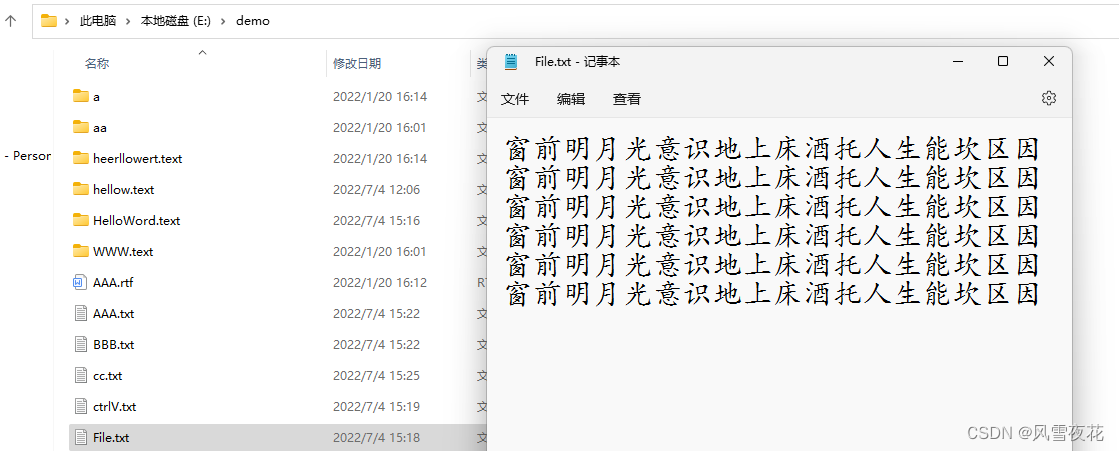
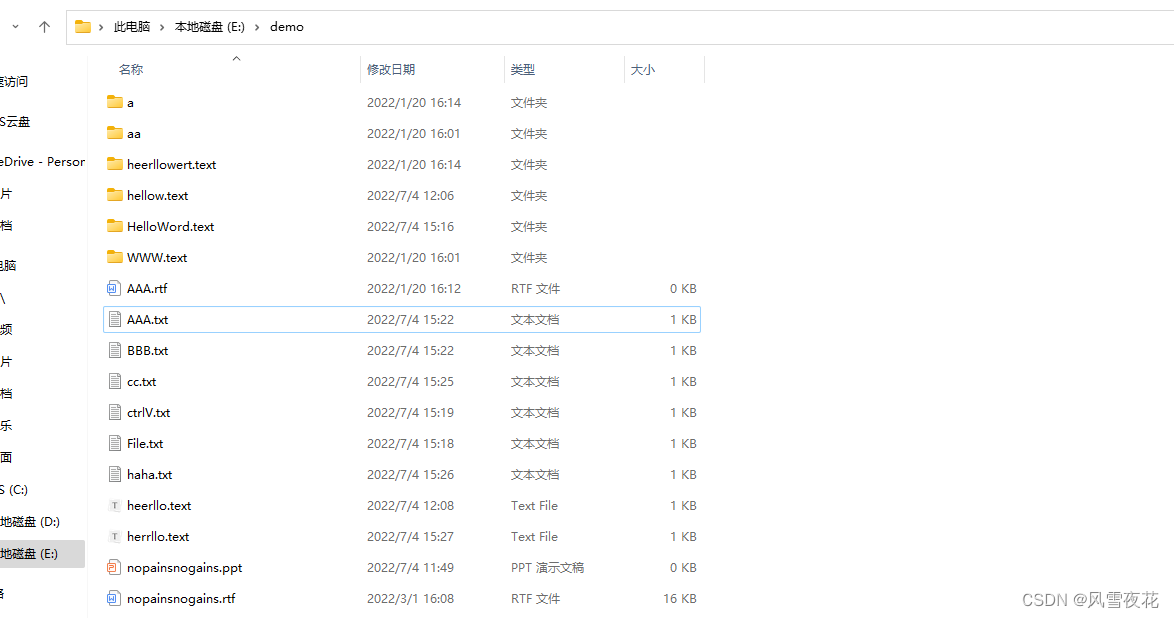
    案例二:

    1. package com.JavaBasicsDemo9;
    2. import java.io.FileOutputStream;
    3. import java.io.IOException;
    4. public class Demo1Test2 {
    5. public static void main(String[] args) {
    6. // TODO Auto-generated method stub
    7. FileOutputStream fos=null;
    8. try {
    9. //创建
    10. fos =new FileOutputStream("E:\\demo\\File.txt" ,true);
    11. for (int i = 0; i <=5; i++) {
    12. System.out.println("ctrl+c ctrl+v");
    13. fos.write("窗前明月光意识地上床酒托人生能坎区因".getBytes());
    14. fos.write("\r\n".getBytes());
    15. }
    16. } catch (Exception e) {
    17. e.printStackTrace();
    18. }finally {
    19. //释放资源
    20. try {
    21. if(fos!=null) {
    22. fos.close();
    23. }
    24. } catch (IOException e) {
    25. e.printStackTrace();
    26. }
    27. }
    28. }
    29. }

     案例三:

    1. package com.JavaBasicsDemo9;
    2. import java.io.FileInputStream;
    3. import java.io.FileOutputStream;
    4. import java.io.IOException;
    5. public class Demo1Test3 {
    6. public static void main(String[] args) throws IOException {
    7. //输入流中的ctrl+A ctrl+C
    8. FileInputStream fis=new FileInputStream("E:\\demo\\File.txt");
    9. //输出
    10. //Ctrl+v
    11. FileOutputStream fos =new FileOutputStream("E:\\demo\\ctrlV.txt",true);
    12. int by;
    13. while((by=fis.read())!=-1) {
    14. fos.write(by);
    15. }
    16. fis.close();
    17. fos.close();
    18. }
    19. }

     Java程序员的ctrl+A ctrl+c  ctrl+v

    案例四:

    1. package com.JavaBasicsDemo9;
    2. import java.io.FileInputStream;
    3. import java.io.FileOutputStream;
    4. import java.io.IOException;
    5. public class Demo1Test4 {
    6. public static void main(String[] args) throws IOException {
    7. //输入
    8. FileInputStream fis=new FileInputStream("E:\\demo\\AAA.txt");
    9. //输出
    10. FileOutputStream fos =new FileOutputStream("E:\\demo\\BBB.txt",true);
    11. int by;
    12. while((by=fis.read())!=-1) {
    13. fos.write(by);
    14. }
    15. fis.close();
    16. fos.close();
    17. }
    18. }

    案例五:

    1. package com.JavaBasicsDemo9;
    2. import java.io.File;
    3. public class Demo1Test5 {
    4. public static void main(String[] args) throws Exception{
    5. // 1 File(String pathname)
    6. File file =new File ("E:\\demo\\AAA.text");
    7. System.out.println(file);
    8. //判断文件夹
    9. System.out.println(file.isDirectory());
    10. //判断文件
    11. System.out.println(file.isFile());
    12. //file文件路径
    13. System.out.println(file.exists());
    14. System.out.println(file.getAbsolutePath());
    15. System.out.println(file.getName());
    16. System.out.println(file.getPath());
    17. System.out.println(file.getCanonicalFile());
    18. //创建文件
    19. file.createNewFile();
    20. //多及目录
    21. File file2 =new File("E:\\demo\\aa\\ba\\ca\\da\\ea\\fa\\ga");
    22. file2.mkdirs();
    23. File f =new File ("E:\\demo\\hellow.text");
    24. System.out.println(f);
    25. f.mkdir();
    26. System.out.println(f.isDirectory());
    27. System.out.println(f.isFile());
    28. }
    29. }

    File file =new File ("E:\\demo\\AAA.text"); 创建文件的方式

    案例六:

    1. package com.JavaBasicsDemo9;
    2. import java.io.FileOutputStream;
    3. import java.io.IOException;
    4. public class Demo1Test6 {
    5. public static void main(String[] args) {
    6. // TODO Auto-generated method stub
    7. FileOutputStream fos=null;
    8. try {
    9. //创建
    10. fos =new FileOutputStream("E:\\demo\\AAA.txt" ,true);
    11. for (int i = 0; i <=10; i++) {
    12. // System.out.println("NO PAINS");
    13. fos.write("我是转入的数据ctrl ".getBytes());
    14. fos.write("\r\n".getBytes());
    15. }
    16. } catch (Exception e) {
    17. e.printStackTrace();
    18. }finally {
    19. //释放资源
    20. try {
    21. if(fos!=null) {
    22. fos.close();
    23. }
    24. } catch (IOException e) {
    25. e.printStackTrace();
    26. }
    27. }
    28. }
    29. }

    案例七: 

    1. package com.JavaBasicsDemo9;
    2. import java.io.File;
    3. public class Demo1Test7 {
    4. public static void main(String[] args) throws Exception{
    5. // 1 File(String pathname)
    6. //文件名
    7. File file =new File ("E:\\demo\\heerllo.text");
    8. System.out.println(file);
    9. //创建文件
    10. file.createNewFile();
    11. //创建目录文件夹
    12. File file1 =new File("E:\\demo\\hello");
    13. file1.mkdir();
    14. File file22 =new File("E:\\dem\\hert");
    15. //多及目录
    16. File file2 =new File("E:\\demo\\a\\b\\c");
    17. file2.mkdirs();
    18. File f =new File ("E:\\demo\\heerllowert.text");
    19. System.out.println(f);
    20. f.mkdir();
    21. System.out.println(f.isDirectory());
    22. System.out.println(f.isFile());
    23. }
    24. }

     案例八:

    1. package com.JavaBasicsDemo9;
    2. import java.io.File;
    3. /**
    4. * File的删除文件
    5. */
    6. public class Demo1Test8 {
    7. public static void main(String[] args) {
    8. File file =new File ("E:\\demo\\hello");
    9. //删除路径的文件夹
    10. file.delete();
    11. //不能伤处多及目录
    12. File file1 =new File ("E:\\demo\\hello");
    13. //删除路径的文件夹
    14. file.delete();
    15. //
    16. File file2 =new File ("E:\\demo\\a\\b\\c\\d\\e\\f");
    17. //删除路径的文件夹
    18. file2.delete();
    19. }
    20. }

    案例九:

    1. package com.JavaBasicsDemo9;
    2. import java.io.FileInputStream;
    3. import java.io.IOException;
    4. public class Demo1Test9 {
    5. public static void main(String[] args) throws IOException {
    6. FileInputStream fis=new FileInputStream("E:\\demo\\haha.txt");
    7. //调用字节数人流对象数据方法;return
    8. // int read(); 1
    9. int num =fis.read();
    10. System.out.println(num);
    11. //2
    12. int num1 =fis.read();
    13. System.out.println(num1);
    14. //3
    15. int num2 =fis.read();
    16. System.out.println(num2);
    17. //4
    18. int num3 =fis.read();
    19. System.out.println(num3);
    20. }
    21. }

    案例十:

    1. package com.JavaBasicsDemo9;
    2. import java.io.FileInputStream;
    3. import java.io.IOException;
    4. public class Demo1Test10 {
    5. public static void main(String[] args) throws IOException {
    6. FileInputStream fis=new FileInputStream("E:\\demo\\haha.txt");
    7. //调用字节数人流对象数据方法;return
    8. int by;
    9. while((by=fis.read())!=-1) {
    10. System.out.print((char)by);
    11. //释放资源
    12. //fis.close();
    13. }
    14. }
    15. }

    案例十一:

    1. package com.JavaBasicsDemo9;
    2. import java.io.FileOutputStream;
    3. import java.io.IOException;
    4. public class Demo1Test11 {
    5. public static void main(String[] args) throws IOException {
    6. // FileOutputStream(String name)
    7. FileOutputStream fos =new FileOutputStream("E:\\demo\\herrllo.text" ,true);
    8. // void write (int b) 写入数据
    9. fos.write(121);
    10. fos.write(11);
    11. fos.write(111);
    12. fos.write(101);
    13. fos.write(111);
    14. fos.close();
    15. // 2数组 void write(byte[] by) 将byte数组写入数组中
    16. byte[] by = {34,56,78};
    17. fos.write(by);
    18. //写一句话
    19. String str = "我爱你";
    20. byte [] by1=str.getBytes();
    21. fos.write(by1);
    22. fos.close();
    23. //
    24. byte[] by2 = {34,56,78};
    25. fos.write(by2,2,1);
    26. }
    27. }

    案例十二:

    1. package com.JavaBasicsDemo9;
    2. import java.io.FileOutputStream;
    3. import java.io.IOException;
    4. public class Demo1Test12 {
    5. public static void main(String[] args) {
    6. FileOutputStream fos=null;
    7. try {
    8. //创建
    9. fos =new FileOutputStream("E:\\demo\\haha.txt" ,true);
    10. for (int i = 0; i <=10; i++) {
    11. fos.write("I love you in the end ".getBytes());
    12. fos.write("\r\n".getBytes());
    13. }
    14. } catch (Exception e) {
    15. e.printStackTrace();
    16. }finally {
    17. //释放资源
    18. try {
    19. if(fos!=null) {
    20. fos.close();
    21. }
    22. } catch (IOException e) {
    23. e.printStackTrace();
    24. }
    25. }
    26. }
    27. }

    案例十三:

    1. package com.JavaBasicsDemo9;
    2. import java.io.*;
    3. public class BufferStreamDemo1 {
    4. /**
    5. *第一种方式
    6. FileInputStream fis= new FileInputStream("C:\\Users\\MZFAITHDREAM\\Desktop\\1.jpg");
    7. FileOutputStream fos =new FileOutputStream("D:\\haha.jpg" ,true);
    8. byte[] by =new byte[1024];
    9. //int read(byte[]) by)
    10. int num=0;
    11. while((num=fis.read(by))!=-1) {
    12. //reading
    13. fos.write(by, 0, num);
    14. }
    15. //关闭流
    16. fis.close();
    17. fos.close();
    18. //基本字节读一个 字节/数组/字节/一个字节数组
    19. * @param args
    20. */
    21. public static void main(String[] args)throws IOException {
    22. //获取时间
    23. long startTime1 =System.currentTimeMillis();
    24. //调用方法
    25. method1();
    26. long endTime1 =System.currentTimeMillis();
    27. System.out.println("方法1:"+(endTime1-startTime1));
    28. long startTime2 =System.currentTimeMillis();
    29. //调用方法
    30. method1();
    31. long endTime2 =System.currentTimeMillis();
    32. System.out.println("方法2:"+(endTime2-startTime2));
    33. long startTime3 =System.currentTimeMillis();
    34. //调用方法
    35. method1();
    36. long endTime3 =System.currentTimeMillis();
    37. System.out.println("方法3:"+(endTime3-startTime3));
    38. long startTime4 =System.currentTimeMillis();
    39. //调用方法
    40. method1();
    41. long endTime4 =System.currentTimeMillis();
    42. System.out.println("方法4:"+(endTime4-startTime4));
    43. }
    44. public static void method1() throws IOException {
    45. FileInputStream fis= new FileInputStream("C:\\Users\\MZFAITHDREAM\\Pictures\\Saved Pictures\\A-1 (4)\\黑白上色\\01.jpg");
    46. FileOutputStream fos =new FileOutputStream("D:\\01.jpg" ,true);
    47. byte[] by =new byte[1024];
    48. //int read(byte[]) by)
    49. int num=0;
    50. while((num=fis.read(by))!=-1) {
    51. //reading
    52. fos.write(by, 0, num);
    53. }
    54. //关闭流
    55. fis.close();
    56. fos.close();
    57. }
    58. public static void method2() throws IOException {
    59. FileInputStream fis= new FileInputStream("C:\\Users\\MZFAITHDREAM\\Desktop\\1.jpg");
    60. FileOutputStream fos =new FileOutputStream("D:\\method2.jpg" ,true);
    61. byte[] by =new byte[1024];
    62. //int read(byte[]) by)
    63. int num=0;
    64. while((num=fis.read(by))!=-1) {
    65. //reading
    66. fos.write(by, 0, num);
    67. }
    68. //关闭流
    69. fis.close();
    70. fos.close();
    71. }
    72. public static void method3() throws IOException {
    73. FileInputStream fis= new FileInputStream("C:\\Users\\MZFAITHDREAM\\Desktop\\1.jpg");
    74. //创建字节输入缓冲流
    75. BufferedInputStream bis =new BufferedInputStream(fis);
    76. FileOutputStream fos =new FileOutputStream("D:\\method3.jpg" ,true);
    77. BufferedOutputStream bos =new BufferedOutputStream(fos);
    78. //int read(byte[]) by)
    79. int num=0;
    80. while((num=fis.read())!=-1) {
    81. //reading
    82. fos.write( num);
    83. }
    84. //关闭流
    85. fis.close();
    86. fos.close();
    87. }
    88. public static void method4() throws IOException {
    89. FileInputStream fis= new FileInputStream("C:\\Users\\MZFAITHDREAM\\Desktop\\1.jpg");
    90. //创建字节输入缓冲流
    91. BufferedInputStream bis =new BufferedInputStream(fis);
    92. FileOutputStream fos =new FileOutputStream("D:\\method4.jpg" ,true);
    93. BufferedOutputStream bos =new BufferedOutputStream(fos);
    94. byte[] by=new byte [1024];
    95. //int read(byte[]) by)
    96. int num=0;
    97. while((num=fis.read())!=-1) {
    98. //reading
    99. fos.write( by,0,num);
    100. }
    101. //关闭流
    102. fis.close();
    103. fos.close();
    104. }
    105. }

     案例十四:

    1. package com.JavaBasicsDemo9;
    2. public class CodeDemo1 {
    3. public static void main(String[] args) throws Exception {
    4. // TODO Auto-generated method stub
    5. String str="我爱距离100km江西南字符昌学lookforyou江西区的学院";
    6. //将字符串转成编码
    7. byte [] by =str.getBytes("utf-8");
    8. //将数据给用户看
    9. String str1 =new String(by,"utf-8");
    10. System.out.println(str1);
    11. //网页定义utf-8
    12. String str2="我爱距离100km江西南区的学院";
    13. //将字符串转成编码
    14. byte [] by1 =str1.getBytes("gbk");
    15. //将数据给用户看
    16. String str3 =new String(by,"gbk");
    17. System.out.println(str2);
    18. System.out.println(str.getBytes());
    19. System.out.println(str);
    20. System.out.println(str2);
    21. }
    22. }

     案例十五:

    1. package com.JavaBasicsDemo9;
    2. import java.io.*;
    3. public class CopeFile {
    4. public static void main(String[] args) throws IOException {
    5. //创建字节输入
    6. FileInputStream fis= new FileInputStream("C:\\Users\\MZFAITHDREAM\\Desktop\\Javaday1_9.zip");
    7. //创建字节输出
    8. FileOutputStream fos =new FileOutputStream("D:\\Day");
    9. //字符输入
    10. InputStreamReader isr=new InputStreamReader(fis,"utf-8");
    11. //字符输出
    12. OutputStreamWriter osr=new OutputStreamWriter(fos,"utf-8");
    13. //创建一个数组去放入取到的数据
    14. char[] cr=new char[1024];
    15. int num=0;
    16. //while
    17. while((num=isr.read(cr))!=-1) {
    18. //reading
    19. osr.write( cr,0,num);
    20. }
    21. isr.close();
    22. osr.close();
    23. }
    24. }

    案例十六:

    1. package com.JavaBasicsDemo9;
    2. import java.io.FileInputStream;
    3. import java.io.FileOutputStream;
    4. import java.io.IOException;
    5. public class Copy1 {
    6. public static void main(String[] args) throws IOException {
    7. // TODO Auto-generated method stub
    8. FileInputStream fis= new FileInputStream("C:\\Users\\MZFAITHDREAM\\Desktop\\1.jpg");
    9. FileOutputStream fos =new FileOutputStream("D:\\胡滨.jpg" ,true);
    10. byte[] by =new byte[1024];
    11. //int read(byte[]) by)
    12. int num=0;
    13. while((num=fis.read(by))!=-1) {
    14. //reading
    15. fos.write(by, 0, num);
    16. }
    17. //关闭流
    18. fis.close();
    19. fos.close();
    20. }
    21. }

    十六个小案例带你走进java的IO流

  • 相关阅读:
    金九银十求职季,美团高频面试题和答案都帮你准备好啦
    【Java基础】Java8新特性
    Day39 LeetCode
    RabbitMQ(控制台模拟收发消息与数据隔离)
    LeetCode——Weekly Contest 318
    Bert浅谈
    Git 基础使用
    正则表达式
    VUE + JS 生成指定区间随机数
    Shopee活动名称怎么填写好?Shopee活动名称设置注意事项——站斧浏览器
  • 原文地址:https://blog.csdn.net/qq_56248592/article/details/125606293