-
3D视觉——2.人体姿态估计(Pose Estimation)入门——OpenPose含安装、编译、使用(单帧、实时视频)
本章博客就是对OpenPose工具包进行开发;我呕心沥血(笑哭),经历重重困难,想放弃了很多次(因为openpose的编译实在是太麻烦了)但是后来还是成功了,各位点个赞吧!这个真的太麻烦了。

按照单帧图像和实时视频的顺序述写,其中单帧是使用的Pytorch编程只是调用OpenPose的模型;实时视频中使用Python调用OpenPose的包,所以必须得安装OpenPose,并对其进行编译,最后再使用。
首先从github上,下载CMU提供的源码下来:
项目结构
- OpenPose-Demo-Pytorch-master
- |
- |----images----|----pose.jpg
- |----bin(编译之后,从源码拷贝下来的,单帧不看这个)
- |----x64(编译之后,从源码拷贝下来的,单帧不看这个)
- |----Release(编译之后,从源码拷贝下来的,单帧不看这个)
- |----models----|----pose----|----body_25----|----pose_deploy.prototxt
- | | |----pose_iter_584000.caffemodel
- | |----coco----|----pose_deploy_linevec.prototxt
- | | |----pose_iter_440000.caffemodel
- |----video----|----1.mp4
- |----config.py
- |----predict.py(单帧)
- |----Demo.py(实时视频)
关键点详解
关键点25(model\pose\body_25\pose_iter_584000.caffemodel or pose_deploy.prototxt)如下图1. 所示,关键点18(model\pose\coco\pose_iter_440000.caffemodel or pose_deploy_linevec.prototxt)如下图2.所示。
下载模型,可在CMU的github上下载,上面提供了,就不再提供。
步骤:
- git clone https://github.com/CMU-Perceptual-Computing-Lab/openpose.git
- or
- downloads .zip
- cd openpose-master/models
- bash getModels.sh (Linux)
- 双击 getModels.bat (Windows)
- 下载 pose_iter_584000.caffemodel
- pose_iter_440000.caffemodel
- ...(只用这两个,将其放置在我们项目的models\pose\下)

图1.
- {0, “Nose”},
- {1, “Neck”},
- {2, “RShoulder”},
- {3, “RElbow”},
- {4, “RWrist”},
- {5, “LShoulder”},
- {6, “LElbow”},
- {7, “LWrist”},
- {8, “MidHip”},
- {9, “RHip”},
- {10, “RKnee”},
- {11, “RAnkle”},
- {12, “LHip”},
- {13, “LKnee”},
- {14, “LAnkle”},
- {15, “REye”},
- {16, “LEye”},
- {17, “REar”},
- {18, “LEar”},
- {19, “LBigToe”},
- {20, “LSmallToe”},
- {21, “LHeel”},
- {22, “RBigToe”},
- {23, “RSmallToe”},
- {24, “RHeel”}

图2.
- {"Nose": 0,
- "Neck": 1,
- "RShoulder": 2,
- "RElbow": 3,
- "LShoulder": 5,
- "LElbow": 6,
- "LWrist": 7,
- "RHip": 8,
- "RKnee": 9,
- "RAnkle": 10,
- "LHip": 11,
- "LKnee": 12,
- "LAnkle": 13,
- "REye": 14,
- "LEye": 15,
- "REar": 16,
- "LEar": 17,
- "Background": 18}
1.单帧代码
对于单帧将之前的源码下载下来,并将模型权重拷贝(进入源码的models里面双击getModels.bat下载这些权重)到我们自己的项目,就是将models中.prototxt与.caffemodel拷走;之后我们对模型进行推理,其步骤主要为:
- 首先,读取模型与推理所需要的图像,在进行推理获取结果
- 其次,关键点检测,再利用PAFs,找到有些关键点对
- 最后,将点对组合成正确的人体骨骼图
配置文件
config.py
- prototxt_25 = "models/pose/body_25/pose_deploy.prototxt"
- caffemodel_25 = "models/pose/body_25/pose_iter_584000.caffemodel"
- point_name_25 = ['None', 'Neck', 'RShoulder',
- 'RElbow', 'RWrist', 'LShoulder',
- 'LElbow', 'LWrist', 'MidHip',
- 'RHip', 'RKnee', 'RAnkle',
- 'LHip', 'LKnee', 'LAnkle',
- 'REye', 'LEye', 'REar',
- 'LEar', 'LBigToe', 'LSmallToe',
- 'LHeel', 'RBigToe', 'RSmallToe',
- 'RHeel']
- point_pairs_25 = [[1, 8], [1, 2], [1, 5], [2, 3], [3, 4], [5, 6],
- [6, 7], [8, 9], [9, 10], [10, 11], [8, 12], [12, 13],
- [13, 14], [1, 0], [0, 15], [15, 17], [0, 16], [16, 18],
- [2, 17], [5, 18], [14, 19], [19, 20], [14, 21], [11, 22],
- [22, 23], [11, 24]]
- map_idx_25 = [[26, 27], [40, 41], [48, 49], [42, 43], [44, 45], [50, 51],
- [52, 53], [32, 33], [28, 29], [30, 31], [34, 35], [36, 37],
- [38, 39], [56, 57], [58, 59], [62, 63], [60, 61], [64, 65],
- [46, 47], [54, 55], [66, 67], [68, 69], [70, 71], [72, 73],
- [74, 75], [76, 77]]
- colors_25 = [[255, 0, 0], [255, 85, 0], [255, 170, 0],
- [255, 255, 0], [170, 255, 0], [85, 255, 0],
- [0, 255, 0], [0, 255, 85], [0, 255, 170],
- [0, 255, 255], [0, 170, 255], [0, 85, 255],
- [0, 0, 255], [85, 0, 255], [170, 0, 255],
- [255, 0, 255], [255, 0, 170], [255, 0, 85],
- [255, 170, 85], [255, 170, 170], [255, 170, 255],
- [255, 85, 85], [255, 85, 170], [255, 85, 255],
- [170, 170, 170]]
- prototxt_18 = "./models/coco/pose_deploy_linevec.prototxt"
- caffemodel_18 = "./models/coco/pose_iter_440000.caffemodel"
- point_names_18 = ['Nose', 'Neck',
- 'R-Sho', 'R-Elb', 'R-Wr',
- 'L-Sho', 'L-Elb', 'L-Wr',
- 'R-Hip', 'R-Knee', 'R-Ank',
- 'L-Hip', 'L-Knee', 'L-Ank',
- 'R-Eye', 'L-Eye', 'R-Ear', 'L-Ear']
- point_pairs_18 = [[1, 2], [1, 5], [2, 3], [3, 4], [5, 6], [6, 7],
- [1, 8], [8, 9], [9, 10], [1, 11], [11, 12], [12, 13],
- [1, 0], [0, 14], [14, 16], [0, 15], [15, 17],
- [2, 17], [5, 16]]
- map_idx_18 = [[31, 32], [39, 40], [33, 34], [35, 36], [41, 42], [43, 44],
- [19, 20], [21, 22], [23, 24], [25, 26], [27, 28], [29, 30],
- [47, 48], [49, 50], [53, 54], [51, 52], [55, 56],
- [37, 38], [45, 46]]
- colors_18 = [[0, 100, 255], [0, 100, 255], [0, 255, 255],
- [0, 100, 255], [0, 255, 255], [0, 100, 255],
- [0, 255, 0], [255, 200, 100], [255, 0, 255],
- [0, 255, 0], [255, 200, 100], [255, 0, 255],
- [0, 0, 255], [255, 0, 0], [200, 200, 0],
- [255, 0, 0], [200, 200, 0], [0, 0, 0]]
OpenPose
predict.py(核心)
- import cv2
- import time
- import numpy as np
- import matplotlib.pyplot as plt
- from config import *
- class general_mulitpose_model(object):
- # 初始化 Pose keypoint_num: 25 or 18
- def __init__(self, keypoint_num):
- # 加载openpose模型
- def get_model(self):
- # 获取关键点
- def getKeypoints(self, probMap, threshold=0.1):
- # 获取有效点对
- def getValidPairs(self, output, detected_keypoints, width, height):
- # 连接有效点对,获取完整的人体骨骼图
- def getPersonwiseKeypoints(self, valid_pairs, invalid_pairs, keypoints_list):
- # 关键点连接后的可视化
- def vis_pose(self, img_file, personwiseKeypoints, keypoints_list):
- # 预测(推理)关键点
- def predict(self, imgfile):
初始化
- def __init__(self, keypoint_num):
- self.point_names = point_name_25 if keypoint_num == 25 else point_names_18
- self.point_pairs = point_pairs_25 if keypoint_num == 25 else point_pairs_18
- self.map_idx = map_idx_25 if keypoint_num == 25 else map_idx_18
- self.colors = colors_25 if keypoint_num == 25 else colors_18
- self.num_points = 25 if keypoint_num == 25 else 18
- self.prototxt = prototxt_25 if keypoint_num == 25 else prototxt_18
- self.caffemodel = caffemodel_25 if keypoint_num == 25 else caffemodel_18
- self.pose_net = self.get_model()
获取关键点
- def getKeypoints(self, probMap, threshold=0.1):
- mapSmooth = cv2.GaussianBlur(probMap, (3, 3), 0, 0)
- mapMask = np.uint8(mapSmooth > threshold)
- keypoints = []
- # find the blobs
- contours, hierarchy = cv2.findContours(mapMask, cv2.RETR_TREE, cv2.CHAIN_APPROX_SIMPLE)
- for cnt in contours:
- blobMask = np.zeros(mapMask.shape)
- blobMask = cv2.fillConvexPoly(blobMask, cnt, 1)
- maskedProbMap = mapSmooth * blobMask
- _, maxVal, _, maxLoc = cv2.minMaxLoc(maskedProbMap)
- keypoints.append(maxLoc + (probMap[maxLoc[1], maxLoc[0]],))
- return keypoints
获取有效点对
- def getValidPairs(self, output, detected_keypoints, width, height):
- valid_pairs = []
- invalid_pairs = []
- n_interp_samples = 15
- paf_score_th = 0.1
- conf_th = 0.7
- for k in range(len(self.map_idx)):
- # A -> B constitute a limb
- pafA = output[0, self.map_idx[k][0], :, :]
- pafB = output[0, self.map_idx[k][1], :, :]
- pafA = cv2.resize(pafA, (width, height))
- pafB = cv2.resize(pafB, (width, height))
- candA = detected_keypoints[self.point_pairs[k][0]]
- candB = detected_keypoints[self.point_pairs[k][1]]
- nA = len(candA)
- nB = len(candB)
- if (nA != 0 and nB != 0):
- valid_pair = np.zeros((0, 3))
- for i in range(nA):
- max_j = -1
- maxScore = -1
- found = 0
- for j in range(nB):
- # Find d_ij
- d_ij = np.subtract(candB[j][:2], candA[i][:2])
- norm = np.linalg.norm(d_ij)
- if norm:
- d_ij = d_ij / norm
- else:
- continue
- # Find p(u)
- interp_coord = list(
- zip(np.linspace(candA[i][0], candB[j][0], num=n_interp_samples),
- np.linspace(candA[i][1], candB[j][1], num=n_interp_samples)))
- # Find L(p(u))
- paf_interp = []
- for k in range(len(interp_coord)):
- paf_interp.append([pafA[int(round(interp_coord[k][1])), int(round(interp_coord[k][0]))],
- pafB[int(round(interp_coord[k][1])), int(round(interp_coord[k][0]))]])
- # Find E
- paf_scores = np.dot(paf_interp, d_ij)
- avg_paf_score = sum(paf_scores) / len(paf_scores)
- # check if the connection is valid
- # If the fraction of interpolated vectors aligned with PAF is higher then threshold -> Valid Pair
- if (len(np.where(paf_scores > paf_score_th)[0]) / n_interp_samples) > conf_th:
- if avg_paf_score > maxScore:
- max_j = j
- maxScore = avg_paf_score
- found = 1
- # Append the connection to the list
- if found:
- valid_pair = np.append(valid_pair, [[candA[i][3], candB[max_j][3], maxScore]], axis=0)
- # Append the detected connections to the global list
- valid_pairs.append(valid_pair)
- else: # If no keypoints are detected
- print("No Connection : k = {}".format(k))
- invalid_pairs.append(k)
- valid_pairs.append([])
- return valid_pairs, invalid_pairs
连接有效点对,获取完整的人体骨骼图
- def getPersonwiseKeypoints(self, valid_pairs, invalid_pairs, keypoints_list):
- personwiseKeypoints = -1 * np.ones((0, self.num_points + 1))
- for k in range(len(self.map_idx)):
- if k not in invalid_pairs:
- partAs = valid_pairs[k][:, 0]
- partBs = valid_pairs[k][:, 1]
- indexA, indexB = np.array(self.point_pairs[k])
- for i in range(len(valid_pairs[k])):
- found = 0
- person_idx = -1
- for j in range(len(personwiseKeypoints)):
- if personwiseKeypoints[j][indexA] == partAs[i]:
- person_idx = j
- found = 1
- break
- if found:
- personwiseKeypoints[person_idx][indexB] = partBs[i]
- personwiseKeypoints[person_idx][-1] += keypoints_list[partBs[i].astype(int), 2] + \
- valid_pairs[k][i][2]
- elif not found and k < self.num_points - 1:
- row = -1 * np.ones(self.num_points + 1)
- row[indexA] = partAs[i]
- row[indexB] = partBs[i]
- row[-1] = sum(keypoints_list[valid_pairs[k][i, :2].astype(int), 2]) + \
- valid_pairs[k][i][2]
- personwiseKeypoints = np.vstack([personwiseKeypoints, row])
- return personwiseKeypoints
关键点连接后的可视化
- def vis_pose(self, img_file, personwiseKeypoints, keypoints_list):
- img = cv2.imread(img_file)
- for i in range(self.num_points - 1):
- for n in range(len(personwiseKeypoints)):
- index = personwiseKeypoints[n][np.array(self.point_pairs[i])]
- if -1 in index:
- continue
- B = np.int32(keypoints_list[index.astype(int), 0])
- A = np.int32(keypoints_list[index.astype(int), 1])
- cv2.line(img, (B[0], A[0]), (B[1], A[1]), self.colors[i], 3, cv2.LINE_AA)
- plt.figure()
- plt.imshow(img[:, :, ::-1])
- plt.title('Results')
- plt.axis("off")
- plt.show()
预测(推理)关键点
import cv2 显示
因为原始图像尺寸太大了,所以我resize了一下。
- def vis_pose(self, img_file, personwiseKeypoints, keypoints_list):
- img = cv2.imread(img_file)
- for i in range(self.num_points - 1):
- for n in range(len(personwiseKeypoints)):
- index = personwiseKeypoints[n][np.array(self.point_pairs[i])]
- if -1 in index:
- continue
- B = np.int32(keypoints_list[index.astype(int), 0])
- A = np.int32(keypoints_list[index.astype(int), 1])
- cv2.line(img, (B[0], A[0]), (B[1], A[1]), self.colors[i], 3, cv2.LINE_AA)
- img = cv2.resize(img, (480, 640))
- cv2.imshow("Results", img)
- cv2.waitKey(0)
- cv2.destroyAllWindows()
import matplotlib.pyplot as plt 显示
- def predict(self, imgfile):
- img = cv2.imread(imgfile)
- height, width, _ = img.shape
- net_height = 368
- net_width = int((net_height / height) * width)
- start = time.time()
- in_blob = cv2.dnn.blobFromImage(
- img, 1.0 / 255, (net_width, net_height), (0, 0, 0), swapRB=False, crop=False)
- self.pose_net.setInput(in_blob)
- output = self.pose_net.forward()
- print("[INFO]Time Taken in Forward pass: {} ".format(time.time() - start))
- detected_keypoints = []
- keypoints_list = np.zeros((0, 3))
- keypoint_id = 0
- threshold = 0.1
- for part in range(self.num_points):
- probMap = output[0, part, :, :]
- probMap = cv2.resize(probMap, (width, height))
- keypoints = self.getKeypoints(probMap, threshold)
- print("Keypoints - {} : {}".format(self.point_names[part], keypoints))
- keypoint_with_id = []
- for i in range(len(keypoints)):
- keypoint_with_id.append(keypoints[i] + (keypoint_id,))
- keypoints_list = np.vstack([keypoints_list, keypoints[i]])
- keypoint_id += 1
- detected_keypoints.append(keypoint_with_id)
- valid_paris, invalid_pairs = self.getValidPairs(output, detected_keypoints, width, height)
- personwiseKeypoints = self.getPersonwiseKeypoints(valid_paris, invalid_pairs, keypoints_list)
- self.vis_pose(imgfile, personwiseKeypoints, keypoints_list)
main.py
- if __name__ == '__main__':
- gmm = general_mulitpose_model(25)
- personwiseKeypoints, keypoints_list = gmm.predict("images/pose.jpg")
完整代码
- import cv2
- import time
- import math
- import numpy as np
- from config import *
- class general_mulitpose_model(object):
- def __init__(self, keypoint_num):
- self.point_names = point_name_25 if keypoint_num == 25 else point_names_18
- self.point_pairs = point_pairs_25 if keypoint_num == 25 else point_pairs_18
- self.map_idx = map_idx_25 if keypoint_num == 25 else map_idx_18
- self.colors = colors_25 if keypoint_num == 25 else colors_18
- self.num_points = 25 if keypoint_num == 25 else 18
- self.prototxt = prototxt_25 if keypoint_num == 25 else prototxt_18
- self.caffemodel = caffemodel_25 if keypoint_num == 25 else caffemodel_18
- self.pose_net = self.get_model()
- def get_model(self):
- coco_net = cv2.dnn.readNetFromCaffe(self.prototxt, self.caffemodel)
- return coco_net
- def predict(self, imgfile):
- start = time.time()
- img = cv2.imread(imgfile)
- height, width, _ = img.shape
- net_height = 368
- net_width = int((net_height / height) * width)
- start = time.time()
- in_blob = cv2.dnn.blobFromImage(
- img, 1.0 / 255, (net_width, net_height), (0, 0, 0), swapRB=False, crop=False)
- self.pose_net.setInput(in_blob)
- output = self.pose_net.forward()
- print("[INFO]Time Taken in Forward pass: {} ".format(time.time() - start))
- detected_keypoints = []
- keypoints_list = np.zeros((0, 3))
- keypoint_id = 0
- threshold = 0.1
- for part in range(self.num_points):
- probMap = output[0, part, :, :]
- probMap = cv2.resize(probMap, (width, height))
- keypoints = self.getKeypoints(probMap, threshold)
- print("Keypoints - {} : {}".format(self.point_names[part], keypoints))
- keypoint_with_id = []
- for i in range(len(keypoints)):
- keypoint_with_id.append(keypoints[i] + (keypoint_id,))
- keypoints_list = np.vstack([keypoints_list, keypoints[i]])
- keypoint_id += 1
- detected_keypoints.append(keypoint_with_id)
- valid_paris, invalid_pairs = self.getValidPairs(output, detected_keypoints, width, height)
- personwiseKeypoints = self.getPersonwiseKeypoints(valid_paris, invalid_pairs, keypoints_list)
- img = self.vis_pose(imgfile, personwiseKeypoints, keypoints_list)
- FPS = math.ceil(1 / (time.time() - start))
- img = cv2.putText(img, "FPS" + str(int(FPS)), (25, 50), cv2.FONT_HERSHEY_SIMPLEX, 1, (0, 255, 0), 3)
- return img
- def getKeypoints(self, probMap, threshold=0.1):
- mapSmooth = cv2.GaussianBlur(probMap, (3, 3), 0, 0)
- mapMask = np.uint8(mapSmooth > threshold)
- keypoints = []
- # find the blobs
- _, contours, hierarchy = cv2.findContours(mapMask, cv2.RETR_TREE, cv2.CHAIN_APPROX_SIMPLE)
- for cnt in contours:
- blobMask = np.zeros(mapMask.shape)
- blobMask = cv2.fillConvexPoly(blobMask, cnt, 1)
- maskedProbMap = mapSmooth * blobMask
- _, maxVal, _, maxLoc = cv2.minMaxLoc(maskedProbMap)
- keypoints.append(maxLoc + (probMap[maxLoc[1], maxLoc[0]],))
- return keypoints
- def getValidPairs(self, output, detected_keypoints, width, height):
- valid_pairs = []
- invalid_pairs = []
- n_interp_samples = 15
- paf_score_th = 0.1
- conf_th = 0.7
- for k in range(len(self.map_idx)):
- # A -> B constitute a limb
- pafA = output[0, self.map_idx[k][0], :, :]
- pafB = output[0, self.map_idx[k][1], :, :]
- pafA = cv2.resize(pafA, (width, height))
- pafB = cv2.resize(pafB, (width, height))
- candA = detected_keypoints[self.point_pairs[k][0]]
- candB = detected_keypoints[self.point_pairs[k][1]]
- nA = len(candA)
- nB = len(candB)
- if (nA != 0 and nB != 0):
- valid_pair = np.zeros((0, 3))
- for i in range(nA):
- max_j = -1
- maxScore = -1
- found = 0
- for j in range(nB):
- # Find d_ij
- d_ij = np.subtract(candB[j][:2], candA[i][:2])
- norm = np.linalg.norm(d_ij)
- if norm:
- d_ij = d_ij / norm
- else:
- continue
- # Find p(u)
- interp_coord = list(
- zip(np.linspace(candA[i][0], candB[j][0], num=n_interp_samples),
- np.linspace(candA[i][1], candB[j][1], num=n_interp_samples)))
- # Find L(p(u))
- paf_interp = []
- for k in range(len(interp_coord)):
- paf_interp.append([pafA[int(round(interp_coord[k][1])), int(round(interp_coord[k][0]))],
- pafB[int(round(interp_coord[k][1])), int(round(interp_coord[k][0]))]])
- # Find E
- paf_scores = np.dot(paf_interp, d_ij)
- avg_paf_score = sum(paf_scores) / len(paf_scores)
- # check if the connection is valid
- # If the fraction of interpolated vectors aligned with PAF is higher then threshold -> Valid Pair
- if (len(np.where(paf_scores > paf_score_th)[0]) / n_interp_samples) > conf_th:
- if avg_paf_score > maxScore:
- max_j = j
- maxScore = avg_paf_score
- found = 1
- # Append the connection to the list
- if found:
- valid_pair = np.append(valid_pair, [[candA[i][3], candB[max_j][3], maxScore]], axis=0)
- # Append the detected connections to the global list
- valid_pairs.append(valid_pair)
- else: # If no keypoints are detected
- print("No Connection : k = {}".format(k))
- invalid_pairs.append(k)
- valid_pairs.append([])
- return valid_pairs, invalid_pairs
- def getPersonwiseKeypoints(self, valid_pairs, invalid_pairs, keypoints_list):
- personwiseKeypoints = -1 * np.ones((0, self.num_points + 1))
- for k in range(len(self.map_idx)):
- if k not in invalid_pairs:
- partAs = valid_pairs[k][:, 0]
- partBs = valid_pairs[k][:, 1]
- indexA, indexB = np.array(self.point_pairs[k])
- for i in range(len(valid_pairs[k])):
- found = 0
- person_idx = -1
- for j in range(len(personwiseKeypoints)):
- if personwiseKeypoints[j][indexA] == partAs[i]:
- person_idx = j
- found = 1
- break
- if found:
- personwiseKeypoints[person_idx][indexB] = partBs[i]
- personwiseKeypoints[person_idx][-1] += keypoints_list[partBs[i].astype(int), 2] + \
- valid_pairs[k][i][2]
- elif not found and k < self.num_points - 1:
- row = -1 * np.ones(self.num_points + 1)
- row[indexA] = partAs[i]
- row[indexB] = partBs[i]
- row[-1] = sum(keypoints_list[valid_pairs[k][i, :2].astype(int), 2]) + \
- valid_pairs[k][i][2]
- personwiseKeypoints = np.vstack([personwiseKeypoints, row])
- return personwiseKeypoints
- def vis_pose(self, img_file, personwiseKeypoints, keypoints_list):
- img = cv2.imread(img_file)
- for i in range(self.num_points - 1):
- for n in range(len(personwiseKeypoints)):
- index = personwiseKeypoints[n][np.array(self.point_pairs[i])]
- if -1 in index:
- continue
- B = np.int32(keypoints_list[index.astype(int), 0])
- A = np.int32(keypoints_list[index.astype(int), 1])
- cv2.line(img, (B[0], A[0]), (B[1], A[1]), self.colors[i], 3, cv2.LINE_AA)
- img = cv2.resize(img, (480, 640))
- return img
- if __name__ == '__main__':
- gmm = general_mulitpose_model(25)
- img = gmm.predict("images/pose.jpg")
- cv2.imshow("frame", img)
- cv2.waitKey(0)
- cv2.destroyAllWindows()
运行结果
cv2显示

plt 显示

2.实时视频
因为之前都只是调用了openpose的模型并没有真正使用源码,所以现在真正使用,并且编译一下,其步骤为:
1)配置文件3rdparty\windows
将之前github上下载好的项目,找到位置打开,如我的位置:
D:\PycharmProject\openpose-master
进入"3rdparty",找到windows,双击四个.bat文件
- D:\PycharmProject\openpose-master\3rdparty\windows
- getCaffe.bat
- getCaffe3rdparty.bat
- getFreeglut.bat
- getOpenCV.bat

2)配置文件3rdparty\caffe or pybind11
进入官网的"3rdparty",找到caffe or pybind11

将其git clone https://github.com/CMU-Perceptual-Computing-Lab/caffe.git 或者 下载.zip文件, 放到你文件所在的位置如:
'D:\PycharmProject\openpose-master\3rdparty\caffe'
将其git clone https://github.com/pybind/pybind11.git 或者 下载.zip文件,放到你文件所在的位置如:'D:\PycharmProject\openpose-master\3rdparty\pybind11'
如图

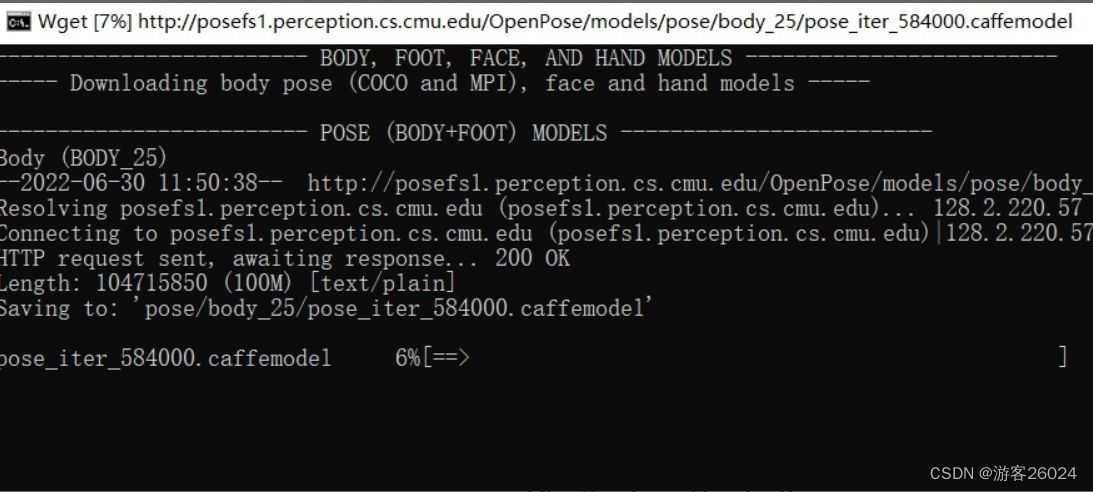
3)模型下载(之前已经介绍过了)
- cd openpose-master/models
- bash getModels.sh (Linux)
- 双击 getModels.bat (Windows)
- 下载 pose_iter_584000.caffemodel
- pose_iter_440000.caffemodel
- ...(还有hand,face的模型)

4)Cmake编译
首先下载cmake-gui:
https://cmake.org/download/
 https://cmake.org/download/windows就下载.msi版本的
之后就是将openpose-master编译
第三行的build是自己取的名字,可以直接build或者其他build_CPU

点击Add Entry,输入自己的Python路径,再点击OK!

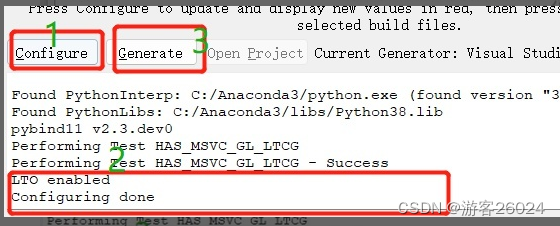
之后,点击“Configure“

配置vs,你的vs要和你电脑的版本一样,可在 控制面板-> 程序 中查看


完成之后,再点BUILD_PYTHON,DOWNLOAD_BODY_25_MODEL,DOWNLOAD_BODY_COCO_MODEL,DOWNLOAD_BODY_MPI_MODEL(hand,face也如果有用也选吧!)。


“GPU_MODE”选中“CPU_ONLY”,不选"USE_CUDNN";你也可以选择"CUDA",那之后必须选择“USE_CUDNN”

点击“Configure”,等全部完成之后,点击“Generate”

5)编译工程
找到openpose-master/build/OpenPose.sln使用vs 2017打开,输入(release x64版本)点击绿色倒三角符号,等待结果

如果成功这是下面这种状态,并且视频摄像头打开,openpose开始识别人体姿态与人!

之后右键点击pyopenpose,设为启动项目


之后结合,官网给的代码,仿照"openpose-master\build\examples\tutorial_api_python\01_body_from_image.py"来导入pyopenpose
把官网给的openpose-master\build\bin 与 openpose-master\x64拷贝到自己的项目里面去

把openpose-master\build\python\openpose\Release 导入自己的项目

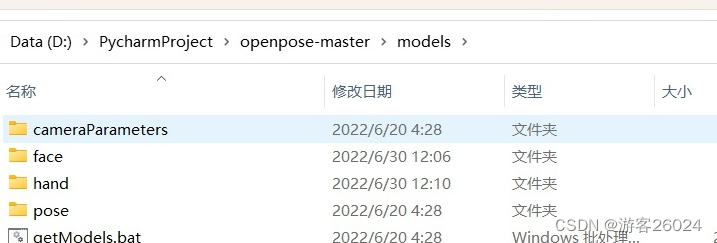
再把openpose-master\models中的 hand 和 face 还有 pose 导入自己的项目中去
代码
尝试导入openpose,查看是否成功
- import os
- import sys
- from sys import platform
- BASE_DIR = os.path.dirname(os.path.realpath(__file__))
- if platform == 'win32':
- lib_dir = 'Release'
- bin_dir = 'bin'
- x64_dir = 'x64'
- lib_path = os.path.join(BASE_DIR, lib_dir)
- bin_path = os.path.join(BASE_DIR, bin_dir)
- x64_path = os.path.join(BASE_DIR, x64_dir)
- sys.path.append(lib_path)
- os.environ['PATH'] += ';' + bin_path + ';' + x64_path + '\Release;'
- try:
- import pyopenpose as op
- print("successful, import pyopenpose!")
- except ImportError as e:
- print("fail to import pyopenpose!")
- raise e
- else:
- print(f"当前电脑环境:\n{platform}\n")
- sys.exit(-1)
查看结果

实时视频核心代码
- # 处理数据
- datum = op.Datum()
- # 开始openpose
- opWrapper = op.WrapperPython()
- # 配置参数
- params = dict()
- params["model_folder"] = BASE_DIR + "\models"
- params["model_pose"] = "BODY_25"
- params["number_people_max"] = 3
- params["disable_blending"] = False
- # 导入参数
- opWrapper.configure(params)
- opWrapper.start()
- ...
- ...
- # 处理图像
- # 输入图像frame打入datum.cvInputData
- datum.cvInputData = frame
- # 处理输入图像
- opWrapper.emplaceAndPop(op.VectorDatum([datum]))
- # 输出图像为opframe
- opframe = datum.cvOutputData
- ....
完整代码
- import os
- import time
- import cv2
- import sys
- from tqdm import tqdm
- from sys import platform
- BASE_DIR = os.path.dirname(os.path.realpath(__file__))
- if platform == 'win32':
- lib_dir = 'Release'
- bin_dir = 'bin'
- x64_dir = 'x64'
- lib_path = os.path.join(BASE_DIR, lib_dir)
- bin_path = os.path.join(BASE_DIR, bin_dir)
- x64_path = os.path.join(BASE_DIR, x64_dir)
- sys.path.append(lib_path)
- os.environ['PATH'] += ';' + bin_path + ';' + x64_path + '\Release;'
- try:
- import pyopenpose as op
- print("successful, import pyopenpose!")
- except ImportError as e:
- print("fail to import pyopenpose!")
- raise e
- else:
- print(f"当前电脑环境:\n{platform}\n")
- sys.exit(-1)
- def out_video(input):
- datum = op.Datum()
- opWrapper = op.WrapperPython()
- params = dict()
- params["model_folder"] = BASE_DIR + "\models"
- params["model_pose"] = "BODY_25"
- params["number_people_max"] = 3
- params["disable_blending"] = False
- opWrapper.configure(params)
- opWrapper.start()
- file = input.split("/")[-1]
- output = "video/out-optim-" + file
- print("It will start processing video: {}".format(input))
- cap = cv2.VideoCapture(input)
- frame_count = int(cap.get(cv2.CAP_PROP_FRAME_COUNT))
- frame_size = (int(cap.get(cv2.CAP_PROP_FRAME_WIDTH)), int(cap.get(cv2.CAP_PROP_FRAME_HEIGHT)))
- # create VideoWriter,VideoWriter_fourcc is video decode
- fourcc = cv2.VideoWriter_fourcc('D', 'I', 'V', 'X')
- fps = cap.get(cv2.CAP_PROP_FPS)
- out = cv2.VideoWriter(output, fourcc, fps, frame_size)
- # the progress bar
- with tqdm(range(frame_count)) as pbar:
- while cap.isOpened():
- start = time.time()
- success, frame = cap.read()
- if success:
- datum.cvInputData = frame
- opWrapper.emplaceAndPop(op.VectorDatum([datum]))
- opframe = datum.cvOutputData
- FPS = 1 / (time.time() - start)
- opframe = cv2.putText(opframe, "FPS" + str(int(FPS)), (25, 50), cv2.FONT_HERSHEY_SIMPLEX, 1,
- (0, 255, 0), 3)
- out.write(opframe)
- pbar.update(1)
- else:
- break
- pbar.close()
- cv2.destroyAllWindows()
- out.release()
- cap.release()
- print("{} finished!".format(output))
- if __name__ == "__main__":
- video_dir = "video/2.avi"
- out_video(video_dir)
运行结果
OpenPose运行结果
效果比之前的MediaPipe好很多
参考:
工程实现 || 基于opencv使用openpose完成人体姿态估计
https://blog.csdn.net/magic_ll/article/details/108451560?spm=1001.2014.3001.5506openpose从安装到实战全攻略!(win10)https://zhuanlan.zhihu.com/p/500651669 -
相关阅读:
用无感知的方式为你的数据加上一层缓存
Python课程设计之学生信息管理系统
Win11开机只有鼠标显示怎么办?
基于移动应用的城市公共气象服务平台的设计与实现
二叉树最近公共祖先
【大画数据结构】第一话 —— 动态顺序表的增删改查
数据结构——顺序表
仅需一个依赖给Swagger换上新皮肤,既简单又炫酷
Kubernetes云原生实战03 搭建高可用负载均衡器(Keepalived 和 HAproxy)
SSM出租车查询系统 毕业设计-附源码220915
- 原文地址:https://blog.csdn.net/XiaoyYidiaodiao/article/details/125565738
