-
【快应用】text组件里的文字很多,旁边的div样式会被拉伸如何解决
【现象描述】
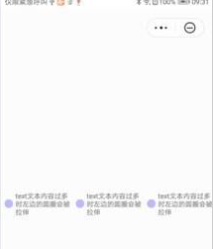
当text组件的内容较多多行显示的时候,相邻的div样式会显示异常,会从正常的圆形变为椭圆。
代码如下:
- <template>
- <div class="container">
- <div style="align-items: center;">
- <div class="typscolor" style="background-color: blue; opacity: 0.26; margin-left: 16px;"></div>
- <text>{{text}}</text>
- <div class="typscolor" style="background-color: blue; opacity: 0.26; margin-left: 16px;"></div>
- <text>{{text}}</text>
- <div class="typscolor" style="background-color: blue; opacity: 0.26; margin-left: 16px;"></div>
- <text>{{text}}</text>
- </div>
- </div>
- </template>
- <style>
- .container {
- flex-direction: column;
- justify-content: center;
- height: 100%;
- }
- text {
- font-size: 24px;
- }
- .typscolor {
- border-radius: 50%;
- width: 30px;
- height: 30px;
- background-color: red;
- margin-right: 8px;
- }
- </style>
- <script>
- module.exports = {
- data: {
- text:'text文本内容过多时左边的圆圈会被拉伸'
- },
- onInit() {
- },
- }
- </script>
如图所示
异常

正常

【问题分析】
当text组件内容过多时,flex布局的时候宽度超出会自动压缩,从而导致div标签被拉伸了
【解决方法】
可以给div标签设置flex-shrink: 0属性,即可解决该问题
示例代码如下:
- <template>
- <div class="container">
- <div style="align-items: center;">
- <div class="typscolor" style="background-color: blue; opacity: 0.26; margin-left: 16px;"></div>
- <text>{{text}}</text>
- <div class="typscolor" style="background-color: blue; opacity: 0.26; margin-left: 16px;"></div>
- <text>{{text}}</text>
- <div class="typscolor" style="background-color: blue; opacity: 0.26; margin-left: 16px;"></div>
- <text>{{text}}</text>
- </div>
- </div>
- </template>
- <style>
- .container {
- flex-direction: column;
- justify-content: center;
- height: 100%;
- }
- text {
- font-size: 24px;
- }
- .typscolor {
- border-radius: 50%;
- width: 30px;
- height: 30px;
- background-color: red;
- margin-right: 8px;
- flex-shrink: 0; /*加上该属性即可解决拉伸问题*/
- }
- </style>
- <script>
- module.exports = {
- data: {
- text:'text文本内容过多时左边的圆圈会被拉伸'
- },
- onInit() {
- },
- }
- </script>
如图所示:
欲了解更多详情,请参见:
华为官网:
https://developer.huawei.com/consumer/cn/forum/topic/0203908673278080243?fid=23?ha_source=zzh -
相关阅读:
二叉树(进阶)
【数据结构】树与二叉树(三):二叉树的定义、特点、性质及相关证明
设计模式-代理模式(delegate)
Vue3——区域内无限滚动
【华为OD机试】HJ68 成绩排序
kvm链接克隆虚拟机迁移到openstack机器的实验
NoSQL之Redis配置与优化
Axure 9 使用 font awesome 字体发布原型
欧盟仍在阻止社交媒体用户的数据传输
nodejs+vue菜谱美食食谱网站系统
- 原文地址:https://blog.csdn.net/weixin_44708240/article/details/125552008
