-
3Blue1Brown 安装教程
检查Python版本,我这里是
Python 3.10.5Python 怎么安装就没必要说了

安装
Scoop来管理之后的软件包,Scoop包含了丰富的软件库。我们可以先到 Scoop 查看官方的教程如下。

复制命令在
PowerShell中输入Set-ExecutionPolicy RemoteSigned -Scope CurrentUser irm get.scoop.sh | iex- 1
- 2
如果没有
VPN大概率会出现以下的意外
我这里开了
VPN之后再次输入以下命令后正常安装irm get.scoop.sh | iex- 1

如果你没有
VPN则不妨尝试以下命令进行安装Set-ExecutionPolicy RemoteSigned -Scope CurrentUser irm get.scoop.sh -outfile 'install.ps1' .\install.ps1 -RunAsAdmin- 1
- 2
- 3
然后输入 scoop -v 检查是否安装成功
scoop -v- 1

到这里
Scoop就安装完成了然后我们安装第三方软件
ffmpeg,以及LaTeX安装
ffmpegscoop install ffmpeg- 1


安装
LaTeX对于
LaTeX的常见版本,个人推荐MiKTeX,即最小安装版本。相比于很多人推荐的TeXLive(3.7 G)和MacTeX(4.0 G)轻便了一个量级。其官方下载地址如下:https://miktex.org/download对于
Windows用户scoop install latex scoop install miktex- 1
- 2

对于
MacOS用户brew cask install basictex- 1
安装
manim输入
python -m pip install manim- 1


然后有个警告,提示
pip需要升级了在此按提示输入
python -m pip install --upgrade pip- 1

测试
创建一个 python 文件,复制以下程序
from manim import * class SquareToCircle(Scene): def construct(self): circle = Circle() square = Square() square.flip(RIGHT) square.rotate(-3 * TAU / 8) circle.set_fill(PINK, opacity=0.5) self.play(Create(square)) self.play(Transform(square, circle)) self.play(FadeOut(square))- 1
- 2
- 3
- 4
- 5
- 6
- 7
- 8
- 9
- 10
- 11
- 12
- 13
- 14
然后我们进入文件目录
E: cd E:\Math\Manim\example0 manim -p -ql example0.py SquareToCircle- 1
- 2
- 3
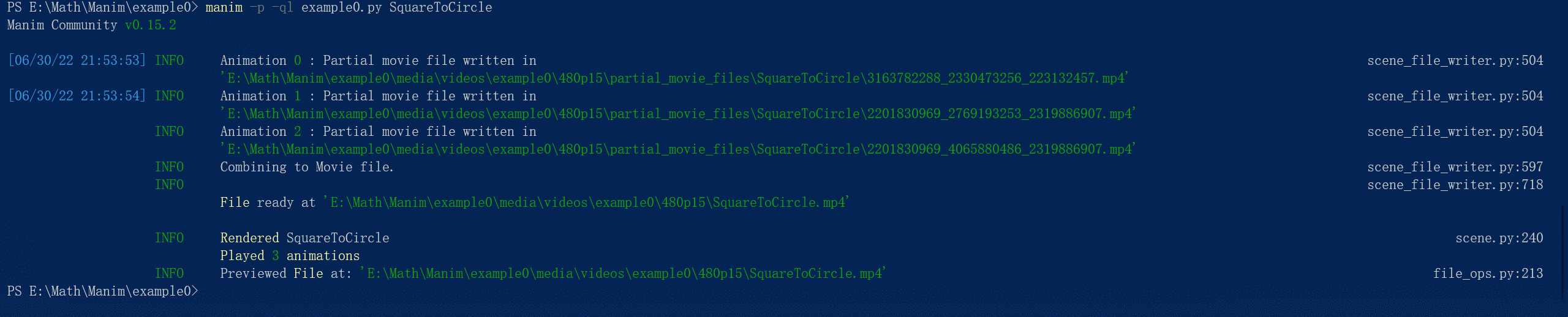
再创建一个
example1.py进行检查from manim import * class OpeningManim(Scene): def construct(self): title = Tex(r"This is some \LaTeX") basel = MathTex(r"\sum_{n=1}^\infty \frac{1}{n^2} = \frac{\pi^2}{6}") VGroup(title, basel).arrange(DOWN) self.play( Write(title), FadeIn(basel, shift=UP), ) self.wait() transform_title = Tex("That was a transform") transform_title.to_corner(UP + LEFT) self.play( Transform(title, transform_title), LaggedStart(*[FadeOut(obj, shift=DOWN) for obj in basel]), ) self.wait() grid = NumberPlane(x_range=(-10, 10, 1), y_range=(-6.0, 6.0, 1)) grid_title = Tex("This is a grid") grid_title.scale(1.5) grid_title.move_to(transform_title) self.add(grid, grid_title) self.play( FadeOut(title), FadeIn(grid_title, shift=DOWN), Create(grid, run_time=3, lag_ratio=0.1), ) self.wait() grid_transform_title = Tex( r"That was a non-linear function \\ applied to the grid" ) grid_transform_title.move_to(grid_title, UL) grid.prepare_for_nonlinear_transform() self.play( grid.animate.apply_function( lambda p: p + np.array([np.sin(p[1]), np.sin(p[0]), 0]) ), run_time=3, ) self.wait() self.play(Transform(grid_title, grid_transform_title)) self.wait()- 1
- 2
- 3
- 4
- 5
- 6
- 7
- 8
- 9
- 10
- 11
- 12
- 13
- 14
- 15
- 16
- 17
- 18
- 19
- 20
- 21
- 22
- 23
- 24
- 25
- 26
- 27
- 28
- 29
- 30
- 31
- 32
- 33
- 34
- 35
- 36
- 37
- 38
- 39
- 40
- 41
- 42
- 43
- 44
- 45
- 46
- 47
- 48
manim -p -qh example1.py OpeningManim- 1
然后报错了


应该是miktex不是最新导致,选择合理的宏包存储库,进行安装继续即可,这部分我没忘截图了

-
相关阅读:
案例--某站视频爬取
《uni-app》表单组件-Checkbox组件
使用 vve-i18n-cli 来一键式自动化实现国际化
IOS覆盖率报告info文件解读
Scratch软件编程等级考试一级——20191221
部署jar包到windows服务器,并自动执行启动脚本
世媒讯提供海内外媒体宣发服务,引领企业新媒体发展之路
机器学习-特征选择:使用Lassco回归精确选择最佳特征
VUE2.x
JSON Web Token
- 原文地址:https://blog.csdn.net/qq_42754856/article/details/125550246
