-
Java实现微信支付功能
微信实现支付功能与支付宝实现支付功能是相似的,接入前的准备工作,包括申请APPID、申请mchid、绑定APPID及mchid、配置API key、下载并配置商户证书等,具体可查看微信支付文档
接入前准备-APP支付 | 微信支付商户平台文档中心 (qq.com)
 https://pay.weixin.qq.com/wiki/doc/apiv3/open/pay/chapter2_5_1.shtml之后需要将APP与微信支付进行绑定,文档如下:
看一下微信支付的流程图:
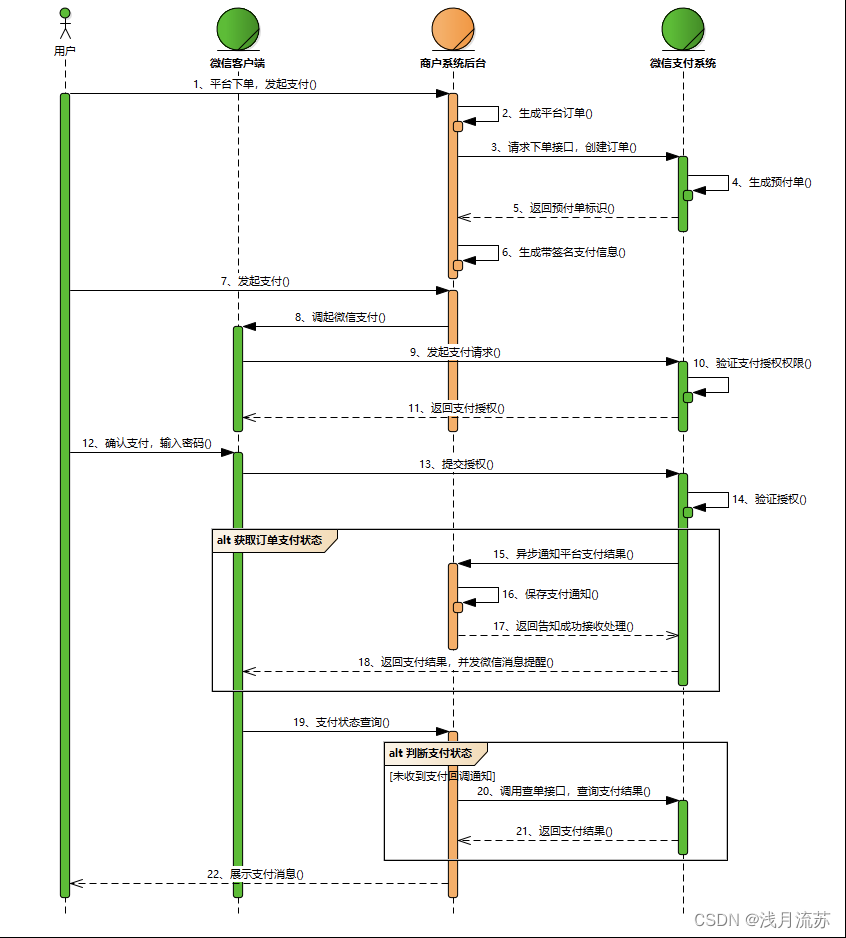 微信支付的流程,同样与支付宝相似, 微信支付需要调微信生成预付单,然后由客户端发起真正的支付。
微信支付请求参数
Map<String, String> callWeChatPay = new HashMap<>();
// 调用微信统一下单接口
Map<String, String> requestPara = new HashMap<>();
// 公众账号ID
requestPara.put("appid", appid);
// 商户号
requestPara.put("mch_id", mch_id);
// 商品描述
requestPara.put("body", body);
requestPara.put("out_trade_no", tradeNo);
// 总金额
requestPara.put("total_fee", amount.intValue() + "");
// 终端IP
requestPara.put("spbill_create_ip", "127.0.0.1");
// 通知地址
requestPara.put("notify_url", notify_url);
// 交易类型
requestPara.put("trade_type", "APP");
//加密方式
requestPara.put("sign_type", FreePayUtils.MD5);
//标价币种
requestPara.put("fee_type", "CNY");
//订单失效时间
requestPara.put("time_expire", DateUtil.addMinute("", 10, "yyyyMMddHHmmss"));
//签名
String sign = WechatPaykey(微信支付秘钥生成);

//parseString2Xml
String xmlData = FreePayUtils.parseString2Xml(requestPara, sign);

//调用微信统一下单接口
HttpSupport httpSupport = HttpSupport.makeConnect();
String result = httpSupport.doPostBody("https://api.mch.weixin.qq.com/pay/unifiedorder", xmlData).result();

//xmlToMap
Map<String, String> returnMap = FreePayUtils.xmlToMap(result);
String returnCode = returnMap.get("return_code");
String resultCode = returnMap.get("result_code");

if ("SUCCESS".equals(returnCode) && "SUCCESS".equals(resultCode)) {
    String prepayId = returnMap.get("prepay_id");
    //应用ID
    callWeChatPay.put("appid", waistcoat.getWechatAppid());
    //商户号
    callWeChatPay.put("partnerid", waistcoat.getWechatMchid());
    //预支付交易会话ID
    callWeChatPay.put("prepayid", prepayId);
    //扩展字段
    callWeChatPay.put("package", "Sign=WXPay");
    callWeChatPay.put("noncestr", FreePayUtils.generateNonceStr());
    callWeChatPay.put("timestamp", FreePayUtils.getCurrentTimestamp() + "");
    // 签名
    String appSign = FreePayUtils.generateSignature(callWeChatPay, waistcoat.getWechatPaykey());
    callWeChatPay.put("sign", appSign);
注意,微信发起请求之后,返回的数据是XML格式的,如下
- <xml>
- <appid><![CDATA[wx2421b1c4370ec43b]]></appid>
- <attach><![CDATA[支付测试]]></attach>
- <bank_type><![CDATA[CFT]]></bank_type>
- <fee_type><![CDATA[CNY]]></fee_type>
- <is_subscribe><![CDATA[Y]]></is_subscribe>
- <mch_id><![CDATA[10000100]]></mch_id>
- <nonce_str><![CDATA[5d2b6c2a8db53831f7eda20af46e531c]]></nonce_str>
- <openid><![CDATA[oUpF8uMEb4qRXf22hE3X68TekukE]]></openid>
- <out_trade_no><![CDATA[1409811653]]></out_trade_no>
- <result_code><![CDATA[SUCCESS]]></result_code>
- <return_code><![CDATA[SUCCESS]]></return_code>
- <sign><![CDATA[B552ED6B279343CB493C5DD0D78AB241]]></sign>
- <time_end><![CDATA[20140903131540]]></time_end>
- <total_fee>1</total_fee>
- <coupon_fee><![CDATA[10]]></coupon_fee>
- <coupon_count><![CDATA[1]]></coupon_count>
- <coupon_type><![CDATA[CASH]]></coupon_type>
- <coupon_id><![CDATA[10000]]></coupon_id>
- <coupon_fee><![CDATA[100]]></coupon_fee>
- <trade_type><![CDATA[JSAPI]]></trade_type>
- <transaction_id><![CDATA[1004400740201409030005092168]]></transaction_id>
- </xml>
所以拿到微信支付的结果之后,需要转换成自己需要的格式。
将这些数据返回给客户端,由客户端发起支付,就可以实现微信的支付功能。
-
相关阅读:
学校ROS培训项目记录
【Auth Proxy】为你的 Web 服务上把锁
前端 JavaScript 数组相关知识点有哪些?
【JVM技术专题】服务发生OOM故障定位方案「实战篇」
阅读笔记|让区块空间成为商品,打造Web3云基础设施
Win10电脑不能读取U盘怎么办?不识别U盘怎么解决?
MCDF实验2
笔试、面试总结(网络安全与渗透测试)
Android A13 CTS 测试问题部分总结
【题型总结】使用双指针+哈希表寻找符合某种条件的字符串/数字的个数
- 原文地址:https://blog.csdn.net/wsf408908184/article/details/125544067
