-
< element组件封装: element表格(element-table)实现表格列筛选功能组件 >
👉 前言
在 Vue + elementUi 开发中,element表格本身仅自带升序和降序排列,可能在日常开发中,不太能满足自定义筛选的要求,比如说,实现excel文档中的筛选个例的功能,今天小温就把这个干货给大家分享一下。本篇文章简单展示! 案例仅供参考!
👉 一、效果演示
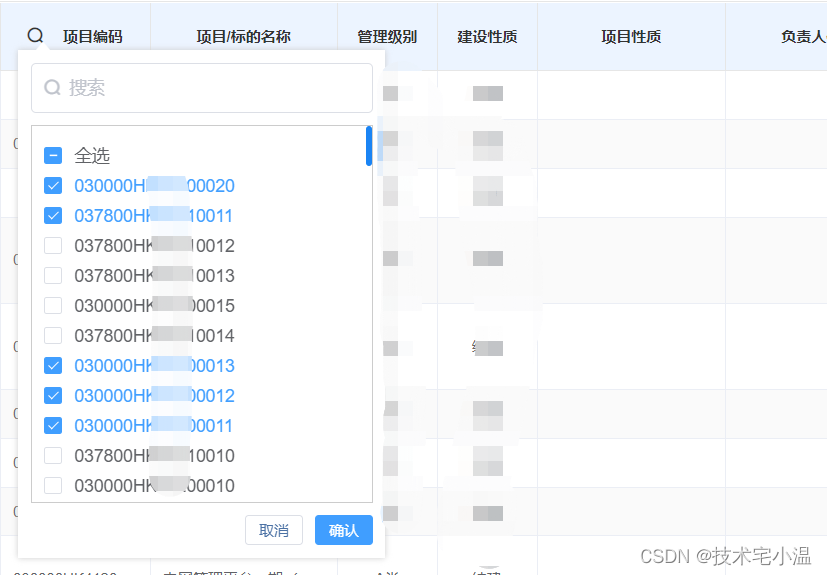
话不多说,先上效果图! 白嫖万岁!当然,如果有帮助,希望不要吝啬你的点赞呀!


👉 二、原理
通过实现对鼠标点击的位置的获取,使指定的弹窗展示在指定的位置。然后便是自己自定义多选按钮和内容,以及实现关键词搜索功能!原理较为简单,直接上代码!
👉 三、实现案例
> HTML模板(组件)
<template> <div class="tableTool" :style="{top:filterToolTop + 15 +'px',left:filterToolLeft -20 +'px'}"> <el-input v-model="keyword" prefix-icon="el-input__icon el-icon-search" type="text" placeholder="搜索" @input="seachKey" oninput="if(value.length>11)value=value.slice(0,100)" ></el-input> <div class="select-box"> <el-checkbox v-if="this.seachType !== 'sfzkList'" :indeterminate="isIndeterminate" v-model="checkAll" @change="handleCheckAllChange" id="checkAll" >全选</el-checkbox> <el-checkbox-group v-if="this.seachType !== 'sfzkList'" v-model="checkedList" @change="handleCheckedCitiesChange" > <el-checkbox v-for="(item,index) in options" :label="`${item.NAME ? item.NAME : item}`" :key="index" > <span>{{item.NAME ? item.NAME : item}}</span> <span v-if="item.NUM">({{item.NUM}})</span> </el-checkbox> </el-checkbox-group> <el-radio-group v-if="this.seachType === 'sfzkList'" v-model="checkedList" @change="handleCheckedCitiesChange" > <el-radio v-for="(item,index) in options" :key="index" :label="`${item.NAME ? item.NAME : item}`"> <span>{{item.NAME ? item.NAME : item}}</span> <span v-if="item.NUM">({{item.NUM}})</span> </el-radio> </el-radio-group> </div> <div class="bottom"> <el-button size="mini" @click="$emit('closeTool')">取消</el-button> <el-button type="primary" size="mini" @click="save">确认</el-button> </div> <i class="el-icon-caret-top"></i> </div> </template> <script> export default { name: "tableCol", props: { filterToolLeft: { required: true, type: Number }, filterToolTop: { required: true, type: Number }, // 已经选中的数据 seachData: { required: true, type: Object }, // 正在更改哪个 seachType: { required: true, type: String }, // 需要后端给的所有数据 allOptionsObj: { required: true, type: Object }, useTableToolComponent: { default: null } }, data() { return { keyword: "", checkAll: false, checkedList: [], options: [], isIndeterminate: true, allOptions: [] }; }, methods: { handleCheckAllChange(val) { const arr = JSON.parse(JSON.stringify(this.allOptions)); const arrOptions = arr.map(item => { return item.NAME; }); this.checkedList = val ? arrOptions : []; this.isIndeterminate = false; }, handleCheckedCitiesChange(value) { let checkedCount = value.length; this.checkAll = checkedCount === this.options.length; this.isIndeterminate = checkedCount > 0 && checkedCount < this.options.length; }, save() { this.seachData[this.seachType.replace("List", "")] = this.checkedList; // 把查询条件给父组件 this.$emit("saveSeach", this.seachData); }, seachKey() { this.allOptions = this.allOptionsObj[this.seachType].filter( item => (item.NAME || item).indexOf(this.keyword) != -1 ); this.options = this.allOptions; this.checkedList = []; this.checkAll = false; }, setposition() { let boxEl = document.querySelector(".tableTool"); let icon = document.querySelector(".tableTool .el-icon-caret-top"); if ( this.filterToolLeft + boxEl.offsetWidth + 48 > document.body.clientWidth ) { boxEl.style.transform = "translateX(-90%)"; icon.style.left = "90%"; } } }, created() {}, async mounted() { this.allOptions = this.allOptionsObj[this.seachType]; const selectOption = this.$parent.seachData[ `${this.seachType.replace("List", "")}` ]; this.options = this.allOptions; if (selectOption.length || this.seachType === "sfzkList") { this.checkedList = this.seachType === "sfzkList" ? selectOption.join("") : selectOption; } else { document.querySelector("#checkAll").click(); } this.setposition(); }, beforeMount() { let that = this; this._close = e => { let isFlag = that.$el.contains(e.target) || e.target.className.indexOf("el-icon-caret-bottom") != -1; // if (!isFlag) { // that.$emit("closeTool"); // } }; document.body.addEventListener("click", this._close); }, beforeDestroy() { document.body.removeEventListener("click", this._close); } }; </script> <style lang="scss" scoped> .tableTool { position: fixed; background: #fff; box-shadow: 0 0 5px #ccc; padding: 10px; z-index: 999; /deep/.el-input__inner { padding-left: 30px; } .select-box { border: #ccc solid 1px; padding: 10px; margin-top: 10px; max-height: 280px; overflow: auto; max-width: 400px; } /deep/ .el-checkbox { display: block; margin-top: 5px; } /deep/ .el-radio-group { display: flex; flex-direction: column; } .bottom { display: flex; justify-content: flex-end; margin-top: 10px; } .el-icon-caret-top { position: absolute; color: #fff; top: -13px; font-size: 20px; } } </style>- 1
- 2
- 3
- 4
- 5
- 6
- 7
- 8
- 9
- 10
- 11
- 12
- 13
- 14
- 15
- 16
- 17
- 18
- 19
- 20
- 21
- 22
- 23
- 24
- 25
- 26
- 27
- 28
- 29
- 30
- 31
- 32
- 33
- 34
- 35
- 36
- 37
- 38
- 39
- 40
- 41
- 42
- 43
- 44
- 45
- 46
- 47
- 48
- 49
- 50
- 51
- 52
- 53
- 54
- 55
- 56
- 57
- 58
- 59
- 60
- 61
- 62
- 63
- 64
- 65
- 66
- 67
- 68
- 69
- 70
- 71
- 72
- 73
- 74
- 75
- 76
- 77
- 78
- 79
- 80
- 81
- 82
- 83
- 84
- 85
- 86
- 87
- 88
- 89
- 90
- 91
- 92
- 93
- 94
- 95
- 96
- 97
- 98
- 99
- 100
- 101
- 102
- 103
- 104
- 105
- 106
- 107
- 108
- 109
- 110
- 111
- 112
- 113
- 114
- 115
- 116
- 117
- 118
- 119
- 120
- 121
- 122
- 123
- 124
- 125
- 126
- 127
- 128
- 129
- 130
- 131
- 132
- 133
- 134
- 135
- 136
- 137
- 138
- 139
- 140
- 141
- 142
- 143
- 144
- 145
- 146
- 147
- 148
- 149
- 150
- 151
- 152
- 153
- 154
- 155
- 156
- 157
- 158
- 159
- 160
- 161
- 162
- 163
- 164
- 165
- 166
- 167
- 168
- 169
- 170
- 171
- 172
- 173
- 174
- 175
- 176
- 177
- 178
- 179
- 180
- 181
- 182
- 183
- 184
- 185
- 186
- 187
- 188
- 189
- 190
- 191
- 192
- 193
- 194
- 195
- 196
- 197
- 198
- 199
- 200
- 201
- 202
- 203
> HTML模板(父组件使用)
<el-table-column :key="item.comments" v-for="item in columnTables['fixed']" :prop="item.comments" :label="item.columnName" :filters="item.filters" align="center" fixed="left" :show-overflow-tooltip="item.overflow" :min-width="`${item.width ? item.width : '80px'}`"> <!-- 自定义头部 --> <template v-slot:header> <i class="el-icon-search" style="margin-right: 15px;" @click.stop="filterData($event, item.comments)" v-if="item.screen" ></i> <span class="table-heard-filter">{{item.columnName}}</span> </template> <template slot-scope="scope"> <span>{{ scope.row[item.comments] }}</span> </template> </el-table-column> <selectTool v-if="showFilterTool" ref="selectTool" :filterToolLeft="filterToolLeft" :filterToolTop="filterToolTop" :seachData="seachData" @saveSeach="saveSeach" :allOptionsObj="allOptionsObj" :seachType="seachType" @closeTool="closeTool" /> <script> export default { components: { selectTool }, data () { return { showFilterTool: false, filterToolTop: 0, filterToolLeft: 0, seachData: { bdfl: [], xmbm: [] }, allOptionsObj: { bdflList: [], xmbmList: [], }, seachType: "bdflList", columnTables: { fixed: [ { comments: "bdfl", columnName: "标的分类", width: "120px", screen: true }, { comments: "xmbm", columnName: "项目编码", width: "120px", overflow: true, screen: true }, ] } } }, methods: { filterData(e, type) { this.showFilterTool = false; this.$nextTick(() => { this.seachType = type + 'List'; this.filterToolTop = e.pageY; this.filterToolLeft = e.pageX; this.showFilterTool = true; }); }, closeTool() { this.showFilterTool = false; }, saveSeach(data) { console.log(data, "data."); this.seachData = JSON.parse(JSON.stringify(data)); for(let key in this.seachData) { this.seachData[key] = this.seachData[key].filter(el => { return el != null; }); } this.closeTool(); this.handleSearch(); }, } } </script>- 1
- 2
- 3
- 4
- 5
- 6
- 7
- 8
- 9
- 10
- 11
- 12
- 13
- 14
- 15
- 16
- 17
- 18
- 19
- 20
- 21
- 22
- 23
- 24
- 25
- 26
- 27
- 28
- 29
- 30
- 31
- 32
- 33
- 34
- 35
- 36
- 37
- 38
- 39
- 40
- 41
- 42
- 43
- 44
- 45
- 46
- 47
- 48
- 49
- 50
- 51
- 52
- 53
- 54
- 55
- 56
- 57
- 58
- 59
- 60
- 61
- 62
- 63
- 64
- 65
- 66
- 67
- 68
- 69
- 70
- 71
- 72
- 73
- 74
- 75
- 76
- 77
- 78
- 79
- 80
- 81
- 82
- 83
- 84
- 85
- 86
- 87
- 88
- 89
- 90
- 91
- 92
- 93
- 94
- 95
- 96
- 97
- 98
- 99
- 100
案例较为粗浅,仅供参考!
往期内容 💨
🔥 < 今日份知识点:谈谈内存泄漏 及 在 Javascript 中 针对内存泄漏的垃圾回收机制 >
🔥 < 今日份知识点:浅述对 “ Vue 插槽 (slot) ” 的理解 以及 插槽的应用场景 >
-
相关阅读:
【Java基础夯实】枚举类回炉重造
更改Windows上的远程桌面的侦听端口
Minecraft 1.16.5模组开发(五十一) 方块实体 (Tile Entity)
为何恒星/太阳(辐射)可以被视为黑体(辐射)?
23种设计模式——策略模式
使用EVO
如何将音乐导入iphone手机,怎么将歌曲导入到iphone
代理技术的演进:从SOCKS到透明代理再到智能HTTP代理
深度学习 --- stanford cs231 编程作业(assignment1,Q2: SVM分类器)
【pytorch】数据加载dataset和dataloader的使用
- 原文地址:https://blog.csdn.net/MrWen2395772383/article/details/125537426