-
Dapr在Java中的实践 之 状态管理
状态管理
状态管理(State Management)使用键值对作为存储机制,可以轻松的使长时运行、高可用的有状态服务和无状态服务共同运行在我们的服务中。
我们的服务可以利用Dapr的状态管理API在状态存储组件中保存、读取和查询键值对。
状态存储组件是可插拔的,目前支持使用Azure CosmosDB、 Azure SQL Server、 PostgreSQL,、AWS DynamoDB、Redis 作为状态存储介质。
编写示例代码
创建一个SpringBoot项目,命名为:
state-management,该项目的状态管理调用过程如下图:
在
state-management该项目的pom.xml文件中添加如下依赖:<dependency> <groupId>io.dapr</groupId> <artifactId>dapr-sdk-springboot</artifactId> <version>1.4.0</version> </dependency> <dependency> <groupId>com.squareup.okhttp3</groupId> <artifactId>okhttp</artifactId> <version>4.9.3</version> </dependency>- 1
- 2
- 3
- 4
- 5
- 6
- 7
- 8
- 9
- 10
注入一个
DaprClient的bean:@Configuration public class DaprConfig { private static final DaprClientBuilder BUILDER = new DaprClientBuilder(); @Bean public DaprClient buildDaprClient() { return BUILDER.build(); } }- 1
- 2
- 3
- 4
- 5
- 6
- 7
- 8
- 9
- 10
state-management项目中一共有3个接口:save:保存状态get:读取状态delete:删除状态
具体源码如下:
package one.more.society.state.management; import io.dapr.client.DaprClient; import io.dapr.client.domain.State; import lombok.extern.slf4j.Slf4j; import org.springframework.beans.factory.annotation.Autowired; import org.springframework.web.bind.annotation.RequestMapping; import org.springframework.web.bind.annotation.RequestMethod; import org.springframework.web.bind.annotation.RestController; @Slf4j @RestController public class StateManagementController { @Autowired private DaprClient client; private static final String STATE_STORE_NAME = "statestore"; private static final String STATE_STORE_KEY = "one.more.society"; /** * 保存状态 * * @param value value * @return */ @RequestMapping(value = "/save", method = RequestMethod.GET) public StateResponse save(String value) { log.info("save - value:{}", value); client.saveState(STATE_STORE_NAME, STATE_STORE_KEY, value).block(); StateResponse response = new StateResponse(); response.setCode(1); response.setStatus("save"); response.setValue(value); return response; } /** * 读取状态 * * @return StateResponse */ @RequestMapping(value = "/get", method = RequestMethod.GET) public StateResponse get() { log.info("get"); State<String> value = client.getState(STATE_STORE_NAME, STATE_STORE_KEY, String.class).block(); log.info("value: {}", value.getValue()); StateResponse response = new StateResponse(); response.setCode(1); response.setStatus("get"); response.setValue(value.getValue()); return response; } /** * 删除状态 * * @return */ @RequestMapping(value = "/delete", method = RequestMethod.GET) public StateResponse delete() { log.info("delete"); client.deleteState(STATE_STORE_NAME, STATE_STORE_KEY).block(); StateResponse response = new StateResponse(); response.setCode(1); response.setStatus("delete"); return response; } }- 1
- 2
- 3
- 4
- 5
- 6
- 7
- 8
- 9
- 10
- 11
- 12
- 13
- 14
- 15
- 16
- 17
- 18
- 19
- 20
- 21
- 22
- 23
- 24
- 25
- 26
- 27
- 28
- 29
- 30
- 31
- 32
- 33
- 34
- 35
- 36
- 37
- 38
- 39
- 40
- 41
- 42
- 43
- 44
- 45
- 46
- 47
- 48
- 49
- 50
- 51
- 52
- 53
- 54
- 55
- 56
- 57
- 58
- 59
- 60
- 61
- 62
- 63
- 64
- 65
- 66
- 67
- 68
- 69
- 70
- 71
- 72
另外,在
application.properties中配置:server.port=30003- 1
启动服务
在启动之前先用
mvn命令打包:mvn clean package- 1
在
state-management项目的目录中执行以下命令,启动state-management服务:dapr run --app-id state-management --app-port 30003 --dapr-http-port 31003 -- java -jar target/state-management-0.0.1-SNAPSHOT.jar- 1
在Dapr Dashboard中看到:

服务都已经启动成功。
先访问http://localhost:30003/get,可以看到:

读取状态返回为null,接下来访问http://localhost:30003/save?value=万猫学社,可以看到:

状态已经保存了,再访问http://localhost:30003/get验证一下:

状态被正确读取,再访问http://localhost:30003/delete,可以看到:
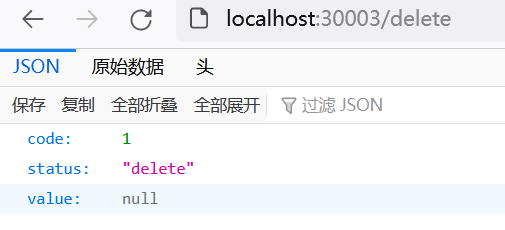
状态已经被删除了,再访问http://localhost:30003/get验证一下:
读取状态返回为null。
状态储存组件
初始化Dapr后,默认为我们指定的状态储存组件是Redis,在用户目录下的
.dapr文件夹中的components文件夹中,可以找到statestore.yaml文件:apiVersion: dapr.io/v1alpha1 kind: Component metadata: name: statestore spec: type: state.redis version: v1 metadata: - name: redisHost value: localhost:6379 - name: redisPassword value: "" - name: actorStateStore value: "true"- 1
- 2
- 3
- 4
- 5
- 6
- 7
- 8
- 9
- 10
- 11
- 12
- 13
- 14
下面让我们来尝试一下,使用MySQL作为状态储存组件,把
statestore.yaml文件修改为:apiVersion: dapr.io/v1alpha1 kind: Component metadata: name: statestore spec: type: state.mysql version: v1 metadata: - name: connectionString value: "root:one.more.society@tcp(127.0.0.1:3306)/?allowNativePasswords=true"- 1
- 2
- 3
- 4
- 5
- 6
- 7
- 8
- 9
- 10
重新启动服务,可以看到在日志中看到使用MySQL作为状态储存组件:
time="09:57:35.5632633+08:00" level=info msg="Creating MySql schema 'dapr_state_store'" app_id=state-management instance=JT-243137 scope=dapr.contrib type=log ver=1.7.3 time="09:57:35.5862126+08:00" level=info msg="Creating MySql state table 'state'" app_id=state-management instance=JT-243137 scope=dapr.contrib type=log ver=1.7.3 time="09:57:35.6563599+08:00" level=info msg="component loaded. name: statestore, type: state.mysql/v1" app_id=state-management instance=JT-243137 scope=dapr.runtime type=log ver=1.7.3- 1
- 2
- 3
如果在MySQL中没有对应的库和表,Dapr默认为我们自动创建一个名为
dapr_state_store的库,还有一个名为state的表,如下图:
其中,
state的表结构为:CREATE TABLE `state` ( `id` varchar(255) NOT NULL, `value` json NOT NULL, `isbinary` tinyint(1) NOT NULL, `insertDate` timestamp NOT NULL DEFAULT CURRENT_TIMESTAMP, `updateDate` timestamp NOT NULL DEFAULT CURRENT_TIMESTAMP ON UPDATE CURRENT_TIMESTAMP, `eTag` varchar(36) NOT NULL, PRIMARY KEY (`id`) ) ENGINE=InnoDB DEFAULT CHARSET=utf8;- 1
- 2
- 3
- 4
- 5
- 6
- 7
- 8
- 9
再访问一下http://localhost:30003/save?value=万猫学社,就可以在数据库中看到对应的数据:

值得注意的是:MySQL状态储存组件目前还处于Alpha状态,最好不要在生产环境使用。
更详细的配置说明见下表:
配置项 是否必填 说明 示例 connectionString Y 用于连接到 MySQL 的连接字符串。 请不要将schema添加到连接字符串中。 非SSL连接: "<user>:<password>@tcp(<server>:3306)/?allowNativePasswords=true"
Enforced SSL 连接:"<user>:<password>@tcp(<server>:3306)/?allowNativePasswords=true&tls=custom"schemaName N 要使用的schema名称。 如果指定的schema不存在,将会自动创建。默认值为 "dapr_state_store""one_more_state_store"tableName N 要使用的表名。如果对应的表不存在,将被自动创建。默认值为 “state” "one_more_state"pemPath N 使用 Enforced SSL 连接 时,指定要使用的 PEM 文件完整路径。 “/one/more/society/file.pem” pemContents N 如果没有提供pemPath,用于Enforced SSL连接的PEM文件的内容。可以在K8s环境下使用。 “pem value” 配置示例:
apiVersion: dapr.io/v1alpha1 kind: Component metadata: name: statestore spec: type: state.mysql version: v1 metadata: - name: connectionString value: "root:one.more.society@tcp(127.0.0.1:3306)/?allowNativePasswords=true&tls=custom" - name: schemaName value: "one_more_state_store" - name: tableName value: "one_more_state" - name: pemPath value: "/one/more/society/file.pem"- 1
- 2
- 3
- 4
- 5
- 6
- 7
- 8
- 9
- 10
- 11
- 12
- 13
- 14
- 15
- 16
最后,感谢你这么帅,还给我点赞。
-
相关阅读:
Python 完美诠释"高内聚"概念的 IO 流 API 体系结构
Windows环境的Jenkins脚本
Android 实现GIF播放的几种方式
探索实人认证API:保障在线交互安全的关键一步
云原生:Docker 实践经验(六)-镜像的使用及分层讲解
爬虫工作流程、请求与响应原理、requests库讲解
jh7110 visionfive2 linux uboot debian
mysql数据库基本操作中where条件查询
C语言关于自定义字符函数和字符串函数的相关笔试题(找工作必看)
redis缓存一致性讨论
- 原文地址:https://blog.csdn.net/heihaozi/article/details/125533588
