-
Spring Cloud Alibaba组件Nacos
Nacos简介
Nacos(Naming Configuration Service)是阿里巴巴基于Java语言开发的开源项目。是用来易于构建云原生项目的动态服务发现,配置和管理平台。
其中Nacos开以拆分为以下三个内容
组成部分 全称 描述 Na naming/nameServer 作为服务注册中心,相当于Spring Cloud Eureka的功能 co configuration 作为配置中心,与Spring Cloud Config + Spring Cloud Bus功能类似 s server 即服务,表示Nacos实现的服务注册中心和配置中心都是以服务为核心的。 Nacos实质上是服务注册中心和配置中心的组合体,分别实现了 服务注册与发现和配置的动态刷新。
Nacos 支持几乎所有主流类型“服务”的发现、配置和管理:
- Kubernetes Service
- gRPC & Dubbo RPC Service
- Spring Cloud RESTful Service
Nacos的特点
- 简单易用
- 稳定可靠
- 性能卓越
- 易于构建和管理微服务应用
Nacos 特性
服务发现
Nacos支持基于DNS和RPC的服务发现。当服务提供者使用原生 SDK、OpenAPI 或一个独立的 Agent TODO 向 Nacos 注册服务后,服务消费者可以在 Nacos 上通过 DNS TODO 或 HTTP&API 查找、发现服务。
服务健康监测
Nacos提供对服务的实时健康检查,能够有效阻止请求发送到不健康主机或服务实例上。还提供一个健康仪表盘,能够帮助我们根据健康状态管理服务的可用性及流量。
动态配置服务
动态配置服务可以让我们以中心化、外部化和动态化的方式,管理所有环境的应用配置和服务配置。动态配置消除了配置变更时重新部署应用和服务的需要,让配置管理变得更加高效、敏捷。
Nacos提供了一个简洁易用的 UI 帮助我们管理所有服务和应用的配置
动态DNS服务
Nacos 提供了动态 DNS 服务,能够让我们更容易地实现负载均衡、流量控制以及数据中心内网的简单 DNS 解析服务。服务及其元数据管理
Nacos 能让我们从微服务平台建设的视角管理数据中心的所有服务及元数据,包括管理服务的描述、生命周期、服务的静态依赖分析、服务的健康状态、服务的流量管理、路由及安全策略、服务的 SLA 以及 metrics 统计数据。
Nacos两大组件
Nacos采用CS(Client/Server ,客户端/服务器)架构,它包含两大组件,如下表。
组件 描述 功能 Nacos Server Nacos 服务端,与 Eureka Server 不同,Nacos Server 由阿里巴巴团队使用 Java 语言编写并将 Nacos Server 的下载地址给用户,用户只需要直接下载并运行即可。 Nacos Server 可以作为服务注册中心,帮助 Nacos Client 实现服务的注册与发现。Nacos Server 可以作为配置中心,帮助 Nacos Client 在不重启的情况下,实现配置的动态刷新。 Nacos Client Nacos 客户端,通常指的是微服务架构中的各个服务,由用户自己搭建,可以使用多种语言编写。 Nacos Client 通过添加依赖 spring-cloud-starter-alibaba-nacos-discovery,在服务注册中心(Nacos Server)中实现服务的注册与发现。Nacos Client 通过添加依赖 spring-cloud-starter-alibaba-nacos-config,在配置中心(Nacos Server)中实现配置的动态刷新。 Nacos服务注册中心

根据上图可知涉及以下三个角色- 服务注册中心: 为服务者提供者和服务消费者提供服务注册与发现功能。
- 服务提供者: 将自身提供的服务注册到服务注册中心,以供服务消费者发现和调用。
- 服务消费者: 从服务注册中心获取服务列表,调用所需的服务。
Nacos实现服务注册和发现流程如下:
-
从 Nacos 官方提供的下载页面中,下载 Nacos Server 并运行。
-
服务提供者 Nacos Client 启动时,会把服务以服务名(spring.application.name)的方式注册到服务注册中心(Nacos Server)
-
服务消费者 Nacos Client 启动时,也会将自己的服务注册到服务注册中心;
-
服务消费者在注册服务的同时,它还会从服务注册中心获取一份服务注册列表信息,该列表中包含了所有注册到服务注册中心上的服务的信息(包括服务提供者和自身的信息);
-
在获取了服务提供者的信息后,服务消费者通过HTTP或消息中间件远程调用服务提供者提供的服务。
Nocos安装(Nacos Server)
以Nacos2.0.3为例进行安装
2.在控制台跳转到安装目录的bin下,执行以下命令,以单机模式启动Nacos Server
startup.cmd -m standalone- 1
3.启动成功后使用浏览器访问“http://localhost:8848/nacos",然后输入用户名密码都为nacos

此时Nacos服务注册中心的部署就完成了。搭建服务提供者
1.创建一个名叫Spring-Cloud-alibaba-quick的过程,并在pom.xml导入相应的依赖坐标
<parent> <groupId>org.springframework.boot</groupId> <artifactId>spring-boot-starter-parent</artifactId> <version>2.5.6</version> <relativePath/> <!-- lookup parent from repository --> <properties> <maven.compiler.source>8</maven.compiler.source> <maven.compiler.target>8</maven.compiler.target> <project.build.sourceEncoding>UTF-8</project.build.sourceEncoding> <maven.compiler.source>1.8</maven.compiler.source> <maven.compiler.target>1.8</maven.compiler.target> <junit.version>4.13.1</junit.version> <log4j.version>1.2.17</log4j.version> <lombok.version>1.16.18</lombok.version> <spring-cloud.version>2020.0.4</spring-cloud.version> <spring-cloud-alibaba.version>2021.1</spring-cloud-alibaba.version> </properties> <!-- 父模块控制版本问题--> <dependencyManagement> <dependencies> <dependency> <groupId>log4j</groupId> <artifactId>log4j</artifactId> <version>${log4j.version}</version> </dependency> <dependency> <groupId>junit</groupId> <artifactId>junit</artifactId> <version>${junit.version}</version> <scope>test</scope> </dependency> <dependency> <groupId>org.projectlombok</groupId> <artifactId>lombok</artifactId> <version>${lombok.version}</version> </dependency> <!--Spring Cloud Alibaba 的版本信息--> <dependency> <groupId>com.alibaba.cloud</groupId> <artifactId>spring-cloud-alibaba-dependencies</artifactId> <version>${spring-cloud-alibaba.version}</version> <type>pom</type> <scope>import</scope> </dependency> <!--Spring Cloud 的版本信息--> <dependency> <groupId>org.springframework.cloud</groupId> <artifactId>spring-cloud-dependencies</artifactId> <version>${spring-cloud.version}</version> <type>pom</type> <scope>import</scope> </dependency> <!-- Spring Cloud loadbalancer版本信息 --> <dependency> <groupId>org.springframework.cloud</groupId> <artifactId>spring-cloud-loadbalancer</artifactId> <version>3.0.4</version> </dependency> </dependencies> </dependencyManagement> <build> <plugins> <plugin> <groupId>org.springframework.boot</groupId> <artifactId>spring-boot-maven-plugin</artifactId> <configuration> <excludes> <exclude> <groupId>org.projectlombok</groupId> <artifactId>lombok</artifactId> </exclude> </excludes> </configuration> </plugin> </plugins> </build> </parent>- 1
- 2
- 3
- 4
- 5
- 6
- 7
- 8
- 9
- 10
- 11
- 12
- 13
- 14
- 15
- 16
- 17
- 18
- 19
- 20
- 21
- 22
- 23
- 24
- 25
- 26
- 27
- 28
- 29
- 30
- 31
- 32
- 33
- 34
- 35
- 36
- 37
- 38
- 39
- 40
- 41
- 42
- 43
- 44
- 45
- 46
- 47
- 48
- 49
- 50
- 51
- 52
- 53
- 54
- 55
- 56
- 57
- 58
- 59
- 60
- 61
- 62
- 63
- 64
- 65
- 66
- 67
- 68
- 69
- 70
- 71
- 72
- 73
- 74
- 75
- 76
- 77
- 78
- 79
- 80
- 81
- 82
- 83
- 84
2.创建子模块spring-cloud-alibaba-provider-8001并在pom.xml导入以下环境配置
<?xml version="1.0" encoding="UTF-8"?> <project xmlns="http://maven.apache.org/POM/4.0.0" xmlns:xsi="http://www.w3.org/2001/XMLSchema-instance" xsi:schemaLocation="http://maven.apache.org/POM/4.0.0 http://maven.apache.org/xsd/maven-4.0.0.xsd"> <parent> <artifactId>spring-cloud-alibaba-quick</artifactId> <groupId>org.liang</groupId> <version>1.0-SNAPSHOT</version> </parent> <modelVersion>4.0.0</modelVersion> <artifactId>spring-cloud-alibaba-provider-8001</artifactId> <properties> <java.version>1.8</java.version> </properties> <dependencies> <dependency> <groupId>org.springframework.boot</groupId> <artifactId>spring-boot-starter-web</artifactId> </dependency> <dependency> <groupId>org.springframework.boot</groupId> <artifactId>spring-boot-devtools</artifactId> <scope>runtime</scope> <optional>true</optional> </dependency> <dependency> <groupId>org.projectlombok</groupId> <artifactId>lombok</artifactId> <optional>true</optional> </dependency> <dependency> <groupId>org.springframework.boot</groupId> <artifactId>spring-boot-starter-test</artifactId> <scope>test</scope> </dependency> <!--Spring Cloud Alibaba Nacos discovery --> <dependency> <groupId>com.alibaba.cloud</groupId> <artifactId>spring-cloud-starter-alibaba-nacos-discovery</artifactId> </dependency> </dependencies> </project>- 1
- 2
- 3
- 4
- 5
- 6
- 7
- 8
- 9
- 10
- 11
- 12
- 13
- 14
- 15
- 16
- 17
- 18
- 19
- 20
- 21
- 22
- 23
- 24
- 25
- 26
- 27
- 28
- 29
- 30
- 31
- 32
- 33
- 34
- 35
- 36
- 37
- 38
- 39
- 40
- 41
- 42
- 43
- 44
- 45
- 46
- 47
- 48
3.编写配置文件,创建application.yml并配置
application.yml
server: port: 8001 spring: application: name: spring-cloud-alibaba-provider cloud: nacos: # nacos配置 discovery: # nacos服务注册中心配置 server-addr: localhost:8848 (单机版) #server-addr: localhost:1111 (集群版) # 扫描所有节点信息 management: endpoints: web: exposure: include: "*"- 1
- 2
- 3
- 4
- 5
- 6
- 7
- 8
- 9
- 10
- 11
- 12
- 13
- 14
- 15
- 16
- 17
- 18
- 19
4.编写controller,提供服务。
在类路径下org.liang.controller创建ProviderController类,并添加以下代码。
@RestController public class ProviderController { @Value("${server.port}") private String serverPort; @Value("${spring.application.name}") private String applicationName; @GetMapping("/user/nacos/{id}") public String hello(@PathVariable("id") Integer id) { return "你好,欢迎使用"+serverPort+"端口,访问"+applicationName+"服务"+",参数为:"+id; } }- 1
- 2
- 3
- 4
- 5
- 6
- 7
- 8
- 9
- 10
- 11
- 12
- 13
- 14
- 15
5.编写主启动类,在org.liang下创建一个主启动类Cloud_Alibaba_Provider_8001类,并编写如下代码。
@SpringBootApplication @EnableDiscoveryClient //开启服务发现功能 public class Cloud_Alibaba_Provider_8001 { public static void main(String[] args) { SpringApplication.run(Cloud_Alibaba_Provider_8001.class,args); } }- 1
- 2
- 3
- 4
- 5
- 6
- 7
- 8
6.测试
开启主启动类,输入localhost:8001/user/nacos/1(确保开启nacos service的前提下)


搭建服务消费者
1.创建子模块spring-cloud-alibaba-consumer-8101并在pom.xml导入以下环境配置
<properties> <java.version>1.8</java.version> </properties> <dependencies> <!-- nacos discovery--> <dependency> <groupId>com.alibaba.cloud</groupId> <artifactId>spring-cloud-starter-alibaba-nacos-discovery</artifactId> </dependency> <!-- 由于Netfilx进入停更维护阶段,Nacos新版本移除了ribbon,使用了SpringCloud原生的loadbalance代替--> <dependency> <groupId>org.springframework.cloud</groupId> <artifactId>spring-cloud-loadbalancer</artifactId> </dependency> <dependency> <groupId>org.springframework.boot</groupId> <artifactId>spring-boot-starter-web</artifactId> </dependency> <dependency> <groupId>org.springframework.boot</groupId> <artifactId>spring-boot-devtools</artifactId> <scope>runtime</scope> <optional>true</optional> </dependency> <dependency> <groupId>org.projectlombok</groupId> <artifactId>lombok</artifactId> <optional>true</optional> </dependency> <dependency> <groupId>org.springframework.boot</groupId> <artifactId>spring-boot-starter-test</artifactId> <scope>test</scope> </dependency> </dependencies> <build> <plugins> <plugin> <groupId>org.springframework.boot</groupId> <artifactId>spring-boot-maven-plugin</artifactId> <configuration> <excludes> <exclude> <groupId>org.projectlombok</groupId> <artifactId>lombok</artifactId> </exclude> </excludes> </configuration> </plugin> </plugins> </build>- 1
- 2
- 3
- 4
- 5
- 6
- 7
- 8
- 9
- 10
- 11
- 12
- 13
- 14
- 15
- 16
- 17
- 18
- 19
- 20
- 21
- 22
- 23
- 24
- 25
- 26
- 27
- 28
- 29
- 30
- 31
- 32
- 33
- 34
- 35
- 36
- 37
- 38
- 39
- 40
- 41
- 42
- 43
- 44
- 45
- 46
- 47
- 48
- 49
- 50
- 51
- 52
- 53
- 54
- 55
- 56
2.编写配置类,在类路径下resource目录创建application.yml配置并配置
spring: application: name: spring-cloud-alibaba-consumer cloud: nacos: discovery: server-addr: localhost:8848 # 集群版 # server-addr: localhost:1111 # 集群版 server: port: 8101 #自定义配置,目的是不在 Controller 内硬编码服务提供者的服务名 service-url: nacos-user-service: http://spring-cloud-alibaba-provider # 服务提供者服务名- 1
- 2
- 3
- 4
- 5
- 6
- 7
- 8
- 9
- 10
- 11
- 12
- 13
- 14
- 15
- 16
- 17
3.编写配置类,在org.liang.config下创建ConfigBean类并编写如下代码。
@Configuration //标记配置类 public class ConfigBean { @Bean //将RestTemplate加入Spring 容器中 @LoadBalanced//开启负载均衡策略,新版本使用的是loadbalancer,与Ribbon集成 public RestTemplate restTemplate() { return new RestTemplate(); } }- 1
- 2
- 3
- 4
- 5
- 6
- 7
- 8
- 9
- 10
4.编写controller,获取服务。
在类路径下org.liang.controller创建ConsumerController类,并添加以下代码。
@RestController public class ConsumerController { @Resource //通过注解的方式将RestTemplate加入到容器中 private RestTemplate restTemplate; @Value("${service-url.nacos-user-service}") private String serviceUrl; @GetMapping("/consumer/user/nacos/{id}") public String consumer(@PathVariable("id") Integer id ) { return restTemplate.getForObject(serviceUrl+"/user/nacos/"+id,String.class); } }- 1
- 2
- 3
- 4
- 5
- 6
- 7
- 8
- 9
- 10
- 11
- 12
- 13
- 14
- 15
- 16
- 17
5.编写主启动类,在org.liang包下创建Cloud_Alibaba_Consumer_8101类,并编写如下代码
//spring-cloud-loadbalancer版本要和spring-cloud-commons版本一致 @SpringBootApplication @EnableDiscoveryClient //开启服务注册和发现 public class Cloud_Alibaba_Consumer_8101 { public static void main(String[] args) { SpringApplication.run(Cloud_Alibaba_Consumer_8101.class,args); } }- 1
- 2
- 3
- 4
- 5
- 6
- 7
- 8
- 9
- 10
- 11
- 12
注意: spring-cloud-loadbalancer版本要和spring-cloud-commons版本一致

6.测试开启主启动类,输入http://localhost:8101/consumer/user/nacos/1(确保开启nacos service的前提下)


搭建Nacos 配置文件动态管理
Nacos除了用于服务注册与发现,还可以作为配置中心,对 Spring Cloud 应用的外部配置进行统一地集中化管理。相比于Spring Cloud Config 和Spring Cloud Bus,配置更简单轻便。
1.创建子模块spring-cloud-alibaba-config-8201并在pom.xml导入以下环境配置
<properties> <java.version>1.8</java.version> </properties> <!-- Spring Boot类--> <dependencies> <dependency> <groupId>org.springframework.boot</groupId> <artifactId>spring-boot-starter-web</artifactId> </dependency> <dependency> <groupId>org.springframework.boot</groupId> <artifactId>spring-boot-starter-test</artifactId> </dependency> <dependency> <groupId>org.springframework.boot</groupId> <artifactId>spring-boot-devtools</artifactId> </dependency> <!-- 完善SpringBoot监控模块--> <dependency> <groupId>org.springframework.boot</groupId> <artifactId>spring-boot-actuator</artifactId> </dependency> <!-- Spring Cloud类--> <dependency> <groupId>com.alibaba.cloud</groupId> <artifactId>spring-cloud-starter-alibaba-nacos-discovery</artifactId> </dependency> <dependency> <groupId>com.alibaba.cloud</groupId> <artifactId>spring-cloud-starter-alibaba-nacos-config</artifactId> </dependency> <!-- SpringCloud2020以以后的版本默认不使用bootstrap配置,我们这里要显示的引入jar包 --> <dependency> <groupId>org.springframework.cloud</groupId> <artifactId>spring-cloud-starter-bootstrap</artifactId> </dependency> <!-- 实体类--> <dependency> <groupId>org.projectlombok</groupId> <artifactId>lombok</artifactId> <optional>true</optional> </dependency> </dependencies> <build> <plugins> <plugin> <groupId>org.springframework.boot</groupId> <artifactId>spring-boot-maven-plugin</artifactId> <configuration> <excludes> <exclude> <groupId>org.projectlombok</groupId> <artifactId>lombok</artifactId> </exclude> </excludes> </configuration> </plugin> </plugins> </build>- 1
- 2
- 3
- 4
- 5
- 6
- 7
- 8
- 9
- 10
- 11
- 12
- 13
- 14
- 15
- 16
- 17
- 18
- 19
- 20
- 21
- 22
- 23
- 24
- 25
- 26
- 27
- 28
- 29
- 30
- 31
- 32
- 33
- 34
- 35
- 36
- 37
- 38
- 39
- 40
- 41
- 42
- 43
- 44
- 45
- 46
- 47
- 48
- 49
- 50
- 51
- 52
- 53
- 54
- 55
- 56
- 57
- 58
- 59
- 60
- 61
- 62
- 63
- 64
- 65
- 66
- 67
2.编写配置类。
在类路径下resource目录创建application.yml配置并配置
spring: profiles: active: dev #激活 dev 的配置- 1
- 2
- 3
在类路径下resource目录创建bootstrap.yml配置并配置
server: port: 8201 #端口号 # 在 Nacos Server 中,配置的 dataId(即 Data ID)的完整格式如下: # ${prefix}-${spring.profiles.active}.${file-extension} spring: application: name: config-client #服务名 cloud: nacos: discovery: server-addr: localhost:8848 # 配置Nacos服务注册中心地址 config: # server-addr: localhost:1111 #集群版 localhost:8848 # (单机)配置Nacos配置中心地址 file-extension: yaml # 指定yaml格式的配置- 1
- 2
- 3
- 4
- 5
- 6
- 7
- 8
- 9
- 10
- 11
- 12
- 13
- 14
- 15
- 16
- 17
3.编写controller类,在org.liang添加ConfigController类并添加如下代码
@RestController @RefreshScope //刷新作用域,用于配置文件刷新 public class ConfigController { @Value("${config.info}") private String configInfo; @GetMapping("/config/info") public String getConfigInfo() { return configInfo; } }- 1
- 2
- 3
- 4
- 5
- 6
- 7
- 8
- 9
- 10
- 11
- 12
- 13
- 14
4.在org.liang包下创建Cloud_Alibaba_Config_8201类并添加如下代码
@SpringBootApplication @EnableDiscoveryClient public class Cloud_Alibaba_Config_8201 { public static void main(String[] args) { SpringApplication.run(Cloud_Alibaba_Config_8201.class,args); } }- 1
- 2
- 3
- 4
- 5
- 6
- 7
- 8
- 9
6.启动 Nacos Server,并在 Nacos Server 控制台的“配置管理”下的“配置列表”中,点击“+”按钮,新建如下配置。

配置说明,如下表
配置项 配置内容 Data ID ${prefix}-${spring.profiles.active}.${file-extension}Group DEFAULT_GROUP 配置格式 YAML 配置内容 YAML具体内容 其中配置项应严格按照要求,要求如下:
- ${prefix}:默认取值为微服务的服务名,即配置文件中 spring.application.name 的值,我们可以在配置文件中通过配置 spring.cloud.nacos.config.prefix 来指定。
- ${spring.profiles.active}:表示当前环境对应的 Profile,例如 dev、test、prod 等。当没有指定环境的 Profile 时,其对应的连接符也将不存在, dataId 的格式变成 p r e f i x . {prefix}. prefix.{file-extension}。
- ${file-extension}:表示配置内容的数据格式,我们可以在配置文件中通过配置项 spring.cloud.nacos.config.file-extension 来配置,例如 properties 和 yaml。

-
启动 spring-cloud-alibaba-config-8201,并使用浏览器访问“http://localhost:8201/config/info”

-
在 Nacos Server 中,将 config-client-dev.yaml 中的配置修改成如下内容。

9.在不重启 spring-cloud-alibaba-config-8201 的情况下,使用浏览器再次访问“http://localhost:8201/config/info”,拿到最新的配置文件。

Nacos Server集群化部署
在实际的项目开发中,一个微服务系统往往由十几,几十个甚至几百个微服务组成。 这些服务若全部注册到同一台 Nacos Server,就极有可能导致 Nacos Server 因为不堪重负而崩溃,最终导致整个微服务系统瘫痪。解决这个问题最直接的办法就是使用 Nacos Server 集群。
Nacos Server 的集群化部署有一个十分明显的优点,那就是可以保障系统的高可用性。在集群化部署中,只要不是所有的 Nacos Server 都停止工作,Nacos Client 就还可以从集群中正常的 Nacos Server 上获取服务信息及配置。
实现原理如下图:

实现
1.在Mysql创建一个名叫naco_config的数据库,并在nacos安装目录下找到nacos-mysql.sql的文件,执行该文件的SQL语句。
2.在 Nacos Server 安装目录下的 conf 文件夹中,将 cluster.conf.example 重命名为 cluster.conf,然后在该文件中添加以下内容。
主机IPv4地址:3333 主机IPv4地址:4444 主机IPv4地址:5555- 1
- 2
- 3
- 4
写localhost或者127.0.0.1可能集群搭建失败,可以通过在命令控制台输入ipconfig/all查看
3.将nacos目录复制一份命名为nacos_3333,然后在 config 目录下的 application.properties 中,将 server.port(端口号)修改为 3333,并在该文件中添加 MySQL 数据库配置,具体修改内容如下。
server.port=3333 ################ MySQL 数据库配置################## spring.datasource.platform=mysql db.num=1 db.url.0=jdbc:mysql://127.0.0.1:3306/nacos_config?characterEncoding=utf8&connectTimeout=1000&socketTimeout=3000&autoReconnect=true&useUnicode=true&useSSL=false&serverTimezone=Asia/Shanghai db.user=root db.password=root- 1
- 2
- 3
- 4
- 5
- 6
- 7
- 8
4.将该目录nacos_3333再复制两份,并将它们的端口号分别修改为: 4444 和 5555。
5.下载nginx
下载地址: http://nginx.org/en/download.html
修改nginx.conf文件,如下:
#user nobody; worker_processes 1; #error_log logs/error.log; #error_log logs/error.log notice; #error_log logs/error.log info; #pid logs/nginx.pid; events { worker_connections 1024; } http { include mime.types; default_type application/octet-stream; sendfile on; keepalive_timeout 65; upstream cluster{ server 127.0.0.1:3333; server 127.0.0.1:4444; server 127.0.0.1:5555; } server { listen 1111; server_name localhost; #charset koi8-r; #access_log logs/host.access.log main; location / { #root html; #index index.html index.htm; proxy_pass http://cluster; } } }- 1
- 2
- 3
- 4
- 5
- 6
- 7
- 8
- 9
- 10
- 11
- 12
- 13
- 14
- 15
- 16
- 17
- 18
- 19
- 20
- 21
- 22
- 23
- 24
- 25
- 26
- 27
- 28
- 29
- 30
- 31
- 32
- 33
- 34
- 35
- 36
- 37
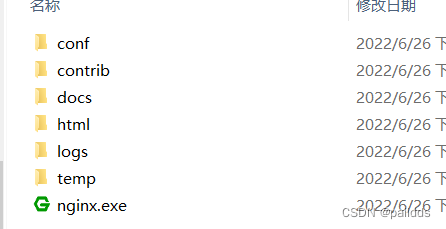
6.启动集群中所有的 Nacos Server,所有 Nacos Server 都启动成功后,双击 Nignx 安装目录下的 nginx.exe,启动 Nginx。
7.使用浏览器访问“http://localhost:1111/nacos/”,若成功访问 Nacos Server 的控制台,则说明 Nacos 集群部署成功,如下图。

8.修改服务注册地址
由单机版到集群版
# server-addr: localhost:8848 # 集群版 server-addr: localhost:1111 # 集群版- 1
- 2
- 3
9.重启 spring-cloud-alibaba-consumer-8101,并使用浏览器访问“http://localhost:1111/nacos”,查看“服务管理”下的“服务列表”,结果如下图。

-
相关阅读:
Java程序流程控制
ORA-32771 cannot add file to bigfile tablespace
【进程概念③】:进程环境变量/进程切换
从转载阿里开源项目 Egg.js 技术文档引发的“版权纠纷”,看宽松的 MIT 许可该如何用?...
C语言基础--数组
Leetcode 19. 删除链表的倒数第N个节点
Oracle Scheduler中日期表达式和PLSQL表达式的区别
C# 11新特性之原始字符串
Java第2章 类与对象(二)
python html(文件/url/html字符串)转pdf
- 原文地址:https://blog.csdn.net/paiidds/article/details/125464378
