-
利用Paddle OCR进行文字识别
利用Paddle OCR HubServing + Java Demo进行文字识别
需求描述
需要批量过滤一批本地图片,将含有网址水印的图片剔除
实现逻辑
使用python开源库 chinese_ocr_db_crnn_server 部署成本地http服务,使用Java进行http调用,获取图片中的文字信息,进行文字比较。
经测试,识别效果很好,准确率也很高,至于性能需要看服务器的配置了。
运行环境
名称 版本 操作系统 Centos7.9 python 3.7.0 pip3 22.1.1 paddlepaddle 2.3 1. 安装paddlepaddle
python -m pip install paddlepaddle==2.3.0 -i https://mirror.baidu.com/pypi/simple ## 验证安装是否成功,执行下面命令出现 PaddlePaddle is installed successfully 即是安装成功 python3 import paddle paddle.utils.run_check()- 1
- 2
- 3
- 4
- 5
安装的过程中由于硬件和操作系统环境不同,可能会出现某些依赖缺少的情况,需要自己进行排错安装
2. 下载Paddle OCR的源码
## git仓库克隆源码 git clone https://gitee.com/PaddlePaddle/PaddleOCR ## 移动源码到你想要的位置 mv ./PaddleOCR /PaddleOCR ##进入PaddleOCR目录进行依赖的安装 cd /PaddleOCR pip3 install -r requirements.txt -i https://pypi.tuna.tsinghua.edu.cn/simple- 1
- 2
- 3
- 4
- 5
- 6
- 7
3. 模型库下载
需要下载3个模型,分别是检测模型,方向分类器,识别模型
模型 链接 检测模型 https://paddleocr.bj.bcebos.com/dygraph_v2.0/ch/ch_ppocr_server_v2.0_det_infer.tar 方向分类器 https://paddleocr.bj.bcebos.com/dygraph_v2.0/ch/ch_ppocr_mobile_v2.0_cls_infer.tar 识别模型 https://paddleocr.bj.bcebos.com/dygraph_v2.0/ch/ch_ppocr_server_v2.0_rec_infer.tar 下载之后上传到PaddleOCR/interface目录下,interface如果无此目录则使用mkdir新建,然后解压
cd /PaddleOCR mkdir interface ## 模型解压 tar -xvf ch_ppocr_mobile_v2.0_cls_infer.tar tar -xvf ch_ppocr_server_v2.0_det_infer.tar tar -xvf ch_ppocr_server_v2.0_rec_infer.tar- 1
- 2
- 3
- 4
- 5
- 6
4. 安装HubServing服务
cd /PaddleOCR export PYTHONPATH=. ## 下载服务模型 hub install chinese_ocr_db_crnn_server==1.1.1 ## 服务启动 nohup hub serving start -m chinese_ocr_db_crnn_server >> /PaddleOCR/hub.log 2>&1 & ##出现 Running on http:/127.0.0.1:8866之类的信息表示启动成功 ## 服务停止命令 kill -9 pid ## 或者 hub serving stop- 1
- 2
- 3
- 4
- 5
- 6
- 7
- 8
- 9
- 10
- 11
5. 编写Java单元测试
package com.example.test.util; import java.io.*; import java.util.ArrayList; import java.util.List; /** * @autor Hou Dehong * @date 2022/5/19 * @description */ public class PaddleDemo2 { public static List<String> list = new ArrayList<>(); public static void main(String[] args) throws Exception { String url = "http://10.10.102.208:8866/predict/chinese_ocr_db_crnn_server"; String dirOri = "C:\\Users\\Administrator\\Desktop\\"; String fileName = "test.jpg"; // 读取文件 byte[] imgData = readFileByBytes(dirOri + fileName); String imgStr = Base64Util.encode(imgData); String param = "{\"images\":[\"" + imgStr + "\"]}"; System.out.println(fileName); String result = HttpUtil.postGeneralUrl(url, "application/json", param,"UTF-8"); System.out.println(result); } public static byte[] readFileByBytes(String filePath) throws IOException { File file = new File(filePath); if (!file.exists()) { throw new FileNotFoundException(filePath); } else { ByteArrayOutputStream bos = new ByteArrayOutputStream((int) file.length()); BufferedInputStream in = null; try { in = new BufferedInputStream(new FileInputStream(file)); short bufSize = 1024; byte[] buffer = new byte[bufSize]; int len1; while (-1 != (len1 = in.read(buffer, 0, bufSize))) { bos.write(buffer, 0, len1); } byte[] var7 = bos.toByteArray(); return var7; } finally { try { if (in != null) { in.close(); } } catch (IOException var14) { var14.printStackTrace(); } bos.close(); } } } }- 1
- 2
- 3
- 4
- 5
- 6
- 7
- 8
- 9
- 10
- 11
- 12
- 13
- 14
- 15
- 16
- 17
- 18
- 19
- 20
- 21
- 22
- 23
- 24
- 25
- 26
- 27
- 28
- 29
- 30
- 31
- 32
- 33
- 34
- 35
- 36
- 37
- 38
- 39
- 40
- 41
- 42
- 43
- 44
- 45
- 46
- 47
- 48
- 49
- 50
- 51
- 52
- 53
- 54
- 55
- 56
- 57
- 58
- 59
- 60
package com.example.test.util; /** * Base64 工具类 */ public class Base64Util { private static final char last2byte = (char) Integer.parseInt("00000011", 2); private static final char last4byte = (char) Integer.parseInt("00001111", 2); private static final char last6byte = (char) Integer.parseInt("00111111", 2); private static final char lead6byte = (char) Integer.parseInt("11111100", 2); private static final char lead4byte = (char) Integer.parseInt("11110000", 2); private static final char lead2byte = (char) Integer.parseInt("11000000", 2); private static final char[] encodeTable = new char[]{'A', 'B', 'C', 'D', 'E', 'F', 'G', 'H', 'I', 'J', 'K', 'L', 'M', 'N', 'O', 'P', 'Q', 'R', 'S', 'T', 'U', 'V', 'W', 'X', 'Y', 'Z', 'a', 'b', 'c', 'd', 'e', 'f', 'g', 'h', 'i', 'j', 'k', 'l', 'm', 'n', 'o', 'p', 'q', 'r', 's', 't', 'u', 'v', 'w', 'x', 'y', 'z', '0', '1', '2', '3', '4', '5', '6', '7', '8', '9', '+', '/'}; public Base64Util() { } public static String encode(byte[] from) { StringBuilder to = new StringBuilder((int) ((double) from.length * 1.34D) + 3); int num = 0; char currentByte = 0; int i; for (i = 0; i < from.length; ++i) { for (num %= 8; num < 8; num += 6) { switch (num) { case 0: currentByte = (char) (from[i] & lead6byte); currentByte = (char) (currentByte >>> 2); case 1: case 3: case 5: default: break; case 2: currentByte = (char) (from[i] & last6byte); break; case 4: currentByte = (char) (from[i] & last4byte); currentByte = (char) (currentByte << 2); if (i + 1 < from.length) { currentByte = (char) (currentByte | (from[i + 1] & lead2byte) >>> 6); } break; case 6: currentByte = (char) (from[i] & last2byte); currentByte = (char) (currentByte << 4); if (i + 1 < from.length) { currentByte = (char) (currentByte | (from[i + 1] & lead4byte) >>> 4); } } to.append(encodeTable[currentByte]); } } if (to.length() % 4 != 0) { for (i = 4 - to.length() % 4; i > 0; --i) { to.append("="); } } return to.toString(); } }- 1
- 2
- 3
- 4
- 5
- 6
- 7
- 8
- 9
- 10
- 11
- 12
- 13
- 14
- 15
- 16
- 17
- 18
- 19
- 20
- 21
- 22
- 23
- 24
- 25
- 26
- 27
- 28
- 29
- 30
- 31
- 32
- 33
- 34
- 35
- 36
- 37
- 38
- 39
- 40
- 41
- 42
- 43
- 44
- 45
- 46
- 47
- 48
- 49
- 50
- 51
- 52
- 53
- 54
- 55
- 56
- 57
- 58
- 59
- 60
- 61
- 62
- 63
- 64
- 65
- 66
package com.example.test.util; import java.io.BufferedReader; import java.io.DataOutputStream; import java.io.InputStreamReader; import java.net.HttpURLConnection; import java.net.URL; import java.util.List; import java.util.Map; /** * http 工具类 */ public class HttpUtil { public static String post(String requestUrl, String accessToken, String params) throws Exception { //String contentType = "application/x-www-form-urlencoded"; String contentType = "application/json"; return HttpUtil.post(requestUrl, accessToken, contentType, params); } public static String post(String requestUrl, String accessToken, String contentType, String params) throws Exception { String encoding = "UTF-8"; if (requestUrl.contains("nlp")) { encoding = "GBK"; } return HttpUtil.post(requestUrl, accessToken, contentType, params, encoding); } public static String post(String requestUrl, String accessToken, String contentType, String params, String encoding) throws Exception { // String url = requestUrl + "?access_token=" + accessToken; String url = requestUrl; return HttpUtil.postGeneralUrl(url, contentType, params, encoding); } public static String postGeneralUrl(String generalUrl, String contentType, String params, String encoding) throws Exception { URL url = new URL(generalUrl); // 打开和URL之间的连接 HttpURLConnection connection = (HttpURLConnection) url.openConnection(); connection.setRequestMethod("POST"); // 设置通用的请求属性 connection.setRequestProperty("Content-Type", contentType); // connection.setRequestProperty("Connection", "Keep-Alive"); connection.setUseCaches(false); connection.setDoOutput(true); connection.setDoInput(true); // 得到请求的输出流对象 DataOutputStream out = new DataOutputStream(connection.getOutputStream()); out.write(params.getBytes(encoding)); out.flush(); out.close(); // 建立实际的连接 connection.connect(); // 获取所有响应头字段 Map<String, List<String>> headers = connection.getHeaderFields(); // 遍历所有的响应头字段 /* for (String key : headers.keySet()) { System.err.println(key + "--->" + headers.get(key)); }*/ // 定义 BufferedReader输入流来读取URL的响应 BufferedReader in = null; in = new BufferedReader( new InputStreamReader(connection.getInputStream(), encoding)); String result = ""; String getLine; while ((getLine = in.readLine()) != null) { result += getLine; } in.close(); // System.err.println("result:" + result); return result; } }- 1
- 2
- 3
- 4
- 5
- 6
- 7
- 8
- 9
- 10
- 11
- 12
- 13
- 14
- 15
- 16
- 17
- 18
- 19
- 20
- 21
- 22
- 23
- 24
- 25
- 26
- 27
- 28
- 29
- 30
- 31
- 32
- 33
- 34
- 35
- 36
- 37
- 38
- 39
- 40
- 41
- 42
- 43
- 44
- 45
- 46
- 47
- 48
- 49
- 50
- 51
- 52
- 53
- 54
- 55
- 56
- 57
- 58
- 59
- 60
- 61
- 62
- 63
- 64
- 65
- 66
- 67
- 68
- 69
- 70
- 71
- 72
- 73
- 74
- 75
- 76
- 77
- 78
- 79
- 80
6.调用返回结果
text中的即为识别出的文字,文字识别出来了,可以在java中进行text的获取判断,实现自己想实现的需求
{"msg":"","results":[{"data":[{"confidence":0.9984913468360901,"text":"只有自己变优秀了","text_box_position":[[182,357],[391,357],[391,380],[182,380]]},{"confidence":0.9871423244476318,"text":"其他的事情才会跟着好起来","text_box_position":[[181,391],[501,391],[501,414],[181,414]]}],"save_path":""}],"status":"000"}- 1
测试图片
[外链图片转存失败,源站可能有防盗链机制,建议将图片保存下来直接上传(img-59HUgBiE-1656496465758)(C:\Users\Administrator\AppData\Roaming\Typora\typora-user-images\image-20220629174229948.png)]
9984913468360901,“text”:“只有自己变优秀了”,“text_box_position”:[[182,357],[391,357],[391,380],[182,380]]},{“confidence”:0.9871423244476318,“text”:“其他的事情才会跟着好起来”,“text_box_position”:[[181,391],[501,391],[501,414],[181,414]]}],“save_path”:“”}],“status”:“000”}
测试图片 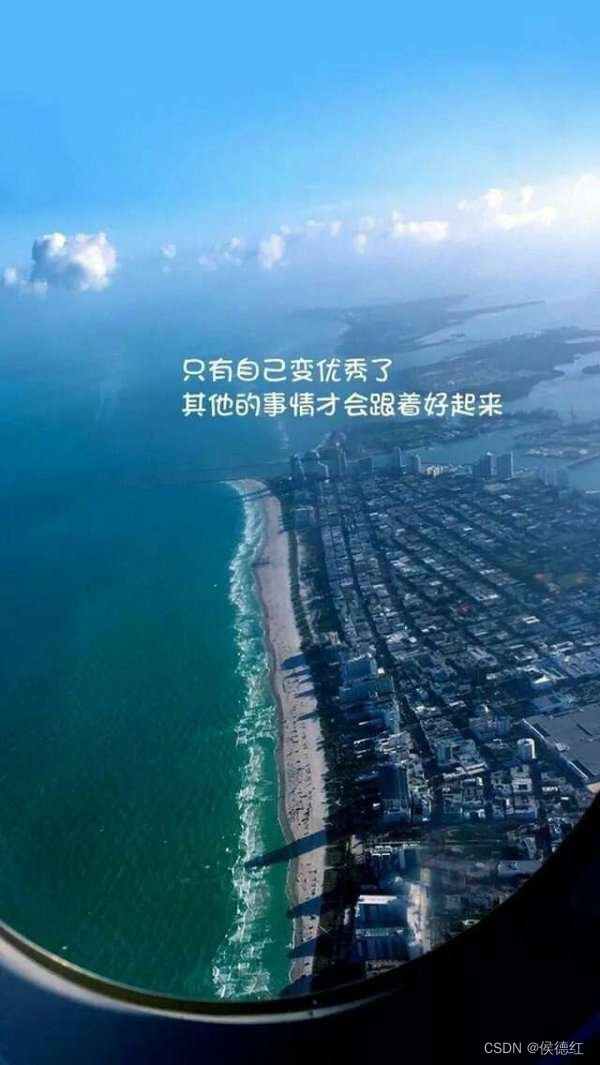- 1
- 2
- 3
- 4
- 5
- 6
- 7
-
相关阅读:
华为云云耀云服务器L实例评测|轻松购买 快速使用 上云如此简单【详细版】
batch_size和data_iter的理解
Web 自动化神器 TestCafe—页面基本操作篇
海南热带海洋学院金秋悦读《乡村振兴战略下传统村落文化旅游设计》2023新学年许少辉八一新书
毕设作品案例-基于JAVA-SSM实现-小程序-商品展示系统-微信外卖小程序-附源码+LW(文档+PPT)+示例视频
万字长文详解静态图和动态图中的自动求导机制
编译原理:上下文无关文法 CFG
Running job: job_1709516801756_0003
【服务器数据恢复】IBM服务器raid5两块硬盘离线数据恢复案例
IDEA 连接 数据库
- 原文地址:https://blog.csdn.net/hou_zi/article/details/125526891
