-
Selinux
一、实验环境的部署
配置的虚拟机,网络和软件仓库和主机名称是配置好的
vim /etc/sysconfig/selinux- 1
将SELINUX=enforcing改成disabled
selinux的关闭开启必须重启系统,要不然无法生效reboot dnf install vsftpd -y- 1
- 2
修改配置文件,使得匿名用户可以访问上传
vim /etc/vsftpd/vsftpd.conf anonymous_enable=NO 改成YES anon_upload_enable=YES 开启该功能,去掉# chgrp ftp /var/ftp/pub/ chmod 775 /var/ftp/pub/ systemctl enable vsftpd systemctl disable --now firewalld- 1
- 2
- 3
- 4
- 5
- 6
- 7
可以看到selinux这个软件关闭了
getenforce Disabled- 1
- 2
二、selinux的介绍
全称:内核级加强型火墙
作用:
1.特定的程序能访问特定的安全上下文文件
2.程序的某些功能加上开关
3.端口限制2.1当selinux是Disabled时候
文件:
touch /mnt/yan mv /mnt/yan /var/ftp/- 1
- 2
lftp 172.25.138.10 lftp 172.25.138.10:~> ls drwxrwxr-x 2 0 50 20 Jun 28 20:16 pub -rw-r--r-- 1 0 0 0 Jun 28 20:06 yan- 1
- 2
- 3
- 4
上传程序:
lftp 172.25.138.10:/pub> put /etc/passwd lftp 172.25.138.10:/pub> ls -rw------- 1 14 50 2655 Jun 28 20:16 passwd- 1
- 2
- 3
显示文件的信息,某些信息是?
ls -Z /var/ftp/ drwxrwxr-x root ftp ? pub -rw-r--r-- root root ? yan- 1
- 2
- 3
程序的LABEL信息前面也是缺失的

2.2 当selinux是enforcing时候
当selinux是enforcing时候会对所有的文件和程序加入安全上下文
vim /etc/sysconfig/selinux SELINUX=enforcing reboot- 1
- 2
- 3
在重启的时候能看到
selinux在系统当中正在实现初始化
初始化的过程:对所有/底下所有的文件读取并且重新设定标签getenforce Enforcing- 1
- 2
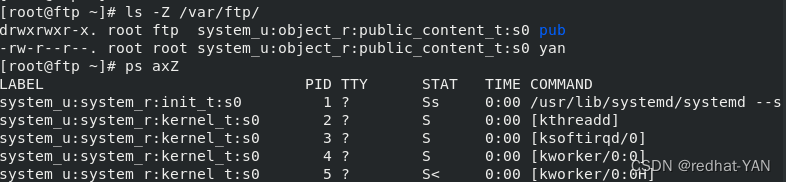
显示的?变成信息了(安全上下文),程序的LABEL信息(安全上下文)也有了
安全上下文,一个标签(类似护照)ls -Z /var/ftp/ drwxrwxr-x. root ftp system_u:object_r:public_content_t:s0 pub -rw-r--r--. root root system_u:object_r:public_content_t:s0 yan ps axZ- 1
- 2
- 3
- 4
在其余目录的文件移动(数据不会变化)到ftp默认发布目录的时候,访问看不见,并且上传不了[root@ftp ~]# touch /mnt/yan1 [root@ftp ~]# mv /mnt/yan1 /var/ftp/ [root@ftp ~]# ls /var/ftp/ pub yan yan1 [root@ftp ~]# lftp 172.25.138.10 lftp 172.25.138.10:~> ls drwxrwxr-x 2 0 50 20 Jun 28 20:16 pub -rw-r--r-- 1 0 0 0 Jun 28 20:06 yan lftp 172.25.138.10:/pub> put /etc/passwd put: Access failed: 553 Could not create file. (passwd)- 1
- 2
- 3
- 4
- 5
- 6
- 7
- 8
- 9
- 10
ftp的安全上下文ftpd_t与pub和yan(system_u:object_r:public_content_t:s0)安全上下文匹配,程序访问文件就可以访问,底下的yan1不匹配所以被拒绝了,是selinux这个机制把程序访问文件的权限拒绝掉,所以程序访问文件的机制多了一条,所以更加安全了
[root@ftp ~]# ls -Z /var/ftp/ drwxrwxr-x. root ftp system_u:object_r:public_content_t:s0 pub -rw-r--r--. root root system_u:object_r:public_content_t:s0 yan -rw-r--r--. root root unconfined_u:object_r:mnt_t:s0 yan1 [root@ftp ~]# ps axZ | grep vsftpd system_u:system_r:ftpd_t:s0-s0:c0.c1023 3173 ? Ss 0:00 /usr/sbin/vsftpd /etc/vsftpd/vsftpd.conf unconfined_u:unconfined_r:unconfined_t:s0-s0:c0.c1023 3489 pts/0 R+ 0:00 grep --color=auto vsftpd- 1
- 2
- 3
- 4
- 5
- 6
- 7
ftp可以共享文件,某些功能安全性不高,加载了selinux后,ftp这类程序里面的某些功能默认情况下是开启的,但是加了selinux后,这些程序加了开关,必须要用管理员的身份打开后(手动打开),才能使用,这样安全性更改
程序功能开关叫做se波尔值se bool
波尔值 01 yes no on off true false
查看波尔值,可以发现功能是关闭了[root@ftp ~]# getsebool -a | grep ftp- 1

程序的接口,只要没有被占用就可以直接用,开启selinux后,不可以随便占用没有用的端口[root@ftp ~]# vim /etc/ssh/sshd_config Port 2222 [root@ftp ~]# systemctl restart sshd Job for sshd.service failed because the control process exited with error code. See "systemctl status sshd.service" and "journalctl -xe" for details.- 1
- 2
- 3
- 4
ssh这个端口只能用22,用22端口,能启动
[root@ftp ~]# semanage port -l | grep ssh ssh_port_t tcp 22 [root@ftp ~]# vim /etc/ssh/sshd_config Port 22 [root@ftp ~]# systemctl restart sshd- 1
- 2
- 3
- 4
- 5
2.3 总结
selinux限制1:文件被访问的时候,程序必须有和文件匹配的安全上下文才能被访问,否则seliunx会把程序拒绝掉
selinux限制2:程序功能默认情况下会被seliunx加上开关,并且是关闭状态,要使用这个功能,必须手动打开,否则会被禁止
selinux限制3:程序的端口在seliunx开启的情况会被selinux固定,如果使用其它端口,必须在selinux设定端口的允许性否则会被拒绝三、selinux状态控制
3.1selinux的开启关闭
开启状态2个,enforcing(强制)和permissive(警告),关闭是disabled
enforcing:拒绝 permissive:警告
enforcing和permissive之间切换,服务器不需要重启,但是enforcing和permissive与disabled切换,服务器需要重启,因为selinux是内核上的加强型火墙,是内核的插件,selinux开启关闭需要对内核进行初始化[root@ftp ~]# vim /etc/selinux/config 开启关闭必须修改这个配置文件- 1
编辑
/etc/selinux/config和/etc/sysconfig/selinux效果是一样的,第二个是第一个的快捷方式[root@ftp ~]# ls -l /etc/sysconfig/selinux lrwxrwxrwx. 1 root root 17 Mar 28 2021 /etc/sysconfig/selinux -> ../selinux/config- 1
- 2

查看状态[root@ftp ~]# getenforce Enforcing- 1
- 2
selinux开启状态下,enforcing与permissive之间的切换
[root@ftp ~]# setenforce 0 [root@ftp ~]# getenforce Permissive [root@ftp ~]# setenforce 1 [root@ftp ~]# getenforce Enforcing- 1
- 2
- 3
- 4
- 5
- 6
selinux开启后重启系统不会重新初始化,当selinux关闭再打开,重启会重新初始化
selinux重新启动的标志文件,当这个文件存在,selinux在系统重启的时候会重新初始化[root@ftp ~]# touch /.autorelabel reboot 尽管时在selinux开启后重启系统,但是还是会重新初始化标签- 1
- 2
启动系统时,想让selinux关闭,方法一进入服务器后编辑文件,下次重启服务器,服务器关闭seliunx
方法二,系统开机的时候,强制指定selinux开启或者关闭,当下直接关闭,不需要等待下一次再关闭
方法二:进入服务器的时候按e

在内核参数中加入selinux=0,表示在系统启动的时候,无论在文件设定是selinux开启还是关闭,selinux一定是关闭状态
ctrl+x

[root@ftp ~]# getenforce Disabled [root@ftp ~]# cat /etc/sysconfig/selinux SELINUX=enforcing reboot [root@ftp ~]# getenforce [root@ftp ~]# getenforce Enforcing- 1
- 2
- 3
- 4
- 5
- 6
- 7
- 8
四、文件的安全上下文的控制
4.1安全上下文的查看
文件的安全上下文的查看
ls -Z
这个就是安全上下文mnt_t[root@ftp ~]# ls -Z /mnt/yan1 -rw-r--r--. root root unconfined_u:object_r:mnt_t:s0 /mnt/yan1- 1
- 2
目录安全上下文的查看
ls -Zd
这个就是安全上下文mnt_t[root@ftp ~]# ls -Zd /mnt drwxr-xr-x. root root system_u:object_r:mnt_t:s0 /mnt- 1
- 2
程序的安全上下文的查看
ps axZ | grep 程序
这个就是它的安全上下文ftpd_t[root@ftp ~]# ps axZ | grep vsftpd system_u:system_r:ftpd_t:s0-s0:c0.c1023 3178 ? Ss 0:00 /usr/sbin/vsftpd /etc/vsftpd/vsftpd.conf unconfined_u:unconfined_r:unconfined_t:s0-s0:c0.c1023 3486 pts/0 S+ 0:00 grep --color=auto vsftpd- 1
- 2
- 3
文件移动的时候安全上下文不会改变,都是
mnt_t[root@ftp ~]# ls -Z /mnt/yan3 -rw-r--r--. root root unconfined_u:object_r:mnt_t:s0 /mnt/yan3 [root@ftp ~]# ls -Z /var/ftp/yan3 -rw-r--r--. root root unconfined_u:object_r:mnt_t:s0 yan3- 1
- 2
- 3
- 4
由于安全上下文不变,所以ftp的程序访问时被拒绝
[root@ftp ~]# lftp 172.25.138.10 lftp 172.25.138.10:~> ls drwxrwxr-x 2 0 50 20 Jun 28 20:16 pub -rw-r--r-- 1 0 0 0 Jun 28 20:06 yan -rw-r--r-- 1 0 0 0 Jun 28 20:35 yan1- 1
- 2
- 3
- 4
- 5
4.2 临时修改安全上下文
当selinux关闭再开启后(重新初始化),会恢复原来的安全上下文
mnt_t[root@ftp ~]# chcon -t public_content_t /var/ftp/yan3 [root@ftp ~]# ls -Z /var/ftp/yan3 -rw-r--r--. root root unconfined_u:object_r:public_content_t:s0 /var/ftp/yan3 [root@ftp ~]# lftp 172.25.138.10 lftp 172.25.138.10:~> ls drwxrwxr-x 2 0 50 20 Jun 28 20:16 pub -rw-r--r-- 1 0 0 0 Jun 28 20:06 yan -rw-r--r-- 1 0 0 0 Jun 28 20:35 yan1 -rw-r--r-- 1 0 0 0 Jun 28 22:03 yan3 lftp 172.25.138.10:/> quit- 1
- 2
- 3
- 4
- 5
- 6
- 7
- 8
- 9
- 10
4.3永久设定安全上下文
这里列表里面都是被永久固定的
yan3不在安全上下文列表中[root@ftp ~]# semanage fcontext -l | grep /var/ftp /var/ftp(/.*)? all files system_u:object_r:public_content_t:s0 /var/ftp/bin(/.*)? all files system_u:object_r:bin_t:s0 /var/ftp/etc(/.*)? all files system_u:object_r:etc_t:s0 /var/ftp/lib(/.*)? all files system_u:object_r:lib_t:s0 /var/ftp/lib/ld[^/]*\.so(\.[^/]*)* regular file system_u:object_r:ld_so_t:s0 [root@ftp ~]# semanage fcontext -l | grep /var/ftp/yan3- 1
- 2
- 3
- 4
- 5
- 6
- 7
这种修改是包括目录和目录底下所有文件安全上下文都修改,shell中/?*有特殊含义,要用’'注释起来
[root@ftp ~]# semanage fcontext -a -t public_content_t '/yan(/.*)?'- 1
这种修改是目录安全上下文修改,底下的文件不被修改
semanage fcontext -a -t public_content_t /yan- 1
更改安全上下文后,目录本身的安全上下文不会变的,只有selinux重启后,才会变成设定的样子,立即生效需要刷新
[root@ftp ~]# semanage fcontext -l | grep /yan /yan(/.*)? all files system_u:object_r:public_content_t:s0 [root@ftp ~]# restorecon -RvvF /yan/ 对目录刷新 restorecon reset /yan context unconfined_u:object_r:default_t:s0->system_u:object_r:public_content_t:s0- 1
- 2
- 3
- 4
五、sebool值控制服务功能
[root@ftp ~]# lftp 172.25.138.10 lftp 172.25.138.10:/> cd pub lftp 172.25.138.10:/pub> put /etc/passwd put: Access failed: 553 Could not create file. (passwd)- 1
- 2
- 3
- 4
原来是只读的,现在可以读写
[root@ftp ~]# ls -Z /var/ftp/ drwxrwxr-x. root ftp system_u:object_r:public_content_t:s0 pub [root@ftp ~]# chcon -t public_content_rw_t /var/ftp/pub/ [root@ftp ~]# ls -Zd /var/ftp/pub/ drwxrwxr-x. root ftp system_u:object_r:public_content_rw_t:s0 /var/ftp/pub/- 1
- 2
- 3
- 4
- 5
[root@ftp ~]# lftp 172.25.138.10 lftp 172.25.138.10:~> cd pub lftp 172.25.138.10:/pub> put /etc/passwd put: Access failed: 553 Could not create file. (passwd)- 1
- 2
- 3
- 4
因为匿名用户写的功能是关闭的
[root@ftp ~]# getsebool -a | grep ftp ftpd_anon_write --> off- 1
- 2
-P是永久生效,要不然系统重启会还原(永久设定)
-a是查看所有[root@ftp ~]# setsebool -P ftpd_anon_write on [root@ftp ~]# getsebool -a | grep ftp | grep ftpd_anon_write ftpd_anon_write --> on- 1
- 2
- 3
[root@ftp ~]# lftp 172.25.138.10 lftp 172.25.138.10:~> cd pub/ lftp 172.25.138.10:/pub> put /etc/group 470 bytes transferred- 1
- 2
- 3
- 4
六、selinux对于服务端口的控制
[root@ftp ~]# vim /etc/ssh/sshd_config Port 2222 [root@ftp ~]# systemctl restart sshd Job for sshd.service failed because the control process exited with error code. See "systemctl status sshd.service" and "journalctl -xe" for details.- 1
- 2
- 3
- 4
所用端口必须22
[root@ftp ~]# semanage port -l | grep ssh ssh_port_t tcp 22- 1
- 2
[root@ftp ~]# semanage port -a -t ssh_port_t -p tcp 2222 [root@ftp ~]# semanage port -l | grep ssh ssh_port_t tcp 2222, 22 [root@ftp ~]# systemctl restart sshd [root@ftp ~]# systemctl restart sshd [root@ftp ~]# netstat -antlupe | grep sshd tcp 0 0 0.0.0.0:2222 0.0.0.0:* LISTEN 0 41046 3660/sshd tcp 0 0 172.25.138.10:22 172.25.138.250:37738 ESTABLISHED 0 24736 3431/sshd: root@pts tcp6 0 0 :::2222 :::* LISTEN 0 41048 3660/sshd- 1
- 2
- 3
- 4
- 5
- 6
- 7
- 8
- 9
去掉2222端口
[root@ftp ~]# semanage port --help [root@ftp ~]# semanage port -d -t ssh_port_t -p tcp 2222 [root@ftp ~]# semanage port -l | grep ssh ssh_port_t tcp 22 [root@ftp ~]# systemctl restart sshd Job for sshd.service failed because the control process exited with error code. See "systemctl status sshd.service" and "journalctl -xe" for details.- 1
- 2
- 3
- 4
- 5
- 6
-
相关阅读:
每日一题——
【Linux】25. 生产者消费者模型
BetaFlight深入传感设计之六:四元数计算方法
javaSE- 方法的使用
软件测试中如何快速Linux下部署禅道
conda从4.12升级到最新版23.9 自动升级失败 手动升级方法
Java--嵌套类
flinkcdc踩坑指南
集合框架----源码解读HashSet篇
【中级软件设计师】上午题12-软件工程(2):单元测试、黑盒测试、白盒测试、软件运行与维护
- 原文地址:https://blog.csdn.net/westos_yanzheng/article/details/125504303