-
vue3 tsx语法
1,v-model
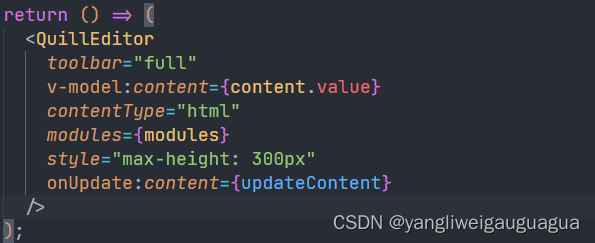
tsx语法也可以使用v-model语法来绑定变量
2,事件 @click,@change
tsx语法统一把@符号变成on+事件名称的格式

3,属性,slot,emit位置
vue3组件获取props,slots,emits统一在setup方法中拿到

4, 插槽
tsx语法的组件插槽和传统的vue语法存在很大不同
传统插槽:

在tsx语法中,插槽要这么写

5,注意事项
tsx组件只有一个根节点
tsx变量直接使用大括号,不需要使用v-bind
tsx在大括号中写代码语句,在圆括号中写jsx语法
6,例子: 一个封装的editor组件
- import { defineComponent, ref } from "vue";
- import { QuillEditor } from "@vueup/vue-quill";
- import "@vueup/vue-quill/dist/vue-quill.snow.css";
- import ImageUploader from "quill-image-uploader";
- import { upload } from "@/api";
- export default defineComponent({
- props: {
- modelValue: {
- type: String,
- default: () => "",
- },
- },
- emits: ["update:modelValue"],
- setup(props, { emit }) {
- const content = ref(props.modelValue);
- const updateContent = (content: any) => {
- emit("update:modelValue", content);
- };
- const modules = {
- name: "imageUploader",
- module: ImageUploader,
- options: {
- upload: async (file: any) => {
- const res = await upload(file);
- return res.data.url;
- },
- },
- };
- return () => (
- <QuillEditor
- toolbar="full"
- v-model:content={content.value}
- contentType="html"
- modules={modules}
- style="max-height: 300px"
- onUpdate:content={updateContent}
- />
- );
- },
- });
-
相关阅读:
2022年你必须要会的微前端 -(源码篇)
linux驱动开发:linux设备模型
我们总结了 3 大Nacos使用建议,并首次公开 Nacos 3.0 规划图 Nacos 开源 4 周年
备战数学建模1——MATLAB矩阵相关
【蓝桥杯选拔赛真题04】C++计算24数字游戏 青少年组蓝桥杯C++选拔赛真题 STEMA比赛真题解析
【gazebo要素9】 SDF制作Model文件(2)
【c++百日刷题计划】 ———— DAY18,刷题百天,养成刷题好习惯
【博客490】prometheus-----综合优化
hcie数通和云计算选哪个好?
提高倾斜摄影三维模型顶层合并构建效率的技术方法初探
- 原文地址:https://blog.csdn.net/qq_32674347/article/details/125499731
