-
Day18:C++飞机大战
0.基本效果界面展示:
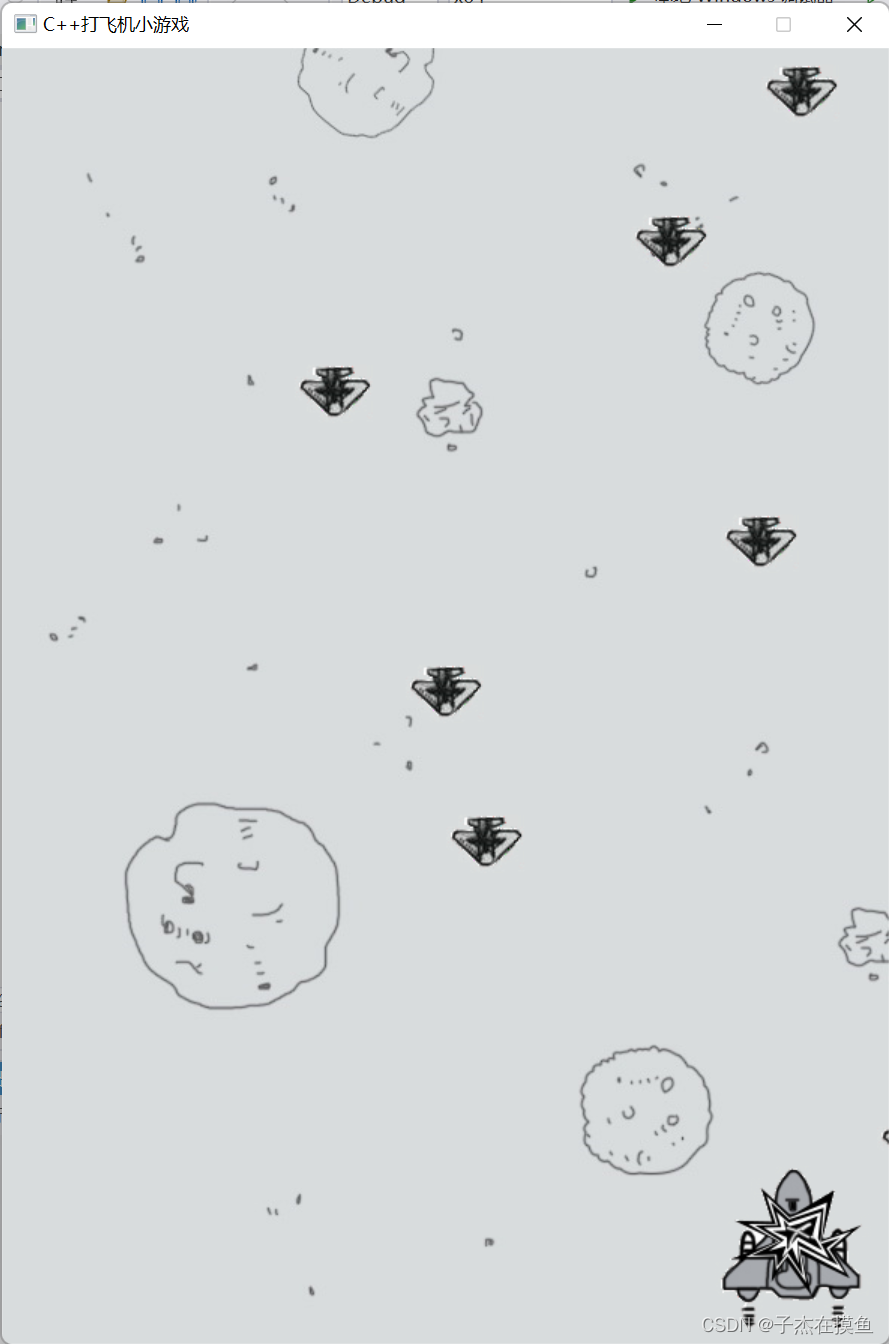
一、思路与细节
1.仍然采用单例设计模式,高度抽象出几个类如point、graph、element(敌机、主机(role包含数据成员包含子弹)均包含其作为一个数据成员,进行共通的操作)。
2.子弹十分密集,按一下空格会发出很多子弹:写一个timer定时器
(注:当声明和实现放在同一个文件去实现的时候,可以以.hpp结尾)
MyTimer::Timer(100,0) #100ms产生一颗3.注:虽然作了前向声明,但是在.cpp文件中,找不到其相应的成员函数,
那一定是没有在.cpp中包含其相关的头文件。4.我承认:debug最好的定位方式,注释掉疑似代码,看相关功能的变化。
二、具体实现:
公共头文件:common.h
- #pragma once
- #include<graphics.h>
- #include<iostream>
- #include<thread> /*c++多线程*/
- #include<ctime>
- #include<string>
- #include<map>
- #include<list>
- #include<vector>
- #include<mmsystem.h>
- #pragma commment(lib,"winmm.lib")
- using namespace std;
计时器:timer.h
- #pragma once
- #include"common.h"
- class MyTimer
- {
- public:
- static bool Timer(int duration, int id);
- protected:
- };
time.cpp
- #include "timer.h"
- bool MyTimer::Timer(int duration, int id)
- {
- static int startTime[10];/*自动初始化为0*/
- int endTime = clock();
- if (endTime - startTime[id] >= duration)
- {
- startTime[id] = endTime;
- return true;
- }
- return false;
- }
资源存放类: res.h
在上个推箱子的项目中已经讲过单例设计的基本操作了。在此大致提几个点,都是相通的,大部分的数据成员和成员函数都是static,直接通过类名调用。
①构造函数是私有!
②给一个公有接口,返回资源类的指针,进行对其内部的相关函数以及成员的操作
③数据成员用的map进行映射相关的资源!方便后面对资源的索引与调用。
- #pragma once
- #include"common.h"
- /*仍然采用单例设计模式*/
- class Res
- {
- public:
- static int WIDTH(string name); /*获取资源的宽度和高度*/
- static int HEIGHT(string name);
- static Res* GetInstance();
- static void DrawIMG(int x, int y,string name);
- static void DrawRole(int x, int y, string name, int preIndex);
- /*注;角色有不同的,用preIndex来索引*/
- //static DWORD WINAPI PlayMusic(LPVOID lparame); /*播放音乐的线程处理函数*/
- public:
- static map<string,IMAGE*> img; /*图片*/
- static map<string, string> music; /*音乐*/
- public:
- ~Res();
- private:
- Res();
- };
res.cpp
(静态数据成员的初始化,
此外,此处还涉及一个细节,如何去掉一个物体图片周围的阴影部分:大致的实现原理是:准备原图一份,需要切除部分一张图片,/*NOTSRCERASE 先对遮罩进行处理 , 使得遮罩白色变黑 ,黑色区域变透明*//*SRCINVERT 在对小鸟原图处理*/->按位合&,实现背景部分的透明化操作)
参考博客:c愤怒小鸟
- #include "res.h"
- /*step1:类外对静态数据成员进行初始化*/
- map<string, IMAGE*>Res::img; /*图片*/
- map<string, string>Res::music; /*音乐*/
- /*获取图片的宽度和高度*/
- int Res::WIDTH(string name)
- {
- return GetInstance()->img[name]->getwidth(); //img是一个map容器,通过name去映射出IMAGE*类型的数组,
- } //IMAGE自带获取图片的宽度和高度的相关功能
- int Res::HEIGHT(string name)
- {
- return GetInstance()->img[name]->getheight();
- }
- Res* Res::GetInstance()
- {
- static Res* res = new Res;
- return res;/*单例设计模式的固定写法*/
- }
- //只有一张图片的贴图:即背景图贴图
- void Res::DrawIMG(int x, int y, string name)
- {
- putimage(x, y, GetInstance()->img[name]);
- }
- void Res::DrawRole(int x, int y, string name, int preIndex)
- {
- //透明贴图(注意:一个固定的贴图方式->去掉背景!!!!)
- /*留有白色区域棱角就不好看了 ,此时就需要用函数去处理 , 是白色区域透明化,拿到小鸟的遮罩和原图*/
- putimage(x, y, GetInstance()->img[name] + preIndex, NOTSRCERASE);/*NOTSRCERASE 先对遮罩进行处理 , 使得遮罩白色变黑 ,黑色区域变透明*/
- putimage(x, y, GetInstance()->img[name] + preIndex+1, SRCINVERT);/*SRCINVERT 在对小鸟原图处理*/
- }
- Res::~Res()
- {
- delete img["背景"];
- delete[]img["角色"];
- delete[]img["敌机"];
- delete[]img["子弹"];
- }
- Res::Res()
- {
- /*路径处理*/
- string background = "..//res//background.jpg";
- string roleImg[4] = { "..//res//planeExplode_1.jpg","..//res//planeExplode_2.jpg",
- "..//res//planeNormal_1.jpg","..//res//planeNormal_2.jpg" }; //->注:只有下标0和2为有效的人物角色,下标1和3是0和2的遮罩,用于去阴影的。
- string ballImg[2] = {"..//res//bullet1.jpg","..//res//bullet2.jpg"};
- string enemy[4] = { "..//res//enemy_1.jpg","..//res//enemy_2.jpg",
- "..//res//enemyPlane1.jpg", "..//res//enemyPlane2.jpg", };
- img["背景"] = new IMAGE;
- img["角色"] = new IMAGE[4];
- img["子弹"] = new IMAGE[2];
- img["敌机"] = new IMAGE[4];
- loadimage(img["背景"], background.c_str());
- for (int i = 0; i < 4; i++)
- {
- loadimage(img["角色"] + i, roleImg[i].data());
- loadimage(img["敌机"] + i, enemy[i].data());
- }
- for (int i = 0; i < 2; i++)
- {
- loadimage(img["子弹"] + i, ballImg[i].c_str()); /*c_str()和data()等效,都是转化为c语言风格的string*/
- }
- }
专门用于地图操作的类: graph.h
负责①创建句柄,并②将地图绘制好!
- #pragma once
- class Graph
- {
- public:
- Graph();
- ~Graph();
- void DrawMap(); /*对于地图的切换*/
- protected:
- };
graph.cpp
- #include "graph.h"
- #include"res.h"
- Graph::Graph()
- {
- /*用图片的大小来初始化这个窗口*/
- initgraph(Res::GetInstance()->img["背景"]->getwidth(),
- Res::GetInstance()->img["背景"]->getheight());
- }
- Graph::~Graph()
- {
- closegraph();
- }
- void Graph::DrawMap()
- {
- Res::DrawIMG(0, 0, "背景"); /*第3个参数是用来map索引相关的资源的*/
- }
抽象出敌机、玩家(主机)、子弹的共性类: element.h
共同的特征方法:①x、y坐标②是否存活(bool状态)③血量④相关图片的宽度和高度
⑤自身的绘制(直接调用Res类中的绘制函数即可。) ⑥自身的移动(直接调用point类的相关方法即可(见下))
共同的数据成员:①坐标②名称③是否存活标记④血量
- #include"common.h"
- #include"res.h"
- #include"point.h"
- /*抽象出一个元素类,所有的敌机和角色都是由这个进行派生的*/
- class Element
- {
- public:
- virtual ~Element();
- Element();
- Element(int x, int y, string name, bool live, int hp = 0);
- int& GetX();
- int& GetY();
- bool& GetLive();
- int& GetHp();
- int GetWidth();
- int GetHeight();
- void DrawElement(int pre);
- void MoveElement(int speed,Point::Dir dir);
- protected:
- Point point; /*元素在窗口上的位置*/
- string name; /*元素的名字->用处之一:获取元素的高度和宽度*/
- bool live; /*是否存活的标记*/
- int hp; /*血量*/
- };
element.cpp
- #include "element.h"
- #include"res.h"
- Element::~Element()
- {
- }
- Element::Element()
- {
- }
- Element::Element(int x, int y, string name, bool live, int hp):point(x,y),name(name)/*类的组合->初始化参数列表*/
- {
- this->live = live;
- this->hp = hp;
- }
- int& Element::GetX()
- {
- return point.getX();
- }
- int& Element::GetY()
- {
- return point.getY();
- }
- bool& Element::GetLive()
- {
- return live;
- }
- int& Element::GetHp()
- {
- return hp;
- }
- int Element::GetWidth()
- {
- return Res::GetInstance()->WIDTH(name);/*直接调用相应的接口,调用中间函数*/
- }
- int Element::GetHeight()
- {
- return Res::GetInstance()->HEIGHT(name);
- }
- void Element::DrawElement(int pre)
- {
- Res::GetInstance()->DrawRole(point.getX(), point.getY(), name, pre);
- }
- void Element::MoveElement(int speed, Point::Dir dir)
- {
- point.move(speed, dir);
- }
内部物体的移动原理抽象出来的类: point.h
关键:枚举类型->上下左右
成员函数:①x、y坐标的接口②构造函数、拷贝构造函数③关键还是move()方法:如何实现物体的移动,要做好与Element类的对接。
- #pragma once
- #include"common.h"
- /*重点:所有物体的运转,都是坐标的改变,于是抽象出此坐标类*/
- class Point
- {
- public:
- enum Dir{left,right,down,up};
- Point(int x = 0, int y = 0);
- Point(const Point& point);
- int& getX();
- int& getY();
- /*移动点*/
- void move(int speed, Dir dir);
- protected:
- int x;
- int y;
- };
point.cpp
- #include "point.h"
- Point::Point(int x, int y)
- {
- this->x = x;
- this->y = y;
- }
- Point::Point(const Point& point)
- {
- this->x = point.x;
- this->y = point.y;
- }
- int& Point::getX()
- {
- return x;
- }
- int& Point::getY()
- {
- return y;
- }
- void Point::move(int speed, Dir dir)
- {
- switch (dir)
- {
- case Point::left:
- this->x -= speed;
- break;
- case Point::right:
- this->x += speed;
- break;
- case Point::up:
- this->y -= speed;
- break;
- case Point::down:
- this->y += speed;
- break;
- }
- }
主机的具体实现类: role.h
数据成员:主角Element*类型的指针plane、和一个存放Element*类型的list
容器(当做bullet来用!)
方法:①构造函数(飞机的居中,hp和live状态的设置)
②画飞机和子弹(遍历调用)只需要调用element中写好的方法即可。
③数据成员的接口
④子弹的移动(只会向前移动,遍历每一个子弹-=速度,改变y坐标即可)
⑤plane的移动(异步函数的调用),GetAsyncKeyState()函数调用(具体说明看实现部分的注释!)
注:plane的移动中,核心的几点:(i)按上下左右键实现移动调用element类中写好的方法暂且不提,(ii)还有按下空格键,产生子弹(塞到链表中,new出来(注意产生的位置)),为了不让子弹过于密集,采用timer计时器!(iii)子弹的移动后,移动子弹+绘制子弹!!control中就直接调用此函数即可。
- #pragma once
- #include"common.h"
- class Element; /*因为只用到了该类的指针,所以直接前向声明即可!!!*/
- class Role
- {
- public:
- Role();
- ~Role();
- void DrawPlane(int preIndex);
- void MovePlane(int speed);
- void DrawBullet();
- void MoveBullet(int speed);
- Element*& GetPlane();
- list<Element*>& GetBullet();
- protected:
- Element* plane; /*角色*/
- list<Element*>bullet; /*子弹*/
- };
role.cpp
- #include "role.h"
- #include"res.h"
- #include"element.h"
- #include"timer.h"
- Role::Role()
- {
- plane = new Element(Res::GetInstance()->WIDTH("背景")/2-Res::GetInstance()->WIDTH("角色")/2, //x
- Res::GetInstance()->HEIGHT("背景")-Res::GetInstance()->HEIGHT("角色"), //y
- "角色", //角色名
- true, //存活状态
- 100); /*产生一个居中的飞机*/ //hp
- }
- Role::~Role()
- {
- }
- void Role::DrawPlane(int preIndex)
- {
- plane->DrawElement(preIndex); /*元素类已经做好了*/
- }
- void Role::MovePlane(int speed)
- {
- /*GetAsyncKeyState是一个用来判断函数调用时指定虚拟键的状态,确定用户当前是否按下了键盘上的一个键的函数。如果按下,则返回值最高位为1。*/
- /*另一个函数GetKeyState与GetAsyncKeyState函数不同。GetAsyncKeyState在按下某键的同时调用,判断正在按下某键。
- GetKeyState则在按过某键之后再调用,它返回最近的键盘消息从线程的队列中移出时的键盘状态,判断刚按过了某键。
- GetAsyncKeyState 取异步键状态。*/
- if (GetAsyncKeyState(VK_UP) && plane->GetY() >= 0)
- {
- plane->MoveElement(speed, Point::up);
- }
- if (GetAsyncKeyState(VK_DOWN) && plane->GetY() <= Res::GetInstance()->HEIGHT("背景") - Res::GetInstance()->HEIGHT("角色"))
- {
- plane->MoveElement(speed, Point::down);
- }
- /*if (GetAsyncKeyState(VK_RIGHT)&& plane->GetX() <= Res::GetInstance()->WIDTH("背景") - Res::GetInstance()->WIDTH("角色"));
- {
- plane->MoveElement(speed, Point::right);
- }*/
- if (GetAsyncKeyState(VK_RIGHT) &&
- plane->GetX() <= Res::GetInstance()->WIDTH("背景") - Res::GetInstance()->WIDTH("角色"))
- {
- plane->MoveElement(speed, Point::right);
- }
- if (GetAsyncKeyState(VK_LEFT) && plane->GetX() >= 0)
- {
- plane->MoveElement(speed, Point::left);
- }
- /*子弹按空格产生*/
- if (GetAsyncKeyState(VK_SPACE)&&MyTimer::Timer(100,0)) /*100ms产生一颗*/
- {
- /*每产生一个子弹,就播放音乐*/
- //HANDLE threadID = CreateThread(NULL, 0, Res::PlayMusic, (int*)1, 0, 0);
- bullet.push_back(new Element(plane->GetX()+45,plane->GetY()-10,"子弹",1));
- //CloseHandle(threadID);
- }
- MoveBullet(1);
- DrawBullet();
- }
- /*子弹是存在容器中的,要把其都画出来*/
- void Role::DrawBullet()
- {
- for (auto v : bullet)
- {
- if (v->GetLive()) /*细节:首先是要存活*/
- {
- v->DrawElement(0);
- }
- }
- }
- void Role::MoveBullet(int speed)
- {
- for (auto v : bullet)
- {
- v->GetY() -= speed; /*子弹只会向前跑*/
- }
- }
- Element*& Role::GetPlane()
- {
- return plane;
- }
- list<Element*>& Role::GetBullet()
- {
- return bullet;
- }
敌机的具体实现类: enemy.h
数据成员:由于有多个敌机,本质上和子弹一样,创建一个list容器存放Element*(当做enemy来用)
成员函数:①构造+析构
②for逐一地遍历绘制
③敌机的移动(调用element中封装好的move(方向固定向下))
④敌机的创建(不在构造函数中写),设计到随机生成+从边界一点一点飞出来的效果,单独写一个create函数,随机生成rand()%宽度,起始创建位置在-1*敌机的高度处。
- #pragma once
- #include"common.h"
- class Element;
- class Enemy
- {
- public:
- Enemy();
- ~Enemy();
- void DrawEnemy(int preIndex);
- void MoveEnemy(int speed);
- Element* CreateEnemy();
- list<Element*>& GetEnemy();
- protected:
- list<Element*> enemyPlane; /*有多个敌机,用链表存储*/
- };
enemy.cpp
- #include "enemy.h"
- #include"element.h"
- #include"res.h"
- Enemy::Enemy()
- {
- }
- Enemy::~Enemy()
- {
- }
- void Enemy::DrawEnemy(int preIndex)
- {
- for (auto v : enemyPlane)
- {
- if (v->GetLive())
- {
- v->DrawElement(preIndex);
- }
- }
- }
- void Enemy::MoveEnemy(int speed)
- {
- for (auto v : enemyPlane)
- {
- v->MoveElement(speed, Point::down);
- }
- }
- Element* Enemy::CreateEnemy()
- {
- return new Element(rand() % Res::GetInstance()->WIDTH("背景"),
- -1 * Res::GetInstance()->HEIGHT("敌机"), "敌机", 1, 3); /*3点血量,需要打三次才能消失*/
- }
- list<Element*>& Enemy::GetEnemy()
- {
- return enemyPlane;
- }
函数流程的具体操作封装的类: control.h
数据成员:①敌机 的指针
②主机(包含子弹) 的指针
③地图 的指针
成员函数:①构造函数+析构函数
②绘制:
(i)地图,就直接调用graph类的绘制地图函数即可
(ii)主机,调用绘制主机的同时,调用move函数(包含了检测键盘信息的功能,传参速度)
(iii)敌机:A:每过1s即1000ms产生敌机,并放置到容器中
B:每过10ms,敌机进行移动
C:绘制敌机
③打飞机的核心逻辑:
(i)碰撞处理:碰到子弹,把子弹的live置为0(这个地方只改标记,删除放在第二步,思路清晰)
(ii)通过标记去删除相应的数据(否则内存会越来越大)
(注意:迭代器删除的细节!)
- #pragma once
- #include"role.h"
- #include"graph.h"
- class Role;
- class pMap;
- class Enemy;
- class Control
- {
- public:
- Control(Graph* pMap = nullptr, Role* pRole = nullptr,Enemy*pEnemy=nullptr);
- ~Control();
- void DrawMap();
- void DrawRole();
- void DrawEnemy();
- void PlayEnemy();
- protected:
- /*所有的组成部分都可以在此封装好*/
- Role* pRole;
- Graph* pMap;
- Enemy* pEnemy;
- };
control.cpp
- #include "control.h"
- #include"timer.h"
- #include"role.h"
- #include"graph.h"
- #include"enemy.h"
- #include"element.h"
- #include"res.h"
- Control::Control(Graph* pMap, Role* pRole,Enemy* pEnemy)
- {
- this->pMap = pMap;
- this->pRole = pRole;
- this->pEnemy = pEnemy;
- }
- Control::~Control()
- {
- }
- void Control::DrawMap()
- {
- pMap->DrawMap();
- }
- void Control::DrawRole()
- {
- pRole->DrawPlane(0);
- pRole->MovePlane(1);
- }
- void Control::DrawEnemy()
- {
- if (MyTimer::Timer(1000, 1))
- {
- pEnemy->GetEnemy().push_back(pEnemy->CreateEnemy());/*每过一秒就随机产生一个飞机*/
- }
- if (MyTimer::Timer(10, 2))
- {
- pEnemy->MoveEnemy(1);
- }
- pEnemy->DrawEnemy(0);
- }
- void Control::PlayEnemy()
- {
- /*1.碰撞处理:碰到子弹,把子弹的live置为0(这个地方只改标记,删除放在第二步,思路清晰)*/
- for (auto bullet : pRole->GetBullet()) /*角色里面自带子弹的数据成员*/
- {
- if (bullet->GetLive()==0)
- {
- continue;
- }
- if (bullet->GetY() < 0) /*子弹出了边界*/
- {
- bullet->GetLive() = false;
- }
- for (auto enemy : pEnemy->GetEnemy())
- {
- if (enemy->GetLive() && /*首先得活着!*/
- bullet->GetX() > enemy->GetX() &&
- bullet->GetX() < enemy->GetX() + Res::WIDTH("敌机") &&
- bullet->GetY() > enemy->GetY() &&
- bullet->GetY() < enemy->GetY() + Res::HEIGHT("敌机"))
- {
- enemy->GetHp() --;
- if (enemy->GetHp() <= 0)
- {
- enemy->GetLive() = false;
- }
- bullet->GetLive() = false; /*子弹碰到敌机也要消失*/
- }
- /*敌机出了窗口边界,也要消失*/
- if (enemy->GetY() >= Res::HEIGHT("背景"))
- {
- enemy->GetLive() = false;
- }
- }
- }
- /*2.通过标记去删除相应的数据(否则内存会越来越大)*/
- for (auto iterE = pEnemy->GetEnemy().begin(); iterE != pEnemy->GetEnemy().end();)
- { //细节:迭代的删除,一定要分开,不把++放在for中(否则会删不干净)
- if ((*iterE)->GetLive()==false)
- {
- iterE = pEnemy->GetEnemy().erase(iterE);
- }
- else
- {
- iterE++;
- }
- }
- for (auto iterB = pRole->GetBullet().begin(); iterB != pRole->GetBullet().end();)
- { //细节:迭代的删除,一定要分开,不把++放在for中(否则会删不干净)
- if ((*iterB)->GetLive() == false)
- {
- iterB = pRole->GetBullet().erase(iterB);
- }
- else
- {
- iterB++;
- }
- }
- }
主函数:MainControl.cpp
生成随机数种子->pControl初始化->双缓冲绘制图片(防闪屏)->
while(1)
{cleardevice()->绘制核心物件->打飞机核心逻辑检测};
- #include"control.h"
- #include"graph.h"
- #include"role.h"
- #include"enemy.h"
- int main()
- {
- srand((size_t)time(NULL));
- Graph* pMap = new Graph;
- Role* pRole = new Role;
- Enemy* pEnemy = new Enemy;
- Control*pControl=new Control(pMap,pRole,pEnemy);
- BeginBatchDraw();
- while (1)
- {
- cleardevice();
- pControl->DrawMap();
- pControl->DrawRole();
- pControl->DrawEnemy();
- pControl->PlayEnemy();
- FlushBatchDraw();
- }
- while (1);/*防止闪屏*/
- return 0;
- }
三、资源:
C++飞机大战项目代码和素材
 https://download.csdn.net/download/zjjaibc/85802748
 -
相关阅读:
npm install卡住与node-npy的各种奇怪报错
CASIO4850万能程序
并查集模版以及两道例题
Linux Ubuntu 22.04常用系统快捷键
css取消移动端长按元素背景色
Java Random.setseed()方法具有什么功能呢?
蓝桥杯物联网竞赛_STM32L071_19_输出方波信号(PWM)
行列均按段分组汇总
细说React组件性能优化
QMenu的基本使用:实现右键弹出菜单栏
- 原文地址:https://blog.csdn.net/zjjaibc/article/details/125492166
