-
Window下Mysql8.0 怎样恢复被删除的Root
Mysql8.0很多地方和之前有所不同,接下来说下如果误删了root,如何快速恢复root。
提示:本方法虽快捷有效,但会删除所有数据库文件,就是data文件夹里的数据库。
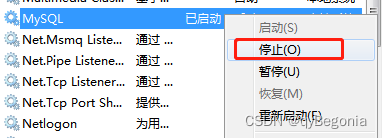
1.关闭mysql服务:
win+R键键入services.msc(也可以“计算机”右键-》管理),找到mysql服务停掉
2.删除data文件夹及其文件:
进入mysql文件夹,找到data文件夹并删除;

3.初始化mysql:
再次进入services.msc,运行mysql服务,点击启动;
cmd窗口进入mysql\bin文件路径,运行mysqld --initialize --console结果类似如下:2021-06-06T02:08:11.300849Z 0 [Warning] TIMESTAMP with implicit DEFAULT value is deprecated. Please use --explicit_defaults_for_timestamp server option (see doc umentation for more details). 2021-06-06T02:08:11.724874Z 0 [Warning] InnoDB: New log files created, LSN=45790 2021-06-06T02:08:12.024891Z 0 [Warning] InnoDB: Creating foreign key constraint system tables. 2021-06-06T02:08:12.056893Z 0 [Warning] No existing UUID has been found, so we a ssume that this is the first time that this server has been started. Generating a new UUID: 35611a71-b8b8-11e9-8e24-28d24409926b. 2021-06-06T02:08:12.064893Z 0 [Warning] Gtid table is not ready to be used. Tabl e 'mysql.gtid_executed' cannot be opened. 2021-06-06T02:08:12.076894Z 1 [Note] A temporary password is generated for root@ localhost: QrWg4Y!sh:(k- 1
- 2
- 3
- 4
- 5
- 6
- 7
- 8
- 9
- 10
- 11
- 12
- 13
注意:最后面的就是暂时生成的root账户密码:QrWg4Y!sh:(k
4.cmd运行mysql:
键入mysql -u root -p密码; -p和密码一定要连在一起才有效,中间没有空格;
注意:p是password的缩写,按上面的例子就应键入:
mysql -u root -pQrWg4Y!sh:(k5.修改临时root密码:
运行sql语句:
alter user root@localhost identified by ' root密码 ' ;注意:密码要包含在 英文单引号 ‘ ’ 中,不然无效报错,末尾分号 ;也要写。
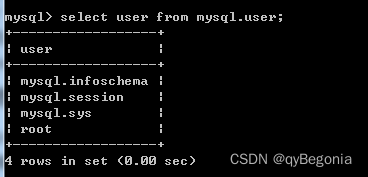
6.查询是否成功:
运行sql语句:
select user from mysql.user;成功显示root账户;
-
相关阅读:
Debian12 中重新安装MSSQL 并指定服务器、数据库、数据表字段的字符排序规则和默认语言等参数
celery apply_async定时任务重复执行问题
浅谈UI自动化测试
多行文本下的文字渐隐消失术
杂牌行车记录仪特殊AVI结构恢复案例
交换机与路由技术-16-生成树协议STP
使用重定向输入和输出创建子进程
泛洪攻击(Flood Attack)
人类基因功能问题(DP)
云原生虚拟网络 tun/tap & veth-pair
- 原文地址:https://blog.csdn.net/weixin_47061482/article/details/125496273