-
Java程序设计——Swing UI 事件处理(五)
目录
5.5.1.ActionEvent 与 ActionListener
5.5.2.ItemEvent 与 ItemListener
5.5.4.MouseEvent 与 MouseListener/MouseMotionListener
5.5.5.ListSelectionEvent与ListSelectionListener
5.5.6.ChangeEvent 与 ChangeListener
5.5.7.FocusEvent 与 FocusListener
事件处理
5.1.事件处理机制
事件:Java语言将每一个键盘或鼠标的操作定义为一个“事件”。

- 当用户点击了一个按钮,意味着一个按钮事件的发生。
- 事件处理方法对该事件进行响应
- 事件响应:当事件发生时,程序应该作出何种响应。
5.2.事件处理的模型
事件处理的基本思路如下:
- 一个源(事件源)产生一个事件(事件对象)并把它送到监听器那里,监听器只是简单地等待,直到它收到一个事件,一旦事件被接收,监听器将处理这些事件;
- 一个事件源必须注册监听器,以便监听器可以接受关于一个特定事件的通知。
- 事件源:产生事件的组件叫事件源。
- 事件对象:描述系统中发生了什么的对象
- 事件监听器:对事件进行处理的类。

- 事件源:按钮
- 事件对象:动作事件
- 事件监视器:动作事件-处理程序
5.3.常见事件及事件监视器
事件名称
监听器
主要用途
WindowEvent
WindowListener
窗口发生变化,如关闭
ActionEvent
ActionListener
产生动作,如单击按钮
ItemEvent
ItemListener
项目变化,如复选框
ListSelectionEvent
ListSelectionListener
选择列表中的项目时
ChangeEvent
ChangeListener
状态改变,如进度条
FocusEvent
FocusListener
焦点获得或失去
MouseEvent
MouseListener
鼠标点击、进入或离开
MouseEvent
MouseMotionListener
鼠标拖动或移动
KeyEvent
KeyListener
按键产生时
MenuEvent
MenuListener
菜单选择
5.4.事件处理方法
- 创建将要产生事件的组件对象
- 构造实现相应事件监听器接口的类,并创建事件监听器对象
- 为组件对象增加事件监听器对象:组件对象.addXxxListener(事件监听器对象);如:button.addActionListener(this);
- 注:接口中的方法都含有所产生的事件对象参数,使用该参数的getSource()方法可以得到产生该事件的事件源
- 例如:public void actionPerformed(ActionEvent e);
5.5.事件处理:
5.5.1.ActionEvent 与 ActionListener
- 当单击按钮、在文本域中回车、选择组合框中的项目、选择菜单项时产生该事件
- ActionListener接口中的方法:void actionPerformed(ActionEvent e);
- ActionEvent中的常用方法:String getActionCommand();//获得与该动作相联系的组件的命令字符串名称,
- 组件对象可使用setActionCommand(String str)方法进行设置,默认的命令字符串名称是组件的标签名称 //使用该方法可实现不同组件共用同一段处理代码
- import javax.swing.*;
- import java.awt.*;
- import java.awt.event.ActionEvent;
- import java.awt.event.ActionListener;
- public class MainClass{
- public static void main(String[] args){
- new ActionListener_1();
- }
- }
- class ActionListener_1 extends JFrame{
- private JPanel panel = new JPanel();
- private JButton btn1 = new JButton("粉色");
- private JButton btn2 = new JButton("黄色");
- private JButton btn3 = new JButton("绿色");
- public ActionListener_1(){
- super("ActionListener");
- btn1.addActionListener(new ActionListener(){
- public void actionPerformed(ActionEvent e) {
- panel.setBackground(Color.pink); // 设置面板背景颜色
- }
- });
- btn2.addActionListener(new ActionListener(){
- public void actionPerformed(ActionEvent e) {
- panel.setBackground(Color.yellow);
- }
- });
- btn3.addActionListener(new ActionListener(){
- public void actionPerformed(ActionEvent e) {
- panel.setBackground(Color.green);
- }
- });
- panel.add(btn1);
- panel.add(btn2);
- panel.add(btn3);
- this.add(panel);
- this.setSize(300,300);
- this.setLocation(200,250);
- this.setDefaultCloseOperation(JFrame.EXIT_ON_CLOSE);
- this.setVisible(true);
- }
- }


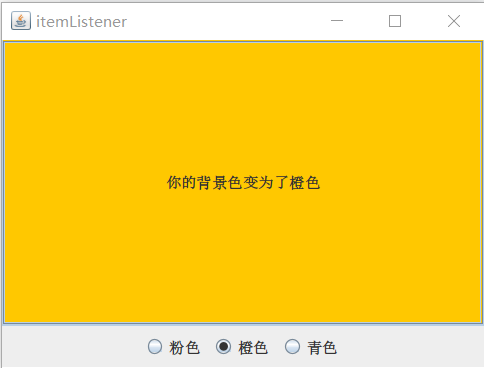
5.5.2.ItemEvent 与 ItemListener
- 当单选按钮、复选按钮、下拉列表框中的项目状态发生变化时产生该事件
- ItemListener接口中的方法:void itemStateChanged(ActionEvent e);
- ItemEvent中的常用方法:
- Object getItem();//返回受该事件影响的项目对象,据需要可将Object转换为相应的类型
- int getStateChange();//返回项目状态发生变化的类型
- 取值:ItemEvent.SELECTED ItemEvent.DESELECTED
- import javax.swing.*;
- import java.awt.*;
- import java.awt.event.ItemEvent;
- import java.awt.event.ItemListener;
- public class MainClass {
- public static void main(String[] args){
- MyJFrame mf = new MyJFrame();
- }
- }
- class MyJFrame extends JFrame {
- private JPanel panel;
- private JButton button;
- private JRadioButton btnPink,btnOrag,btnGren;
- private ButtonGroup buttonGroup;
- public MyJFrame(){
- super("itemListener");
- button = new JButton("请为我选择一种背景颜色");
- panel = new JPanel();
- btnPink = new JRadioButton("粉色");
- btnOrag = new JRadioButton("橙色");
- btnGren = new JRadioButton("青色");
- buttonGroup = new ButtonGroup();
- btnPink.addItemListener(new ItemListener() {
- @Override
- public void itemStateChanged(ItemEvent e) {
- button.setBackground(Color.PINK);
- button.setText("你的背景色变为了粉色");
- }
- });
- btnOrag.addItemListener(new ItemListener() {
- @Override
- public void itemStateChanged(ItemEvent e) {
- button.setBackground(Color.ORANGE);
- button.setText("你的背景色变为了橙色");
- }
- });
- btnGren.addItemListener(new ItemListener() {
- @Override
- public void itemStateChanged(ItemEvent e) {
- button.setBackground(Color.cyan);
- button.setText("你的背景色变为了青色");
- }
- });
- buttonGroup.add(btnPink);
- buttonGroup.add(btnOrag);
- buttonGroup.add(btnGren);
- panel.add(btnPink);
- panel.add(btnOrag);
- panel.add(btnGren);
- this.add(button);
- this.add(panel, BorderLayout.SOUTH);
- this.setLocation(100,200);
- this.setSize(400,300);
- this.setDefaultCloseOperation(JFrame.EXIT_ON_CLOSE);
- this.setVisible(true);
- }
- }

5.5.3.KeyEvent 与 KeyListener
当组件上发生击键时产生该事件
KeyListener接口中的方法:- void keyPressed(KeyEvent e);
- void keyReleased(KeyEvent e);
- void keyTyped(KeyEvent e);
KeyEvent中的常用方法:
- char getKeyChar(); //返回字符键值
- int getKeyCode(); //返回整数键值
- boolean isAltDown();
- boolean isControlDown();
- boolean isShiftDown();
注:KeyEvent中定义了表示键的常量,如 VK_1
- import javax.swing.*;
- import java.awt.event.KeyEvent;
- import java.awt.event.KeyListener;
- public class MainClass{
- public static void main(String[] args) {
- new KeyListener_2();
- }
- }
- class KeyListener_2 extends JFrame{
- private JPanel panel = new JPanel();
- private JButton button = new JButton("走动");
- public KeyListener_2(){
- super("KeyListener");
- button.addKeyListener(new KeyListener(){
- public void keyPressed(KeyEvent e) {
- int keyCode = e.getKeyCode();
- int x = button.getX();
- int y = button.getY();
- if(keyCode == KeyEvent.VK_RIGHT){
- button.setLocation(x+20,y);
- }else if(keyCode == KeyEvent.VK_LEFT){
- button.setLocation(x-20,y);
- }else if(keyCode == KeyEvent.VK_UP){
- button.setLocation(x,y-20);
- }else if(keyCode == KeyEvent.VK_DOWN){
- button.setLocation(x,y+20);
- }
- }
- public void keyReleased(KeyEvent e) {
- }
- public void keyTyped(KeyEvent e) {
- // TODO Auto-generated method stub
- }
- });
- panel.add(button);
- add(panel);
- setLocation(300,250);
- setSize(300,300);
- setDefaultCloseOperation(JFrame.EXIT_ON_CLOSE);
- setVisible(true);
- }
- }


5.5.4.MouseEvent 与 MouseListener/MouseMotionListener
5.5.4.1MouseListener
当在组件上进行鼠标基本操作时产生该事件
MouseListener接口中的方法:- void mousePressed(MouseEvent e);
- void mouseReleased(MouseEvent e);
- void mouseClicked(MouseEvent e);
- void mouseEntered(MouseEvent e);
- void mouseExited(MouseEvent e);
MouseEvent中的常用方法:
- int getButton();
- boolean isAltDown();
- boolean isControlDown();
- boolean isShiftDown();
- int getClickCount();
- Point getPoint();
- int getX();
- int getY();
- boolean isPopupTrigger();//是否是触发弹出式菜单的鼠标操作
5.5.4.2.MouseMotionListener
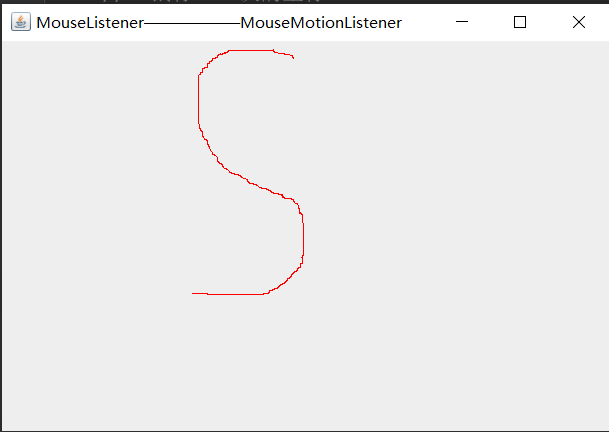
当在组件上进行鼠标拖动或移动时产生该事件
MouseMotionListener接口中的方法:- void mouseDragged(MouseEvent);
- void mouseMoved(MouseEvent);
- import javax.swing.*;
- import java.awt.*;
- import java.awt.event.MouseEvent;
- import java.awt.event.MouseListener;
- import java.awt.event.MouseMotionListener;
- public class MainClass{
- public static void main(String[] args) {
- new MouseEvent_1();
- }
- }
- class MouseEvent_1 extends JFrame {
- private JPanel panel;
- // 鼠标上一次的坐标
- int pre_x = -1;
- int pre_y = -1;
- // 鼠标当前坐标
- int x;
- int y;
- public MouseEvent_1(){
- super("MouseListener——MouseMotionListener");
- panel = new JPanel();
- panel.addMouseMotionListener(new MouseMotionListener() {
- // 鼠标拖拽事件
- public void mouseDragged(MouseEvent e) {
- x = e.getX();
- y = e.getY();
- // 重画,调用repaint方法触发paint
- MouseEvent_1.this.repaint();
- }
- // 鼠标移动事件
- public void mouseMoved(MouseEvent e) {
- }
- });
- panel.addMouseListener(new MouseListener() {
- // 鼠标点击事件
- public void mouseClicked(MouseEvent e) {
- }
- // 鼠标按下事件
- public void mousePressed(MouseEvent e) {
- // 如果是右键
- if(e.getButton() == MouseEvent.BUTTON3){
- // 擦除原来的轨迹
- MouseEvent_1.this.panel.repaint();
- }
- }
- // 鼠标松开事件
- public void mouseReleased(MouseEvent e) {
- // 松开后恢复历史坐标
- pre_x = -1;
- pre_y = -1;
- }
- // 鼠标移入事件
- public void mouseEntered(MouseEvent e) {
- }
- // 鼠标移出事件
- public void mouseExited(MouseEvent e) {
- }
- });
- add(panel);
- setSize(500,350);
- setLocation(350,270);
- setDefaultCloseOperation(JFrame.EXIT_ON_CLOSE);
- setVisible(true);
- }
- public void paint(Graphics graphics){
- // 设置画笔的颜色
- graphics.setColor(Color.red);
- // 历史坐标 > 0
- if(pre_x > 0 && pre_y > 0){
- // 开始画一条线
- graphics.drawLine(pre_x,pre_y,x,y);
- }
- // 保存当前鼠标坐标,作为上一次的鼠标坐标
- pre_x = x;
- pre_y = y;
- }
- }

5.5.5.ListSelectionEvent与ListSelectionListener
- 当列表框中的项目发生变化时产生该事件
- ListSelectionListener接口中的方法:void valueChanged(ListSelectionEvent e);
- 处理事件时常使用列表框(JList)对象本身提供的一些方法
5.5.6.ChangeEvent 与 ChangeListener
- 当进度条,滑动条、微调器、标签窗格等组件的状态发生变化时产生该事件
- ChangeListener接口中的方法:void stateChanged(ChangeEvent);
5.5.7.FocusEvent 与 FocusListener
当组件获得或失去输入焦点时产生该事件
FocusListener接口中的方法:
void focusGained(FocusEvent);
void focusLost(FocusEvent);
FocusEvent中的常用方法:
Component getOppositeComponent();5.5.8.事件适配器类(Adapter)
只实现接口所需要处理的方法——通过覆盖
对于接口中的其它方法: 系统会提供默认的方法(方法体为空)
事件适配器类与事件监听器接口的区别?- 利用事件适配器类,只需实现所需处理的方法
- 利用事件监听器接口,必须实现所有的方法

- import javax.swing.*;
- import java.awt.*;
- import java.awt.event.MouseAdapter;
- import java.awt.event.MouseEvent;
- import java.awt.event.MouseMotionAdapter;
- public class MainClass{
- public static void main(String[] args) {
- new MouseEvent_2();
- }
- }
- class MouseEvent_2 extends JFrame {
- private JPanel panel;
- int pre_x = -1;
- int pre_y = -1;
- int x;
- int y;
- public MouseEvent_2(){
- super("MouseAdapter——MouseMotionAdapter");
- panel = new JPanel();
- panel.addMouseMotionListener(new MouseMotionAdapter() {
- // 只需实现需处理的方法
- public void mouseDragged(MouseEvent e) {
- x = e.getX();
- y = e.getY();
- MouseEvent_2.this.repaint();
- }
- });
- panel.addMouseListener(new MouseAdapter() {
- // 只需实现需处理的方法
- public void mousePressed(MouseEvent e){
- if(e.getButton() == MouseEvent.BUTTON3){
- MouseEvent_2.this.panel.repaint();
- }
- }
- public void mouseReleased(MouseEvent e){
- pre_x = -1;
- pre_y = -1;
- }
- });
- add(panel);
- setSize(300,400);
- setLocation(300,250);
- setDefaultCloseOperation(JFrame.EXIT_ON_CLOSE);
- setVisible(true);
- }
- public void paint(Graphics graphics){
- graphics.setColor(Color.red);
- if(pre_x>0 && pre_y>0){
- graphics.drawLine(pre_x,pre_y,x,y);
- }
- pre_x = x;
- pre_y = y;
- }
- }
(27条消息) Swing UI——容器(一)_Stuttering Guy的博客-CSDN博客
 https://blog.csdn.net/Mr_Morgans/article/details/125109643?csdn_share_tail=%7B%22type%22%3A%22blog%22%2C%22rType%22%3A%22article%22%2C%22rId%22%3A%22125109643%22%2C%22source%22%3A%22Mr_Morgans%22%7D&ctrtid=l9JMT(27条消息) Swing UI——基本组件(二)_Stuttering Guy的博客-CSDN博客https://blog.csdn.net/Mr_Morgans/article/details/125110881?csdn_share_tail=%7B%22type%22%3A%22blog%22%2C%22rType%22%3A%22article%22%2C%22rId%22%3A%22125110881%22%2C%22source%22%3A%22Mr_Morgans%22%7D&ctrtid=Kzbcx(27条消息) Swing UI——高级组件(三)_Stuttering Guy的博客-CSDN博客https://blog.csdn.net/Mr_Morgans/article/details/125115383?csdn_share_tail=%7B%22type%22%3A%22blog%22%2C%22rType%22%3A%22article%22%2C%22rId%22%3A%22125115383%22%2C%22source%22%3A%22Mr_Morgans%22%7D&ctrtid=81Bbq(27条消息) Swing UI——布局管理器(四)_Stuttering Guy的博客-CSDN博客https://blog.csdn.net/Mr_Morgans/article/details/125115409?csdn_share_tail=%7B%22type%22%3A%22blog%22%2C%22rType%22%3A%22article%22%2C%22rId%22%3A%22125115409%22%2C%22source%22%3A%22Mr_Morgans%22%7D&ctrtid=GZyFf
 -
相关阅读:
ACM实训冲刺第二十二天
[AutoSAR系列] 1.2 AutoSar 综述
python创建一个简单的flask应用
[硬件基础]-555定时器-单稳态多谐振荡器配置
电容笔可以用什么代替?好用电容笔品牌推荐
浅析即时通讯开发中HTTP与WebSocket的关系
关于Spring遇到的各种问题
阿里云 短信服务——发送短信验证码图文教程
【博客450】OpenFlow学习
【面试题】写一个脚本统计一个文本文件的行数
- 原文地址:https://blog.csdn.net/Mr_Morgans/article/details/125115417
