-
【JVM系列】JVM调优
talk is cheap, show me the dry cargo.
JVM调优工具详解
Software version OpenJDK 1.8 Jps常用命令(Java Virtual Machine Process Status Tool)
-
jps -helproot@CN02:/home/demo-server# jps -help usage: jps [-help] jps [-q] [-mlvV] [<hostid>] Definitions: <hostid>: <hostname>[:<port>]- 1
- 2
- 3
- 4
- 5
- 6
-
jps -mlvroot@CN02:/home/demo-server# jps -mlv 16082 demo-uat.jar --spring.profiles.active=uat -XX:+UseConcMarkSweepGC -Xmn512m -Xms768m -Xmx768m -Duser.timezone=GMT+08 14339 sun.tools.jps.Jps -mlv -Dapplication.home=/usr/lib/jvm/java-8-openjdk-amd64 -Xms8m 15509 demo-test.jar --spring.profiles.active=test -XX:+UseConcMarkSweepGC -Xmn512m -Xms768m -Xmx768m -Duser.timezone=GMT+08- 1
- 2
- 3
- 4
Jstat常用命令(JVM统计监测工具)
-
jstat -helproot@CN02:/home/demo-server# jstat -help Usage: jstat -help|-options jstat -<option> [-t] [-h<lines>] <vmid> [<interval> [<count>]] Definitions: <option> An option reported by the -options option <vmid> Virtual Machine Identifier. A vmid takes the following form: <lvmid>[@<hostname>[:<port>]] Where <lvmid> is the local vm identifier for the target Java virtual machine, typically a process id; <hostname> is the name of the host running the target Java virtual machine; and <port> is the port number for the rmiregistry on the target host. See the jvmstat documentation for a more complete description of the Virtual Machine Identifier. <lines> Number of samples between header lines. <interval> Sampling interval. The following forms are allowed: <n>["ms"|"s"] Where <n> is an integer and the suffix specifies the units as milliseconds("ms") or seconds("s"). The default units are "ms". <count> Number of samples to take before terminating. -J<flag> Pass <flag> directly to the runtime system.- 1
- 2
- 3
- 4
- 5
- 6
- 7
- 8
- 9
- 10
- 11
- 12
- 13
- 14
- 15
- 16
- 17
- 18
- 19
- 20
- 21
-
jstat -optionsroot@CN02:/home/demo-server# jstat -options -class -compiler -gc -gccapacity -gccause -gcmetacapacity -gcnew -gcnewcapacity -gcold -gcoldcapacity -gcutil -printcompilation- 1
- 2
- 3
- 4
- 5
- 6
- 7
- 8
- 9
- 10
- 11
- 12
- 13
-
jstat -gcutil <vmid> [<interval> [<count>]]root@CN02:/home/demo-server# jstat -gcutil 15509 1000 5 S0 S1 E O M CCS YGC YGCT FGC FGCT GCT 0.00 0.00 1.73 14.61 92.80 90.76 16 1.117 9 0.888 2.006 0.00 0.00 1.73 14.61 92.80 90.76 16 1.117 9 0.888 2.006 0.00 0.00 1.73 14.61 92.80 90.76 16 1.117 9 0.888 2.006 0.00 0.00 1.73 14.61 92.80 90.76 16 1.117 9 0.888 2.006 0.00 0.00 1.73 14.61 92.80 90.76 16 1.117 9 0.888 2.006- 1
- 2
- 3
- 4
- 5
- 6
- 7
Jmap常用命令(Memory Map)
-
jmap -helproot@CN02:/home/demo-server# jmap -help Usage: jmap [option] <pid> (to connect to running process) jmap [option] <executable <core> (to connect to a core file) jmap [option] [server_id@]<remote server IP or hostname> (to connect to remote debug server) where <option> is one of: <none> to print same info as Solaris pmap -heap to print java heap summary -histo[:live] to print histogram of java object heap; if the "live" suboption is specified, only count live objects -clstats to print class loader statistics -finalizerinfo to print information on objects awaiting finalization -dump:<dump-options> to dump java heap in hprof binary format dump-options: live dump only live objects; if not specified, all objects in the heap are dumped. format=b binary format file=<file> dump heap to <file> Example: jmap -dump:live,format=b,file=heap.bin <pid> -F force. Use with -dump:<dump-options> <pid> or -histo to force a heap dump or histogram when <pid> does not respond. The "live" suboption is not supported in this mode. -h | -help to print this help message -J<flag> to pass <flag> directly to the runtime system- 1
- 2
- 3
- 4
- 5
- 6
- 7
- 8
- 9
- 10
- 11
- 12
- 13
- 14
- 15
- 16
- 17
- 18
- 19
- 20
- 21
- 22
- 23
- 24
- 25
- 26
- 27
- 28
- 29
-
jmap -histo:live <pid> | moreroot@CN02:/home/demo-server# jmap -histo:live 15509 | more num #instances #bytes class name ---------------------------------------------- 1: 112649 10985672 [C 2: 31705 2790040 java.lang.reflect.Method 3: 112092 2690208 java.lang.String 4: 73094 2339008 java.util.concurrent.ConcurrentHashMap$Node 5: 17300 1911192 java.lang.Class 6: 26357 1535776 [Ljava.lang.Object; 7: 6531 1173184 [B 8: 8364 1068264 [I 9: 25101 1004040 java.util.LinkedHashMap$Entry 10: 9878 804744 [Ljava.util.HashMap$Node; 11: 39438 631008 java.lang.Object 12: 18762 600384 java.util.HashMap$Node 13: 278 595344 [Ljava.util.concurrent.ConcurrentHashMap$Node; 14: 10367 580552 java.util.LinkedHashMap- 1
- 2
- 3
- 4
- 5
- 6
- 7
- 8
- 9
- 10
- 11
- 12
- 13
- 14
- 15
- 16
- 17
- 18
class name列是对象类型,说明如下:
B byte C char D double F float I int J long Z boolean [ 数组,如[I表示int[] [L+类名 其他对象- 1
- 2
- 3
- 4
- 5
- 6
- 7
- 8
- 9
-
jmap -dump:live,format=b,file=heap.bin <pid>root@CN02:/home/demo-server# jmap -dump:live,format=b,file=heap.bin 15509 Dumping heap to /home/demo-server/heap.bin ... Heap dump file created- 1
- 2
- 3
Jhat常用命令(Java Heap Analysis Tool)
jhat -helproot@CN02:/home/demo-server# jhat -help Usage: jhat [-stack <bool>] [-refs <bool>] [-port <port>] [-baseline <file>] [-debug <int>] [-version] [-h|-help] <file> -J<flag> Pass <flag> directly to the runtime system. For example, -J-mx512m to use a maximum heap size of 512MB -stack false: Turn off tracking object allocation call stack. -refs false: Turn off tracking of references to objects -port <port>: Set the port for the HTTP server. Defaults to 7000 -exclude <file>: Specify a file that lists data members that should be excluded from the reachableFrom query. -baseline <file>: Specify a baseline object dump. Objects in both heap dumps with the same ID and same class will be marked as not being "new". -debug <int>: Set debug level. 0: No debug output 1: Debug hprof file parsing 2: Debug hprof file parsing, no server -version Report version number -h|-help Print this help and exit <file> The file to read For a dump file that contains multiple heap dumps, you may specify which dump in the file by appending "#<number>" to the file name, i.e. "foo.hprof#3". All boolean options default to "true"- 1
- 2
- 3
- 4
- 5
- 6
- 7
- 8
- 9
- 10
- 11
- 12
- 13
- 14
- 15
- 16
- 17
- 18
- 19
- 20
- 21
- 22
- 23
- 24
- 25
- 26
jhat -J-Xmx512m heap.binroot@CN02:/home/demo-server# jhat -J-Xmx512m heap.bin Reading from heap.bin... Dump file created Tue Jun 25 01:53:08 CST 2022 Snapshot read, resolving... Resolving 2779596 objects... Chasing references, expect 555 dots................................................................................................................ ................................................................................................................................................... ................................................................................................................................................... ................................................................................................................................................... .. Eliminating duplicate references................................................................................................................... ................................................................................................................................................... ................................................................................................................................................... .................................................................................................................................................. Snapshot resolved. Started HTTP server on port 7000 Server is ready.- 1
- 2
- 3
- 4
- 5
- 6
- 7
- 8
- 9
- 10
- 11
- 12
- 13
- 14
- 15
- 16
- 17
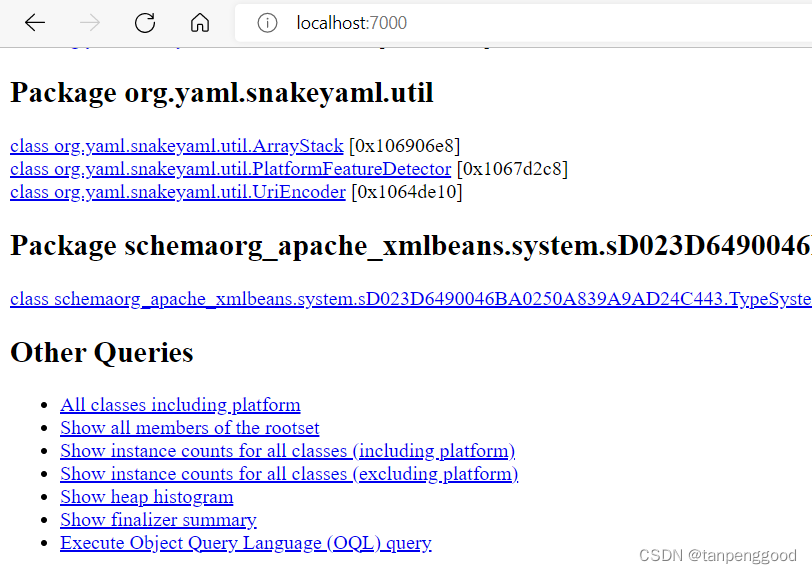
Jstack常用命令
jstack -helproot@CN02:/home/demo-server# jstack -help Usage: jstack [-l] <pid> (to connect to running process) jstack -F [-m] [-l] <pid> (to connect to a hung process) jstack [-m] [-l] <executable> <core> (to connect to a core file) jstack [-m] [-l] [server_id@]<remote server IP or hostname> (to connect to a remote debug server) Options: -F to force a thread dump. Use when jstack <pid> does not respond (process is hung) -m to print both java and native frames (mixed mode) -l long listing. Prints additional information about locks -h or -help to print this help message- 1
- 2
- 3
- 4
- 5
- 6
- 7
- 8
- 9
- 10
- 11
- 12
- 13
- 14
- 15
- 16
Jinfo常用命令
jinfo -helproot@CN02:/home/demo-server# jinfo -help Usage: jinfo [option] <pid> (to connect to running process) jinfo [option] <executable <core> (to connect to a core file) jinfo [option] [server_id@]<remote server IP or hostname> (to connect to remote debug server) where <option> is one of: -flag <name> to print the value of the named VM flag -flag [+|-]<name> to enable or disable the named VM flag -flag <name>=<value> to set the named VM flag to the given value -flags to print VM flags -sysprops to print Java system properties <no option> to print both of the above -h | -help to print this help message- 1
- 2
- 3
- 4
- 5
- 6
- 7
- 8
- 9
- 10
- 11
- 12
- 13
- 14
- 15
- 16
- 17
Jcmd常用命令
jcmd -helproot@CN02:/home/demo-server# jcmd -help Usage: jcmd <pid | main class> <command ...|PerfCounter.print|-f file> or: jcmd -l or: jcmd -h command must be a valid jcmd command for the selected jvm. Use the command "help" to see which commands are available. If the pid is 0, commands will be sent to all Java processes. The main class argument will be used to match (either partially or fully) the class used to start Java. If no options are given, lists Java processes (same as -p). PerfCounter.print display the counters exposed by this process -f read and execute commands from the file -l list JVM processes on the local machine -h this help- 1
- 2
- 3
- 4
- 5
- 6
- 7
- 8
- 9
- 10
- 11
- 12
- 13
- 14
- 15
- 16
jcmd -lroot@CN02:/home/demo-server# jcmd -l 16082 demo-uat.jar --spring.profiles.active=uat 16420 sun.tools.jcmd.JCmd -l 15509 demo-test.jar --spring.profiles.active=test- 1
- 2
- 3
- 4
jcmd <pid> helproot@CN02:/home/demo-server# jcmd 15509 help 15509: The following commands are available: VM.unlock_commercial_features JFR.configure JFR.stop JFR.start JFR.dump JFR.check VM.native_memory ManagementAgent.stop ManagementAgent.start_local ManagementAgent.start VM.classloader_stats GC.rotate_log Thread.print GC.class_stats GC.class_histogram GC.heap_dump GC.finalizer_info GC.heap_info GC.run_finalization GC.run VM.uptime VM.dynlibs VM.flags VM.system_properties VM.command_line VM.version help For more information about a specific command use 'help <command>'.- 1
- 2
- 3
- 4
- 5
- 6
- 7
- 8
- 9
- 10
- 11
- 12
- 13
- 14
- 15
- 16
- 17
- 18
- 19
- 20
- 21
- 22
- 23
- 24
- 25
- 26
- 27
- 28
- 29
- 30
- 31
- 32
jcmd <pid> GC.heap_inforoot@CN02:/home/demo-server# jcmd 15509 GC.heap_info 15509: par new generation total 471872K, used 22827K [0x00000000d0000000, 0x00000000f0000000, 0x00000000f0000000) eden space 419456K, 5% used [0x00000000d0000000, 0x00000000d164ae48, 0x00000000e99a0000) from space 52416K, 0% used [0x00000000e99a0000, 0x00000000e99a0000, 0x00000000eccd0000) to space 52416K, 0% used [0x00000000eccd0000, 0x00000000eccd0000, 0x00000000f0000000) concurrent mark-sweep generation total 262144K, used 38326K [0x00000000f0000000, 0x0000000100000000, 0x0000000100000000) Metaspace used 86305K, capacity 92137K, committed 92944K, reserved 1130496K class space used 10985K, capacity 11915K, committed 12100K, reserved 1048576K- 1
- 2
- 3
- 4
- 5
- 6
- 7
- 8
- 9
Jconsole工具详解
Jvisualvm工具详解
https://github.com/oracle/visualvm
VisualVM is an All-in-One Java Troubleshooting Tool
MAT工具详解(Memory Analyzer Tool)
http://www.eclipse.org/mat/downloads.php
Arthas工具详解
源码:https://github.com/alibaba/arthas
官网:https://arthas.aliyun.com/zh-cn/GC日志分析
GCEasy日志分析工具使用
Universal
GC Log Analyzer
Industry’s first machine learning guided Garbage collection log analysis tool. GCeasy has in-built intelligence to auto-detect problems in the JVM & Android GC logs and recommend solutions to it.- Solve Memory & GC problems in seconds
- Get JVM Heap settings recommendations
- Machine Learning Algorithms
- Trusted by 4,000+ enterprises
GCViewer日志分析工具使用
https://github.com/chewiebug/GCViewer
Fork of tagtraum industries’ GCViewer. Tagtraum stopped development in 2008, I aim to improve support for Sun’s / Oracle’s java 1.6+ garbage collector logs (including G1 collector)
调优实战
- 了解JDK版本信息?
OpenJDK还是OracleJDK,JDK6、JDK8还是JDK11等等,第一时间掌握不同版本对JVM调优方式的差异。- 1
- 了解服务器内存、CPU及磁盘空间等信息?
掌握对JVM可分配的物理内存大小- 1
- 了解服务的业务类型?
根据服务的内存使用特点选择更适合的垃圾收集器- 1
- 了解服务访问流量?
分析单位时间内年轻代、老年代内存变化曲线- 1
- 了解服务启动命令?
掌握内存分配、GC垃圾收集器等情况- 1
- 是否有近期的GC日志?
分析系统当前JVM Throughput、FGC等指标,用于调优后进行指标对比。- 1
亿级电商网站 jvm 参数调优实战案例
java -Xms3g -Xmx3g -Xmn2g -Xss1M -XX:MetaspaceSize=512M -XX:MaxmetaspaceSize=512M -jar order.jar- 1
单机几十万并发的系统 jvm 如何优化
如:
RocktMQ、Kafukajava -Xms64g -Xmx64g -Xss1M -XX:+UseG1GC -XX:MaxGCPauseMillis=100 -XX:MetaspaceSize=512M -XX:MaxmetaspaceSize=512M -jar RocktMQ.jar- 1
- 2
参考
-
-
相关阅读:
C++:模板进阶
CDN的优势,为什么各大站点都选择接入CDN
java计算机毕业设计汇美食电子商城MyBatis+系统+LW文档+源码+调试部署
D8调试工具——jsvu的使用细则
sql常用语法总结
【React】Lodash---groupBy() 分组
写着简单跑着又快的数据库语言SPL
在移动固态硬盘上安装Ubuntu系统和ROS2
长路漫漫、技术作伴
音视频播放器—音视频同步
- 原文地址:https://blog.csdn.net/AV_woaijava/article/details/125454612
