-
【牛客讨论区】第四章:Redis
1. Redis入门
- Redis是一款基于键值对的NoSQL数据库,它的值支持多种数据结构: 字符串(strings)、哈希(hashes)、列表(lists)、集合(sets)、有序集合(sorted sets)等。
- Redis将所有的数据都存放在内存中,所以它的读写性能十分惊人。 同时,Redis还可以将内存中的数据以快照或日志的形式保存到硬盘上,以保证数据的安全性。
- Redis典型的应用场景包括:缓存、排行榜、计数器、社交网络、消息队列等
https://redis.io
https://github.com/microsoftarchive/redis安装Redis
双击 “Redis-x64-3.2.100.msi”,将安装目录配到环境变量中,打开 cmd,输入
redis-cli,连接 Redis:
String 类型的存取
127.0.0.1:6379> set test:count 1 OK 127.0.0.1:6379> get test:count "1" 127.0.0.1:6379> incr test:count (integer) 2 127.0.0.1:6379> decr test:count (integer) 1- 1
- 2
- 3
- 4
- 5
- 6
- 7
- 8
哈希类型的存取
127.0.0.1:6379> hset test:user id 1 (integer) 1 127.0.0.1:6379> hset test:user username zhangsan (integer) 1 127.0.0.1:6379> hget test:user id "1" 127.0.0.1:6379> hget test:user username "zhangsan"- 1
- 2
- 3
- 4
- 5
- 6
- 7
- 8
list类型的存取
127.0.0.1:6379> lpush test:ids 101 102 103 (integer) 3 127.0.0.1:6379> llen test:ids (integer) 3 127.0.0.1:6379> lindex test:ids 0 "103" 127.0.0.1:6379> lindex test:ids 2 "101" 127.0.0.1:6379> lrange test:ids 0 2 1) "103" 2) "102" 3) "101" 127.0.0.1:6379> rpop test:ids "101"- 1
- 2
- 3
- 4
- 5
- 6
- 7
- 8
- 9
- 10
- 11
- 12
- 13
- 14
集合类型的存取
无序
scard统计集合内的元素数
spop随机弹出一个元素
smembers查看集合剩余元素127.0.0.1:6379> sadd test:teachers aaa bbb ccc ddd eee (integer) 5 127.0.0.1:6379> scard test:teachers (integer) 5 127.0.0.1:6379> spop test:teachers "eee" 127.0.0.1:6379> smembers test:teachers 1) "aaa" 2) "ddd" 3) "bbb" 4) "ccc"- 1
- 2
- 3
- 4
- 5
- 6
- 7
- 8
- 9
- 10
- 11
有序
zscore查看某个元素的分数
zrank查看某个元素的排名127.0.0.1:6379> zadd test:students 10 aaa 20 bbb 30 ccc 40 ddd 50 eee (integer) 5 127.0.0.1:6379> zcard test:students (integer) 5 127.0.0.1:6379> zscore test:students ccc "30" 127.0.0.1:6379> zrank test:students ccc (integer) 2 127.0.0.1:6379> zrange test:students 0 2 1) "aaa" 2) "bbb" 3) "ccc"- 1
- 2
- 3
- 4
- 5
- 6
- 7
- 8
- 9
- 10
- 11
- 12
全局命令
对所有的数据类型都生效查看库中所有的 key
127.0.0.1:6379> keys * 1) "test:ids" 2) "test:user" 3) "test:students" 4) "test:teachers" 5) "test:count"- 1
- 2
- 3
- 4
- 5
- 6
所有以 test 开头的 key
127.0.0.1:6379> keys test* 1) "test:ids" 2) "test:user" 3) "test:students" 4) "test:teachers" 5) "test:count"- 1
- 2
- 3
- 4
- 5
- 6
查看某个 key 的类型
127.0.0.1:6379> type test:user hash- 1
- 2
查看某个 key 是否存在,1表示存在
127.0.0.1:6379> exists test:user (integer) 1- 1
- 2
删掉某个 key
127.0.0.1:6379> del test:user (integer) 1 127.0.0.1:6379> exists test:user (integer) 0- 1
- 2
- 3
- 4
设置某个 key 的过期时间 (秒)
127.0.0.1:6379> expire test:stundets 10 (integer) 0- 1
- 2
10秒之后查看 test:stundets,不存在了
127.0.0.1:6379> exists test:stundets (integer) 0- 1
- 2
2. SpringBoot整合Redis
pom.xml
版本已经在父 pom 中指定了,所以可以不写<dependency> <groupId>org.springframework.boot</groupId> <artifactId>spring-boot-starter-data-redis</artifactId> </dependency>- 1
- 2
- 3
- 4
application.properties
# redis spring.redis.database=11 spring.redis.host=localhost spring.redis.port=6379- 1
- 2
- 3
- 4
配置类
package com.nowcoder.community.Config; import org.springframework.context.annotation.Bean; import org.springframework.context.annotation.Configuration; import org.springframework.data.redis.connection.RedisConnectionFactory; import org.springframework.data.redis.core.RedisTemplate; import org.springframework.data.redis.serializer.RedisSerializer; @Configuration public class RedisConfig { @Bean public RedisTemplate<String, Object> redisTemplate(RedisConnectionFactory factory) { RedisTemplate<String, Object> template = new RedisTemplate<>(); template.setConnectionFactory(factory); // 设置key的序列化方式 template.setKeySerializer(RedisSerializer.string()); // 设置value的序列化方式 template.setValueSerializer(RedisSerializer.json()); // 设置hash的key的序列化方式 template.setHashKeySerializer(RedisSerializer.string()); // 设置hash的value的序列化方式 template.setHashValueSerializer(RedisSerializer.json()); template.afterPropertiesSet(); return template; } }- 1
- 2
- 3
- 4
- 5
- 6
- 7
- 8
- 9
- 10
- 11
- 12
- 13
- 14
- 15
- 16
- 17
- 18
- 19
- 20
- 21
- 22
- 23
- 24
- 25
- 26
- 27
- 28
测试一下
创新的测试类package com.nowcoder.community; import org.junit.jupiter.api.Test; import org.springframework.boot.test.context.SpringBootTest; import org.springframework.dao.DataAccessException; import org.springframework.data.redis.core.BoundValueOperations; import org.springframework.data.redis.core.RedisOperations; import org.springframework.data.redis.core.RedisTemplate; import org.springframework.data.redis.core.SessionCallback; import javax.annotation.Resource; import java.util.concurrent.TimeUnit; @SpringBootTest public class RedisTests { @Resource private RedisTemplate redisTemplate; @Test public void testStrings() { String redisKey = "test:count"; redisTemplate.opsForValue().set(redisKey, 1); System.out.println(redisTemplate.opsForValue().get(redisKey));//取值 System.out.println(redisTemplate.opsForValue().increment(redisKey));//增加 System.out.println(redisTemplate.opsForValue().decrement(redisKey));//减少 } @Test public void testHashes() { String redisKey = "test:user"; redisTemplate.opsForHash().put(redisKey, "id", 1); redisTemplate.opsForHash().put(redisKey, "username", "张三"); //取值 System.out.println(redisTemplate.opsForHash().get(redisKey, "id")); System.out.println(redisTemplate.opsForHash().get(redisKey, "username")); } @Test public void testLists() { String redisKey = "test:ids"; redisTemplate.opsForList().leftPush(redisKey, 101); redisTemplate.opsForList().leftPush(redisKey, 102); redisTemplate.opsForList().leftPush(redisKey, 103); //取值 System.out.println(redisTemplate.opsForList().size(redisKey)); System.out.println(redisTemplate.opsForList().index(redisKey, 0));//左边下标0的数据 System.out.println(redisTemplate.opsForList().range(redisKey, 0, 2));//左边[0,2]的数据 System.out.println(redisTemplate.opsForList().leftPop(redisKey));//从左边弹出 System.out.println(redisTemplate.opsForList().leftPop(redisKey)); System.out.println(redisTemplate.opsForList().leftPop(redisKey)); } @Test public void testSets() { String redisKey = "test:teachers"; redisTemplate.opsForSet().add(redisKey, "刘备", "关羽", "张飞"); //取值 System.out.println(redisTemplate.opsForSet().size(redisKey)); System.out.println(redisTemplate.opsForSet().pop(redisKey));//随机弹出一个 System.out.println(redisTemplate.opsForSet().members(redisKey));//剩余元素 } @Test public void testSortedSets() { String redisKey = "test:students"; redisTemplate.opsForZSet().add(redisKey, "唐僧", 80);//80是唐僧的分数 redisTemplate.opsForZSet().add(redisKey, "悟空", 90); redisTemplate.opsForZSet().add(redisKey, "沙僧", 50); redisTemplate.opsForZSet().add(redisKey, "八戒", 60); System.out.println(redisTemplate.opsForZSet().zCard(redisKey));//统计元素个数 System.out.println(redisTemplate.opsForZSet().score(redisKey, "八戒"));//统计某个元素的分数 //统计某个元素的排名,默认由小到大 System.out.println(redisTemplate.opsForZSet().rank(redisKey, "八戒")); //由大到小 System.out.println(redisTemplate.opsForZSet().reverseRank(redisKey, "八戒")); //最小的前三名(默认由小到大排) System.out.println(redisTemplate.opsForZSet().range(redisKey, 0, 2)); //最大的前三名 System.out.println(redisTemplate.opsForZSet().reverseRange(redisKey, 0, 2)); } @Test public void testKeys() { //测试全局命令 redisTemplate.delete("test:user"); System.out.println(redisTemplate.hasKey("test:user")); redisTemplate.expire("test:students", 10, TimeUnit.SECONDS); } //多次访问同一个key,使用绑定,简化代码 @Test public void testBoundOperations() { String redisKey = "test:count"; BoundValueOperations operations = redisTemplate.boundValueOps(redisKey); operations.increment(); operations.increment(); operations.increment(); System.out.println(operations.get()); } //编程式事务 @Test public void testTransactional() { Object obj = redisTemplate.execute(new SessionCallback() { @Override public Object execute(RedisOperations operations) throws DataAccessException { String redisKey = "test:tx"; operations.multi();//启动事务 operations.opsForSet().add(redisKey, "张三"); operations.opsForSet().add(redisKey, "李四"); operations.opsForSet().add(redisKey, "王五"); //没有数据,因为此时还未执行add System.out.println(operations.opsForSet().members(redisKey)); return operations.exec();//提交事务 } }); System.out.println(obj); } }- 1
- 2
- 3
- 4
- 5
- 6
- 7
- 8
- 9
- 10
- 11
- 12
- 13
- 14
- 15
- 16
- 17
- 18
- 19
- 20
- 21
- 22
- 23
- 24
- 25
- 26
- 27
- 28
- 29
- 30
- 31
- 32
- 33
- 34
- 35
- 36
- 37
- 38
- 39
- 40
- 41
- 42
- 43
- 44
- 45
- 46
- 47
- 48
- 49
- 50
- 51
- 52
- 53
- 54
- 55
- 56
- 57
- 58
- 59
- 60
- 61
- 62
- 63
- 64
- 65
- 66
- 67
- 68
- 69
- 70
- 71
- 72
- 73
- 74
- 75
- 76
- 77
- 78
- 79
- 80
- 81
- 82
- 83
- 84
- 85
- 86
- 87
- 88
- 89
- 90
- 91
- 92
- 93
- 94
- 95
- 96
- 97
- 98
- 99
- 100
- 101
- 102
- 103
- 104
- 105
- 106
- 107
- 108
- 109
- 110
- 111
- 112
- 113
- 114
- 115
- 116
- 117
- 118
- 119
- 120
- 121
- 122
- 123
- 124
- 125
- 126
- 127
- 128
3. 点赞
- 点赞
- 支持对帖子、评论点赞。
- 第1次点赞,第2次取消点赞。
- 首页点赞数量
- 统计帖子的点赞数量。
- 详情页点赞数量
- 统计点赞数量。
- 显示点赞状态。
因为点赞是频率非常高的操作,所以把点赞数据存到 Redis 中提高性能
写个工具类
package com.nowcoder.community.util; public class RedisKeyUtil { public static final String SPLIT = ":"; public static final String PREFIX_ENTITY_LIKE = "like:entity"; //某个实体(帖子、评论)的赞 //like:entity:entityType:entityId-->set(userId) public static String getEntityLikeKey(int entityType, int entityId) { return PREFIX_ENTITY_LIKE + SPLIT + entityType + SPLIT + entityId; } }- 1
- 2
- 3
- 4
- 5
- 6
- 7
- 8
- 9
- 10
- 11
- 12
- 13
- 14
service
package com.nowcoder.community.service; import com.nowcoder.community.util.RedisKeyUtil; import org.springframework.data.redis.core.RedisTemplate; import org.springframework.stereotype.Service; import javax.annotation.Resource; @Service public class LikeService { @Resource private RedisTemplate redisTemplate; // 点赞 public void like(int userId, int entityType, int entityId) { String entityLikeKey = RedisKeyUtil.getEntityLikeKey(entityType, entityId); Boolean isMember = redisTemplate.opsForSet().isMember(entityLikeKey, userId); if (isMember) { //点过赞了,则取消 redisTemplate.opsForSet().remove(entityLikeKey, userId); } else { redisTemplate.opsForSet().add(entityLikeKey, userId); } } //查询某实体赞的数量 public long findEntityLikeCount(int entityType, int entityId) { String entityLikeKey = RedisKeyUtil.getEntityLikeKey(entityType, entityId); return redisTemplate.opsForSet().size(entityLikeKey); } // 查询某人对某实体的点赞状态 public int findEntityLikeStatus(int userId, int entityType, int entityId) { String entityLikeKey = RedisKeyUtil.getEntityLikeKey(entityType, entityId); return redisTemplate.opsForSet().isMember(entityLikeKey, userId) ? 1 : 0; } }- 1
- 2
- 3
- 4
- 5
- 6
- 7
- 8
- 9
- 10
- 11
- 12
- 13
- 14
- 15
- 16
- 17
- 18
- 19
- 20
- 21
- 22
- 23
- 24
- 25
- 26
- 27
- 28
- 29
- 30
- 31
- 32
- 33
- 34
- 35
- 36
- 37
controller
package com.nowcoder.community.controller; import com.nowcoder.community.entity.User; import com.nowcoder.community.service.LikeService; import com.nowcoder.community.util.CommunityUtil; import com.nowcoder.community.util.HostHolder; import org.springframework.stereotype.Controller; import org.springframework.web.bind.annotation.PostMapping; import org.springframework.web.bind.annotation.ResponseBody; import javax.annotation.Resource; import java.util.HashMap; import java.util.Map; @Controller public class LikeController { @Resource private LikeService likeService; @Resource private HostHolder hostHolder; @PostMapping("/like") @ResponseBody public String like(int entityType, int entityId) { User user = hostHolder.getUser(); // 点赞 likeService.like(user.getId(), entityType, entityId); // 数量 long likeCount = likeService.findEntityLikeCount(entityType, entityId); // 状态 int likeStatus = likeService.findEntityLikeStatus(user.getId(), entityType, entityId); // 返回的结果 Map<String, Object> map = new HashMap<>(); map.put("likeCount", likeCount); map.put("likeStatus", likeStatus); return CommunityUtil.getJSONString(0, null, map); } }- 1
- 2
- 3
- 4
- 5
- 6
- 7
- 8
- 9
- 10
- 11
- 12
- 13
- 14
- 15
- 16
- 17
- 18
- 19
- 20
- 21
- 22
- 23
- 24
- 25
- 26
- 27
- 28
- 29
- 30
- 31
- 32
- 33
- 34
- 35
- 36
- 37
- 38
- 39
- 40
discuss-detail.html
86行<li class="d-inline ml-2"> <a href="javascript:;" th:onclick="|like(this, 1, ${post.id});|" class="text-primary"> <b>赞</b> <i>11</i> </a> </li>- 1
- 2
- 3
- 4
- 5
138行
<li class="d-inline ml-2"> <a href="javascript:;" th:onclick="|like(this, 2, ${cvo.comment.id})|" class="text-primary"> <b>赞</b>(<i>1</i>) </a> </li>- 1
- 2
- 3
- 4
- 5
164行
<li class="d-inline ml-2"> <a href="javascript:;" th:onclick="|like(this, 2, ${rvo.reply.id})|" class="text-primary"> <b>赞</b>(<i>1</i>) </a> </li>- 1
- 2
- 3
- 4
- 5
在最后面加一个 script 标签
<script th:src="@{/js/discuss.js}"></script>- 1
resources / static / js 下新建 discuss.js
function like(btn, entityType, entityId) { $.post( CONTEXT_PATH + "/like", {"entityType":entityType, "entityId":entityId}, function (data) { data = $.parseJSON(data); if (data.code == 0) { $(btn).children("i").text(data.likeCount); $(btn).children("b").text(data.likeStatus==1?'已赞':'赞'); } else { alert(data.msg); } } ); }- 1
- 2
- 3
- 4
- 5
- 6
- 7
- 8
- 9
- 10
- 11
- 12
- 13
- 14
- 15
启动,测试:登陆之后找个帖子点赞试试。再点一下赞,取消了,然后对评论以及评论的回复点赞试试
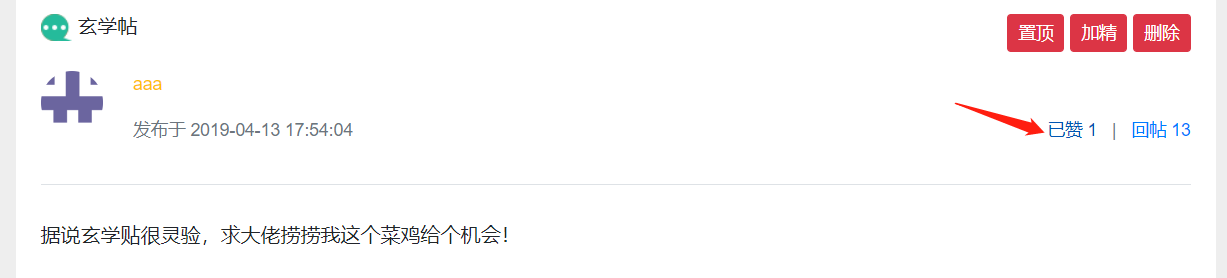
修改初始时赞的数量不对的问题:
1.处理首页
完善 HomeController 的 getIndexPage() 方法
public class HomeController implements CommunityConstant { //为了使用常量 @Resource private LikeService likeService; @GetMapping("/index") public String getIndexPage(Model model, Page page) { //方法调用前, SpringMVC会自动实例化Model和Page,并将Page注入Model. // 所以,在thymeleaf中可以直接访问Page对象中的数据. page.setRows(discussPostService.findDiscussPostRows(0)); page.setPath("/index"); //这个list里的帖子含有外键userId,我们需要查到userName拼接到帖子上 List<DiscussPost> list = discussPostService.findDiscussPosts(0, page.getOffset(), page.getLimit()); List<Map<String, Object>> discussPosts = new ArrayList<>(); if (list != null) { for (DiscussPost post : list) { Map<String, Object> map = new HashMap<>(); map.put("post", post); User user = userService.findUserById(post.getUserId()); map.put("user", user); //加了这两句 long likeCount = likeService.findEntityLikeCount(ENTITY_TYPE_POST, post.getId()); map.put("likeCount", likeCount); discussPosts.add(map); } } model.addAttribute("discussPosts", discussPosts); return "/index"; }- 1
- 2
- 3
- 4
- 5
- 6
- 7
- 8
- 9
- 10
- 11
- 12
- 13
- 14
- 15
- 16
- 17
- 18
- 19
- 20
- 21
- 22
- 23
- 24
- 25
- 26
- 27
- 28
- 29
- 30
- 31
- 32
index.html
134行<li class="d-inline ml-2">赞 <span th:text="${map.likeCount}">11</span></li>- 1
2.处理帖子详情页
DiscussPostController 的 getDiscussPost() 方法
@Resource private LikeService likeService; @GetMapping("/detail/{discussPostId}") public String getDiscussPost(@PathVariable("discussPostId") int discussPostId, Model model, Page page) { //帖子 DiscussPost post = discussPostService.findDiscussPostById(discussPostId); model.addAttribute("post", post); //作者 User user = userService.findUserById(post.getUserId()); model.addAttribute("user", user); // 点赞数量 long likeCount = likeService.findEntityLikeCount(ENTITY_TYPE_POST, discussPostId); model.addAttribute("likeCount", likeCount); // 点赞状态 int likeStatus = hostHolder.getUser() == null ? 0 : likeService.findEntityLikeStatus(hostHolder.getUser().getId(), ENTITY_TYPE_POST, discussPostId); model.addAttribute("likeStatus", likeStatus); //评论的分页信息 page.setLimit(5); page.setPath("/discuss/detail/" + discussPostId); page.setRows(post.getCommentCount()); //评论:给帖子的评论 //回复:给评论的评论 //评论列表 List<Comment> commentList = commentService.findCommentsByEntity( ENTITY_TYPE_POST, post.getId(), page.getOffset(), page.getLimit()); //评论VO列表 List<Map<String, Object>> commentVoList = new ArrayList<>(); if (commentList != null) { for (Comment comment : commentList) { //评论VO Map<String, Object> commentVo = new HashMap<>(); //往VO中添加评论 commentVo.put("comment", comment); //添加作者 commentVo.put("user", userService.findUserById(comment.getUserId())); // 点赞数量 likeCount = likeService.findEntityLikeCount(ENTITY_TYPE_COMMENT, comment.getId()); commentVo.put("likeCount", likeCount); // 点赞状态 likeStatus = hostHolder.getUser() == null ? 0 : likeService.findEntityLikeStatus(hostHolder.getUser().getId(), ENTITY_TYPE_COMMENT, comment.getId()); commentVo.put("likeStatus", likeStatus); //查询回复列表 List<Comment> replyList = commentService.findCommentsByEntity( ENTITY_TYPE_COMMENT, comment.getId(), 0, Integer.MAX_VALUE); //回复VO列表 List<Map<String, Object>> replyVoList = new ArrayList<>(); if (replyList != null) { for (Comment reply : replyList) { Map<String, Object> replyVo = new HashMap<>(); //回复 replyVo.put("reply", reply); //作者 replyVo.put("user", userService.findUserById(reply.getUserId())); //回复的目标 User target = reply.getTargetId() == 0 ? null : userService.findUserById(reply.getTargetId()); replyVo.put("target", target); // 点赞数量 likeCount = likeService.findEntityLikeCount(ENTITY_TYPE_COMMENT, reply.getId()); replyVo.put("likeCount", likeCount); // 点赞状态 likeStatus = hostHolder.getUser() == null ? 0 : likeService.findEntityLikeStatus(hostHolder.getUser().getId(), ENTITY_TYPE_COMMENT, reply.getId()); replyVo.put("likeStatus", likeStatus); replyVoList.add(replyVo); } } commentVo.put("replys", replyVoList); //回复的数量 int replyCount = commentService.findCommentCount(ENTITY_TYPE_COMMENT, comment.getId()); commentVo.put("replyCount", replyCount); commentVoList.add(commentVo); } } model.addAttribute("comments", commentVoList); return "site/discuss-detail"; }- 1
- 2
- 3
- 4
- 5
- 6
- 7
- 8
- 9
- 10
- 11
- 12
- 13
- 14
- 15
- 16
- 17
- 18
- 19
- 20
- 21
- 22
- 23
- 24
- 25
- 26
- 27
- 28
- 29
- 30
- 31
- 32
- 33
- 34
- 35
- 36
- 37
- 38
- 39
- 40
- 41
- 42
- 43
- 44
- 45
- 46
- 47
- 48
- 49
- 50
- 51
- 52
- 53
- 54
- 55
- 56
- 57
- 58
- 59
- 60
- 61
- 62
- 63
- 64
- 65
- 66
- 67
- 68
- 69
- 70
- 71
- 72
- 73
- 74
- 75
- 76
- 77
- 78
- 79
- 80
- 81
- 82
- 83
- 84
- 85
- 86
discuss-detail.html
88行<b th:text="${likeStatus==1?'已赞':'赞'}">赞</b> <i th:text="${likeCount}">11</i>- 1
140行
<b th:text="${cvo.likeStatus==1?'已赞':'赞'}">赞</b>(<i th:text="${cvo.likeCount}">1</i>)- 1
166行
<b th:text="${rvo.likeStatus==1?'已赞':'赞'}">赞</b>(<i th:text="${rvo.likeCount}">1</i>)- 1
4. 我收到的赞
重构点赞功能
- 以用户为key,记录点赞数量
- increment(key),decrement(key)
开发个人主页
- 以用户为key,查询点赞数量
RedisKeyUtil 增加属性和方法
public static final String PREFIX_USER_LIKE = "like:user"; // 某个用户的赞 // like:user:userId -> int public static String getUserLikeKey(int userId) { return PREFIX_USER_LIKE + SPLIT + userId; }- 1
- 2
- 3
- 4
- 5
- 6
- 7
LikeService
重构 like() 方法// 点赞 public void like(int userId, int entityType, int entityId, int entityUserId) { redisTemplate.execute(new SessionCallback() { @Override public Object execute(RedisOperations operations) throws DataAccessException { String entityLikeKey = RedisKeyUtil.getEntityLikeKey(entityType, entityId); String userLikeKey = RedisKeyUtil.getUserLikeKey(entityUserId); //这句查询不能放在事务内部 boolean isMember = operations.opsForSet().isMember(entityLikeKey, userId); //开启事务 operations.multi(); if (isMember) { operations.opsForSet().remove(entityLikeKey, userId); operations.opsForValue().decrement(userLikeKey); } else { operations.opsForSet().add(entityLikeKey, userId); operations.opsForValue().increment(userLikeKey); } return operations.exec(); } }); }- 1
- 2
- 3
- 4
- 5
- 6
- 7
- 8
- 9
- 10
- 11
- 12
- 13
- 14
- 15
- 16
- 17
- 18
- 19
- 20
- 21
- 22
增加一个方法,统计赞的数量
// 查询某个用户获得的赞的数量 public int findUserLikeCount(int userId) { String userLikeKey = RedisKeyUtil.getUserLikeKey(userId); Integer count = (Integer) redisTemplate.opsForValue().get(userLikeKey); return count == null ? 0 : count.intValue(); }- 1
- 2
- 3
- 4
- 5
- 6
LikeController
like() 方法 增加一个形参 entityUserIdpublic String like(int entityType, int entityId, int entityUserId) { ... // 点赞 likeService.like(user.getId(), entityType, entityId, entityUserId);- 1
- 2
- 3
- 4
discuss-detail.html
78行<a th:href="@{|/user/profile/${user.id}|}">- 1
87行
<a href="javascript:;" th:onclick="|like(this, 1, ${post.id}, ${post.userId});|" class="text-primary">- 1
139行
<a href="javascript:;" th:onclick="|like(this, 2, ${cvo.comment.id},${cvo.comment.userId})|" class="text-primary">- 1
165行
<a href="javascript:;" th:onclick="|like(this, 2, ${rvo.reply.id}, ${rvo.reply.userId})|" class="text-primary">- 1
discuss.js
function like(btn, entityType, entityId, entityUserId) { $.post( CONTEXT_PATH + "/like", {"entityType":entityType, "entityId":entityId, "entityUserId":entityUserId}, function (data) { data = $.parseJSON(data); if (data.code == 0) { $(btn).children("i").text(data.likeCount); $(btn).children("b").text(data.likeStatus==1?'已赞':'赞'); } else { alert(data.msg); } } ); }- 1
- 2
- 3
- 4
- 5
- 6
- 7
- 8
- 9
- 10
- 11
- 12
- 13
- 14
- 15
UserController
@Resource private LikeService likeService; //个人主页 @GetMapping("/profile/{userId}") public String getProfilePage(@PathVariable("userId") int userId, Model model) { User user = userService.findUserById(userId); if (user == null) { throw new RuntimeException("该用户不存在!"); } // 用户 model.addAttribute("user", user); // 获赞数量 int likeCount = likeService.findUserLikeCount(userId); model.addAttribute("likeCount", likeCount); return "/site/profile"; }- 1
- 2
- 3
- 4
- 5
- 6
- 7
- 8
- 9
- 10
- 11
- 12
- 13
- 14
- 15
- 16
- 17
index.html
43行<a class="dropdown-item text-center" th:href="@{|/user/profile/${loginUser.id}|}">个人主页</a>- 1
122行
<a th:href="@{|/user/profile/${map.user.id}|}">- 1
profile.html
2行<html lang="en" xmlns:th="http://www.thymeleaf.org">- 1
8行
<link rel="stylesheet" th:href="@{/css/global.css}" />- 1
14行
<!-- 头部 --> <header class="bg-dark sticky-top" th:replace="index::header">- 1
- 2
165-166行
<script th:src="@{/js/global.js}"></script> <script th:src="@{/js/profile.js}"></script>- 1
- 2
80行
<img th:src="${user.headerUrl}" class="align-self-start mr-4 rounded-circle" alt="用户头像" style="width:50px;">- 1
83行
<span th:utext="${user.username}">nowcoder</span>- 1
87行
<span>注册于 <i class="text-muted" th:text="${#dates.format(user.createTime, 'yyyy-MM-dd HH:mm:ss')}">2015-06-12 15:20:12</i></span>- 1
92行
<span class="ml-4">获得了 <i class="text-danger" th:text="${likeCount}">87</i> 个赞</span>- 1
启动测试,先删掉之前的点赞数据
C:\Users\15642>redis-cli 127.0.0.1:6379> select 11 OK 127.0.0.1:6379[11]> keys * 1) "like:entity:2:94" 2) "like:entity:1:234" 3) "test:teachers" 4) "test:tx" 5) "test:count" 127.0.0.1:6379[11]> flushdb OK 127.0.0.1:6379[11]> keys * (empty list or set)- 1
- 2
- 3
- 4
- 5
- 6
- 7
- 8
- 9
- 10
- 11
- 12
- 13
登陆之后,随便选个人的帖子进行点赞,再给他的评论点赞,然后去他的主页看看收到的赞的数量对不对
5. 关注、取消关注
需求
- 开发关注、取消关注功能。
- 统计用户的关注数、粉丝数。
关键
- 若A关注了B,则A是B的Follower(粉丝),B是A的Followee(目标)。
- 关注的目标可以是用户、帖子、题目等,在实现时将这些目标抽象为实体。
RedisKeyUtil
增加属性和方法public static final String PREFIX_FOLLOWEE = "followee"; public static final String PREFIX_FOLLOWER = "follower"; //某个用户关注的实体 //followee:userId:entityType -> zSet(entityId, now) public static String getFolloweeKey(int userId, int entityType) { return PREFIX_FOLLOWEE + SPLIT + userId + SPLIT + entityType; } //某个用户拥有的粉丝 //follower:entityType:entityId -> zSet(userId, now) public static String getFollowerKey(int entityType, int entityId) { return PREFIX_FOLLOWER + SPLIT + entityType + SPLIT + entityId; }- 1
- 2
- 3
- 4
- 5
- 6
- 7
- 8
- 9
- 10
- 11
- 12
- 13
- 14
新建 FollowService
package com.nowcoder.community.service; import com.nowcoder.community.util.RedisKeyUtil; import org.springframework.dao.DataAccessException; import org.springframework.data.redis.core.RedisOperations; import org.springframework.data.redis.core.RedisTemplate; import org.springframework.data.redis.core.SessionCallback; import org.springframework.stereotype.Service; import javax.annotation.Resource; @Service public class FollowService { @Resource private RedisTemplate redisTemplate; //关注 public void follow(int userId, int entityType, int entityId) { redisTemplate.execute(new SessionCallback() { @Override public Object execute(RedisOperations operations) throws DataAccessException { String followeeKey = RedisKeyUtil.getFolloweeKey(userId, entityType); String followerKey = RedisKeyUtil.getFollowerKey(entityType, entityId); operations.multi(); operations.opsForZSet().add(followeeKey, entityId, System.currentTimeMillis()); operations.opsForZSet().add(followerKey, userId, System.currentTimeMillis()); return operations.exec(); } }); } //取消关注 public void unfollow(int userId, int entityType, int entityId) { redisTemplate.execute(new SessionCallback() { @Override public Object execute(RedisOperations operations) throws DataAccessException { String followeeKey = RedisKeyUtil.getFolloweeKey(userId, entityType); String followerKey = RedisKeyUtil.getFollowerKey(entityType, entityId); operations.multi(); operations.opsForZSet().remove(followeeKey, entityId); operations.opsForZSet().remove(followerKey, userId); return operations.exec(); } }); } }- 1
- 2
- 3
- 4
- 5
- 6
- 7
- 8
- 9
- 10
- 11
- 12
- 13
- 14
- 15
- 16
- 17
- 18
- 19
- 20
- 21
- 22
- 23
- 24
- 25
- 26
- 27
- 28
- 29
- 30
- 31
- 32
- 33
- 34
- 35
- 36
- 37
- 38
- 39
- 40
- 41
- 42
- 43
- 44
- 45
新建 FollowController
package com.nowcoder.community.controller; import com.nowcoder.community.entity.User; import com.nowcoder.community.service.FollowService; import com.nowcoder.community.util.CommunityUtil; import com.nowcoder.community.util.HostHolder; import org.springframework.stereotype.Controller; import org.springframework.web.bind.annotation.PostMapping; import org.springframework.web.bind.annotation.ResponseBody; import javax.annotation.Resource; @Controller public class FollowController { @Resource private FollowService followService; @Resource private HostHolder hostHolder; @PostMapping("/follow") @ResponseBody public String follow(int entityType, int entityId) { User user = hostHolder.getUser(); followService.follow(user.getId(), entityType, entityId); return CommunityUtil.getJSONString(0, "已关注!"); } @PostMapping("/unfollow") @ResponseBody public String unfollow(int entityType, int entityId) { User user = hostHolder.getUser(); followService.unfollow(user.getId(), entityType, entityId); return CommunityUtil.getJSONString(0, "已取消关注!"); } }- 1
- 2
- 3
- 4
- 5
- 6
- 7
- 8
- 9
- 10
- 11
- 12
- 13
- 14
- 15
- 16
- 17
- 18
- 19
- 20
- 21
- 22
- 23
- 24
- 25
- 26
- 27
- 28
- 29
- 30
- 31
- 32
- 33
- 34
- 35
- 36
- 37
CommunityConstant
//实体类型:用户 int ENTITY_TYPE_USER = 3;- 1
- 2
profile.html
84行 “关注TA” 的上一行加上:<input type="hidden" id="entityId" th:value="${user.id}">- 1
修改后的 profile.js
$(function(){ $(".follow-btn").click(follow); }); function follow() { var btn = this; if($(btn).hasClass("btn-info")) { // 关注TA $.post( CONTEXT_PATH + "/follow", {"entityType":3, "entityId":$(btn).prev().val()}, function (data) { data = $.parseJSON(data); if (data.code == 0) { window.location.reload(); } else { alert(data.msg); } } ); // $(btn).text("已关注").removeClass("btn-info").addClass("btn-secondary"); } else { // 取消关注 $.post( CONTEXT_PATH + "/unfollow", {"entityType":3, "entityId":$(btn).prev().val()}, function (data) { data = $.parseJSON(data); if (data.code == 0) { window.location.reload(); } else { alert(data.msg); } } ); // $(btn).text("关注TA").removeClass("btn-secondary").addClass("btn-info"); } }- 1
- 2
- 3
- 4
- 5
- 6
- 7
- 8
- 9
- 10
- 11
- 12
- 13
- 14
- 15
- 16
- 17
- 18
- 19
- 20
- 21
- 22
- 23
- 24
- 25
- 26
- 27
- 28
- 29
- 30
- 31
- 32
- 33
- 34
- 35
- 36
- 37
- 38
FollowService
增加方法// 查询关注的实体的数量 public long findFolloweeCount(int userId, int entityType) { String followeeKey = RedisKeyUtil.getFolloweeKey(userId, entityType); return redisTemplate.opsForZSet().zCard(followeeKey); } // 查询实体的粉丝数量 public long findFollowerCount(int entityType, int entityId) { String followerKey = RedisKeyUtil.getFollowerKey(entityType, entityId); return redisTemplate.opsForZSet().zCard(followerKey); } // 查询当前用户是否已关注该实体 public boolean hasFollowed(int userId, int entityType, int entityId) { String followeeKey = RedisKeyUtil.getFolloweeKey(userId, entityType); return redisTemplate.opsForZSet().score(followeeKey, entityId) != null; }- 1
- 2
- 3
- 4
- 5
- 6
- 7
- 8
- 9
- 10
- 11
- 12
- 13
- 14
- 15
- 16
- 17
UserController
完善 getProfilePage 方法public class UserController implements CommunityConstant { @Resource private FollowService followService; //个人主页 @GetMapping("/profile/{userId}") public String getProfilePage(@PathVariable("userId") int userId, Model model) { User user = userService.findUserById(userId); if (user == null) { throw new RuntimeException("该用户不存在!"); } // 用户 model.addAttribute("user", user); // 获赞数量 int likeCount = likeService.findUserLikeCount(userId); model.addAttribute("likeCount", likeCount); // 关注数量 long followeeCount = followService.findFolloweeCount(userId, ENTITY_TYPE_USER); model.addAttribute("followeeCount", followeeCount); // 粉丝数量 long followerCount = followService.findFollowerCount(ENTITY_TYPE_USER, userId); model.addAttribute("followerCount", followerCount); // 是否已关注 boolean hasFollowed = false; if (hostHolder.getUser() != null) { hasFollowed = followService.hasFollowed(hostHolder.getUser().getId(), ENTITY_TYPE_USER, userId); } model.addAttribute("hasFollowed", hasFollowed); return "/site/profile"; }- 1
- 2
- 3
- 4
- 5
- 6
- 7
- 8
- 9
- 10
- 11
- 12
- 13
- 14
- 15
- 16
- 17
- 18
- 19
- 20
- 21
- 22
- 23
- 24
- 25
- 26
- 27
- 28
- 29
- 30
- 31
- 32
profile.html
91行<span>关注了 <a class="text-primary" href="followee.html" th:text="${followeeCount}">5</a> 人</span>- 1
92行
<span class="ml-4">关注者 <a class="text-primary" href="follower.html" th:text="${followerCount}">123</a> 人</span>- 1
85行
<button type="button" class="btn btn-info btn-sm float-right mr-5 follow-btn" th:text="${hasFollowed?'已关注':'关注TA'}" th:if="${loginUser!=null&&loginUser.id!=user.id}">关注TA</button>- 1
- 2
启动,测试

6. 关注列表、粉丝列表
业务层
- 查询某个用户关注的人,支持分页。
- 查询某个用户的粉丝,支持分页。
表现层
- 处理“查询关注的人”、“查询粉丝”请求。
- 编写“查询关注的人”、“查询粉丝”模板。
FollowService
增加方法public class FollowService implements CommunityConstant { @Resource private UserService userService; // 查询某用户关注的人 public List<Map<String, Object>> findFollowees(int userId, int offset, int limit) { String followeeKey = RedisKeyUtil.getFolloweeKey(userId, ENTITY_TYPE_USER); Set<Integer> targetIds = redisTemplate.opsForZSet().reverseRange(followeeKey, offset, offset + limit - 1); if (targetIds == null) { return null; } List<Map<String, Object>> list = new ArrayList<>(); for (Integer targetId : targetIds) { Map<String, Object> map = new HashMap<>(); User user = userService.findUserById(targetId); map.put("user", user); Double score = redisTemplate.opsForZSet().score(followeeKey, targetId); map.put("followTime", new Date(score.longValue())); list.add(map); } return list; } // 查询某用户的粉丝 public List<Map<String, Object>> findFollowers(int userId, int offset, int limit) { String followerKey = RedisKeyUtil.getFollowerKey(ENTITY_TYPE_USER, userId); Set<Integer> targetIds = redisTemplate.opsForZSet().reverseRange(followerKey, offset, offset + limit - 1); if (targetIds == null) { return null; } List<Map<String, Object>> list = new ArrayList<>(); for (Integer targetId : targetIds) { Map<String, Object> map = new HashMap<>(); User user = userService.findUserById(targetId); map.put("user", user); Double score = redisTemplate.opsForZSet().score(followerKey, targetId); map.put("followTime", new Date(score.longValue())); list.add(map); } return list; }- 1
- 2
- 3
- 4
- 5
- 6
- 7
- 8
- 9
- 10
- 11
- 12
- 13
- 14
- 15
- 16
- 17
- 18
- 19
- 20
- 21
- 22
- 23
- 24
- 25
- 26
- 27
- 28
- 29
- 30
- 31
- 32
- 33
- 34
- 35
- 36
- 37
- 38
- 39
- 40
- 41
FollowController
增加方法public class FollowController implements CommunityConstant { @Resource private UserService userService; @GetMapping("/followees/{userId}") public String getFollowees(@PathVariable("userId") int userId, Page page, Model model) { User user = userService.findUserById(userId); if (user == null) { throw new RuntimeException("该用户不存在!"); } model.addAttribute("user", user); page.setLimit(5); page.setPath("/followees/" + userId); page.setRows((int) followService.findFolloweeCount(userId, ENTITY_TYPE_USER)); List<Map<String, Object>> userList = followService.findFollowees(userId, page.getOffset(), page.getLimit()); if (userList != null) { for (Map<String, Object> map : userList) { User u = (User) map.get("user"); map.put("hasFollowed", hasFollowed(u.getId())); } } model.addAttribute("users", userList); return "/site/followee"; } @GetMapping("/followers/{userId}") public String getFollowers(@PathVariable("userId") int userId, Page page, Model model) { User user = userService.findUserById(userId); if (user == null) { throw new RuntimeException("该用户不存在!"); } model.addAttribute("user", user); page.setLimit(5); page.setPath("/followers/" + userId); page.setRows((int) followService.findFollowerCount(ENTITY_TYPE_USER, userId)); List<Map<String, Object>> userList = followService.findFollowers(userId, page.getOffset(), page.getLimit()); if (userList != null) { for (Map<String, Object> map : userList) { User u = (User) map.get("user"); map.put("hasFollowed", hasFollowed(u.getId())); } } model.addAttribute("users", userList); return "/site/follower"; } private boolean hasFollowed(int userId) { if (hostHolder.getUser() == null) { return false; } return followService.hasFollowed(hostHolder.getUser().getId(), ENTITY_TYPE_USER, userId); }- 1
- 2
- 3
- 4
- 5
- 6
- 7
- 8
- 9
- 10
- 11
- 12
- 13
- 14
- 15
- 16
- 17
- 18
- 19
- 20
- 21
- 22
- 23
- 24
- 25
- 26
- 27
- 28
- 29
- 30
- 31
- 32
- 33
- 34
- 35
- 36
- 37
- 38
- 39
- 40
- 41
- 42
- 43
- 44
- 45
- 46
- 47
- 48
- 49
- 50
- 51
- 52
- 53
- 54
- 55
profile.html
92行<span>关注了 <a class="text-primary" th:href="@{|/followees/${user.id}|}" th:text="${followeeCount}">5</a> 人</span>- 1
93行
<span class="ml-4">关注者 <a class="text-primary" th:href="@{|/followers/${user.id}|}" th:text="${followerCount}">123</a> 人</span>- 1
followee.html
2行<html lang="en" xmlns:th="http://www.thymeleaf.org">- 1
8行
<link rel="stylesheet" th:href="@{/css/global.css}" />- 1
14行
<!-- 头部 --> <header class="bg-dark sticky-top" th:replace="index::header">- 1
- 2
233-234行
<script th:src="@{/js/global.js}"></script> <script th:src="@{/js/profile.js}"></script>- 1
- 2
删掉93-148行,只留一个 li 标签即可
64行的 div 标签
<div class="position-relative"> <!-- 选项 --> <ul class="nav nav-tabs mb-3"> <li class="nav-item"> <a class="nav-link position-relative active" th:href="@{|/followees/${user.id}|}"> <i class="text-info" th:utext="${user.username}">Nowcoder</i> 关注的人 </a> </li> <li class="nav-item"> <a class="nav-link position-relative" th:href="@{|/followers/${user.id}|}"> 关注<i class="text-info" th:utext="${user.username}">Nowcoder</i> 的人 </a> </li> </ul> <a th:href="@{|/user/profile/${user.id}|}" class="text-muted position-absolute rt-0">返回个人主页></a> </div>- 1
- 2
- 3
- 4
- 5
- 6
- 7
- 8
- 9
- 10
- 11
- 12
- 13
- 14
- 15
- 16
83行
<li class="media pb-3 pt-3 mb-3 border-bottom position-relative" th:each="map:${users}">- 1
84行 a 标签
<a th:href="@{|/user/profile/${map.user.id}|}"> <img th:src="${map.user.headerUrl}" class="mr-4 rounded-circle user-header" alt="用户头像" > </a>- 1
- 2
- 3
89行
<span class="text-success" th:utext="${map.user.username}">落基山脉下的闲人</span>- 1
90行 span 标签
<span class="float-right text-muted font-size-12"> 关注于 <i th:text="${#dates.format(map.followTime, 'yyyy-MM-dd HH:mm:ss')}">2019-04-28 14:13:25</i> </span>- 1
- 2
- 3
101行
<!-- 分页 --> <nav class="mt-5" th:replace="index::pagination">- 1
- 2
95行前面加一行
<input type="hidden" id="entityId" th:value="${map.user.id}">- 1
96行 button 标签
<button type="button" th:class="|btn ${map.hasFollowed?'btn-secondary':'btn-info'} btn-sm float-right follow-btn|" th:if="${loginUser!=null&&loginUser.id!=map.user.id}" th:text="${map.hasFollowed?'已关注':'关注TA'}">关注TA </button>- 1
- 2
- 3
follower.html 做一模一样的处理!
启动,测试,登录一个账号,随便关注一个人,再登录那个人的账号,查看是否粉丝+1
7. 优化登录模块
使用Redis存储验证码
- 验证码需要频繁的访问与刷新,对性能要求较高。
- 验证码不需永久保存,通常在很短的时间后就会失效。
- 分布式部署时,存在Session共享的问题。
使用Redis存储登录凭证
- 处理每次请求时,都要查询用户的登录凭证,访问的频率非常高。
使用Redis缓存用户信息
- 处理每次请求时,都要根据凭证查询用户信息,访问的频率非常高。
7.1 使用Redis存储验证码
RedisKeyUtil
增加属性和方法public static final String PREFIX_KAPTCHA = "kaptcha"; // 登录验证码的key public static String getKaptchaKey(String owner) { return PREFIX_KAPTCHA + SPLIT + owner; }- 1
- 2
- 3
- 4
- 5
- 6
LoginController
重构 getKaptcha() 方法、login() 方法@Resource private RedisTemplate redisTemplate; @GetMapping("/kaptcha") public void getKaptcha(HttpServletResponse response) { //生成验证码 String text = kaptchaProducer.createText(); BufferedImage image = kaptchaProducer.createImage(text); //验证的归属 String kaptchaOwner = CommunityUtil.generateUUID(); Cookie cookie = new Cookie("kaptchaOwner", kaptchaOwner); cookie.setMaxAge(60); cookie.setPath(contextPath); response.addCookie(cookie); //将验证码存入 Redis String redisKey = RedisKeyUtil.getKaptchaKey(kaptchaOwner); redisTemplate.opsForValue().set(redisKey, text, 60, TimeUnit.SECONDS); //将图片输出给浏览器 response.setContentType("image/png"); try { OutputStream os = response.getOutputStream(); ImageIO.write(image, "png", os); } catch (IOException e) { logger.error("响应验证码失败:" + e.getMessage()); } } @PostMapping("/login") public String login(String username, String password, String code, boolean rememberme, Model model, HttpServletResponse response, @CookieValue("kaptchaOwner") String kaptchaOwner) { //检查验证码 String kaptcha = null; if (StringUtils.isNotBlank(kaptchaOwner)) { String redisKey = RedisKeyUtil.getKaptchaKey(kaptchaOwner); kaptcha = (String) redisTemplate.opsForValue().get(redisKey); } //后面的不变 if (StringUtils.isBlank(kaptcha) || StringUtils.isBlank(code) || !kaptcha.equalsIgnoreCase(code)) { model.addAttribute("codeMsg", "验证码不正确!"); return "/site/login"; } //检查账号、密码 int expiredSeconds = rememberme ? REMEMBER_EXPIRED_SECONDS : DEFAULT_EXPIRED_SECONDS; Map<String, Object> map = userService.login(username, password, expiredSeconds); if (map.containsKey("ticket")) {//只有登陆成功才会存ticket Cookie cookie = new Cookie("ticket", map.get("ticket").toString()); cookie.setPath(contextPath); cookie.setMaxAge(expiredSeconds); response.addCookie(cookie); return "redirect:/index"; } else { model.addAttribute("usernameMsg", map.get("usernameMsg")); model.addAttribute("passwordMsg", map.get("passwordMsg")); return "/site/login"; } }- 1
- 2
- 3
- 4
- 5
- 6
- 7
- 8
- 9
- 10
- 11
- 12
- 13
- 14
- 15
- 16
- 17
- 18
- 19
- 20
- 21
- 22
- 23
- 24
- 25
- 26
- 27
- 28
- 29
- 30
- 31
- 32
- 33
- 34
- 35
- 36
- 37
- 38
- 39
- 40
- 41
- 42
- 43
- 44
- 45
- 46
- 47
- 48
- 49
- 50
- 51
- 52
- 53
- 54
- 55
- 56
- 57
- 58
- 59
- 60
- 61
7.2 使用Redis存储登录凭证
RedisKeyUtil
public static final String PREFIX_TICKET = "ticket"; // 登录凭证 public static String getTicketKey(String ticket) { return PREFIX_TICKET + SPLIT + ticket; }- 1
- 2
- 3
- 4
- 5
- 6
LoginTicketMapper 可以废弃掉了,在类上加上注解
@DeprecatedUserService
// @Resource // private LoginTicketMapper loginTicketMapper; @Resource private RedisTemplate redisTemplate;- 1
- 2
- 3
- 4
- 5
修改 login() 方法的后半段
//生成登录凭证 LoginTicket loginTicket = new LoginTicket(); loginTicket.setUserId(user.getId()); loginTicket.setTicket(CommunityUtil.generateUUID()); loginTicket.setStatus(0); loginTicket.setExpired(new Date(System.currentTimeMillis() + expiredSeconds * 1000)); // loginTicketMapper.insertLoginTicket(loginTicket); String redisKey = RedisKeyUtil.getTicketKey(loginTicket.getTicket()); redisTemplate.opsForValue().set(redisKey, loginTicket); map.put("ticket", loginTicket.getTicket()); return map;- 1
- 2
- 3
- 4
- 5
- 6
- 7
- 8
- 9
- 10
- 11
- 12
- 13
logout() 方法
public void logout(String ticket) { // loginTicketMapper.updateStatus(ticket, 1); String redisKey = RedisKeyUtil.getTicketKey(ticket); LoginTicket loginTicket = (LoginTicket) redisTemplate.opsForValue().get(redisKey); loginTicket.setStatus(1);//状态为1,表示删除 redisTemplate.opsForValue().set(redisKey, loginTicket); }- 1
- 2
- 3
- 4
- 5
- 6
- 7
findLoginTicket() 方法
public LoginTicket findLoginTicket(String ticket) { // return loginTicketMapper.selectByTicket(ticket); String redisKey = RedisKeyUtil.getTicketKey(ticket); return (LoginTicket) redisTemplate.opsForValue().get(redisKey); }- 1
- 2
- 3
- 4
- 5
7.3 使用Redis缓存用户信息
RedisKeyUtil
public static final String PREFIX_USER = "user"; // 用户 public static String getUserKey(int userId) { return PREFIX_USER + SPLIT + userId; }- 1
- 2
- 3
- 4
- 5
- 6
UserService
增加三个方法// 1.优先从缓存中取值 private User getCache(int userId) { String redisKey = RedisKeyUtil.getUserKey(userId); return (User) redisTemplate.opsForValue().get(redisKey); } // 2.取不到时初始化缓存数据 private User initCache(int userId) { User user = userMapper.selectById(userId); String redisKey = RedisKeyUtil.getUserKey(userId); redisTemplate.opsForValue().set(redisKey, user, 3600, TimeUnit.SECONDS); return user; } // 3.数据变更时清除缓存数据 private void clearCache(int userId) { String redisKey = RedisKeyUtil.getUserKey(userId); redisTemplate.delete(redisKey); }- 1
- 2
- 3
- 4
- 5
- 6
- 7
- 8
- 9
- 10
- 11
- 12
- 13
- 14
- 15
- 16
- 17
- 18
修改 findUserById() 方法
public User findUserById(int id) { // return userMapper.selectById(id); User user = getCache(id); if (user == null) { user = initCache(id); } return user; }- 1
- 2
- 3
- 4
- 5
- 6
- 7
- 8
修改 activation() 方法
public int activation(int userId, String code) { User user = userMapper.selectById(userId); if (user.getStatus() == 1) { return ACTIVATION_REPEAT; } else if (user.getActivationCode().equals(code)) { userMapper.updateStatus(userId, 1); clearCache(userId); return ACTIVATION_SUCCESS; } else { return ACTIVATION_FAILURE; } }- 1
- 2
- 3
- 4
- 5
- 6
- 7
- 8
- 9
- 10
- 11
- 12
- 13
- 14
修改 updateHeader() 方法
public int updateHeader(int userId, String headerUrl) { int rows = userMapper.updateHeader(userId, headerUrl); clearCache(userId); return rows; }- 1
- 2
- 3
- 4
- 5
-
相关阅读:
虚拟机配置网络(主机ping、虚拟机ping不通等问题)
Twitter正在测试年度订阅以进行推文和转推
ElasticSearch(二)
单片机——将P1口状态送入P0、P2和P3口
selenium 元素定位
Java中static关键字
kimera论文阅读
用 docker 创建 jmeter 容器,能做性能测试?
【毕业设计】机器学习的员工离职模型研究-python
自学Python 60 socketserver编程
- 原文地址:https://blog.csdn.net/QinLaoDeMaChu/article/details/125360763
