-
3dsmax插件开发遍历节点对象和Object获取及INode变换矩阵说明
遍历节点对象
1.Scene系统遍历
class MyTreeEnum : public ITreeEnumProc { public: MyTreeEnum(void) = default; ~MyTreeEnum(void) = default; public: int callback(INode *node); };- 1
- 2
- 3
- 4
- 5
- 6
- 7
- 8
int MyTreeEnum::callback(INode *node) { ObjectState os = node->EvalWorldState(10); if (os.obj->CanConvertToType(Class_ID(TRIOBJ_CLASS_ID, 0))) { _cprintf("TRIOBJECT %s\n", node->GetName()); Mtl *pMtl = node->GetMtl(); if (pMtl) { _cprintf("MATERIAL %s\n", pMtl->GetName()); } return TREE_CONTINUE; } if (os.obj) { switch (os.obj->SuperClassID()) { case CAMERA_CLASS_ID: _cprintf("CAMERA %s\n", node->GetName()); break; case LIGHT_CLASS_ID: _cprintf("LIGHT %s\n", node->GetName()); break; } } return TREE_CONTINUE; }- 1
- 2
- 3
- 4
- 5
- 6
- 7
- 8
- 9
- 10
- 11
- 12
- 13
- 14
- 15
- 16
- 17
- 18
- 19
- 20
- 21
- 22
- 23
- 24
- 25
- 26
- 27
接着需要修改DoExport()函数调用
EnumTree()方法将场景枚举树与导出插件接口相连接,通过DoExport连接他们
DoExport接口是创建
File Export模板,其中自带ExpInterface,可以使用场景遍历。实际上我们可以自己封装一个ExpBase类将ExpInterface和Interface保存起来供自己调用int MaxExportTest::DoExport(const TCHAR *name,ExpInterface *ei,Interface *i, BOOL suppressPrompts, DWORD options) { MyTreeEnum tempProc; ei->theScene->EnumTree( &tempProc ); return TRUE; }- 1
- 2
- 3
- 4
- 5
- 6
相关原理:
Class IScene
先来找到
Class IScene
再来具体看看
EnumTree()函数
可以看出,这个函数会被系统在合适的时候调用,我们只要给予参数即可(具体可以看下面的例子)。它会枚举场景中的每个结点。对每个结点,它再调用
ITreeEnumProc *proc,这个proc就是用来解析每个结点的东西。
而
ITreeEnumProc接口中有一个callback(pure virtual),该函数参数是INode *node,其中node就是我们需要的对象,这个函数会让系统传给你你要的node。而我们只要实现这个callback函数即可。如上面所说的,node包含了一个节点的所有几何信息,渲染信息等等2.手动INode遍历
实际上我们一般更加采用自由一点的INode遍历方式。
INode中和遍历有关的接口如下:
INode::IsRootNode() - determines if a node is the root node (does not have a parent node). INode::GetParentNode() - returns the parent node of a child. INode::NumberOfChildren() - gets the number of children of the node. INode::GetChildNode() - returns an INode pointer to the nth child. Interface::GetRootNode()- 1
- 2
- 3
- 4
- 5
因此只要有模板中给的
Interface指针,就可获得根节点,从而进行递归遍历。例如:
int skeletal_animation_export::DoExport(const TCHAR *name,ExpInterface *ei,Interface *i, BOOL suppressPrompts, DWORD options) { /*手动回调*/ INode* node = i->GetRootNode(); DfsSceneTree(node, tempProc); } /*手动遍历场景树*/ void DfsSceneTree(INode* node, MyTreeEnum& tempProc) { if (node == nullptr) return; /*实际上可以不用*/ if (node->EvalWorldState(0).obj) { tempProc.callback(node); } auto num = node->NumberOfChildren(); for (int i = 0; i < num; i++) { DfsSceneTree(node->GetChildNode(i), tempProc); } }- 1
- 2
- 3
- 4
- 5
- 6
- 7
- 8
- 9
- 10
- 11
- 12
- 13
- 14
- 15
- 16
- 17
- 18
- 19
- 20
其中callback就是我们遍历到具体节点要写的逻辑,比如判断该节点类型。
int MyTreeEnum::callback(INode *node) { //判断是否导出选中的物体(开启了导出选择物体的模式&&当前节点没有选中) if (exportSelected && node->Selected() == FALSE) return TREE_CONTINUE; ObjectState os = node->EvalWorldState(0); /*判断这个物体是否为Mesh*/ if (os.obj->CanConvertToType(Class_ID(TRIOBJ_CLASS_ID, 0))) { /*向下转型,父类指针调用EvalWorldState返回的ObjectState.obj指向子类,所以没有安全风险。网上的示例代码一般为()由Object基类强转到TriObject类,也没问题*/ TriObject* tri = dynamic_cast<TriObject*>(dynamic_cast<GeomObject*>(os.obj->ConvertToType(0, Class_ID(TRIOBJ_CLASS_ID, 0)))); /*将节点是网格模型的名称打印*/ WriteFileExportPath(AddExportPathSuffix(_exportPath, _dotPos, "AllTriobjectName"), node->GetName()); _cprintf("TriobjectName %s\n", node->GetName()); /*判断当前节点是否是骨骼类型*/ if (CheckBone(node)) { MeshExport inodeDataExport; /*保存骨骼*/ /**/ } /*对材质纹理进行处理*/ Mtl *pMtl = node->GetMtl(); if (pMtl) { //WriteFileExportPath(AddExportPathSuffix(_exportPath, _dotPos, "AllMaterialName"), pMtl->GetName().data()); _cprintf("Material %s\n", pMtl->GetName()); } return TREE_CONTINUE; } if (os.obj) { switch (os.obj->SuperClassID()) { case CAMERA_CLASS_ID: /*当前节点是摄像机,打印名称,根据需要对数据进行操作*/ WriteFileExportPath(AddExportPathSuffix(_exportPath, _dotPos, "AllCameraName"), node->GetName()); _cprintf("Camera %s\n", node->GetName()); break; case LIGHT_CLASS_ID: /*当前节点是灯光,打印名称,根据需要对数据进行操作*/ WriteFileExportPath(AddExportPathSuffix(_exportPath, _dotPos, "AllLightName"), node->GetName()); _cprintf("Light %s\n", node->GetName()); break; } } return TREE_CONTINUE; }- 1
- 2
- 3
- 4
- 5
- 6
- 7
- 8
- 9
- 10
- 11
- 12
- 13
- 14
- 15
- 16
- 17
- 18
- 19
- 20
- 21
- 22
- 23
- 24
- 25
- 26
- 27
- 28
- 29
- 30
- 31
- 32
- 33
- 34
- 35
- 36
- 37
- 38
- 39
- 40
- 41
- 42
- 43
- 44
- 45
- 46
- 47
- 48
- 49
- 50
- 51
- 52
- 53
- 54
- 55
同样的,我们也可以自己封装保存模板中的两个接口。
IO流导出文件
实际上导出文件的数据是由cpp提供的,而不是SDK提供的。
以下是测试代码:
测试过程中直接在
callback回调过程中导出文件测试//-- MyTreeEnum ------------------------------------------------------- class MyTreeEnum : public ITreeEnumProc { public: MyTreeEnum(void) = default; ~MyTreeEnum(void) = default; public: int callback(INode *node); }; int MyTreeEnum::callback(INode *node) { //_cprintf("MyTreeEnum::callback begin[101 lines]"); std::ofstream ofs; ObjectState os = node->EvalWorldState(10); if (os.obj->CanConvertToType(Class_ID(TRIOBJ_CLASS_ID, 0))) { ofs.open("D:\\outputResults\\TRIOBJECT.txt", std::ofstream::out|std::ofstream::app); ofs << node->GetName() << "\n"; ofs.close(); _cprintf("TRIOBJECT %s\n", node->GetName()); Mtl *pMtl = node->GetMtl(); if (pMtl) { ofs.open("D:\\outputResults\\MATERIAL.txt", std::ofstream::out|std::ofstream::app); ofs << pMtl->GetName() << "\n"; ofs.close(); _cprintf("MATERIAL %s\n", pMtl->GetName()); } return TREE_CONTINUE; } if (os.obj) { switch (os.obj->SuperClassID()) { case CAMERA_CLASS_ID: ofs.open("D:\\outputResults\\CAMERA.txt", std::ofstream::out|std::ofstream::app); ofs << node->GetName() << "\n"; ofs.close(); _cprintf("CAMERA %s\n", node->GetName()); break; case LIGHT_CLASS_ID: ofs.open("D:\\outputResults\\LIGHT.txt", std::ofstream::out|std::ofstream::app); ofs << node->GetName() << "\n"; ofs.close(); _cprintf("LIGHT %s\n", node->GetName()); break; } } return TREE_CONTINUE; } int skeletal_animation_export::DoExport(const TCHAR *name,ExpInterface *ei,Interface *i, BOOL suppressPrompts, DWORD options) { /*name是保存的路径*/ #pragma message(TODO("Implement the actual file Export here and")) AllocConsole(); //调出控制台 _cprintf("doing DoExport"); /*if (!suppressPrompts) DialogBoxParam(hInstance, MAKEINTRESOURCE(IDD_PANEL), GetActiveWindow(), skeletal_animation_exportOptionsDlgProc, (LPARAM)this);*/ /*等待系统回调EnumTree方法遍历Scene中的所有INode节点*/ MyTreeEnum tempProc; ei->theScene->EnumTree(&tempProc); return true; /*#pragma message(TODO("return TRUE If the file is exported properly")) return FALSE;*/ }- 1
- 2
- 3
- 4
- 5
- 6
- 7
- 8
- 9
- 10
- 11
- 12
- 13
- 14
- 15
- 16
- 17
- 18
- 19
- 20
- 21
- 22
- 23
- 24
- 25
- 26
- 27
- 28
- 29
- 30
- 31
- 32
- 33
- 34
- 35
- 36
- 37
- 38
- 39
- 40
- 41
- 42
- 43
- 44
- 45
- 46
- 47
- 48
- 49
- 50
- 51
- 52
- 53
- 54
- 55
- 56
- 57
- 58
- 59
- 60
- 61
- 62
- 63
- 64
- 65
- 66
- 67
- 68
- 69
- 70
- 71
- 72
- 73
- 74

SDK基本公共类的继承关系图
如下图只是一个基本的继承关系,其中会有一些小出入,但是可以作为整体框架的一个参考。

大多数SDK类源自三个抽象基类,这三个基类的根被称作动作类(Animatable)、该类定义了大多数动画和追踪视图的相关方法。索引需求(ReferenceMaker)就是源自Animatable。这个类允许检索其他物体。索引目标(ReferenceTarget)继承索引需求(ReferenceMaker)。索引(reference)是介于场景与物体之间的双向链接。
获取INode附着的对象
当INode附着的Object经过对象修改器的如空间弯曲(Bend)、锥形化(Taper)、扭曲(Twist)之类的变化时,此时INode调用
GetObjectRef()获得的是WSM derived object references(WSM——World Space Modifer)而如果INode附着的Object没有经过如空间弯曲的变化,此时INode进行
GetObjectRef()获得的是Object基类指向派生类的指针因此获得途径可以参考如下两种方法:
- 方法一
INode->GetObjectRef()可以得到这个物体的Object。 Object->SuperClassID() == GEN_DERIVED_CLASS_ID的话,就表示这个Object是一个IDerived Object。 DerivedObject->GetObjectRef()得到Derived Object的基类指针- 1
- 2
- 3

注:该图中的
BaseObject是与DerivedObject对应的概念,应不是指代公共类继承关系中的BaseObject[该部分在Help中确实有找到但未保存,目前需要重新再找回该页面]
- 方法二:
INode::EvalWorldState函数获取节点INode的状态ObjectState,而ObjectState中包含Object* obj,如果我们单纯要得到这个INode上最终的Object的状态,只要调用INode->EvalWorldState()就可以了。INode中变换矩阵相关说明
参考文献:
Tips:虽然应该看对应的2012的SDK文档,但是12的文档看的头大和眼睛难受,新版本的文档代码有高亮整体颜色比较柔和以及字体比较符合习惯,同时新文档在api上的解释上一定程度上优于老文档,因此其实可以先看新文档找到相关内容再看老文档。
- INode->GetNodeTM()
NodeTM()只包含了INode的TM,而不是物体的TM。每个INode都有个基准点(Pivot Point),该Pivot Point在世界坐标中的状态,就是这个INode的TM,即INode相对世界的TM。而INode上的Object相对这个Pivot Point可能会有其他的变换(如平移,旋转等)。因此NodeTM实际上不能用来变换Object。
- INode->GetParentTM()
获取父亲节点的TM。上个函数阐述NodeTM处于世界坐标系中。因此要想得到当前节点相对父节点的TM就需要
GetNodeTM()*Inverse(GetParentTM())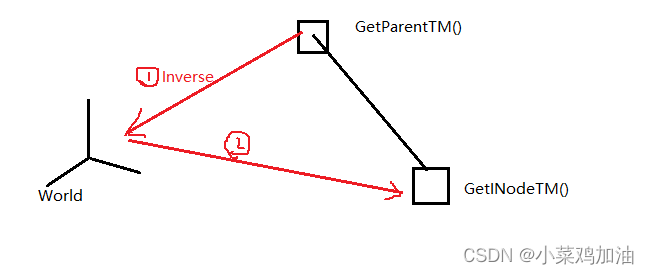
- INode->GetObjectTM()
返回的矩阵可以将Object中的坐标变换到世界坐标。相当于
GetNodeTM()*(Object相对INode的TM)(因为INode和Object之间还可能存在偏移变换矩阵)当对象使用的是世界空间修改器(
WSM——WorldSpaceModifer)的时候,对象的坐标会被转换为世界坐标,因此对象的transform也会被初始化为单位矩阵。而如果对象只使用了对象空间修改器,那么对象的tramsform不会被初始化为单位矩阵。
在调用该函数时会先调用
BaseObject::Display()方法检测对象是否已经被进行了世界空间修改器使用的标志位,再来决定具体返回的是修改前的矩阵还是修改后的单位矩阵。但是存在一些当已经完成WSM后但是仍需要获得之前变换矩阵的情况,3dsMax提供了
INode->GetObjectTMAfterWSM()和INode->GetObjectTMAfterWSM()处理这种情况。- INode->GetObjectTMBeforeWSM()
This method explicitly gets the full node transformation matrix and object-offset transformation effect before the application of any world space modifiers.- 1
该函数返回WSM施加前的INode变换矩阵和Object相对于INode节点的偏移变换矩阵,该作用就相当于获得Object相对世界的矩阵。
- INode->GetObjectTMAfterWSM()
This method explicitly gets the full node transformation matrix and object-offset transformation and world space modifier effect unless the points of the object have already been transformed into world space in which case it will return the identity matrix.- 1
而
WorldSpaceModifer是把Object先变换到世界空间中,因此如果一个INode上的Object已经受到过WorldSpaceModifer的影响,调用EvalWorldState()的时候就已经将顶点变换到世界坐标系中了。调用
GetObjectTMAfterWSM()会返回节点变换矩阵和Object相对节点的变换偏移矩阵以及世界空间修改器的影响,而如果世界空间修改器已经产生影响了,那么返回单位矩阵。因此该函数可以用来检查世界空间修改器是否已经应用到Object上了。因此如果一个INode上没有WSM,那么
GetObjTMAfterWSM()和GetObjectTM是相同的。同样,它和GetObjTMBeforeWSM也是相同。
官方demo:void Utility::ComputeBBox(Interface *ip) { if (ip->GetSelNodeCount()) { INode *node = ip->GetSelNode(0); Box3 box; // The computed box Matrix3 mat; // The Object TM Matrix3 sclMat(1); // This will be used to apply the scaling // Get the result of the pipeline at the current time TimeValue t = ip->GetTime(); Object *obj = node->EvalWorldState(t).obj;/*如果已经应用了,那么此时顶点就是世界空间的顶点;如果没有应用,此时的顶点是Object空间的顶点*/ // Determine if the object is in world space or object space // so we can get the correct TM. We can check this by getting // the Object TM after the world space modifiers have been // applied. It the matrix returned is the identity matrix the // points of the object have been transformed into world space. if (node->GetObjTMAfterWSM(t).IsIdentity()) { // It's in world space, so put it back into object // space. We can do this by computing the inverse // of the matrix returned before any world space // modifiers were applied. mat = Inverse(node->GetObjTMBeforeWSM(t)); //通过矩阵的逆*调用EvalWorldState(t)取得的世界空间中的Object的坐标从而获得在Object空间中的坐标(put it back into object space).[世界相对Object的矩阵] } else { // It's in object space, get the Object TM. mat = node->GetObjectTM(t); /*Object相对世界空间的矩阵,矩阵*Object顶点=世界空间顶点*/ } // Extract just the scaling part from the TM AffineParts parts; decomp_affine(mat, &parts); ApplyScaling(sclMat, ScaleValue(parts.k*parts.f, parts.u)); // Get the bound box, and affect it by just // the scaling portion obj->GetDeformBBox(t, box, &sclMat); // Show the size and frame number float sx = box.pmax.x-box.pmin.x; float sy = box.pmax.y-box.pmin.y; float sz = box.pmax.z-box.pmin.z; TSTR title; title.printf(_T("Result at frame %d"), t/GetTicksPerFrame()); TSTR buf; buf.printf(_T("The size is: (%.1f, %.1f, %.1f)"), sx, sy, sz); MessageBox(NULL, buf, title, MB_ICONINFORMATION|MB_OK); } }- 1
- 2
- 3
- 4
- 5
- 6
- 7
- 8
- 9
- 10
- 11
- 12
- 13
- 14
- 15
- 16
- 17
- 18
- 19
- 20
- 21
- 22
- 23
- 24
- 25
- 26
- 27
- 28
- 29
- 30
- 31
- 32
- 33
- 34
- 35
- 36
- 37
- 38
- 39
- 40
- 41
- 42
- 43
- 44
- 45
- 46
- 47
- 48
- 49
- 50
- 51
- 52
- 53
-
相关阅读:
IM即时通讯系统[SpringBoot+Netty]——梳理(总)
计算机毕业设计Java的音乐网站管理系统(源码+系统+mysql数据库+lw文档)
【【萌新的STM32的学习--非正点原子视频的中断设计思路】】
方块栈问题
项目开发过程中遇到了什么困难?
数据结构与算法:二分查找(心得)
Spring及Spring boot 第四章-第二节 Spring声明式事务管理 @Transaction AOP实现
混合精子群优化和万有引力搜索算法 (HSSOGSA)(Matlab完整代码实现)
【Docker镜像】Node.js项目之使用Dockerfile构建镜像
使用jsonp解决跨域问题
- 原文地址:https://blog.csdn.net/zstuyyyyccccbbbb/article/details/125463958