-
Cannot find a valid baseurl for repo: HDP-3.1-repo-1

目录
一、版本信息
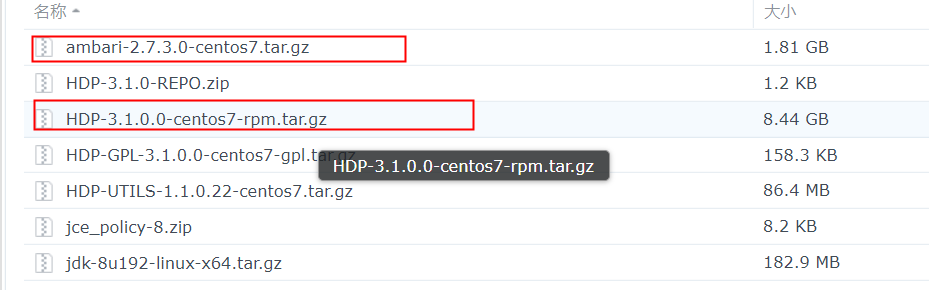
安装报错信息
stderr:
Failed to execute command:  rpm -qa | grep smartsense- ||  yum -y install smartsense-hst ||  rpm -i /var/lib/ambari-agent/cache/stacks/HDP/3.0/services/SMARTSENSE/package/files/rpm/*.rpm; Exit code: 1; stdout: 已加载插件:fastestmirror
Loading mirror speeds from cached hostfile
; stderr:

 One of the configured repositories failed (未知),
 and yum doesn't have enough cached data to continue. At this point the only
 safe thing yum can do is fail. There are a few ways to work "fix" this:

     1. Contact the upstream for the repository and get them to fix the problem.

     2. Reconfigure the baseurl/etc. for the repository, to point to a working
        upstream. This is most often useful if you are using a newer
        distribution release than is supported by the repository (and the
        packages for the previous distribution release still work).

     3. Run the command with the repository temporarily disabled
            yum --disablerepo= ...

     4. Disable the repository permanently, so yum won't use it by default. Yum
        will then just ignore the repository until you permanently enable it
        again or use --enablerepo for temporary usage:

            yum-config-manager --disable
        or
            subscription-manager repos --disable=

     5. Configure the failing repository to be skipped, if it is unavailable.
        Note that yum will try to contact the repo. when it runs most commands,
        so will have to try and fail each time (and thus. yum will be be much
        slower). If it is a very temporary problem though, this is often a nice
        compromise:

            yum-config-manager --save --setopt=.skip_if_unavailable=true

Cannot find a valid baseurl for repo: HDP-3.1-repo-1
错误:文件未找到,所用 glob: /var/lib/ambari-agent/cache/stacks/HDP/3.0/services/SMARTSENSE/package/files/rpm/*.rpm
ambari-hdp-1.repo 内容如下
- [HDP-3.1-repo-1]
- name=HDP-3.1-repo-1
- baseurl=
- path=/
- enabled=1
- gpgcheck=0
- [HDP-UTILS-1.1.0.22-repo-1]
- name=HDP-UTILS-1.1.0.22-repo-1
- baseurl=
- path=/
- enabled=1
- gpgcheck=0
二、解决方式
地址:
Root cause : https://issues.apache.org/jira/browse/AMBARI-25069Workaround :
This is a Javascript bug in ambari that happens when using local repository and there is no internet access to cluster
to workaround this
- Steps
- 1) go to /usr/lib/ambari-server/web/javascipts
- cd /usr/lib/ambari-server/web/javascripts
- 2) take backup of app.js
- cp app.js app.js_backup
- 3) edit the app.js
- find out the line(39892) : onNetworkIssuesExist: function () {
- Change the line from :
- /**
- * Use Local Repo if some network issues exist
- */
- onNetworkIssuesExist: function () {
- if (this.get('networkIssuesExist')) {
- this.get('content.stacks').forEach(function (stack) {
- stack.setProperties({
- usePublicRepo: false,
- useLocalRepo: true
- });
- stack.cleanReposBaseUrls();
- });
- }
- }.observes('networkIssuesExist'),
- to
- /**
- * Use Local Repo if some network issues exist
- */
- onNetworkIssuesExist: function () {
- if (this.get('networkIssuesExist')) {
- this.get('content.stacks').forEach(function (stack) {
- if(stack.get('useLocalRepo') != true){
- stack.setProperties({
- usePublicRepo: false,
- useLocalRepo: true
- });
- stack.cleanReposBaseUrls();
- }
- });
- }
- }.observes('networkIssuesExist'),
- as per : https://github.com/apache/ambari/pull/2743/files
- Later as you have already deployed the cluster we need to reset the cluster (Caution : this will erase all the configs you have created previously in Step6 and also the Hosts and services you have selected need to select again )
- Command :
- ambari-server reset
- And hard reload the page and start the create cluster wizard again.
- Incase you have already at Step 9 and cannot proceed with ambari-server reset (as it invovles lots of Configs being added again , the below steps are for you )
- Preqrequesties : The cluster now is in Deployment step(step 9 ) and you have only retry button to press
- steps
- 1) Stop ambari-server
- 2) login to Database
- 3) use the below command to list out all the contents in repo_definition table :
- select * from repo_definition;
- 4) you can see the base_url will be empty for the all the Rows in the table
- 5) Correct the base_url for every rows and update it using the command :
- update repo_definition set base_url='<YOUR BASE URL>' where id=<THE CORESPONDING ID>;
- for ex :
- update repo_definition set base_url='http://asnaik.example.com/localrepo/HDP-3.1' where id=9;
- 6) after correcting all the base_url columns in repo_definition table and also delete the empty repos created by ambari from location /etc/yum.repos.d
- 7) start ambari, Login to UI and press retry button, The Installation will work as smooth as it can be.
- Hope this helps.
我执行到了 最后一个步骤, 只能 retry
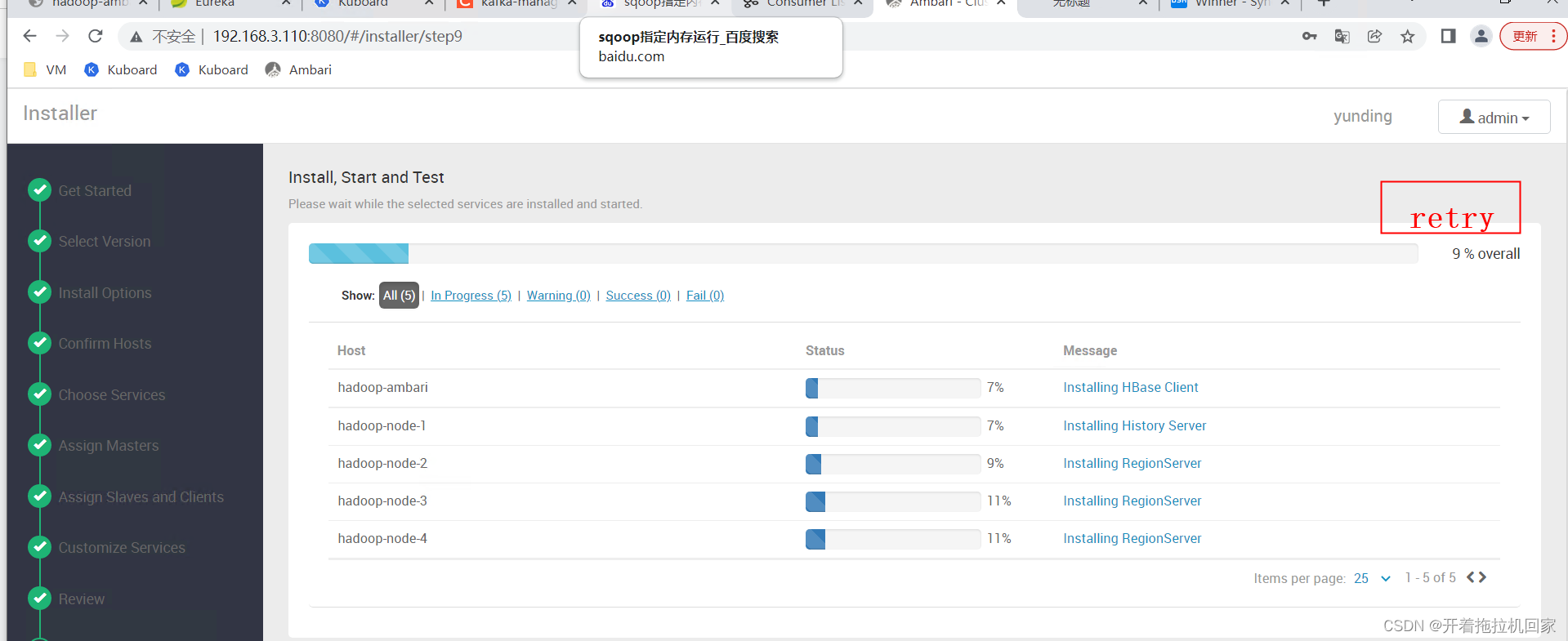
以下是我的三个BaseURL
http://hadoop-ambari/HDP/centos7/3.1.0.0-78
http://hadoop-ambari/HDP-GPL/centos7/3.1.0.0-78
http://hadoop-ambari/HDP-UTILS/centos7/1.1.0.22停止 ambari-server 后,我们 直接修改 repo_definition 表

-------------------------------- 感谢点赞! -------------------------------------
-
相关阅读:
阿里云容器镜像服务的运维总结
基于react18+arco+zustand通用后台管理系统React18Admin
ES6 入门教程 24 Module 的语法 24.3 export 命令
8.16 Day42---数据库面试题
166 个最常用的 Linux 命令汇总,总有你需要用到的...
Linux CentOS 7 离线安装.NET环境
豆腐王国小游戏,烧脑推理全新来袭
Google Earth Engine(GEE)—— GRIDMET: 爱达荷大学网格化地表气象数据集
哪一款除甲醛产品效果好 家用针对除甲醛的净化器品牌
FineReport -问题学习图表设计图表类型-单元格扩展父子格-报表预览
- 原文地址:https://blog.csdn.net/qq_35995514/article/details/124345420