-
前端项目规范化
参考视频: https://www.bilibili.com/video/BV1rh411e7E5?vd_source=eee62ea3954ac01bff9e87e2a7b40084
- prettier代码格式化
- eslint js语法检查
- stylellint css样式检查
配置prettier和eslint
-
初始化React项目
npx create-react-app study_react
-
安装vscode插件
prettier和eslint, 配置vscode


-
安装相关依赖
yarn add -D prettier eslint- 1
在代码格式化时采用Perttier规则,而我们代码校验使用的是ESLint,如果同一个规则配置不一致,往往就会出现冲突问题;
比如:字符串单、双引号的配置,eslint后把字符串变成单引号,更新文件代码过后,重新保存(Prettier)又自动格式化后变成双引号,导致代码校验异常。
解决方案1: 两者配置文件部分配置修改成一致.
解决方案2: 安装相关插件(Prettier 和 ESLint 冲突解决方案 eslint-config-prettier eslint-plugin-prettier)- eslint-config-prettier 禁用 eslint 冲突配置
- eslint-plugin-prettier Prettier先格式化 (默认是先eslint格式化,再Prettier格式化)
yarn add -D eslint-config-prettier eslint-plugin-prettier- 1
-
优雅的提示错误
“extends”: [“eslint:recommended”, “plugin:react/recommended”], 默认是eslint:recommended,(步骤6后面会看到这个配置)
https://www.npmjs.com/package/eslint-config-airbnbnpx install-peerdeps --dev eslint-config-airbnb- 1
-
初始化
.eslintrc.json文件npx eslint --init
如果全局安装了eslint (npm install -g eslint)了, 可以直接使用eslint --init根据提示勾选:

安装完成的eslintrc.json文件
{ "env": { "browser": true, "es2021": true }, "extends": ["eslint:recommended", "plugin:react/recommended"], "parserOptions": { "ecmaFeatures": { "jsx": true }, "ecmaVersion": "latest", "sourceType": "module" }, "plugins": ["react"], "rules": { "indent": ["error", "tab"], "linebreak-style": ["error", "windows"], "quotes": ["error", "double"], "semi": ["error", "always"] } }- 1
- 2
- 3
- 4
- 5
- 6
- 7
- 8
- 9
- 10
- 11
- 12
- 13
- 14
- 15
- 16
- 17
- 18
- 19
- 20
- 21
-
修改
eslintrc.json优雅提示(也就是步骤4所提到)"extends": ["airbnb", "prettier", "plugin:react/recommended"], "plugins": ["prettier", "react"],- 1
- 2
-
新建
.prettierrc文件更多规则: https://www.prettier.cn/docs/options.html
{ "singleQuote": false, "endOfLine": "lf" }- 1
- 2
- 3
- 4
-
可自行定义
eslintrc.json规则https://eslint.bootcss.com/docs/rules/
-
效果

-
让提示更细致
给
eslintrc.json追加rules,"prettier/prettier": "error",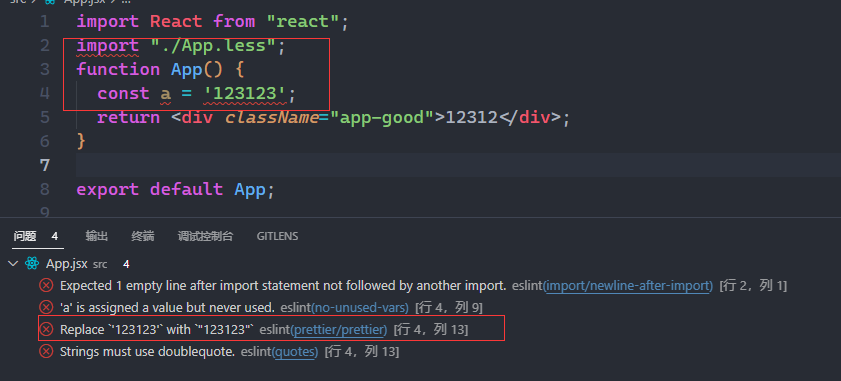
-
最终的两个文件的配置
// eslint { "env": { "browser": true, "es2021": true }, "extends": ["airbnb", "prettier", "plugin:react/recommended"], "parserOptions": { "ecmaFeatures": { "jsx": true }, "ecmaVersion": "latest", "sourceType": "module" }, "plugins": ["prettier", "react"], "rules": { "prettier/prettier": "error", "indent": ["off", "tab"], "linebreak-style": ["off", "windows"], "quotes": ["error", "double"], "semi": ["error", "always"] } } =============================================================================== // prettier { "singleQuote": false, "endOfLine": "lf" }- 1
- 2
- 3
- 4
- 5
- 6
- 7
- 8
- 9
- 10
- 11
- 12
- 13
- 14
- 15
- 16
- 17
- 18
- 19
- 20
- 21
- 22
- 23
- 24
- 25
- 26
- 27
- 28
- 29
配置stylelint
- 安装相关依赖
yarn add stylelint stylelint-config-stardand stylelint-config-prettier stylelint-order -D - stylelint-config-prettier解决和prettier冲突 - stylelint-order 排序css属性- 1
- 2
- 3
- 4
- 新建
.stylelint.json文件stylelint相关规则: http://stylelint.docschina.org/user-guide/rules/
{ "plugins": ["stylelint-order"], "extends": ["stylelint-config-standard", "stylelint-config-prettier"], "rules": { "property-no-unknown": true, "comment-no-empty": [ true, { "message": "禁止空注释" } ], "order/properties-order": [ "position", "top", "right", "bottom", "left", "z-index", "display", "float", "width", "height", "max-width", "max-height", "min-width", "min-height", "padding", "padding-top", "padding-right", "padding-bottom", "padding-left", "margin", "margin-top", "margin-right", "margin-bottom", "margin-left", "margin-collapse", "margin-top-collapse", "margin-right-collapse", "margin-bottom-collapse", "margin-left-collapse", "overflow", "overflow-x", "overflow-y", "clip", "clear", "font", "font-family", "font-size", "font-smoothing", "osx-font-smoothing", "font-style", "font-weight", "hyphens", "src", "line-height", "letter-spacing", "word-spacing", "color", "text-align", "text-decoration", "text-indent", "text-overflow", "text-rendering", "text-size-adjust", "text-shadow", "text-transform", "word-break", "word-wrap", "white-space", "vertical-align", "list-style", "list-style-type", "list-style-position", "list-style-image", "pointer-events", "cursor", "background", "background-attachment", "background-color", "background-image", "background-position", "background-repeat", "background-size", "border", "border-collapse", "border-top", "border-right", "border-bottom", "border-left", "border-color", "border-image", "border-top-color", "border-right-color", "border-bottom-color", "border-left-color", "border-spacing", "border-style", "border-top-style", "border-right-style", "border-bottom-style", "border-left-style", "border-width", "border-top-width", "border-right-width", "border-bottom-width", "border-left-width", "border-radius", "border-top-right-radius", "border-bottom-right-radius", "border-bottom-left-radius", "border-top-left-radius", "border-radius-topright", "border-radius-bottomright", "border-radius-bottomleft", "border-radius-topleft", "content", "quotes", "outline", "outline-offset", "opacity", "filter", "visibility", "size", "zoom", "transform", "box-align", "box-flex", "box-orient", "box-pack", "box-shadow", "box-sizing", "table-layout", "animation", "animation-delay", "animation-duration", "animation-iteration-count", "animation-name", "animation-play-state", "animation-timing-function", "animation-fill-mode", "transition", "transition-delay", "transition-duration", "transition-property", "transition-timing-function", "background-clip", "backface-visibility", "resize", "appearance", "user-select", "interpolation-mode", "direction", "marks", "page", "set-link-source", "unicode-bidi", "speak" ] } }- 1
- 2
- 3
- 4
- 5
- 6
- 7
- 8
- 9
- 10
- 11
- 12
- 13
- 14
- 15
- 16
- 17
- 18
- 19
- 20
- 21
- 22
- 23
- 24
- 25
- 26
- 27
- 28
- 29
- 30
- 31
- 32
- 33
- 34
- 35
- 36
- 37
- 38
- 39
- 40
- 41
- 42
- 43
- 44
- 45
- 46
- 47
- 48
- 49
- 50
- 51
- 52
- 53
- 54
- 55
- 56
- 57
- 58
- 59
- 60
- 61
- 62
- 63
- 64
- 65
- 66
- 67
- 68
- 69
- 70
- 71
- 72
- 73
- 74
- 75
- 76
- 77
- 78
- 79
- 80
- 81
- 82
- 83
- 84
- 85
- 86
- 87
- 88
- 89
- 90
- 91
- 92
- 93
- 94
- 95
- 96
- 97
- 98
- 99
- 100
- 101
- 102
- 103
- 104
- 105
- 106
- 107
- 108
- 109
- 110
- 111
- 112
- 113
- 114
- 115
- 116
- 117
- 118
- 119
- 120
- 121
- 122
- 123
- 124
- 125
- 126
- 127
- 128
- 129
- 130
- 131
- 132
- 133
- 134
- 135
- 136
- 137
- 138
- 139
- 140
- 141
- 142
- 143
- 144
- 145
- 146
- 147
- 148
- 149
- 150
- 151
- 152
- 153
- 154
- 155
- 156
- 157
- 158
- 159
- 160
- 161
- 162
- 效果
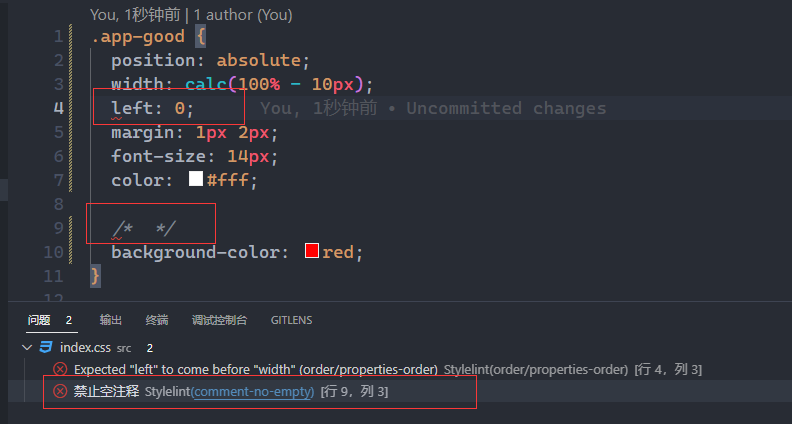
保存自动修复
采用的vscode编辑器, 往setting.json添加配置
"editor.codeActionsOnSave": { "source.fixAll.stylelint": true, "source.fixAll.eslint": true },- 1
- 2
- 3
- 4
-
相关阅读:
CAD中如何绑定外部参照和revit中链接CAD功能
MindSpore,易用性提升的思考与实践
报名开启!飞桨AI for Science公开课与共创计划邀您来学,探索AI与科学的融合
前端项目中使用插件prettier/jscodeshift/json-stringify-pretty-compact格式化代码或json数据
JVM调优-JProfiler
大数据之就业岗位
Pflag、Viper、Cobra 核心功能介绍
22-09-02 西安 JVM(01)类加载器、stack栈、堆体系、堆参数调优、GC垃圾判定、垃圾回收算法
山海鲸汽车需求调研系统:智慧决策的关键一步
【C语言刷LeetCode】1282. 用户分组(M)
- 原文地址:https://blog.csdn.net/qq_39583550/article/details/125458727