-
2022深圳杯数学建模赛题思路 比赛通知
0 前言
2022 年深圳杯竞赛时间官方目前还未放出消息,根据往年一般在2022年7月15月 — 9月10日之间,各位同学做好准备哦!
这里先占个坑,赛题出来后第一时间在这发布赛题思路

1 赛前准备 - 建模步骤
建模资料,获奖秘籍: https://gitee.com/math-sinor/math-data/blob/master/README.md
1.1 第一步 提出问题
- 整理出问题中涉及到的常量、变量与单位。
- 团队讨论出对变量所做的全部假设,包括等式和不等式。
- 用准确的数学表达式给出问题的目标。
1.2 第二步 选择建模方法
- 选择一个解决问题的一般求解方法。
1.3 第三步 推导模型的公式
- 将第1步中得到的问题整理成第2步选择的建模方法所需要形式。
- 注意统一前后字符、公式。
1.4 第四步 求解模型
- 将第2步中所选方法应用于第3步中推导的表达式中。
- 采用适当的软件对问题进行求解计算,常见软件如下。
统计模型:EXCEL、SPSS、Eviews、Stata ,新手可直接上EXCEL。
微分方程:Maple、Mathematic、Matlab
文本排版:Word、Latex
运筹规划:Matlab,Lingo
公式整理:Mathtype
智能算法:Matlab,R
图像处理:Matlab,C++,OpenCV
综上:Matlab万能,所以新手学会Matlab就足以应付竞赛。
1.5 第五步 论文撰写
- 用非技术性的语言将所做成果整理到文本上。
- 注意检查格式以及数学符号、术语。
2 往届赛题思路 - 2021年羊狼追逐
这里学长分享一个去年拿了国一的赛题思路,2022年的赛题思路将在赛题发布会5小时内发布~
2.1 思路流程

2.2 关键代码
''' 自己设置的环境类 智能体:羊 环境:羊、犬和圆形草地,犬采用最优围堵策略围堵羊,若羊在一段时间内逃出圈则胜利,这段时间内没逃出或者被犬抓到则失败; 状态空间:整个圆组成的点集,是二维的; 动作空间:羊每一步可采取的动作的集合 回报的设计:参照pendulum-v0游戏环境源码中的回报的设计方案。 ''' import gym from gym import spaces import numpy as np import math import random from gym.envs.classic_control import rendering sigma=10 # 将弧度转换为角度 def trans(tmp): return 360*(tmp/(2*np.pi)) # 更新犬的状态 def change_dog_state(thetaP,thetaE,delta_theta): new_thetaP=thetaP clockwise = (thetaP - delta_theta + 2 * np.pi) % (2 * np.pi) # 顺时针 counterclockwise = (thetaP + delta_theta + 2 * np.pi) % (2 * np.pi) # 逆时针 if thetaE > thetaP: if thetaE - thetaP >= np.pi: new_thetaP = clockwise else: new_thetaP = counterclockwise elif thetaE < thetaP: if thetaP - thetaE >= np.pi: new_thetaP = counterclockwise else: new_thetaP = clockwise return new_thetaP # 计算夹角 def cal_angel(theta1,theta2): ans=0 if theta1 > theta2: ans = theta1 - theta2 if ans > np.pi: ans = 2 * np.pi - ans # (补)角 else: ans = theta2 - theta1 if ans > np.pi: ans = 2 * np.pi - ans return ans # 判断羊是否给抓住 def catch(R,theta1,theta2,theta3): x=R*np.cos(theta1) y=R*np.sin(theta1) a=R*np.cos(theta2) b=R*np.sin(theta2) A=R*np.cos(theta3) B=R*np.sin(theta3) len1=math.sqrt((x-a)*(x-a)+(y-b)*(y-b)) len2=math.sqrt((x-A)*(x-A)+(y-B)*(y-B)) if len1 <= sigma and len2 <= sigma: return True else: return False class dogSheepEnv(gym.Env): def __init__(self): # self.dt = 0.2 # 采样时间 self.dt=0.2 # self.thetaP=np.pi/2# 狗的极坐标 self.thetaP = random.uniform(0, 2 * np.pi)# 狗1的极坐标 self.wP=np.pi/5# 狗的角速度 self.thetaP2=random.uniform(0, 2 * np.pi)# 狗1的极坐标 self.vE=32# 羊的速度 self.thetaE=np.pi/2# 羊的极坐标 self.radiusE=0# 羊的极坐标半径 self.R=100# 圆的半径 self.state=np.array([self.thetaE,self.radiusE,self.thetaP,self.thetaP2])# 环境的初始状态 self.viewer = rendering.Viewer(400, 400)# 画板 self.lambda1=0.07# reward的参数1 self.lambda2=3.1# reward的参数2 self.lambda3=3.1 self.lambda4=6.2 # 自定义动作空间,观察空间 self.action_space = spaces.Box( # 羊的动作空间即为转动的角度,会根据当前位置进行变化 # 由于怕出现low比high还大的情况,我们的action_space就不做周期处理,用的时候取余2pi就行 low=0, high=2*np.pi, shape=(1,), dtype=np.float32 ) self.observation_space = spaces.Box( # 状态空间为 theta_E,R_E,theta_P low=np.array([0,0,0,0]) ,high=np.array([2*np.pi,self.R,2*np.pi,2*np.pi]) ,dtype=np.float32 ) ''' 羊接受一个动作进行位移: 使用PG算法的choose_action 犬沿劣弧进行位移 接着判断游戏是否结束 评价这个动作的回报 ''' def step(self, action):# u为action # print('action: ',action) # 根据action(即θ_E'来计算新的状态) self.state = self._get_observation(action) reward = self._get_reward() done = self._get_done() if done:# 如果逃脱失败,给予惩罚 if catch(self.R,self.state[0],self.state[2],self.state[3]): reward=reward-1000 print('be catched') else: reward=0 print('no be catched') return self.state,reward,done # 获取reward,根据action作用之后的state来计算reward def _get_reward(self): # thetaP=self.state[2] # thetaP2=self.state[3] # thetaE=self.state[0] thetaE,thetaP,thetaP2=self.state[0],self.state[2],self.state[3] delta_theta1=cal_angel(thetaE,thetaP)# 羊与犬1的夹角 delta_theta2=cal_angel(thetaE,thetaP2)# 羊与犬2的夹角 delta_theta3=cal_angel(thetaP,thetaP2)# 两犬之间的夹角 # a=self.state[1] # b=self.R # distance=math.sqrt(a*a+b*b-2*a*b*np.cos(delta_theta)) # 羊距圆周越近越好(radiusE越大越好),羊与犬的夹角越大越好,羊离犬越远越好 # print('r1: ',self.lambda1 * abs(self.R - self.state[1])) # print('r2: ',self.lambda2 * abs(np.pi-delta_theta1)) # print('r3: ',self.lambda3 * abs(np.pi-delta_theta2)) # print('r4: ',self.lambda4 * abs(delta_theta3)) return -(# 想要趋近于零 self.lambda1 * abs(self.R - self.state[1])# 范围 [0-2*R(200)] + self.lambda2 * abs(np.pi-delta_theta1) # 范围 [0-100] + self.lambda3 * abs(np.pi-delta_theta2) # 范围 [0-100] + self.lambda4 * abs(delta_theta3) # 范围 [0-100] ) # 判断游戏是否结束 def _get_done(self): if self.state[1]>=self.R: return True else: return False # 根据action修改环境,改变状态 def _get_observation(self,action): # 已知现在的位置,首先计算位移后羊的极坐标 xb=self.state[1]*np.cos(self.state[0])+self.vE*self.dt*np.cos(action) yb=self.state[1]*np.sin(self.state[0])+self.vE*self.dt*np.sin(action) new_radiusE=math.sqrt(xb*xb+yb*yb) # 由xb和yb进行θ转换,# 返回弧度pi new_thetaE=math.atan2(yb,xb) new_thetaE=(new_thetaE+2*np.pi)%(2*np.pi) # 根据羊的action,选择狼的位移方向并位移 delta_theta=self.wP*self.dt thetaE = self.state[0] # 修改犬1的状态 thetaP = self.state[2]# 犬1的原状态 new_thetaP=change_dog_state(thetaP,thetaE,delta_theta)# 犬1的新状态 # 修改犬2的状态 thetaP2 = self.state[3] # 犬1的原状态 new_thetaP2 = change_dog_state(thetaP2, thetaE, delta_theta) # 犬1的新状态 # 相等的话就保持原状态 return np.array([new_thetaE,new_radiusE,new_thetaP,new_thetaP2]) # 重置羊和犬的状态 def reset(self): thetaE=random.uniform(0, 2 * np.pi) thetaE2=(thetaE+np.pi)%(2*np.pi) self.state=np.array([0,0,thetaE,thetaE2],dtype=float) return np.array(self.state) # 画画显示犬和羊的状态 def render(self): # 清空轨迹 # self.viewer.geoms.clear() # 绘制大圆 ring = rendering.make_circle(radius=self.R,res=50,filled=False) transform1 = rendering.Transform(translation=(200, 200)) # 相对偏移 ring.add_attr(transform1)# 让圆添加平移这个属性 self.viewer.add_geom(ring) # 绘制犬1 xP,yP=self.R*np.cos(self.state[2]),self.R*np.sin(self.state[2]) ringP = rendering.make_circle(radius=2, res=50, filled=True) ringP.set_color(0,0,1) transform_P = rendering.Transform(translation=(200+xP, 200+yP)) # 相对偏移 ringP.add_attr(transform_P) # 让圆添加平移这个属性 self.viewer.add_geom(ringP) # 绘制犬2 xP2, yP2 = self.R * np.cos(self.state[3]), self.R * np.sin(self.state[3]) ringP2 = rendering.make_circle(radius=2, res=50, filled=True) ringP2.set_color(0, 0, 1) transform_P2 = rendering.Transform(translation=(200 + xP2, 200 + yP2)) # 相对偏移 ringP2.add_attr(transform_P2) # 让圆添加平移这个属性 self.viewer.add_geom(ringP2) # 绘制羊 xE, yE = self.state[1] * np.cos(self.state[0]), self.state[1] * np.sin(self.state[0]) ringE = rendering.make_circle(radius=2, res=50, filled=True) ringE.set_color(1, 0, 0) transform_E = rendering.Transform(translation=(200+xE, 200+yE)) # 相对偏移 ringE.add_attr(transform_E) # 让圆添加平移这个属性 self.viewer.add_geom(ringE) return self.viewer.render() # env = dogSheepEnv() # while True: # env.reset() # for _ in range(2000): # env.render() # action=random.uniform(0,2*np.pi) # action=np.clip(action,env.state[0]-np.pi/2,env.state[0]+np.pi/2) # action=(action+2*np.pi)%(2*np.pi) # state, reward, done = env.step(action) # 和环境交互 # if done: # break- 1
- 2
- 3
- 4
- 5
- 6
- 7
- 8
- 9
- 10
- 11
- 12
- 13
- 14
- 15
- 16
- 17
- 18
- 19
- 20
- 21
- 22
- 23
- 24
- 25
- 26
- 27
- 28
- 29
- 30
- 31
- 32
- 33
- 34
- 35
- 36
- 37
- 38
- 39
- 40
- 41
- 42
- 43
- 44
- 45
- 46
- 47
- 48
- 49
- 50
- 51
- 52
- 53
- 54
- 55
- 56
- 57
- 58
- 59
- 60
- 61
- 62
- 63
- 64
- 65
- 66
- 67
- 68
- 69
- 70
- 71
- 72
- 73
- 74
- 75
- 76
- 77
- 78
- 79
- 80
- 81
- 82
- 83
- 84
- 85
- 86
- 87
- 88
- 89
- 90
- 91
- 92
- 93
- 94
- 95
- 96
- 97
- 98
- 99
- 100
- 101
- 102
- 103
- 104
- 105
- 106
- 107
- 108
- 109
- 110
- 111
- 112
- 113
- 114
- 115
- 116
- 117
- 118
- 119
- 120
- 121
- 122
- 123
- 124
- 125
- 126
- 127
- 128
- 129
- 130
- 131
- 132
- 133
- 134
- 135
- 136
- 137
- 138
- 139
- 140
- 141
- 142
- 143
- 144
- 145
- 146
- 147
- 148
- 149
- 150
- 151
- 152
- 153
- 154
- 155
- 156
- 157
- 158
- 159
- 160
- 161
- 162
- 163
- 164
- 165
- 166
- 167
- 168
- 169
- 170
- 171
- 172
- 173
- 174
- 175
- 176
- 177
- 178
- 179
- 180
- 181
- 182
- 183
- 184
- 185
- 186
- 187
- 188
- 189
- 190
- 191
- 192
- 193
- 194
- 195
- 196
- 197
- 198
- 199
- 200
- 201
- 202
- 203
- 204
- 205
- 206
- 207
- 208
- 209
- 210
- 211
- 212
- 213
- 214
- 215
- 216
- 217
- 218
- 219
- 220
- 221
- 222
- 223
2.3 题解结果
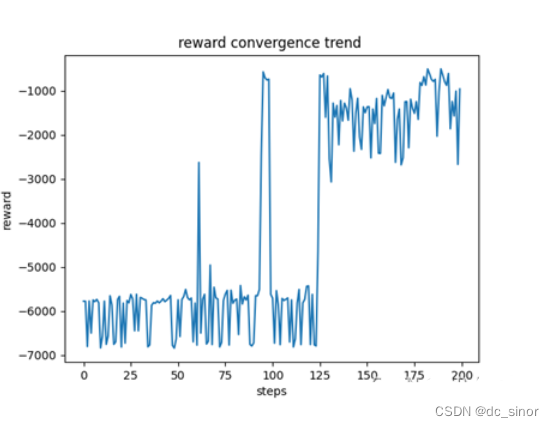
一犬一羊情况,回报收敛的趋势图

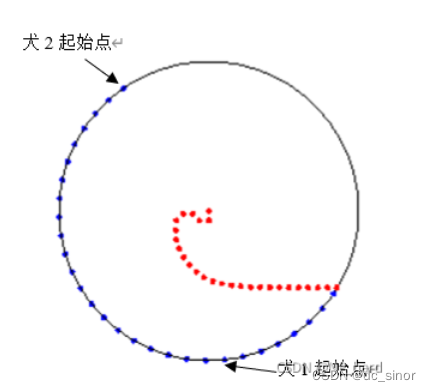
羊的逃逸路径
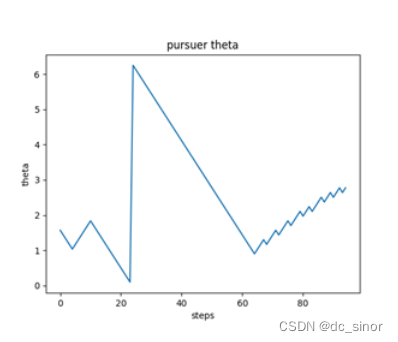
犬的追捕极角
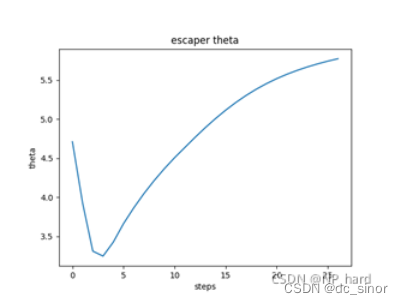
羊的逃逸极角
推广:两犬一只羊情况
回报收敛的趋势图
羊的逃逸路径
羊的逃逸极角
建模资料,获奖秘籍: https://gitee.com/math-sinor/math-data/blob/master/README.md
-
相关阅读:
uView Collapse 折叠面板
css:如何通过不同的值,改变盒子的样式和字体颜色通过computed而不是v-if
3D感知技术(2)3D数据获取技术概述
提升企业人效,从精细化考勤管理开始
关于淘宝多个关键词权重快速提升的方法介绍
【ElasticSearch】更新es索引生命周期策略,策略何时对索引生效
用于可穿戴传感器的人类活动识别、健康监测和行为建模的大型语言模型
【期末大作业】基于HTML+CSS+JavaScript网上订餐系统(23个页面)
离散低通滤波方法
麒麟系统开发笔记(十四):在国产麒麟系统上编译libmodbus库、搭建基础开发环境和移植测试Demo
- 原文地址:https://blog.csdn.net/dc_sinor/article/details/125459007