-
【三剑客+JSP+Mysql+Tomcat】从前到后搭建简易编程导航小网站(期末作业)
前言
审美不好大家不喜勿喷,没有使用任何框架,全凭自己感觉构建但是基本功能可以实现。使用的脚本语言和技术比较老旧,由于CSS渲染的部分很少所以使用的是内部CSS,不是很精通JS主要用它实现简单的界面跳转间弹窗交互
一、环境配置
1.JDK版本:jdk1.8.0_301
2.Tomcat版本:9.0.0.M26
3.MySQL版本:8.0.0.11
4.jar包:8.0.29
5.编辑器:Notepad++
6.浏览器:Chrome技术栈
HTML+CSS+JS+JSP+MySQL+Tomcat
主界面效果图
首页面
有些区块代码里写了超链接,用的###填充拿去交作业的话可以自己改成相应的链接

核心代码:<%@page language="java" import="java.util.*" pageEncoding="UTF-8"%> <html> <style> body{ background-image:url(img/88.jpg); width:100%; height:100%; background-repeat: no-repeat; background-size: 100% 100%; } </style> <body> <h1 style="background-color:white" align=center>编程导航学习网站</h1> <style> div{ text-align:center; color:white; font-size:18; font-weight:900; } .button { background-color:#555555; border-radius: 4px; transition-duration: 0.4s; border: none; color: white; padding: 15px 32px; text-align: center; text-decoration: none; display: inline-block; font-size: 18px; margin: 4px 2px; cursor: pointer; } .button1:hover { background-color: #4CAF50; color: white; } ul { list-style-type: none; margin: 0; padding: 0; overflow: hidden; border: 1px solid #e7e7e7; background-color: #f3f3f3; background: rgba(222,222,2220,2222.3); } li { float: left; } li a { display: block; color: #666; text-align: center; padding: 14px 16px; text-decoration: none; } li a:hover:not(.active) { background-color: #ddd; } li a.active { color: white; background-color: #4CAF50; } li a.active1 { color: red; background-color: #4CAF50; } .list{ position: left; top: 500px;left: 1380px;font-family: "微软雅黑"; font-size: 20px;color:white;} .list a { text-decoration: none; color:white; } * { box-sizing: border-box; } div.search { padding: 0 0; } form { position: relative; width: 400px; margin: 0 auto; } input,button { border: none; outline: none; } .search input { width: 100%; height: 42px; padding-left: 13px; border: 2px solid #c5464a; border-radius: 19px; background: transparent; } .search button { height: 42px; width: 42px; cursor: pointer; position: absolute; background: #c5464a; border-radius: 0 19px 19px 0; width: 60px; right: 0; } .search button:hover { background-color: #c7585c; } .search button:before { content: "搜索"; font-size: 13px; color: #F9F0DA; } </style> <ul> <li><a class="active" href="###">首页</a></li> <li><a class="active1" href="zhuce.jsp">请先登陆注册~~</a></li> <li><a href="java.jsp">Java</a></li> <li><a href="###">Python</a></li> <li><a href="###">php</a></li> <li><a href="###">Go</a></li> <li><a href="###">Spring全家桶</a></li> <li><a href="###">Ajax</a></li> <li><a href="###">数据结构与算法</a></li> <li><a href="###">前端三剑客</a></li> <li><a href="###">面试刷题</a></li> <li><a href="###">数据库</a></li> <li><a href="###">Go</a></li> <li style="float:right"><a class="active" href="###">退出</a></li> <div class="search"> <form action="" method="post"> <input placeholder="请输入..." name="keyword" type="text"> <button type="submit"></button> </form> </div> </ul> <script> window.alert("欢迎光临本站,小猿!"); </script> </table> <table border="0" bordercolor="black" cellspacing="20" align="right"> <tr> <td rowspan="2"><a href="wdress.html" target="_blank"><img src="img/13.jpg" width="240px" height="480px"></a></td> <td rowspan="2" colspan="2"><a href="wdress.html" target="_blank"><img src="img/17.jpg" width="480px" height="480px"></a></td> <td><a href="wdress.html" target="_blank"><img src="img/14.jpg" width="240px" height="240px"></a></td> <td rowspan="2"><a href="wdress.html" target="_blank"> <marquee direction="down"><img src="img/11.jpg" width="240px" height="320px"></a><marquee></td> </tr> <tr> <td><img src="img/9.jpg" width="240px" height="240px"></td> </tr> </table> <table class="list" border="1" bgcolor="green" bordercolor="white"cellpadding="5"> <tr><td><a href="announce.html" target="_blank">公告>></a></td></tr> <tr><td><a href="book.html" target="_blank">必读书籍>></a></td></tr> <tr><td><a href="share.html" target="_blank">开源社区>></a></td></tr> <tr><td><a href="skill.html" target="_blank">主流技术>></a></td></tr> <tr><td><a href="service.html" target="_blank">资源下载>></a></td></tr> </table> </body> </html>- 1
- 2
- 3
- 4
- 5
- 6
- 7
- 8
- 9
- 10
- 11
- 12
- 13
- 14
- 15
- 16
- 17
- 18
- 19
- 20
- 21
- 22
- 23
- 24
- 25
- 26
- 27
- 28
- 29
- 30
- 31
- 32
- 33
- 34
- 35
- 36
- 37
- 38
- 39
- 40
- 41
- 42
- 43
- 44
- 45
- 46
- 47
- 48
- 49
- 50
- 51
- 52
- 53
- 54
- 55
- 56
- 57
- 58
- 59
- 60
- 61
- 62
- 63
- 64
- 65
- 66
- 67
- 68
- 69
- 70
- 71
- 72
- 73
- 74
- 75
- 76
- 77
- 78
- 79
- 80
- 81
- 82
- 83
- 84
- 85
- 86
- 87
- 88
- 89
- 90
- 91
- 92
- 93
- 94
- 95
- 96
- 97
- 98
- 99
- 100
- 101
- 102
- 103
- 104
- 105
- 106
- 107
- 108
- 109
- 110
- 111
- 112
- 113
- 114
- 115
- 116
- 117
- 118
- 119
- 120
- 121
- 122
- 123
- 124
- 125
- 126
- 127
- 128
- 129
- 130
- 131
- 132
- 133
- 134
- 135
- 136
- 137
- 138
- 139
- 140
- 141
- 142
- 143
- 144
- 145
- 146
- 147
- 148
- 149
- 150
- 151
- 152
- 153
- 154
- 155
- 156
- 157
- 158
- 159
- 160
- 161
- 162
- 163
- 164
- 165
- 166
- 167
二、二级页面(Java板块)
效果图:
这里的每个图片都有链接跳转

核心代码:<%@page language="java" import="java.util.*" pageEncoding="UTF-8"%> <html> <style> body{ background-image:url(img/88.jpg); width:100%; height:100%; background-repeat: no-repeat; background-size: 100% 100%; } </style> <body> <h1 style="background-color:white" align=center>Java专栏</h1> <style> div{ text-align:center; color:white; font-size:18; font-weight:900; } .button { background-color:#555555; border-radius: 4px; transition-duration: 0.4s; border: none; color: white; padding: 15px 32px; text-align: center; text-decoration: none; display: inline-block; font-size: 18px; margin: 4px 2px; cursor: pointer; } .button1:hover { background-color: #4CAF50; color: white; } ul { list-style-type: none; margin: 0; padding: 0; overflow: hidden; border: 1px solid #e7e7e7; background-color: #f3f3f3; background: rgba(222,222,2220,2222.3); } li { float: left; } li a { display: block; color: #666; text-align: center; padding: 14px 16px; text-decoration: none; } li a:hover:not(.active) { background-color: #ddd; } li a.active { color: white; background-color: #4CAF50; } li a.active1 { color: red; background-color: #4CAF50; } .list{ position: left; top: 500px;left: 1380px;font-family: "微软雅黑"; font-size: 20px;color:white;} .list a { text-decoration: none; color:white; } * { box-sizing: border-box; /*宽度和高度会包括内边距和边框*/ } div.search { padding: 0 0; } form { position: relative; width: 400px; margin: 0 auto; /*设置宽度后,居中*/ } input,button { border: none; /*无边框样式;元素的总宽度和高度包括边框的宽度 */ outline: none; /*无轮廓样式;轮廓是在元素周围绘制的一条线,在边框之外并且可能与其他内容重叠,以凸显元素,元素的总宽度和高度不受轮廓线宽度的影响。*/ } .search input { width: 100%; height: 42px; padding-left: 13px; border: 2px solid #c5464a; border-radius: 19px; background: transparent; } .search button { height: 42px; width: 42px; cursor: pointer; position: absolute; background: #c5464a; border-radius: 0 19px 19px 0; width: 60px; right: 0; } .search button:hover { background-color: #c7585c; } .search button:before { content: "搜索"; font-size: 13px; color: #F9F0DA; } </style> <ul> <li><a class="active" href="shouye.jsp">首页</a></li> <li><a class="active1" href="zhuce.jsp">你好,Java程序员~~</a></li> <li><a href="###">Java</a></li> <li><a href="###">Python</a></li> <li><a href="###">php</a></li> <li><a href="###">Go</a></li> <li><a href="###">Spring全家桶</a></li> <li><a href="###">Ajax</a></li> <li><a href="###">数据结构与算法</a></li> <li><a href="###">前端三剑客</a></li> <li><a href="###">面试刷题</a></li> <li><a href="###">数据库</a></li> <li><a href="###">Go</a></li> <li style="float:right"><a class="active" href="###">退出</a></li> <div class="search"> <form action="" method="post"> <input placeholder="请输入..." name="keyword" type="text"> <button type="submit"></button> </form> </div> </ul> <script> window.alert("欢迎光临本站,小猿!"); </script> </table> <table border="0" bordercolor="black" cellspacing="20" align="right"> <tr> <td rowspan="2"><a href="####" target="_blank"><img src="img/20.jpg" width="240px" height="480px"></a></td> <td rowspan="2" colspan="2"><a href="javabingfa.jsp" target="_blank"><img src="img/26.jpg" width="480px" height="480px"></a></td> <td><a href="####" target="_blank"><img src="img/22.jpg" width="240px" height="240px"></a></td> <td rowspan="2"><a href="####" target="_blank"> <marquee direction="down"><img src="img/23.jpg" width="240px" height="320px"></a><marquee></td> </tr> <tr> <td><img src="img/24.jpg" width="240px" height="240px"></td> </tr> </table> <table class="list" border="1" bgcolor="green" bordercolor="white"cellpadding="5"> <tr><td><a href="announce.html" target="_blank">公告>></a></td></tr> <tr><td><a href="book.html" target="_blank">必读书籍>></a></td></tr> <tr><td><a href="share.html" target="_blank">开源社区>></a></td></tr> <tr><td><a href="skill.html" target="_blank">主流技术>></a></td></tr> <tr><td><a href="service.html" target="_blank">资源下载>></a></td></tr> </table> </body> </html>- 1
- 2
- 3
- 4
- 5
- 6
- 7
- 8
- 9
- 10
- 11
- 12
- 13
- 14
- 15
- 16
- 17
- 18
- 19
- 20
- 21
- 22
- 23
- 24
- 25
- 26
- 27
- 28
- 29
- 30
- 31
- 32
- 33
- 34
- 35
- 36
- 37
- 38
- 39
- 40
- 41
- 42
- 43
- 44
- 45
- 46
- 47
- 48
- 49
- 50
- 51
- 52
- 53
- 54
- 55
- 56
- 57
- 58
- 59
- 60
- 61
- 62
- 63
- 64
- 65
- 66
- 67
- 68
- 69
- 70
- 71
- 72
- 73
- 74
- 75
- 76
- 77
- 78
- 79
- 80
- 81
- 82
- 83
- 84
- 85
- 86
- 87
- 88
- 89
- 90
- 91
- 92
- 93
- 94
- 95
- 96
- 97
- 98
- 99
- 100
- 101
- 102
- 103
- 104
- 105
- 106
- 107
- 108
- 109
- 110
- 111
- 112
- 113
- 114
- 115
- 116
- 117
- 118
- 119
- 120
- 121
- 122
- 123
- 124
- 125
- 126
- 127
- 128
- 129
- 130
- 131
- 132
- 133
- 134
- 135
- 136
- 137
- 138
- 139
- 140
- 141
- 142
- 143
- 144
- 145
- 146
- 147
- 148
- 149
- 150
- 151
- 152
- 153
- 154
- 155
- 156
- 157
- 158
- 159
- 160
- 161
- 162
- 163
- 164
- 165
- 166
- 167
- 168
三、后台登陆界面
效果图:
(主要涉及到form表单的应用)

核心代码:<%@page language="java" import="java.util.*" pageEncoding="UTF-8"%> <html> <style> body{ background-image:url(img/2.jpg); width:100%; height:100%; background-repeat: no-repeat; background-size: 100% 100%; } </style> <body> <h1 style="background-color:hsl(39, 100%, 50%)" align=center>后台登陆界面</h1> <style> div{ text-align:center; color:black; font-size:18; font-weight:900; } ul { list-style-type: none; margin: 0; padding: 0; overflow: hidden; border: 1px solid #e7e7e7; background-color: #f3f3f3; background: rgba(222,222,2220,0.3); } .button { background-color:#555555; border-radius: 4px; transition-duration: 0.4s; border: none; color: white; padding: 15px 32px; text-align: center; text-decoration: none; display: inline-block; font-size: 18px; margin: 4px 2px; cursor: pointer; } .button1:hover { background-color: #4CAF50; color: white; } li { float: left; } li a { display: block; color: #666; text-align: center; padding: 14px 16px; text-decoration: none; } li a:hover:not(.active) { background-color: #ddd; } li a.active { color: white; background-color: #4CAF50; } li a.active1 { color: red; background-color: #4CAF50; } </style> <ul> <li><a class="active" href="shouye.jsp">首页</a></li> <li><a class="active1" href="###">登陆注册中~~</a></li> <li><a href="###">JAVA</a></li> <li><a href="###">Python</a></li> <li><a href="###">php</a></li> <li><a href="###">Go</a></li> <li><a href="###">Spring全家桶</a></li> <li><a href="###">Ajax</a></li> <li><a href="###">数据结构与算法</a></li> <li><a href="###">前端三剑客</a></li> <li><a href="###">面试刷题</a></li> <li><a href="###">Go</a></li> <li><a href="###">数据库</a></li> <li style="float:right"><a class="active" href="###">退出</a></li> </ul> </table> <table class="list" border="1" bgcolor="green" bordercolor="white"cellpadding="5"> <tr><td><a href="announce.html" target="_blank">公告>></a></td></tr> <tr><td><a href="book.html" target="_blank">必读书籍>></a></td></tr> <tr><td><a href="share.html" target="_blank">开源社区>></a></td></tr> <tr><td><a href="skill.html" target="_blank">主流技术>></a></td></tr> <tr><td><a href="service.html" target="_blank">资源下载>></a></td></tr> </table> <script> window.alert("欢迎注册,编程猿!"); </script> <div> <form method="get" action="login.jsp"> 设置用户名:<br> <input type="text" name="beginNum" value="请输入用户名" maxlength="10" size="40" ><br><br> 性别: <input type="radio" name="sexy" value="男" checked="true">男 <input type="radio" name="sexy" value="女" >女<br><br> 设置密码:<br> <input type="text" name="endNum" value="请输入密码" maxlength="10" size="40" ><br><br> 确认密码:<br> <input type="text" name="endNum" value="请输入密码" maxlength="10" size="40" ><br><br> 学历: <select > <option value="volvo">初中</option> <option value="saab">高中</option> <option value="opel">专科</option> <option value="audi">本科</option> </select><br> 就业方向: <input type="radio" name="subject" value="java" checked="true">Java后端 <input type="radio" name="subject" value="web" >web前端 <input type="radio" name="subject" value="C#" >C# <input type="radio" name="subject" value="python">python<br><br> 期望薪资: <input list="money" name="money"> <datalist id="money"> <option value="5k以上"> <option value="8-10k"> <option value="10k-12k"> <option value="12-15k"> <option value="15k以上"> </datalist> <input type="submit"><br> 备注: <input type="text1" name="beginNum" value="说点什么吧....." maxlength="1000" size="40" ><br><br> <button class="button button1" type="button" onclick="alert('注册成功')" align=center><a href="houtai.jsp">点击完成注册</a></button> <input class="button button1" type="reset" value="退出"> </form> </div> </body> </html>- 1
- 2
- 3
- 4
- 5
- 6
- 7
- 8
- 9
- 10
- 11
- 12
- 13
- 14
- 15
- 16
- 17
- 18
- 19
- 20
- 21
- 22
- 23
- 24
- 25
- 26
- 27
- 28
- 29
- 30
- 31
- 32
- 33
- 34
- 35
- 36
- 37
- 38
- 39
- 40
- 41
- 42
- 43
- 44
- 45
- 46
- 47
- 48
- 49
- 50
- 51
- 52
- 53
- 54
- 55
- 56
- 57
- 58
- 59
- 60
- 61
- 62
- 63
- 64
- 65
- 66
- 67
- 68
- 69
- 70
- 71
- 72
- 73
- 74
- 75
- 76
- 77
- 78
- 79
- 80
- 81
- 82
- 83
- 84
- 85
- 86
- 87
- 88
- 89
- 90
- 91
- 92
- 93
- 94
- 95
- 96
- 97
- 98
- 99
- 100
- 101
- 102
- 103
- 104
- 105
- 106
- 107
- 108
- 109
- 110
- 111
- 112
- 113
- 114
- 115
- 116
- 117
- 118
- 119
- 120
- 121
- 122
- 123
- 124
- 125
- 126
- 127
- 128
- 129
- 130
- 131
- 132
- 133
- 134
- 135
- 136
- 137
- 138
- 139
- 140
- 141
四、对于表单数据校验
主要实现对用户名密码输入合理性的判断
纯JSP脚本:<% try{ String number1=request.getParameter("beginNum"); String number2=request.getParameter("beginKey"); String number3=request.getParameter("endKey"); if(number1==null||number1.length()<=0||number2==null||number2.length()<=0||number3.length()<=0||number3==null){ out.println("输入不能为空!"); }else{ int one=Integer.parseInt(number2); int two=Integer.parseInt(number3); if(one!=two){ out.println("密码输入不一致"); }else { out.println("成功了~~"); out.println("\n用户名:"+number1+"\n密码:"+number2); } } } catch(Exception e){ out.println("输入数据类型有误"); } %>- 1
- 2
- 3
- 4
- 5
- 6
- 7
- 8
- 9
- 10
- 11
- 12
- 13
- 14
- 15
- 16
- 17
- 18
- 19
- 20
- 21
- 22
- 23
五、公告功能
效果图:

用户输入内容,存储到数据库后台并且可以进行查看
<%@page language="java" import="java.util.*" pageEncoding="UTF-8"%> <html> <style> body{ background-image:url(img/88.jpg); width:100%; height:100%; background-repeat: no-repeat; background-size: 100% 100%; } </style> <body> <h1 style="background-color:white" align=center>公告</h1> <style> ul { list-style-type: none; margin: 0; padding: 0; overflow: hidden; border: 1px solid #e7e7e7; background-color: #f3f3f3; background: rgba(222,222,2220,2222.3); } li { float: left; } li a { display: block; color: #666; text-align: center; padding: 14px 16px; text-decoration: none; } li a:hover:not(.active) { background-color: #ddd; } li a.active { color: white; background-color: #4CAF50; } li a.active1 { color: red; background-color: #4CAF50; } div.search { padding: 0 0; } form { position: relative; width: 400px; margin: 0 auto; } .button { background-color:#555555; border-radius: 4px; transition-duration: 0.4s; border: none; color: white; padding: 15px 32px; text-align: center; text-decoration: none; display: inline-block; font-size: 18px; margin: 2px 2px; cursor: pointer; } .button1:hover { background-color: #4CAF50; color: white; } input,button { border: none; outline: none; } .search input { width: 100%; height: 42px; padding-left: 13px; border: 2px solid #c5464a; border-radius: 19px; background: transparent; } .search button { height: 42px; width: 42px; cursor: pointer; position: absolute; background: #c5464a; border-radius: 0 19px 19px 0; width: 60px; right: 0; } .search button:hover { background-color: #c7585c; } .search button:before { content: "搜索"; font-size: 13px; color: #F9F0DA; } .list{ font-family: "微软雅黑"; font-size: 20px; color:white; } .list a{ text-decoration: none; color:white; } input[type=text1] { width: 50%; height:20%; padding:0px ; margin:100px 0; box-sizing: border-box; text-align:left; } </style> <ul> <li><a class="link" href="###">首页</a></li> <li><a class="active1" href="zhuce.jsp">请先登陆注册~~</a></li> <li><a href="java.jsp">Java</a></li> <li><a href="###">Python</a></li> <li><a href="###">php</a></li> <li><a href="###">Go</a></li> <li><a href="###">Spring全家桶</a></li> <li><a href="###">Ajax</a></li> <li><a href="###">数据结构与算法</a></li> <li><a href="###">前端三剑客</a></li> <li><a href="###">面试刷题</a></li> <li><a href="###">数据库</a></li> <li><a href="###">Go</a></li> <li style="float:right"><a class="active" href="###">退出</a></li> <div class="search"> <form action="" method="post"> <input placeholder="请输入..." name="keyword" type="text"> <button type="submit"></button> </form> </div> </ul> <script> window.alert("欢迎光临本站,小猿!"); </script> <table border="0" bordercolor="black" cellspacing="20" align="right"> <tr> <td rowspan="2"><a href="wdress.html" target="_blank"><img src="img/13.jpg" width="240px" height="480px"></a></td> <td rowspan="2" colspan="2"><form action="gonggao2.jsp" method="post"> <font-family: "微软雅黑">增添公告内容:<br> 公告: <input type="text1" name="gg" value="说点什么吧....." maxlength="1000" size="40" ><br> <input class="button button1" type="submit" value="提交"> <input class="button button1" type="reset" value="退出"> </form></td> <td><a href="wdress.html" target="_blank"><img src="img/14.jpg" width="240px" height="240px"></a></td> <td rowspan="2"><a href="wdress.html" target="_blank"> <marquee direction="down"><img src="img/11.jpg" width="240px" height="320px"></a><marquee></td> </tr> <tr> <td><img src="img/9.jpg" width="240px" height="240px"></td> </tr> </table> <table class="list" border="1" bgcolor="green" bordercolor="white"cellpadding="5"> <tr><td><a href="announce.html" target="_blank">公告>></a></td></tr> <tr><td><a href="book.html" target="_blank">必读书籍>></a></td></tr> <tr><td><a href="share.html" target="_blank">开源社区>></a></td></tr> <tr><td><a href="skill.html" target="_blank">主流技术>></a></td></tr> <tr><td><a href="service.html" target="_blank">资源下载>></a></td></tr> </table> </body> </html>- 1
- 2
- 3
- 4
- 5
- 6
- 7
- 8
- 9
- 10
- 11
- 12
- 13
- 14
- 15
- 16
- 17
- 18
- 19
- 20
- 21
- 22
- 23
- 24
- 25
- 26
- 27
- 28
- 29
- 30
- 31
- 32
- 33
- 34
- 35
- 36
- 37
- 38
- 39
- 40
- 41
- 42
- 43
- 44
- 45
- 46
- 47
- 48
- 49
- 50
- 51
- 52
- 53
- 54
- 55
- 56
- 57
- 58
- 59
- 60
- 61
- 62
- 63
- 64
- 65
- 66
- 67
- 68
- 69
- 70
- 71
- 72
- 73
- 74
- 75
- 76
- 77
- 78
- 79
- 80
- 81
- 82
- 83
- 84
- 85
- 86
- 87
- 88
- 89
- 90
- 91
- 92
- 93
- 94
- 95
- 96
- 97
- 98
- 99
- 100
- 101
- 102
- 103
- 104
- 105
- 106
- 107
- 108
- 109
- 110
- 111
- 112
- 113
- 114
- 115
- 116
- 117
- 118
- 119
- 120
- 121
- 122
- 123
- 124
- 125
- 126
- 127
- 128
- 129
- 130
- 131
- 132
- 133
- 134
- 135
- 136
- 137
- 138
- 139
- 140
- 141
- 142
- 143
- 144
- 145
- 146
- 147
- 148
- 149
- 150
- 151
- 152
- 153
- 154
- 155
- 156
- 157
- 158
- 159
- 160
- 161
- 162
- 163
- 164
- 165
- 166
- 167
- 168
- 169
- 170
- 171
- 172
- 173
- 174
- 175
- 176
- 177
六、公告对应的表建立

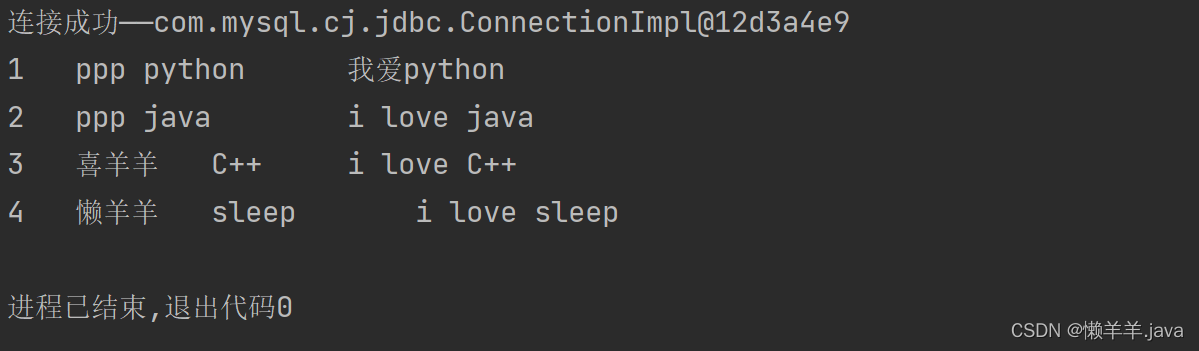
七、公告连接数据库与显示
这里用的是8.0+的jar包,你们连数据库的时候不要版本增差过大否则会版本不兼容而报错
效果展示:

核心代码:
采用的是Properties读文件通过JDBC方式连接数据库(记得自己写配置文件)<% String str=request.getParameter("gg"); String neiron = Integer.parseInt(str); /*1.通过Properties读文件*/ Properties properties = new Properties(); properties.load(new FileInputStream("src\\jdbc.properties")); /*2.得到相关值*/ String user = properties.getProperty("user"); String password = properties.getProperty("password"); String driver = properties.getProperty("driver"); String url = properties.getProperty("url"); Class.forName("com.mysql.cj.jdbc.Driver"); Connection con = DriverManager.getConnection(url, user, password); System.out.println("连接——" + con); /*3.得到Statement*/ Statement statement = con.createStatement(); /*4.组织SQL*/ String sql = "select gonggao,gonggao2 from table1;"; /*5.执行SQL*/ ResultSet res = statement.executeQuery(sql); if(res.next()){ String strOne=rs.getString("gonggao"); String strTwo=rs.getString("gonggao2"); out.println("公告内容:"+"<br>"); out.println("标题是:"+strOne+"<br>"); out.println("内容是:"+strTwo+"<br>"); }else{ out.println("错误"); } res.close(); con.close(); statement.close(); %>- 1
- 2
- 3
- 4
- 5
- 6
- 7
- 8
- 9
- 10
- 11
- 12
- 13
- 14
- 15
- 16
- 17
- 18
- 19
- 20
- 21
- 22
- 23
- 24
- 25
- 26
- 27
- 28
- 29
- 30
- 31
- 32
- 33
- 34
- 35
- 36
- 37
- 38
结语
到这里网站基本设计就完成了,虽然功能比较单一但是却对本学期学过的知识是一个很好的整合和复习,让我对前后端的认识与体会更加深刻,特别是HTML中form表单的使用、CSS修饰HTML元素、利用CSS实现一些简单的特效,其实在学习的过程中我发现CSS学会很简单,但是真正把CSS用好,来实现各种各样的效果,浮动是最难的,这种难度不次于数据结构与算法(个人感觉)。当然还有jsp,jsp就是Java,只是它是一个特别的Java语言,加入了一个特殊的引擎,这个引擎将HTTPServlet这个类的一些对象自动进行初始化好让用户使用,而用户不用再去操心前面的工作,“一次编译到处运行”果然名不虚传,面向对象的特征也使我们对于前台输入的信息可以进行更合理高效的操作。特别是通过JDBC来连接数据库,这真是一个很神奇的事情!通过本次实习,我深深感受到我们平时看到的精美页面背后都是程序员一个又一个复杂的设计。总而言之,web是一个庞大的体系,还没学习的内容有很多,趁现在才大二好好珍惜时间学习技术吧。
路的尽头还是路…
后面还有很长的路要走,现在也准备开始SSM的学习,等以后技术更好我一定会回来把你做的更大更好. -
相关阅读:
VTK----深入理解3D坐标系统和相机
2023年破圈:盘点11个新零售商业模式,永远不再打商业价格战
SolidWorks二次开发 API-SOLIDWORKS Simulation分析参数修改
PDF有限制不能复制怎么办?
QT 智能指针注意事项(备忘)
软考系列(系统架构师)- 2021年系统架构师软考案例分析考点
E. Hanging Hearts #831 div1+2
iOS关于列表布局的几种实现方式小结
算法从未放弃你,放弃你的只有你自己
C++ 性能优化指南 KurtGuntheroth 第12章 优化并发 摘录
- 原文地址:https://blog.csdn.net/weixin_57535055/article/details/125382029