-
【微服务~Nacos】Nacos服务提供者和服务消费者

🔎这里是【微服务~Nacos】,关注我学习云原生不迷路
👍如果对你有帮助,给博主一个免费的点赞以示鼓励
欢迎各位🔎点赞👍评论收藏⭐️👀专栏介绍
【微服务~Nacos】 目前主要更新微服务,一起学习一起进步。
👀本期介绍
本期主要介绍微服务~Nacos
文章目录
搭建父项目
-
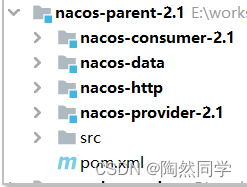
项目名:nacos-parent-2.1
-
添加坐标
- <parent>
- <groupId>org.springframework.cloud</groupId>
- <artifactId>spring-cloud-build</artifactId>
- <version>2.3.5.RELEASE</version>
- </parent>
- <properties>
- <spring.cloud.version>Hoxton.SR12</spring.cloud.version>
- <spring.cloud.alibaba.version>2.2.7-SNAPSHOT</spring.cloud.alibaba.version>
- <mybatis.plus.starter.version>3.4.0</mybatis.plus.starter.version>
- <durid.starter.version>1.1.10</durid.starter.version>
- <swagger.version>2.7.0</swagger.version>
- <jwt.jjwt.version>0.9.0</jwt.jjwt.version>
- <jwt.joda.version>2.9.7</jwt.joda.version>
- </properties>
- <dependencyManagement>
- <dependencies>
- <!-- Spring Dependencies -->
- <dependency>
- <groupId>org.springframework.boot</groupId>
- <artifactId>spring-boot-dependencies</artifactId>
- <version>${spring-boot.version}</version>
- <type>pom</type>
- <scope>import</scope>
- </dependency>
- <dependency>
- <groupId>org.springframework.cloud</groupId>
- <artifactId>spring-cloud-dependencies</artifactId>
- <version>${spring.cloud.version}</version>
- <type>pom</type>
- <scope>import</scope>
- </dependency>
- <dependency>
- <groupId>com.alibaba.cloud</groupId>
- <artifactId>spring-cloud-alibaba-dependencies</artifactId>
- <version>2.2.7.RELEASE</version>
- <type>pom</type>
- <scope>import</scope>
- </dependency>
- <!-- mybatis-plus -->
- <dependency>
- <groupId>com.baomidou</groupId>
- <artifactId>mybatis-plus-boot-starter</artifactId>
- <version>${mybatis.plus.starter.version}</version>
- </dependency>
- <!-- Druid连接池 -->
- <dependency>
- <groupId>com.alibaba</groupId>
- <artifactId>druid-spring-boot-starter</artifactId>
- <version>${durid.starter.version}</version>
- </dependency>
- <!--swagger2-->
- <dependency>
- <groupId>io.springfox</groupId>
- <artifactId>springfox-swagger2</artifactId>
- <version>${swagger.version}</version>
- </dependency>
- <dependency>
- <groupId>io.springfox</groupId>
- <artifactId>springfox-swagger-ui</artifactId>
- <version>${swagger.version}</version>
- </dependency>
- </dependencies>
- </dependencyManagement>
- <build>
- <plugins>
- <plugin>
- <groupId>org.apache.maven.plugins</groupId>
- <artifactId>maven-javadoc-plugin</artifactId>
- <configuration>
- <skip>true</skip>
- </configuration>
- </plugin>
- </plugins>
- </build>
- 项目目录结构
服务提供者Provider
搭建服务
-
创建项目:nacos-provider-2.1
-
添加依赖:
- <dependencies>
- <!-- web 启动类 -->
- <dependency>
- <groupId>org.springframework.boot</groupId>
- <artifactId>spring-boot-starter-web</artifactId>
- </dependency>
- <!-- nacos 服务发现 -->
- <dependency>
- <groupId>com.alibaba.cloud</groupId>
- <artifactId>spring-cloud-starter-alibaba-nacos-discovery</artifactId>
- </dependency>
- </dependencies>
- 创建yml文件
- #server.port=8070
- #spring.application.name=service-provider
- #spring.cloud.nacos.discovery.server-addr=127.0.0.1:8848
- #端口号
- server:
- port: 8070
- spring:
- application:
- name: service-provider #服务名
- cloud:
- nacos:
- discovery:
- server-addr: 127.0.0.1:8848 #nacos服务地址
创建服务
- 启动类

- package com.czxy.nacos;
- import org.springframework.boot.SpringApplication;
- import org.springframework.boot.autoconfigure.SpringBootApplication;
- import org.springframework.cloud.client.discovery.EnableDiscoveryClient;
- @SpringBootApplication
- @EnableDiscoveryClient //服务发现
- public class TestNacosProviderApplication {
- public static void main(String[] args) {
- SpringApplication.run(TestNacosProviderApplication.class, args );
- }
- }
- 处理类controller
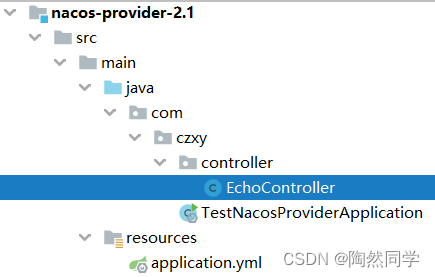
- package com.czxy.controller;
- import org.springframework.web.bind.annotation.GetMapping;
- import org.springframework.web.bind.annotation.PathVariable;
- import org.springframework.web.bind.annotation.RestController;
- import javax.annotation.Resource;
- import javax.servlet.http.HttpServletRequest;
- @RestController
- public class EchoController {
- @Resource
- private HttpServletRequest request;
- @GetMapping("/echo/{string}")
- public String echo(@PathVariable String string) {
- int serverPort = request.getServerPort();
- return "Hello Nacos Discovery " + string + ":" + serverPort;
- }
- }
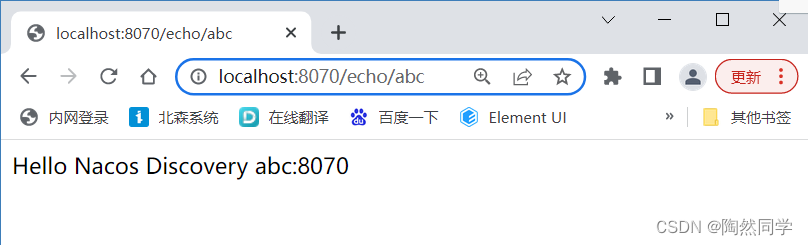
查看服务
- 通过浏览器访问
- 通过Nacos控制台查看

注册异常

服务消费者Consumer
搭建服务
-
项目名:nacos-consumer-2.1
-
添加依赖
- <dependencies>
- <!-- web 启动类 -->
- <dependency>
- <groupId>org.springframework.boot</groupId>
- <artifactId>spring-boot-starter-web</artifactId>
- </dependency>
- <!-- nacos 服务发现 -->
- <dependency>
- <groupId>com.alibaba.cloud</groupId>
- <artifactId>spring-cloud-starter-alibaba-nacos-discovery</artifactId>
- </dependency>
- <!-- openfeign 远程调用 -->
- <dependency>
- <groupId>org.springframework.cloud</groupId>
- <artifactId>spring-cloud-starter-openfeign</artifactId>
- </dependency>
- </dependencies>
- 创建配置文件

- #server.port=8071
- #spring.application.name=service-consumer
- #spring.cloud.nacos.discovery.server-addr=127.0.0.1:8848
- #端口号
- server:
- port: 8071
- spring:
- application:
- name: service-consumer #服务名
- cloud:
- nacos:
- discovery:
- server-addr: 127.0.0.1:8848 #nacos服务地址
创建服务
- 创建启动类
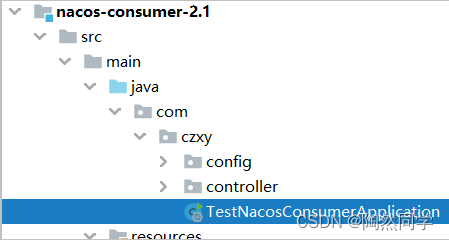
- package com.czxy;
- import org.springframework.boot.SpringApplication;
- import org.springframework.boot.autoconfigure.SpringBootApplication;
- import org.springframework.cloud.client.discovery.EnableDiscoveryClient;
- @SpringBootApplication
- @EnableDiscoveryClient //服务发现
- public class TestNacosConsumerApplication {
- public static void main(String[] args) {
- SpringApplication.run(TestNacosConsumerApplication.class, args );
- }
- }
- 远程调用配置类

- package com.czxy.config;
- import org.springframework.cloud.client.loadbalancer.LoadBalanced;
- import org.springframework.context.annotation.Bean;
- import org.springframework.stereotype.Component;
- import org.springframework.web.client.RestTemplate;
- @Component
- public class RestTemplateConfig {
- @LoadBalanced //负载均衡
- @Bean
- public RestTemplate restTemplate() {
- return new RestTemplate();
- }
- }
- 处理类
- package com.czxy.nacos.controller;
- import org.springframework.web.bind.annotation.PathVariable;
- import org.springframework.web.bind.annotation.RequestMapping;
- import org.springframework.web.bind.annotation.RequestMethod;
- import org.springframework.web.bind.annotation.RestController;
- import org.springframework.web.client.RestTemplate;
- import javax.annotation.Resource;
- @RestController
- public class TestRestController {
- @Resource
- private RestTemplate restTemplate;
- @RequestMapping(value = "/echo/{str}", method = RequestMethod.GET)
- public String echo(@PathVariable String str) {
- return restTemplate.getForObject("http://service-provider/echo/" + str, String.class);
- }
- }
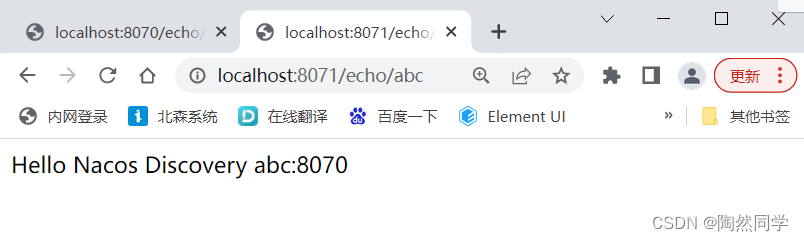
查询服务
- 通过浏览器访问
通过Nacos控制台查看


-
-
相关阅读:
facebook跨境电商如何做
Jmeter之测试元件-JSR223 PreProcessor
淘宝官方订单 API 接口,获取购买到的商品订单详情
如何在Firewalld中为特定IP地址开放端口
Qt 二维码生成与识别
如何在三维地球上加载obj、fbx、ifc、dae、3ds、gltf/glb模型?
原料厂与烧结工艺
深入解析kubernetes中的选举机制
多路h265监控录放开发-(10)XCameraRecord类完成视频的录制
财报解读:双轮驱动下,香飘飘究竟能打开多大的获利空间?
- 原文地址:https://blog.csdn.net/weixin_45481821/article/details/125320833