-
`Thymeleaf`模板引擎全面解析
Thymeleaf模板引擎1.入门
第一步:创建一个
SpringBoot工程引入相关的场景启动器
![[外链图片转存失败,源站可能有防盗链机制,建议将图片保存下来直接上传(img-jROwzUqz-1655975250521)(img\1655817528794.png)]](https://1000bd.com/contentImg/2022/06/26/012935479.png)
<dependencies> <dependency> <groupId>org.springframework.boot</groupId> <artifactId>spring-boot-starter-thymeleaf</artifactId> </dependency> <dependency> <groupId>org.springframework.boot</groupId> <artifactId>spring-boot-starter-web</artifactId> </dependency> <dependency> <groupId>org.springframework.boot</groupId> <artifactId>spring-boot-devtools</artifactId> <scope>runtime</scope> <optional>true</optional> </dependency> <dependency> <groupId>org.projectlombok</groupId> <artifactId>lombok</artifactId> <optional>true</optional> </dependency> <dependency> <groupId>org.springframework.boot</groupId> <artifactId>spring-boot-starter-test</artifactId> <scope>test</scope> </dependency> </dependencies> <build> <plugins> <plugin> <groupId>org.springframework.boot</groupId> <artifactId>spring-boot-maven-plugin</artifactId> <configuration> <excludes> <exclude> <groupId>org.projectlombok</groupId> <artifactId>lombok</artifactId> </exclude> </excludes> </configuration> </plugin> </plugins> </build>- 1
- 2
- 3
- 4
- 5
- 6
- 7
- 8
- 9
- 10
- 11
- 12
- 13
- 14
- 15
- 16
- 17
- 18
- 19
- 20
- 21
- 22
- 23
- 24
- 25
- 26
- 27
- 28
- 29
- 30
- 31
- 32
- 33
- 34
- 35
- 36
- 37
- 38
- 39
- 40
- 41
- 42
- 43
- 44
第二步:编写控制器层
@Controller public class ThymeleafController { @RequestMapping("/") public String helloThymeleaf(Model model){ // 向request域中存储数据 model.addAttribute("data","欢迎使用Thymeleaf模板引擎"); return "hello"; } }- 1
- 2
- 3
- 4
- 5
- 6
- 7
- 8
- 9
- 10
第三步:编写页面,向
request共享域中获取出数据<!DOCTYPE html> <html lang="en" xmlns:th="http://www.thymeleaf.org"> <head> <meta charset="UTF-8"> <title>hello页面</title> </head> <body> <h3 style="color: green">Thymeleaf模板引擎的使用</h3> <p th:text="${data}">数据显示区域</p> </body> </html>- 1
- 2
- 3
- 4
- 5
- 6
- 7
- 8
- 9
- 10
- 11
![[外链图片转存失败,源站可能有防盗链机制,建议将图片保存下来直接上传(img-5TLT4QnZ-1655975250522)(D:\typora笔记\springboot2\img\1655817482696.png)]](https://1000bd.com/contentImg/2022/06/26/012935621.png)
2.使用
spring.thymeleaf可以修改掉模板引擎中的默认配置#修改端口号为 80 server.port=80 #在开发阶段,一般会关闭模板缓存 ,让修改立即生效,默认是true开启的, #在项目上线后,要修改回开启 spring.thymeleaf.cache=false #编码模式 spring.thymeleaf.encoding=UTF-8 #模板的类型(默认是html,模板是html文件) spring.thymeleaf.mode=HTML #模板的前缀:类路径的: classpath:/templates/ spring.thymeleaf.prefix=classpath:/templates/ #模板的后缀: spring.thymeleaf.suffix=.html- 1
- 2
- 3
- 4
- 5
- 6
- 7
- 8
- 9
- 10
- 11
- 12
- 13
- 14
- 15
- 16
- 17
- 18
表达式
1.标准变量表达式
语法:
${key}作用:获取
key对于的文本数据,key是request作用域中的key,使用request.setAttribute();或model.addAttribute();在页面中的
html标签中,使用th:text="${key}"案例:
第0步:编写
JavaBean@Data @NoArgsConstructor @AllArgsConstructor @ToString public class Person { private Integer id; private String name; private String sex; private Integer age; }- 1
- 2
- 3
- 4
- 5
- 6
- 7
- 8
- 9
- 10
第一步:编写控制器
@RequestMapping("/expressionl") public String expressionl(Model model){ // 向request共享域中存储数据 model.addAttribute("site","https://fanyi.baidu.com/"); model.addAttribute("pojo",new Person(101,"海康","男",23)); // 指定跳转视图 return "standard"; }- 1
- 2
- 3
- 4
- 5
- 6
- 7
- 8
- 9
- 10
- 11
第二步:编写页面
<div style="margin-left: 430px"> <h3 style="color: green">标准变量表达式</h3> <a th:href="${site}">去百度翻译</a><br/> <p th:text="${pojo.id}">id</p> <p th:text="${pojo.name}">姓名</p> <p th:text="${pojo.sex}">性别</p> <p th:text="${pojo.age}">年龄</p> </div>- 1
- 2
- 3
- 4
- 5
- 6
- 7
- 8
第三步:测试
![[外链图片转存失败,源站可能有防盗链机制,建议将图片保存下来直接上传(img-5aES50a4-1655975436466)(img\1655861093859.png)]](https://1000bd.com/contentImg/2022/06/26/012935746.png)
2.选择变量表达式
语法:
*{key}说明:需要配和
th:object一起使用,选择变量表达式,也叫星号变量表达式,使用th:object属性来绑定对象,选择表达式首先使用th:object来绑定后台传来的对象,然后使用*来代表这个对象后面{}中的值此对象的属性选择变量表达式
*{...}是另一种类似于标准变量表达式${...}表示变量的方法,选择变量表达式*{...}在执行时是在选择的对象上求解,而${...}是在上下文的变量model上求解选择变量表达式使用步骤:
第一步:
<div th:object="${后台传入对象}></div>"第二步:
th:text="*{对象属性}"案例:
第0步:
@Data @NoArgsConstructor @AllArgsConstructor @ToString public class Person { private Integer id; private String name; private String sex; private Integer age; }- 1
- 2
- 3
- 4
- 5
- 6
- 7
- 8
- 9
- 10
第一步:编写控制器
@RequestMapping("/expression2") public String expression2(Model model){ model.addAttribute("pojo",new Person(102,"湛江","男",23)); return "expression2"; }- 1
- 2
- 3
- 4
- 5
第二步:编写页面
<div> <h3 style="color: green">选择器表达式</h3> <div th:object="${pojo}"> <p th:text="*{id}">id</p> <p th:text="*{name}">name</p> <p th:text="*{sex}">sex</p> <p th:text="*{age}">age</p> </div> </div>- 1
- 2
- 3
- 4
- 5
- 6
- 7
- 8
- 9
第三步:测试
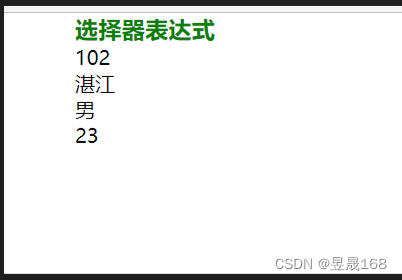
3.链接表达式
URL语法:
@{链接url}说明:主要用来链接,地址的展示,可用于
<srcipt src=".."><link href=".."><a href=".."><form action=".."><img src="..">等,可以在URL路径中动态获取数据案例:
第0步:
@Data @NoArgsConstructor @AllArgsConstructor @ToString public class Student { private Integer studId; private String studName; }- 1
- 2
- 3
- 4
- 5
- 6
- 7
- 8
第一步:编写控制器方法
@Controller @RequestMapping("/thy") public class LinkController { @RequestMapping("/student") public String student(Model model){ model.addAttribute("studId",101); return "link"; } @RequestMapping("/queryById") @ResponseBody public String queryById(@RequestParam("id") Integer id){ return "根据Id查询的学生信息"+id; } @RequestMapping("/findStudent") @ResponseBody public Student student(Student student){ // 返回Student对象 JSON格式 return student; } }- 1
- 2
- 3
- 4
- 5
- 6
- 7
- 8
- 9
- 10
- 11
- 12
- 13
- 14
- 15
- 16
- 17
- 18
- 19
- 20
- 21
- 22
- 23
第二步:编写页面
<div> <h3 style="color: green">链接表达式</h3> <a th:href="@{'/thy/queryById?id='+${studId}}">根据Id查询学生信息</a><br/> <!-- 推荐使用 方式二:--> <a th:href="@{/thy/findStudent(studId=${studId},studName='海康')}">查询学生信息返回JSON数据格式</a> </div>- 1
- 2
- 3
- 4
- 5
- 6
- 7
第四步:测试
![[外链图片转存失败,源站可能有防盗链机制,建议将图片保存下来直接上传(img-EmWzYKGe-1655975436468)(img\1655882086172.png)]](https://1000bd.com/contentImg/2022/06/26/012936083.png)
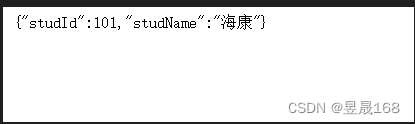
Thymeleaf属性概念:大部分属性和
html的一样,只不过前面加了一个th前缀,加了th前缀的属性,是经过模版引擎处理的1.
th:action定义后台控制器的路径,类似
<form>标签的action属性,主要结合url表达式,获取动态变量<form id="login" th:action="@{/login}" th:method="post">...</form>2.
th:method设置请求方法
<form id="login" th:action="@{/login}" th:method="post">...</form>3.
th:href定义超链接,主要结合
url表达式,获取动态变量<a th:href="@{query/student}">相对地址没有传参数</a>4.
th:src用于外部资源引入,比如
<script>标签的src属性,<img>标签的src属性,常与@{}表达式结合使用,在SpringBoot项目的静态资源都放到resources的static目录下,放到static路径下的内容,写路径时不需要写上staticscript type="text/javascript" th:src="@{/js/jquery-3.4.1.js}"></script>5.
th:text用于文本的显示,该属性显示的文本在标签体中,如果文本框,数据会在文本框外显示,要想显示在文本框内,使用
th:value<input type="text" id="realName" name="reaName" th:text="${realName}">6.
th:style设置样式
<a th:onclick="funl('+${user.id}+')" th:style="color:red">点我试试</a>7.
th:each[重点]这个属性非常非常,比如从后台传来一个对象集合那么就可以使用属性遍历输出,它与
jstl中的<c:forEach>类似,此属性既可以循环遍历集合,也可以循环遍历数组及MapA.
List集合案例:
第0步:
@NoArgsConstructor @AllArgsConstructor @ToString public class Person { private Integer id; private String name; private String sex; private Integer age; }- 1
- 2
- 3
- 4
- 5
- 6
- 7
- 8
- 9
第一步:编写控制器
@Controller @RequestMapping("/collection") public class CollectionController { @RequestMapping("/list") public String list(Model model){ List<Person> list = new ArrayList<>(); list.add(new Person(101,"湛江","男",21)); list.add(new Person(102,"海康","男",21)); list.add(new Person(103,"南宁","女",21)); // 向request共享域中存储数据 model.addAttribute("list",list); return "list"; } }- 1
- 2
- 3
- 4
- 5
- 6
- 7
- 8
- 9
- 10
- 11
- 12
- 13
- 14
- 15
- 16
- 17
第二步:编写页面
<div> <table> <tr> <th>编号</th> <th>姓名</th> <th>性别</th> <th>年龄</th> </tr> <tr th:each="person:${list}"> <td th:text="${person.id}"></td> <td th:text="${person.name}"></td> <td th:text="${person.sex}"></td> <td th:text="${person.age}"></td> </tr> </table> </div>- 1
- 2
- 3
- 4
- 5
- 6
- 7
- 8
- 9
- 10
- 11
- 12
- 13
- 14
- 15
- 16
第三步:测试
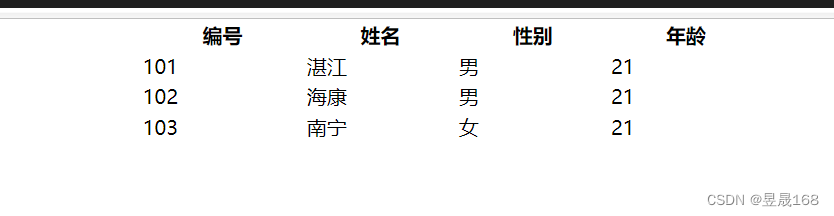
B.数组
案例:
第0步:
@NoArgsConstructor @AllArgsConstructor @ToString public class Person { private Integer id; private String name; private String sex; private Integer age; }- 1
- 2
- 3
- 4
- 5
- 6
- 7
- 8
- 9
第一步:编写控制器
@RequestMapping("/arr") public String arr(Model model){ Person[] people = new Person[3]; people[0] = new Person(101,"湛江","男",21); people[1] = new Person(102,"海康","男",21); people[2] = new Person(103,"西安","女",21); // 向request域中存储数据 model.addAttribute("arr",people); return "arr"; }- 1
- 2
- 3
- 4
- 5
- 6
- 7
- 8
- 9
- 10
- 11
- 12
第二步:编写页面
<div> <table> <tr> <th>编号</th> <th>姓名</th> <th>性别</th> <th>年龄</th> </tr> <tr th:each="person:${arr}"> <td th:text="${person.id}"></td> <td th:text="${person.name}"></td> <td th:text="${person.sex}"></td> <td th:text="${person.age}"></td> </tr> </table> </div>- 1
- 2
- 3
- 4
- 5
- 6
- 7
- 8
- 9
- 10
- 11
- 12
- 13
- 14
- 15
- 16
第三步:测试
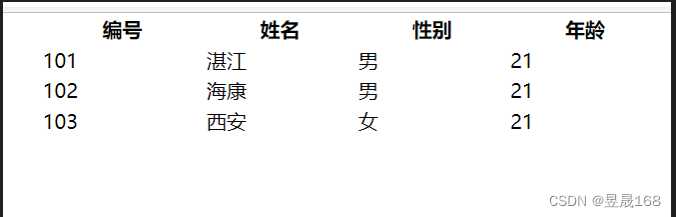
语法:
th:each=person,iterStat:${collection}中的${collection}是后台传来的集合person:定义变量,去接收遍历${collection}集合中的一个数据iterStat${collection}循环体信息
- 其中
person及iterStat自己可以随便取名 iterStat是循环体的信息,通过该变量可以获取如下信息index:当前迭代对象的index(从0开始计算)count:当前迭代对象的个数(从1开始计算)size:被迭代对象的大小current:当前迭代变量even/odd:布尔值,当前循环是否是偶数/奇数(从0开始计算)first:布尔值,当前循环是否第一个last:布尔值,当前循环是否最后一个
注意:循环体信息
iterStat也可以不定义,则默认采用迭代变量加上Stat后缀,即personStat数组和
List集合语法总结:<div th:each="集合循环成员,循环的状态变量:${key}"> <p th:text="${集合循环成员}" ></p> </div> 集合循环成员,循环的状态变量:两个名称都是自定义的。 “循环的状态变量”这个名称可以不定义,默认是"集合循环成员Stat"- 1
- 2
- 3
- 4
- 5
C.
Map集合案例:
第0步:
@NoArgsConstructor @AllArgsConstructor @ToString public class Person { private Integer id; private String name; private String sex; private Integer age; }- 1
- 2
- 3
- 4
- 5
- 6
- 7
- 8
- 9
第一步:编写控制器
@RequestMapping("/map") public String map(Model model){ Map<String,Object> map = new HashMap<>(); map.put("101",new Person(101,"海康","男",21)); map.put("102",new Person(102,"湛江","男",22)); map.put("103",new Person(103,"西安","女",23)); map.put("104",new Person(104,"南宁","女",21)); // 向request域中存储数据 model.addAttribute("map",map); return "map"; }- 1
- 2
- 3
- 4
- 5
- 6
- 7
- 8
- 9
- 10
- 11
- 12
- 13
- 14
第二步:编写页面
<div> <table> <tr> <th>编号</th> <th>姓名</th> <th>性别</th> <th>年龄</th> </tr> <tr th:each="perMap:${map}"> <td th:text="${perMap.key}"></td> <td th:text="${perMap.value.name}"></td> <td th:text="${perMap.value.sex}"></td> <td th:text="${perMap.value.age}"></td> </tr> </table> </div>- 1
- 2
- 3
- 4
- 5
- 6
- 7
- 8
- 9
- 10
- 11
- 12
- 13
- 14
- 15
- 16
第三步:测试

Map集合语法总结<div th:each="集合循环成员,循环的状态变量:${key}"> <p th:text="${集合循环成员.key}" ></p> <p th:text="${集合循环成员.value}" ></p> </div> 集合循环成员,循环的状态变量:两个名称都是自定义的。 “循环的状态变量”这个名称可以不定义,默认是"集合循环成员Stat" key:map集合中的key value:map集合key对应的value值- 1
- 2
- 3
- 4
- 5
- 6
- 7
- 8
- 9
8.条件判断
if-unless语法:
th:if="boolean 条件"条件为
true显示体内容th:unless是th:if的一个相反操作注意是:当
th:if=${..}语法成立时,才会显示标签体中的内容【就是if为true时,显示】注意是:当
th:unless=${..}语法不成立时,才会显示标签体中的内容【就是unless为false时,显示】细节点:
- 在
th:if="${""}"语句中【空字符串】代表是true - 在
th:if="${null}"语句中【null代表是false】
案例:
第一步:编写控制器
@RequestMapping("/MyIf") public String myIf(Model model){ // 向共享域中存储数据 model.addAttribute("sex","性别不详"); // 注意是:在`th:if`语句中空字符串,代表是true // 注意是:在`th:unless`语句中空字符串,代表是true,true则不显示,false才显示 model.addAttribute("name",""); // 注意是:在`th:if`语句中`null`,代表是false // 注意是:在`th:unless`语句中`null`,代表是false,false则显示 model.addAttribute("old",null); return "MyIf"; }- 1
- 2
- 3
- 4
- 5
- 6
- 7
- 8
- 9
- 10
- 11
- 12
- 13
- 14
- 15
- 16
- 17
第二步:编写页面
<div> <h3 style="color: green">IF判断语句</h3> <!-- 下面的两种写法都是正确的 --> <p th:if="${sex=='性别不详'}">性别不详</p> <p th:if="${sex}=='性别不详'">显示性别</p> <!-- 空字符串在`th:if`代表是true,true在unless中不显示 --> <p th:if="${name}">在th:if中空字符串代表是true</p> <!-- null在`th:if`代表是false,false在`th:unless`则显示--> <p th:unless="${old}">在`th:if`中null代表是false,false则不显示该标签,在nuless中则显示</p> </div>- 1
- 2
- 3
- 4
- 5
- 6
- 7
- 8
- 9
- 10
- 11
第三步:测试
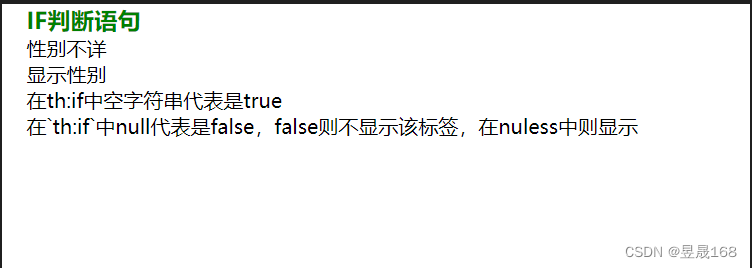
9.
th:switchth:switch和java中的swith一样的语法: <div th:switch="要比对的值"> <p th:case="值1"> 结果1 </p> <p th:case="值2"> 结果2 </p> <p th:case="*"> 默认结果 </p> 以上的case只有一个语句执行 </div>- 1
- 2
- 3
- 4
- 5
- 6
- 7
- 8
- 9
- 10
- 11
- 12
- 13
- 14
注意是:
th:case="*"代表是默认值案例:
第一步:编写控制器
@RequestMapping("/switch") public String switchCase(Model model){ // request共享域中存储数据 // 在switch中匹配了才显示,如果都不匹配可以使用`th:switch="*"`设置默认的 model.addAttribute("sex","男"); return "switch"; }- 1
- 2
- 3
- 4
- 5
- 6
- 7
- 8
第二步:编写页面
<div> <h3 style="color: green">switch判断语句</h3> <div th:switch="${sex}"> <p th:case="男">性别男</p> <p th:case="女">性别女</p> <!-- `th:case="*"`表示是默认的--> <p th:case="*">性别不详</p> </div> </div>- 1
- 2
- 3
- 4
- 5
- 6
- 7
- 8
- 9
第三步:测试
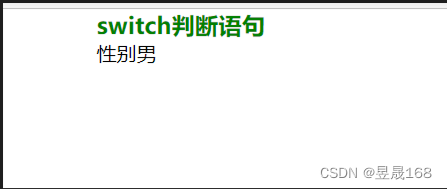
10.
th:inlineth:inline有三个取值类型{text javascript 和 none}内联
text可以让
Thymeleaf表达式不依赖于html标签,直接使用内联表达式即可获取动态数据,要求在父级标签上加th:inline="text"属性内联
javascript可以在
js中,获取模版中的数据案例:
第一步:编写控制器
@RequestMapping("/inline") public String inline(Model model){ // request共享域中存储数据 model.addAttribute("name","海康"); model.addAttribute("age","20"); return "inline"; }- 1
- 2
- 3
- 4
- 5
- 6
- 7
- 8
- 9
第二步:编写页面
<style> * { width: 500px; margin: 0 auto; } </style> <script type="text/javascript" th:inline="javascript"> var name = [[${name}]]; function fun() { alert("我的姓名是:"+name+"\t我的年龄是:"+[[${age}]]); } </script> </head> <body> <div> <h3>内联表达式</h3> <p>我的姓名是:[[${name}]],年龄是:[[${age}]]</p> <input type="button" value="点我试试" onclick="fun()"> </div>- 1
- 2
- 3
- 4
- 5
- 6
- 7
- 8
- 9
- 10
- 11
- 12
- 13
- 14
- 15
- 16
- 17
- 18
- 19
- 20
- 21
- 22
- 23
第三步:测试
![[外链图片转存失败,源站可能有防盗链机制,建议将图片保存下来直接上传(img-NG6NCapt-1655975700898)(img\1655905775137.png)]](https://1000bd.com/contentImg/2022/06/26/012937278.png)
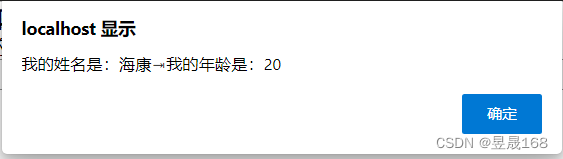
11.字面量
文本字面量
用单引号
'..'包围的字符串为文本字面量案例:
<p th:text="'城市是'+${city}+'用户登录'+${isLogin}"></p>- 1
数字字面量
<p th:if="${age>10}">age>10</p> <p th:if="20>5">20大于5</p>- 1
- 2
- 3
boolean字面量<p th:if="${isLogin==true}">用户登录</p>- 1
12.字符串连接
方式一:使用
''案例:
<p th:text="'城市是'+${city}+'用户登录'+${isLogin}"></p>- 1
方式二:使用
||【建议使用方式二】案例:
<p th:text="|所在城市是${city},我是${name}|"> 显示数据 </p>- 1
- 2
- 3
案例:
第一步:编写控制器
@RequestMapping("/strJoin") public String strJoin(Model model){ // 向request域中共享数据 model.addAttribute("city","海康"); model.addAttribute("name","明天"); model.addAttribute("age",23); // 视图跳转 return "strJoin"; }- 1
- 2
- 3
- 4
- 5
- 6
- 7
- 8
- 9
- 10
第二步:编写页面
<div> <h3 style="color: green">字符串拼接方式一:使用`'..'`</h3> <p th:text="'我是'+${name}+',我所在城市'+${city}+'我的年龄是:'+${age}">显示个人信息</p> <br/> <br/> <h3 style="color: green">字符串拼接方式二:使用`||`</h3> <p th:text="|我是${name},我的所在城市${city},我的年龄是: ${age}|">显示个人信息</p> </div>- 1
- 2
- 3
- 4
- 5
- 6
- 7
- 8
第三步:测试
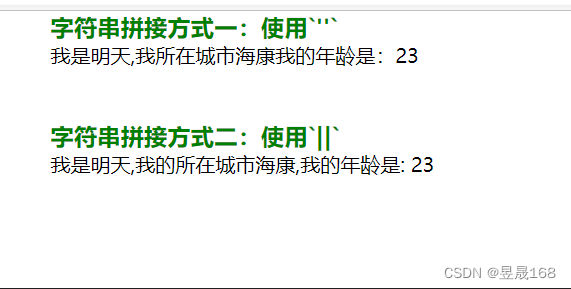
13.运算符
算术运算:
+-*/%关系比较:
><>=<=(gt lt ge le)相等判断:
==!=(eq ne)三元运算符:
表达式 ? true的结果 : false的结果
三元运算符可以嵌套
案例:
第一步:编写控制器
@RequestMapping("/operation") public String operation(Model model){ // 向共享域中存储数据`request` model.addAttribute("name","海康"); model.addAttribute("age",21); // 视图跳转 return "operation"; }- 1
- 2
- 3
- 4
- 5
- 6
- 7
- 8
- 9
第二步:编写页面
<div> <h3 style="color:green;">运算符</h3> <p th:if="${name=='海康'}">表达式为true,则显示</p> <p th:if="${age}>20 ? '年龄大于20' : '年龄不大于20'">判断年龄是否大于20</p> </div>- 1
- 2
- 3
- 4
- 5
第三步:测试
![[外链图片转存失败,源站可能有防盗链机制,建议将图片保存下来直接上传(img-PZEWZnAV-1655975700900)(img\1655950053533.png)]](https://1000bd.com/contentImg/2022/06/26/012937803.png)
Thymeleaf基本对象1.常用内置对象
模板引擎提供了一组的对象,这些内置对象可以直接在模板中使用,这些对象由
#号开始引用,我们比较常用的内置对象request对象#request原型:HttpServetRequest对象session对象#session原型:HttpSesssion对象session原型:HttpSession对象Session表示为Map对象的,是#session的简单表示方法,用来获取session中指定的key的值,#session才是用来调用相关方法的案例:
第一步:控制器
@RequestMapping("/baseObject") public String baseObject(Model model, HttpSession session){ // 向request域中存储数据 model.addAttribute("name","湛江"); // 向session域中存储数据 session.setAttribute("age",23); return "baseObject"; }- 1
- 2
- 3
- 4
- 5
- 6
- 7
- 8
- 9
第二步:编写页面
<div> <h3 style="color: green">基本内置对象的使用</h3> <p th:text="${#request.getAttribute('name')}"></p> <p th:text="${#session.getAttribute('age')}"></p> <p th:text="${session.age}"></p> <h3 style="color: green">`#request`内置对象的使用</h3> getServerPort: <span th:text="${#request.getServerPort()}"></span><br/> getRequestURI<span th:text="${#request.getRequestURI()}"></span><br/> getRequestURL<span th:text="${#request.getRequestURL()}"></span><br/> <h3 style="color: green">`#session`内置对象的使用</h3> getId<span th:text="${#session.getId()}"></span> </div>- 1
- 2
- 3
- 4
- 5
- 6
- 7
- 8
- 9
- 10
- 11
- 12
- 13
第三步:测试
![[外链图片转存失败,源站可能有防盗链机制,建议将图片保存下来直接上传(img-CvVvGl0K-1655976080280)(img\1655951532840.png)]](https://1000bd.com/contentImg/2022/06/26/012937944.png)
2.基于内置对象
#ctx语法:
#ctx: context对象可以获取其他的内置对象
注意是:
#vars和#root是同一个对象,和#ctx的作用一样,建议使用#ctx/* * ====================================================================== * See javadoc API for class org.thymeleaf.context.IContext * ====================================================================== */ ${#ctx.locale} ${#ctx.variableNames} /* * ====================================================================== * See javadoc API for class org.thymeleaf.context.IWebContext * ====================================================================== */ ${#ctx.request} ${#ctx.response} ${#ctx.session} ${#ctx.servletContext}- 1
- 2
- 3
- 4
- 5
- 6
- 7
- 8
- 9
- 10
- 11
- 12
- 13
- 14
- 15
- 16
- 17
- 18
- 19
-
#locale # 地点 : direct access to the : 直接进入
java.util.Localeassociated with current request. 与当前请求有关的 【获取当前地点相关的信息】 -
param : for retrieving request parameters. : 用于检索请求参数
${param.foo}is a 是一个String[]with the values of the 的值foorequest parameter, so 请求参数,所以${param.foo[0]}will normally be used for getting the first value. 将通常用于获取第一个值
/* * ============================================================================ * See javadoc API for class org.thymeleaf.context.WebRequestParamsVariablesMap * ============================================================================ */ ${param.foo} // Retrieves a String[] with the values of request parameter 'foo' ${param.size()} ${param.isEmpty()} ${param.containsKey('foo')} ...- 1
- 2
- 3
- 4
- 5
- 6
- 7
- 8
- 9
- 10
- 11
- session 会议 : for retrieving session attributes. : 用于检索会话属性
/* * ====================================================================== * See javadoc API for class org.thymeleaf.context.WebSessionVariablesMap * ====================================================================== */ ${session.foo} // Retrieves the session atttribute 'foo' ${session.size()} ${session.isEmpty()} ${session.containsKey('foo')} ...- 1
- 2
- 3
- 4
- 5
- 6
- 7
- 8
- 9
- 10
- 11
- application 申请 : for retrieving application/servlet context attributes. 用于检索 application/servlet 上下文属性
/* * ============================================================================= * See javadoc API for class org.thymeleaf.context.WebServletContextVariablesMap * ============================================================================= */ ${application.foo} // Retrieves the ServletContext atttribute 'foo' ${application.size()} ${application.isEmpty()} ${application.containsKey('foo')} ...- 1
- 2
- 3
- 4
- 5
- 6
- 7
- 8
- 9
- 10
- 11
Note there is no need to specify a namespace for accessing request attributes (as opposed to request parameters) because all request attributes are automatically added to the context as variables in the context root:
注意,不需要为访问请求属性指定名称空间(与请求参数相反) ,因为所有请求属性都作为上下文根中的变量自动添加到上下文中:
${myRequestAttribute}- 1
在 Web 环境中,还可以直接访问以下对象(注意,这些是对象,而不是地图/名称空间) :
- #request # 请求 : direct access to the : 直接进入
javax.servlet.http.HttpServletRequestobject associated with the current request. 与当前请求关联的
${#request.getAttribute('foo')} ${#request.getParameter('foo')} ${#request.getContextPath()} ${#request.getRequestName()} ...- 1
- 2
- 3
- 4
- 5
- #session # 会议 : direct access to the : 直接进入
javax.servlet.http.HttpSessionobject associated with the current request. 与当前请求关联的
${#session.getAttribute('foo')} ${#session.id} ${#session.lastAccessedTime} ...- 1
- 2
- 3
- 4
- #servletContext # servletContext : direct access to the : 直接进入
javax.servlet.ServletContextobject associated with the current request. 与当前请求关联的
${#servletContext.getAttribute('foo')} ${#servletContext.contextPath} ...- 1
- 2
- 3
3.内置工具类
内置工具类型:
Thymeleaf自己的一些类,提供对stringdate,集合的一些处理方法#dates:处理日期的工具类#numbers:处理数字工具类#lists:处理list集合工具类null值:处理,在对象后添加?,表示当前对象是否为null,如果为null则不进行后面的取值例如:
zoo?.dog?.name: 表示如果zoo为null,则不进行dog的取值,如果dog为null,则不进行name的取值,可以防止报错案例:
第0步:编写实体类
@Data @ToString public class Cat { private String name; } @Data @ToString public class Dog { private String name; } @Data @ToString public class Zoo { private Dog dog; private Cat cat; }- 1
- 2
- 3
- 4
- 5
- 6
- 7
- 8
- 9
- 10
- 11
- 12
- 13
- 14
- 15
- 16
- 17
- 18
- 19
第一步:编写控制器层
@RequestMapping("/utilObject") public String utilObject(Model model){ // 向request域存储数据 model.addAttribute("myDate",new Date()); // 向request域存储数字 model.addAttribute("num",168.868); // 向request域存储字符串 model.addAttribute("str","haikang168"); // 向request域存储list集合 List<String> list = Arrays.asList("a","b","c","d","e"); model.addAttribute("list",list); // 向request域中存储对象 Dog dog = new Dog(); dog.setName("阿狗"); Cat cat = new Cat(); cat.setName("阿猫"); Zoo zoo = new Zoo(); zoo.setCat(cat); zoo.setDog(dog); model.addAttribute("zoo",zoo); return "utilObject"; }- 1
- 2
- 3
- 4
- 5
- 6
- 7
- 8
- 9
- 10
- 11
- 12
- 13
- 14
- 15
- 16
- 17
- 18
- 19
- 20
- 21
- 22
- 23
- 24
- 25
- 26
- 27
第二步:编写页面
<div> <h3 style="color: green">日期工具类</h3> <!-- 注意是:在方法直接传入属性名,不能使用`${属性名}`--> <p th:text="${#dates.format(myDate)}"></p> <p th:text="${#dates.format(myDate,'yyyy-MM-dd HH:mm:ss')}"></p> <p th:text="${#dates.year(myDate)}"></p> <p th:text="${#dates.month(myDate)}"></p> <!-- createNow创建当前时间 --> <p th:text="${#dates.createNow()}"></p> <h3 style="color: red">数字工具类</h3> <!-- Currency是对货币进行格式化的--> <p th:text="${#numbers.formatCurrency(num)}"></p> <!-- formatDecimal是对数字进行格式,表示长度为5,并保存2位小数--> <p th:text="${#numbers.formatDecimal(num,5,2)}"></p> <h3 style="color: mediumspringgreen">字符串工具类</h3> <p th:text="${#strings.indexOf(str,'h')}"></p> <p th:text="${#strings.isEmpty(str)}"></p> <p th:text="${#strings.length(str)}"></p> <!-- lists工具类--> <h3 style="color: skyblue">list集合工具类</h3> <p th:text="${#lists.size(list)}"></p> <p th:text="${#lists.toList(list)}"></p> <p th:text="${#lists.sort(list)}"></p> <!-- null值的处理使用`?`--> <h3 style="color: blanchedalmond">null值的处理</h3> <p th:text="${zoo?.cat?.name}"></p> <p th:text="${zoo?.dog?.name}"></p> </div>- 1
- 2
- 3
- 4
- 5
- 6
- 7
- 8
- 9
- 10
- 11
- 12
- 13
- 14
- 15
- 16
- 17
- 18
- 19
- 20
- 21
- 22
- 23
- 24
- 25
- 26
- 27
- 28
- 29
- 30
- 31
- 32
第三步:测试
![[外链图片转存失败,源站可能有防盗链机制,建议将图片保存下来直接上传(img-1MA7wA8W-1655976080281)(img\1655970443367.png)]](https://1000bd.com/contentImg/2022/06/26/012938170.png)
4.模板内容复用
自定义模板是复用的行为,可以把一些内容,多次重复使用
第一步:定义模板
语法:
th:fragment="top":表示定义模板,自定义名称是top例如:
<div th:fragment="top"> <p>大海康</p> <p>欢迎你的到来!</p> </div>- 1
- 2
- 3
- 4
定义模板方式二:不使用
th:fragment="top",表示定义整个页面都可以被引用<!DOCTYPE html> <html lang="en" xmlns:th="http://www.thymeleaf.org"> <head> <meta charset="UTF-8"> <title>Title</title> </head> <body> <div> <p>all页面</p> <p>不使用`th:fragment`语法定义模板,表示整个页面都可以被当作用模板使用</p> </div> </body> </html>- 1
- 2
- 3
- 4
- 5
- 6
- 7
- 8
- 9
- 10
- 11
- 12
- 13
第二步:引用模板方式【有两种】
<body> ... <div th:insert="~{footer :: copy}"></div> </body>- 1
- 2
- 3
- 4
- 5
- 6
- 7
上面和下面是完全等同的
<body> ... <div th:insert="footer :: copy"></div> </body>- 1
- 2
- 3
- 4
- 5
- 6
- 7
表示
~{footer :: copy}的作用和footer :: copy作用一样第三步:我们可以使用
copy th:insert th:replace th:include三种方式来引入公共页面,注意在thymeleaf3.0后不再建议使用th:includeth:insertth:replaceth:include三者的区别th:insert是最简单的,它将公共的片段插入指定的片段上th:replace实际上将指定片段替换掉th:include与类似,但不是插入片段,而是只插入此片段的内容
公共片段:
<footer th:fragment="copy"> © 2011 The Good Thymes Virtual Grocery </footer>- 1
- 2
- 3
三种方式:
<body> ... <div th:insert="footer :: copy"></div> <div th:replace="footer :: copy"></div> <div th:include="footer :: copy"></div> </body>- 1
- 2
- 3
- 4
- 5
- 6
- 7
- 8
- 9
- 10
- 11
作用的效果:
<body> ... <div> <footer> © 2011 The Good Thymes Virtual Grocery </footer> </div> <footer> © 2011 The Good Thymes Virtual Grocery </footer> <div> © 2011 The Good Thymes Virtual Grocery </div> </body>- 1
- 2
- 3
- 4
- 5
- 6
- 7
- 8
- 9
- 10
- 11
- 12
- 13
- 14
- 15
- 16
- 17
- 18
- 19
案例:
第一步:编写公共页面
fragment.html页面<!DOCTYPE html> <html lang="en" xmlns:th="http://www.thymeleaf.org"> <head> <meta charset="UTF-8"> <title>自定义模板</title> </head> <body> <div th:fragment="top"> <p>大海康</p> <p>欢迎你的到来!</p> </div> </body> </html>- 1
- 2
- 3
- 4
- 5
- 6
- 7
- 8
- 9
- 10
- 11
- 12
- 13
all.html页面<!DOCTYPE html> <html lang="en" xmlns:th="http://www.thymeleaf.org"> <head> <meta charset="UTF-8"> <title>Title</title> </head> <body> <div> <p>all页面</p> <p>不使用`th:fragment`语法定义模板,表示整个页面都可以被当作用模板使用</p> </div> </body> </html>- 1
- 2
- 3
- 4
- 5
- 6
- 7
- 8
- 9
- 10
- 11
- 12
- 13
不同层级的页面
common.html注意是:
commont文件夹与引用页面同一级<!DOCTYPE html> <html lang="en" xmlns:th="http://www.thymeleaf.org"> <head> <meta charset="UTF-8"> <title>公共页面</title> </head> <body> <div th:fragment="body"> <p>表示是:在不同目录下如何引用公共页面的问题</p> <p>th:insert="目标地址【一般使用相对路径】 :: 片段名"</p> </div> </body> </html>- 1
- 2
- 3
- 4
- 5
- 6
- 7
- 8
- 9
- 10
- 11
- 12
- 13
第二步:定义引用页面并且使用语法引用公共页面
<!DOCTYPE html> <html lang="en" xmlns:th="http://www.thymeleaf.org"> <head> <meta charset="UTF-8"> <title>自定义模板的引用</title> <style> * { width: 500px; margin: 0 auto; } </style> </head> <body> <h3 style="color: mediumspringgreen">引入片段的方式</h3> <!--方式一:使用insert和~{fragment :: top}的方式引入--> <div th:insert="~{fragment :: top}"></div> <!--方式二:使用include和`fragment :: top`--> <div th:include="fragment :: top"></div> <!--方式三:使用--> <div th:replace="fragment :: top"></div> <br/> <br/> <br/> <h3 style="color: skyblue">引入整个页面方式</h3> <!--方式一:表示引用 `all`页面,`html`表示是引用整个页面--> <div th:insert="all :: html"></div> <!--方式二:可以不写`html`--> <div th:insert="~{all}"></div> <br/> <br/> <br/> <h3 style="color: green">引用不同层目录下的公共页面</h3> <div th:replace="common/common :: body"></div> </body> </html>- 1
- 2
- 3
- 4
- 5
- 6
- 7
- 8
- 9
- 10
- 11
- 12
- 13
- 14
- 15
- 16
- 17
- 18
- 19
- 20
- 21
- 22
- 23
- 24
- 25
- 26
- 27
- 28
- 29
- 30
- 31
- 32
- 33
- 34
- 35
![[外链图片转存失败,源站可能有防盗链机制,建议将图片保存下来直接上传(img-oLz7w80w-1655976080282)(img\1655975158342.png)]](https://1000bd.com/contentImg/2022/06/26/012938372.png)
-
相关阅读:
Kafka消费者重平衡
【排版教程】使用Latex ACM 双栏会议模板如何添加跨栏的图片
实战三十一:基于LightGCN推荐算法的推荐系统详细教程(代码+数据)
systemd-modules-load.service
云原生之旅 - 4)基础设施即代码 使用 Terraform 创建 Kubernetes
sqli-labs/Less-48
用Python分析了30000+《独行月球》影评数据,看看观众们怎么说~
基于SSM的流浪动物领养信息系统设计与实现
机械键盘怎么选?5年老码农倾情推荐!
2022国赛C:古代玻璃制品的成分分析与鉴别
- 原文地址:https://blog.csdn.net/weixin_47267628/article/details/125430898