-
史上最全MongoDB之Mongo Shell使用
MongoDB系列文章目录
如果本文对你们的开发之路有所帮助,请帮忙点个赞,您的支持是我坚持写博客的动力
扫描文章底部二维码获取电子书和最新面试资料前言
本系列课程将带着大家以面试题的方式 深入分布式专题之MongoDB。这篇文章带着大家深入MongoDB Shell使用
Mongo Shell介绍
- MongoDB自带Javascript Shell, 可在Shell中使用命令行与MongoDB实列交互
- Mongo Shell 由Mozilla官方提供的JavaScript内核解释器,内部使用SpiderMonkey
- SpiderMonkey对ECMA Script标准兼容性非常好,支持ES 6(ECMA Script 6)
Mongo Shell启动
Mongo Shell 参数如下
[root@localhost mongodb]# mongo --help MongoDB shell version v4.4.14 usage: mongo [options] [db address] [file names (ending in .js)] db address can be: foo foo database on local machine 192.168.0.5/foo foo database on 192.168.0.5 machine 192.168.0.5:9999/foo foo database on 192.168.0.5 machine on port 9999 mongodb://192.168.0.5:9999/foo connection string URI can also be used Options: --ipv6 enable IPv6 support (disabled by default) --host arg server to connect to --port arg port to connect to -h [ --help ] show this usage information --version show version information --verbose increase verbosity --shell run the shell after executing files --nodb don't connect to mongod on startup - no 'db address' arg expected --norc will not run the ".mongorc.js" file on start up --quiet be less chatty --eval arg evaluate javascript --disableJavaScriptJIT disable the Javascript Just In Time compiler --enableJavaScriptJIT enable the Javascript Just In Time compiler --disableJavaScriptProtection allow automatic JavaScript function marshalling --retryWrites automatically retry write operations upon transient network errors --disableImplicitSessions do not automatically create and use implicit sessions --jsHeapLimitMB arg set the js scope's heap size limit --idleSessionTimeout arg (=0) Terminate the Shell session if it's been idle for this many seconds FLE AWS Options: --awsAccessKeyId arg AWS Access Key for FLE Amazon KMS --awsSecretAccessKey arg AWS Secret Key for FLE Amazon KMS --awsSessionToken arg Optional AWS Session Token ID --keyVaultNamespace arg database.collection to store encrypted FLE parameters --kmsURL arg Test parameter to override the URL for KMS AWS IAM Options: --awsIamSessionToken arg AWS Session Token for temporary credentials TLS Options: --tls use TLS for all connections --tlsCertificateKeyFile arg PEM certificate/key file for TLS --tlsCertificateKeyFilePassword arg Password for key in PEM file for TLS --tlsCAFile arg Certificate Authority file for TLS --tlsCRLFile arg Certificate Revocation List file for TLS --tlsAllowInvalidHostnames Allow connections to servers with non-matching hostnames --tlsAllowInvalidCertificates Allow connections to servers with invalid certificates --tlsFIPSMode Activate FIPS 140-2 mode at startup --tlsDisabledProtocols arg Comma separated list of TLS protocols to disable [TLS1_0,TLS1_1,TLS1_2] Authentication Options: -u [ --username ] arg username for authentication -p [ --password ] arg password for authentication --authenticationDatabase arg user source (defaults to dbname) --authenticationMechanism arg authentication mechanism --gssapiServiceName arg (=mongodb) Service name to use when authenticating using GSSAPI/Kerberos --gssapiHostName arg Remote host name to use for purpose of GSSAPI/Kerberos authentication file names: a list of files to run. files have to end in .js and will exit after unless --shell is specified [root@localhost mongodb]#- 1
- 2
- 3
- 4
- 5
- 6
- 7
- 8
- 9
- 10
- 11
- 12
- 13
- 14
- 15
- 16
- 17
- 18
- 19
- 20
- 21
- 22
- 23
- 24
- 25
- 26
- 27
- 28
- 29
- 30
- 31
- 32
- 33
- 34
- 35
- 36
- 37
- 38
- 39
- 40
- 41
- 42
- 43
- 44
- 45
- 46
- 47
- 48
- 49
- 50
- 51
- 52
- 53
- 54
- 55
- 56
- 57
- 58
- 59
- 60
- 61
- 62
- 63
- 64
- 65
- 66
- 67
- 68
- 69
- 70
- 71
- 72
- 73
- 74
- 75
- 76
可选参数如下
mongo -u <user> -p <pass> --host <host> --port <port>- 1
参数 说明 –port 端口号, 未指定为默认端口 27017-u / -username 用户名 -p / -password 密码 -authenticationDatabase 认证数据库 本地客户端可直接mongo 启动
[root@localhost mongodb]# mongo- 1

Mongo Shell 常用命令
数据库常用命令
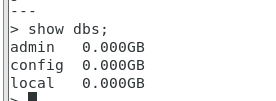
show dbs / show databases 命令
概念
显示数据库列表
命令应用
> show dbs; admin 0.000GB config 0.000GB local 0.000GB- 1
- 2
- 3
- 4
use 数据库名 命令
概念
切换数据库,数据库不存在时会自动创建
命令应用
> show dbs; admin 0.000GB config 0.000GB local 0.000GB- 1
- 2
- 3
- 4
db.dropDatabase() 命令
概念
删除集合
命令应用
> db.emp.drop() true > show collections- 1
- 2
- 3

集合常见操作
show collections / show tables 查看集合命令
概念
查询当前数据库的集合列表数据
命令应用
> show dbs admin 0.000GB config 0.000GB local 0.000GB > use test switched to db test > db.emp.insert({i:1}) WriteResult({ "nInserted" : 1 }) > show collections emp- 1
- 2
- 3
- 4
- 5
- 6
- 7
- 8
- 9
- 10

db.collections(集合名).stats() 查看集合详情命令
概念
查看集合详情
命令应用
> db.emp.stats() { "ns" : "test.emp", "size" : 33, "count" : 1, "avgObjSize" : 33, "storageSize" : 20480, "freeStorageSize" : 0, "capped" : false, "wiredTiger" : { "metadata" : { "formatVersion" : 1 }, ... "scaleFactor" : 1, "ok" : 1 }- 1
- 2
- 3
- 4
- 5
- 6
- 7
- 8
- 9
- 10
- 11
- 12
- 13
- 14
- 15
- 16
- 17

db.collections(集合名).drop() 删除集合 命令
概念
删除集合
命令应用
> db.emp.drop() true > show collections- 1
- 2
- 3
用户角色命令
show roles 查看角色列表命令
概念
查看角色列表
命令应用
> show roles { "role" : "dbAdmin", "db" : "test", "isBuiltin" : true, "roles" : [ ], "inheritedRoles" : [ ] } { "role" : "dbOwner", "db" : "test", "isBuiltin" : true, "roles" : [ ], "inheritedRoles" : [ ] } { "role" : "enableSharding", "db" : "test", "isBuiltin" : true, "roles" : [ ], "inheritedRoles" : [ ] } { "role" : "read", "db" : "test", "isBuiltin" : true, "roles" : [ ], "inheritedRoles" : [ ] } { "role" : "readWrite", "db" : "test", "isBuiltin" : true, "roles" : [ ], "inheritedRoles" : [ ] } { "role" : "userAdmin", "db" : "test", "isBuiltin" : true, "roles" : [ ], "inheritedRoles" : [ ] }- 1
- 2
- 3
- 4
- 5
- 6
- 7
- 8
- 9
- 10
- 11
- 12
- 13
- 14
- 15
- 16
- 17
- 18
- 19
- 20
- 21
- 22
- 23
- 24
- 25
- 26
- 27
- 28
- 29
- 30
- 31
- 32
- 33
- 34
- 35
- 36
- 37
- 38
- 39
- 40
- 41
- 42
- 43

db.createUser(用户信息) 创建用户 命令
概念
创建用户
命令格式
db.createUser({user:“用户名”,pwd:“名称”,roles:[“角色”]})
命令参数 含义 user 用户名称 pwd 密码 roles 角色列表 命令应用
创建test库,并指定test库的管理员
> use test switched to db test > dn.createUser({user:"test",pwd:"test",roles:['dbOwner']}) uncaught exception: ReferenceError: dn is not defined : @(shell):1:1 > use test switched to db test > db.createUser({user:"test",pwd:"test",roles:['dbOwner']}) Successfully added user: { "user" : "test", "roles" : [ "dbOwner" ] } > show users { "_id" : "test.test", "userId" : UUID("d9be5de9-8c28-4b2b-8d88-530be7846b14"), "user" : "test", "db" : "test", "roles" : [ { "role" : "dbOwner", "db" : "test" } ], "mechanisms" : [ "SCRAM-SHA-1", "SCRAM-SHA-256" ] } >- 1
- 2
- 3
- 4
- 5
- 6
- 7
- 8
- 9
- 10
- 11
- 12
- 13
- 14
- 15
- 16
- 17
- 18
- 19
- 20
- 21
- 22
- 23
- 24
- 25
- 26
- 27

db.dropUser(用户名称) 删除用户 命令
概念
创建用户
命令格式
db.dropUser(“用户名”)
命令应用
db.dropUser(“test”)
> use test switched to db test > dn.createUser({user:"test",pwd:"test",roles:['dbOwner']}) uncaught exception: ReferenceError: dn is not defined : @(shell):1:1 > use test switched to db test > db.createUser({user:"test",pwd:"test",roles:['dbOwner']}) Successfully added user: { "user" : "test", "roles" : [ "dbOwner" ] } > show users { "_id" : "test.test", "userId" : UUID("d9be5de9-8c28-4b2b-8d88-530be7846b14"), "user" : "test", "db" : "test", "roles" : [ { "role" : "dbOwner", "db" : "test" } ], "mechanisms" : [ "SCRAM-SHA-1", "SCRAM-SHA-256" ] } >- 1
- 2
- 3
- 4
- 5
- 6
- 7
- 8
- 9
- 10
- 11
- 12
- 13
- 14
- 15
- 16
- 17
- 18
- 19
- 20
- 21
- 22
- 23
- 24
- 25
- 26
- 27

初次见面,也不知道送你们啥。干脆就送几百本电子书和最新面试资料,祝你们找到更好的工作,扫描下面二维码获取
-
相关阅读:
基python的毕业设计题目超市进存销系统
【数据结构】二叉搜索树(Java + 链表实现)
【broadcast-service】一个轻量级Python发布订阅者框架
k8s网络插件之Flannel
大数据-玩转数据-Flume
交割合约(期货合约)是什么?
Mybatis-plus进阶篇(二)
echarts根据上级元素的大小自动更新echarts(element-resize-detector)
小知识分享:控制层尽量别暴露这样的接口,避免横向越权。
Android中使用AlertDialog创建对话框
- 原文地址:https://blog.csdn.net/janyxe/article/details/125422873