x.1 轮播图
ul{
width: 590px;
height: 470px;
margin: 100px auto;
position: relative;
}
ul li{
position: absolute;
}
ul li:nth-child(4){
z-index: 1;
}
.pointer{
position: absolute;
z-index: 9999;
bottom: 20px;
left: 40px;
}
.pointer a{
float: left;
width: 10px;
height: 10px;
margin: 0px 2px;
border-radius: 50%;
background-color: rgba(255, 255, 255, .3);
background-clip: content-box;
border: 2px solid transparent;
}
.pointer a.active,
.pointer a:hover{
background-color: #fff;
border: 2px solid rgba(255, 255, 255, .3);
}
- 1
- 2
- 3
- 4
- 5
- 6
- 7
- 8
- 9
- 10
- 11
- 12
- 13
- 14
- 15
- 16
- 17
- 18
- 19
- 20
- 21
- 22
- 23
- 24
- 25
- 26
- 27
- 28
- 29
- 30
- 31
- 32
- 33
- 34
- 35
- 36
- 37
- 38
- 39
- 40
- 41
- 42
  <ul>
      <li><a href="javascript:;"><img src="./img/1.jpg"></a></li>
      <li><a href="javascript:;"><img src="./img/2.jpg"></a></li>
      <li><a href="javascript:;"><img src="./img/3.jpg"></a></li>
      <li><a href="javascript:;"><img src="./img/4.jpg"></a></li>
      <li><a href="javascript:;"><img src="./img/5.jpg"></a></li>
      <li><a href="javascript:;"><img src="./img/6.jpg"></a></li>
      <li><a href="javascript:;"><img src="./img/7.jpg"></a></li>
      <li><a href="javascript:;"><img src="./img/8.jpg"></a></li>

      <div class="pointer">
          <a class="active" href="javascript:;"></a>
          <a href="javascript:;"></a>
          <a href="javascript:;"></a>
          <a href="javascript:;"></a>
          <a href="javascript:;"></a>
          <a href="javascript:;"></a>
          <a href="javascript:;"></a>
          <a href="javascript:;"></a>
      </div>
  </ul>
- 1
- 2
- 3
- 4
- 5
- 6
- 7
- 8
- 9
- 10
- 11
- 12
- 13
- 14
- 15
- 16
- 17
- 18
- 19
- 20
- 21

x.2 雪碧图
- 雪碧图是将多个小图片统一保存到一个大图片中,然后通过调整background-position来显示的图片
- 这样一次性将多个图片加载进页面,降低请求的次数,加快访问速度,提升用户的体验
- 如下图:正常展示时为左图、鼠标移入时为中图、鼠标点击时为右图

- 使用:雪碧图的关键在于通过 background-position将需要展示的图标移入展示的原点

        a:link{
            display: block;
            width: 93px;
            height: 29px;
            background-image: url('./img/btn.png')
        }

        a:hover{
            background-position: -93px 0;
        }

        a:active{
            background-position: -186px 0;
        }
x.3 导航条
3.1 京东商品分类
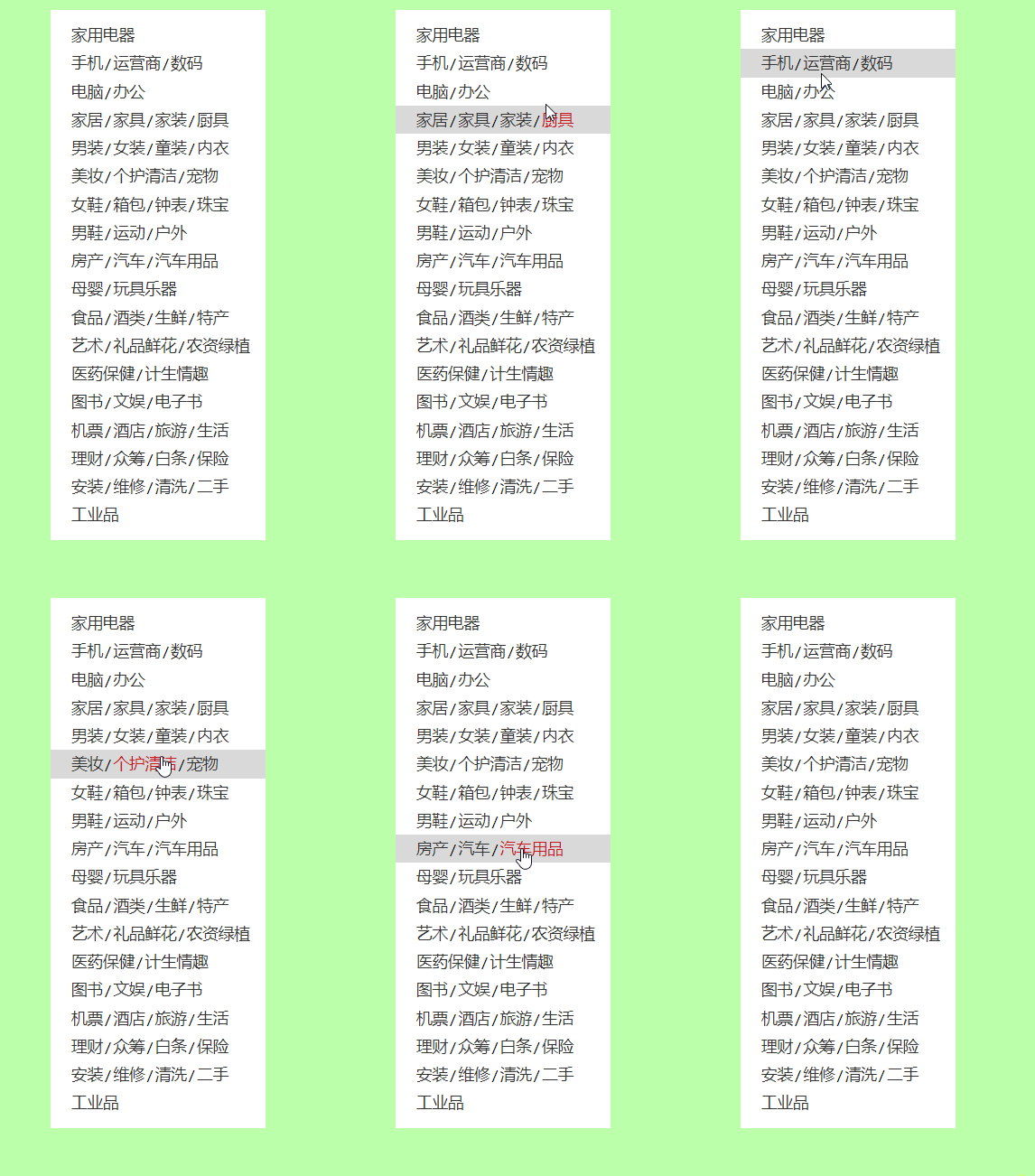
<style>
.left-nav{
width: 190px;
height: 450px;
padding: 10px 0;
margin: 50px auto;
}
.left-nav .item{
height: 25px;
line-height: 25px;
padding-left: 18px;
font-size: 12px;
}
.item .line{
padding: 0 2px;
}
.item:hover{
background-color: #d9d9d9;
}
.item a{
font-size: 14px;
color: #333;
text-decoration: none;
}
.item a:hover{
color: #c81623;
}
</style>
<nav class="left-nav">
<div class="item">
<a href="#">家用电器</a>
</div>
<div class="item">
<a href="#">手机</a><span class='line'>/</span><a href="#">运营商</a><span class='line'>/</span><a href="#">数码</a>
</div>
<div class="item">
<a href="#">电脑</a><span class='line'>/</span><a href="#">办公</a>
</div>
<div class="item">
<a href="#">家居</a><span class='line'>/</span><a href="#">家具</a><span class='line'>/</span><a href="#">家装</a><span class='line'>/</span><a href="#">厨具</a>
</div>
</nav>
- 1
- 2
- 3
- 4
- 5
- 6
- 7
- 8
- 9
- 10
- 11
- 12
- 13
- 14
- 15
- 16
- 17
- 18
- 19
- 20
- 21
- 22
- 23
- 24
- 25
- 26
- 27
- 28
- 29
- 30
- 31
- 32
- 33
- 34
- 35
- 36
- 37
- 38
- 39
- 40
- 41
- 42
- 43
- 44
- 45
3.2 W3C 顶部菜单
- 浮动布局方式

    <style>
        .nav{
            width: 1210px;
            height: 48px;
            background-color: #E8E7E3;
            margin:100px auto;
        }
        .nav li{
            float: left;
            line-height: 48px;
        }
        .nav a{
            display: block;
            text-decoration: none;
            color: #777777;
            font-size: 18px;
            padding: 0 39px;
        }
        .nav li:last-child a{
            padding: 0 42px 0 41px;
        }
        .nav a:hover{
            background-color: #3F3F3F;
            color: #E8E7E3;
        }
    </style>

    <ul class="nav">
        <li><a href="#">HTML/CSS</a></li>
        <li><a href="#">Browser Side</a></li>
        <li><a href="#">Server Side</a></li>
        <li><a href="#">Programming</a></li>
        <li><a href="#">XML</a></li>
        <li><a href="#">Web Building</a></li>
        <li><a href="#">Reference</a></li>
    </ul>
- 1
- 2
- 3
- 4
- 5
- 6
- 7
- 8
- 9
- 10
- 11
- 12
- 13
- 14
- 15
- 16
- 17
- 18
- 19
- 20
- 21
- 22
- 23
- 24
- 25
- 26
- 27
- 28
- 29
- 30
- 31
- 32
- 33
- 34
- 35
- 36

<head>
    <style>
        a {
            text-decoration: none;
        }
        ul {
            padding: 0;
        }
        li {
            list-style: none;
        }

        .nav {
            width: 1210px;
            line-height: 48px;
            margin: 50px auto;
            background-color: #e8e7e3;
            display: flex;
        }

        .nav li {
            flex-grow: 1;
        }

        .nav a {
            display: block;
            font-size: 16px;
            color: #808080;
            text-align: center;
        }

        .nav a:hover {
            color: #fff;
            background-color: #636363;
        }
    </style>
</head>
<body>
    <ul class="nav">
        <li><a href="#">HTML/CSS</a></li>
        <li><a href="#">Browser Side</a></li>
        <li><a href="#">Server Side</a></li>
        <li><a href="#">Programming</a></li>
        <li><a href="#">XML</a></li>
        <li><a href="#">Web Building</a></li>
        <li><a href="#">Reference</a></li>
    </ul>
</body>
- 1
- 2
- 3
- 4
- 5
- 6
- 7
- 8
- 9
- 10
- 11
- 12
- 13
- 14
- 15
- 16
- 17
- 18
- 19
- 20
- 21
- 22
- 23
- 24
- 25
- 26
- 27
- 28
- 29
- 30
- 31
- 32
- 33
- 34
- 35
- 36
- 37
- 38
- 39
- 40
- 41
- 42
- 43
- 44
- 45
- 46
- 47
- 48
3.3 京东顶部选项条

<style>
.clearfix::before,
.clearfix::after {
content: '';
display: table;
clear: both;
}
.top-bar-wrapper {
background-color: #e3e4e5;
font: 12px/1.5 Microsoft YaHei,Heiti SC,tahoma,arial,Hiragino Sans GB,"\5B8B\4F53",sans-serif;
border-bottom: 1px solid #ddd;
}
.top-bar-wrapper a,
.top-bar-wrapper span,
.top-bar-wrapper i {
color: #999;
text-decoration: none;
}
.top-bar-wrapper a:hover,
.top-bar-wrapper a.highlight {
color: #ff0000;
}
.top-bar {
width: 1190px;
line-height: 30px;
margin: 0 auto;
}
.location {
float: left;
}
.location .fa-solid {
color: #ef0215;
font-size: 13px;
}
.location:hover .current-city {
background-color: #fff;
border: 1px solid rgb(204, 204, 204);
border-bottom: none;
}
.location .current-city {
padding: 0 10px;
border: 1px solid transparent;
border-bottom: none;
position: relative;
z-index: 2;
}
.location:hover .city-list {
display: block;
}
.location .city-list {
display: none;
width: 320px;
height: 436px;
position:absolute;
background-color: #fff;
border: 1px solid rgb(204, 204, 204);
box-shadow: 0 2px 2px rgba(0, 0, 0, .2);
top: 30px;
}
.shortcut {
float: right;
}
.shortcut li {
float: left;
}
.shortcut .line {
width: 1px;
height: 10px;
background-color: #ccc;
margin: 11px 12px 0;
}
</style>
<div class="top-bar-wrapper">
<div class="top-bar clearfix">
<div class="location">
<div class="current-city">
<i class="fa-solid fa-location-dot"></i>
<a href="#">北京</a>
</div>
<div class="city-list"></div>
</div>
<ul class="shortcut clearfix">
<li>
<a href="#">你好,请登录</a>
<a href="#" class="highlight">免费注册</a>
</li>
<li class="line"></li>
<li>
<a href="#">我的订单</a>
</li>
<li class="line"></li>
<li>
<a href="#">我的京东</a>
<i class="fa-solid fa-angle-down"></i>
</li>
<li class="line"></li>
<li>
<a href="#">京东会员</a>
</li>
<li class="line"></li>
<li>
<a href="#" class="highlight">企业采购</a>
<i class="fa-solid fa-angle-down"></i>
</li>
<li class="line"></li>
<li>
<span>客户服务</span>
<i class="fa-solid fa-angle-down"></i>
</li>
<li class="line"></li>
<li>
<span>网站导航</span>
<i class="fa-solid fa-angle-down"></i>
</li>
<li class="line"></li>
<li>
<span>手机京东</span>
</li>
<li class="line"></li>
<li>
<a href="#">网站无障碍</a>
</li>
</ul>
</div>
</div>
- 1
- 2
- 3
- 4
- 5
- 6
- 7
- 8
- 9
- 10
- 11
- 12
- 13
- 14
- 15
- 16
- 17
- 18
- 19
- 20
- 21
- 22
- 23
- 24
- 25
- 26
- 27
- 28
- 29
- 30
- 31
- 32
- 33
- 34
- 35
- 36
- 37
- 38
- 39
- 40
- 41
- 42
- 43
- 44
- 45
- 46
- 47
- 48
- 49
- 50
- 51
- 52
- 53
- 54
- 55
- 56
- 57
- 58
- 59
- 60
- 61
- 62
- 63
- 64
- 65
- 66
- 67
- 68
- 69
- 70
- 71
- 72
- 73
- 74
- 75
- 76
- 77
- 78
- 79
- 80
- 81
- 82
- 83
- 84
- 85
- 86
- 87
- 88
- 89
- 90
- 91
- 92
- 93
- 94
- 95
- 96
- 97
- 98
- 99
- 100
- 101
- 102
- 103
- 104
- 105
- 106
- 107
- 108
- 109
- 110
- 111
- 112
- 113
- 114
- 115
- 116
- 117
- 118
- 119
- 120
- 121
- 122
- 123
- 124
- 125
- 126
- 127
- 128
- 129
- 130
- 131
- 132
- 133
- 134
- 135
- 136
- 137
- 138
- 139
- 140
- 141
- 142
- 143
- 144
- 145
- 146
- 147
- 148
- 149
- 150
- 151
- 152
- 153
x.4 淘宝导航(弹性布局)
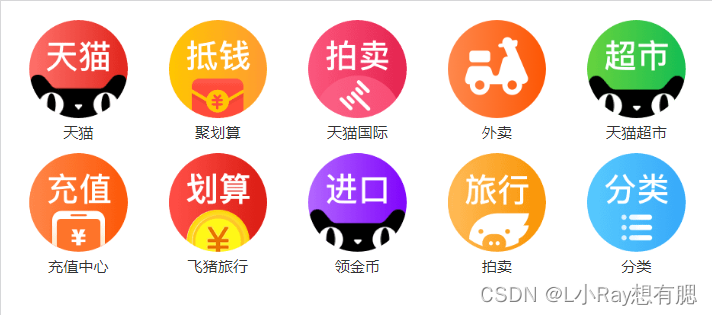
<head>
<style>
.nav {
display: flex;
flex-wrap: wrap;
}
.nav .item {
width: 20%;
text-align: center;
}
.item a {
text-decoration: none;
color: #333;
font-size: 16px;
}
.item img {
width: 100%;
}
</style>
</head>
<body>
<div class="nav">
<div class="item">
<a href="#">
<img src="img/16/1.png">
<span>天猫</span>
</a>
</div>
<div class="item">
<a href="#">
<img src="img/16/2.png">
<span>聚划算</span>
</a>
</div>
<div class="item">
<a href="#">
<img src="img/16/3.png">
<span>天猫国际</span>
</a>
</div>
</div>
</body>
- 1
- 2
- 3
- 4
- 5
- 6
- 7
- 8
- 9
- 10
- 11
- 12
- 13
- 14
- 15
- 16
- 17
- 18
- 19
- 20
- 21
- 22
- 23
- 24
- 25
- 26
- 27
- 28
- 29
- 30
- 31
- 32
- 33
- 34
- 35
- 36
- 37
- 38
- 39
- 40
- 41
- 42
- 43
- 44
- 45
- 46
- 47
- 48
x.5 美图手机顶部导航条(响应式)

<head>
<link rel="stylesheet" href="./css/reset.css">
<link rel="stylesheet" href="./fa/css/all.min.css">
<link rel="stylesheet" href="./css/meitu.css">
</head>
<body>
<div class="top-bar-wrapper">
<div class="top-bar">
<div class="left-menu">
<ul class="menu-icon">
<li></li>
<li></li>
<li></li>
</ul>
<ul class="nav">
<li><a href="#">手机</a></li>
<li><a href="#">美容仪器</a></li>
<li><a href="#">配件</a></li>
<li><a href="#">服务支持</a></li>
<li><a href="#">企业网站</a></li>
<li>
<a href="#"><i class="fas fa-search"></i></a>
<span>搜索 Meitu.com</span>
</li>
</ul>
</div>
<h1 class="logo">
<a href="#">美图手机</a>
</h1>
<div class="user-info">
<a href="#">
<i class="fas fa-user"></i>
</a>
</div>
</div>
</div>
</body>
- 1
- 2
- 3
- 4
- 5
- 6
- 7
- 8
- 9
- 10
- 11
- 12
- 13
- 14
- 15
- 16
- 17
- 18
- 19
- 20
- 21
- 22
- 23
- 24
- 25
- 26
- 27
- 28
- 29
- 30
- 31
- 32
- 33
- 34
- 35
- 36
- 37
- 38
- 39
- 40
- 41
- 42
- 43
- 44
- 45
- 46
- 47
a {
text-decoration: none;
color: #fff;
&:hover {
color: rgb(197, 196, 196);
}
}
.top-bar-wrapper {
background-color: #000;
.top-bar {
max-width: 1200px;
margin: 0 auto;
height: 48px;
padding: 0 14px;
display: flex;
justify-content: space-between;
align-items: center;
}
}
.left-menu {
.menu-icon {
width: 18px;
height: 48px;
position: relative;
li {
position: absolute;
width: 18px;
height: 1px;
background-color: #fff;
transform-origin: left center;
transition: 0.5s;
&:nth-child(1) { top:18px; }
&:nth-child(2) { top:24px; }
&:nth-child(3) { top:30px; }
}
&:hover {
li:nth-child(1) { transform: rotateZ(40deg); }
li:nth-child(2) { opacity: 0; }
li:nth-child(3) { transform: rotateZ(-40deg); }
}
&:hover + .nav {
display: block;
}
}
.nav {
display: none;
position: absolute;
top: 48px;
left: 0;
right: 0;
bottom: 0;
background-color: #000;
&:hover {
display: block;
}
li {
width: 80%;
margin: 0 auto;
border-bottom: 1px solid #757474;
a {
display: block;
line-height: 44px;
font-size: 14px;
}
&:last-child a {
display: inline-block;
margin-right: 6px;
}
span {
color: #fff;
font-size: 14px;
}
}
}
}
.logo a {
display: block;
text-indent: -9999px;
width: 122px;
height: 32px;
background-image: url('../img/18/dff63979.sprites-index@2x.png');
background-size: 400px 400px;
}
@media only screen and (min-width: 768px) {
.logo { order: 1; }
.user-info { order: 3; }
.left-menu {
order: 2;
flex: auto;
.menu-icon { display: none; }
.nav {
display: flex;
position: static;
justify-content: space-around;
&:hover { display: flex; }
li {
border-bottom: none;
text-align: center;
}
span { display: none; }
}
}
}
- 1
- 2
- 3
- 4
- 5
- 6
- 7
- 8
- 9
- 10
- 11
- 12
- 13
- 14
- 15
- 16
- 17
- 18
- 19
- 20
- 21
- 22
- 23
- 24
- 25
- 26
- 27
- 28
- 29
- 30
- 31
- 32
- 33
- 34
- 35
- 36
- 37
- 38
- 39
- 40
- 41
- 42
- 43
- 44
- 45
- 46
- 47
- 48
- 49
- 50
- 51
- 52
- 53
- 54
- 55
- 56
- 57
- 58
- 59
- 60
- 61
- 62
- 63
- 64
- 65
- 66
- 67
- 68
- 69
- 70
- 71
- 72
- 73
- 74
- 75
- 76
- 77
- 78
- 79
- 80
- 81
- 82
- 83
- 84
- 85
- 86
- 87
- 88
- 89
- 90
- 91
- 92
- 93
- 94
- 95
- 96
- 97
- 98
- 99
- 100
- 101
- 102
- 103
- 104
- 105
- 106
- 107
- 108
- 109
- 110
- 111
- 112
- 113
- 114
- 115
- 116
- 117
- 118
- 119
- 120
- 121
- 122
- 123
- 124
- 125
- 126
- 127
- 128
- 129
- 130
- 131
x.6 图标字体
- 在网页中经常需要使用一些图标,可以通过图片来引入图标;但是图片大小本身比较大,并且非常的不灵活。
- 所以在使用图标时,我们还可以将图标直接设置为字体,然后通过
font-face 的形式来对字体进行引入。 - 图标字体即是指通过使用字体的形式来使用图标。
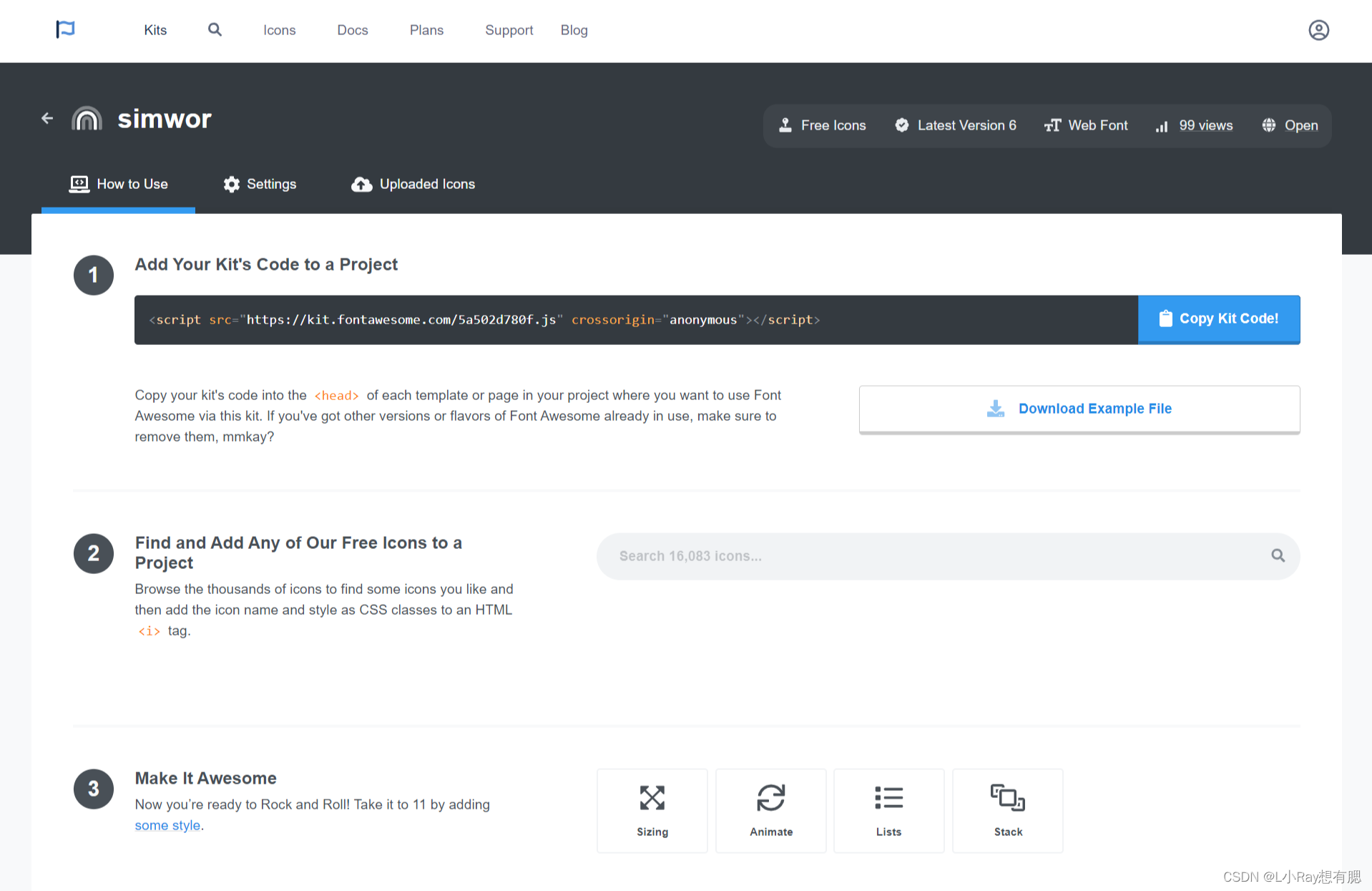
<script src="https://kit.fontawesome.com/5a502d780f.js" crossorigin="anonymous"></script>
<i class="fa-solid fa-hat-wizard"></i>
Icon Font:下载到本地后从浏览器打开 demo_index.html中有很详细的教程
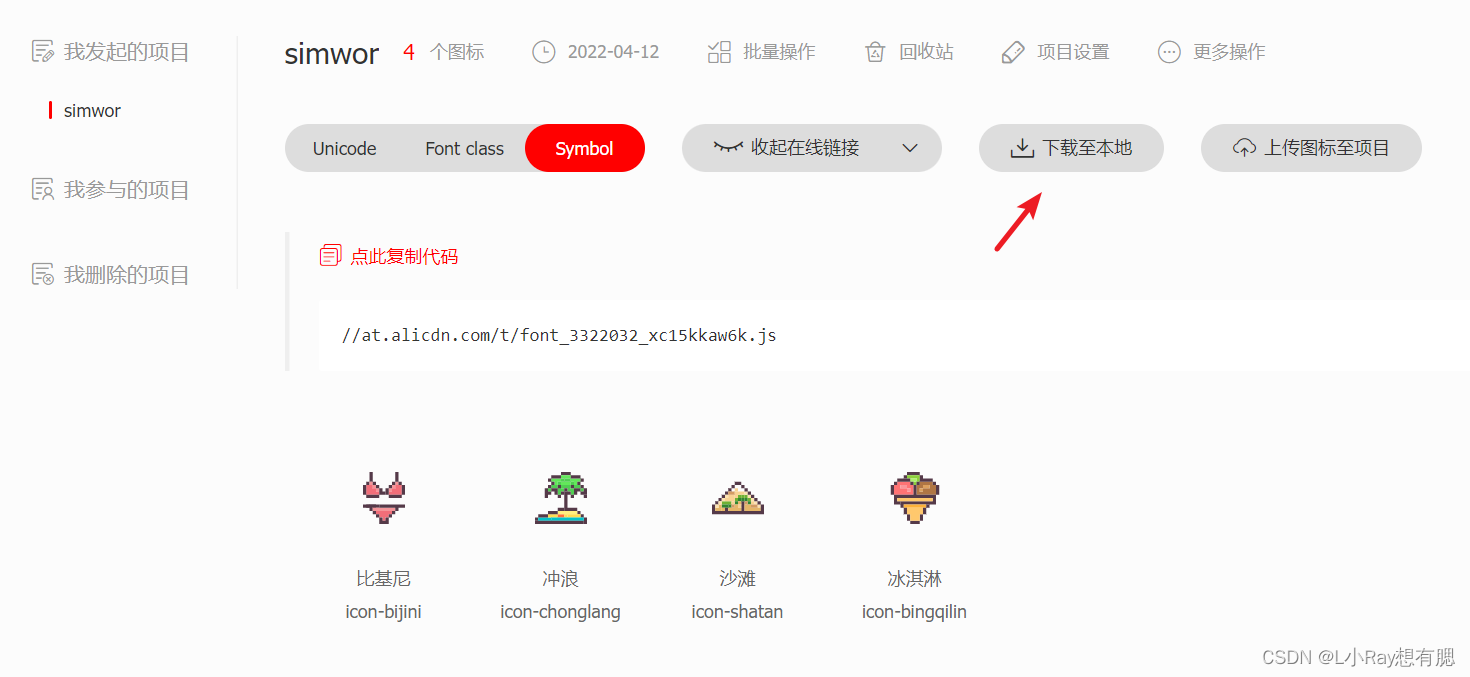
<script src="//at.alicdn.com/t/font_3322032_xc15kkaw6k.js"></script>
<style>
.icon {
width: 1em;
height: 1em;
vertical-align: -0.15em;
fill: currentColor;
overflow: hidden;
}
</style>
<svg class="icon" aria-hidden="true">
<use xlink:href="#icon-bijini"></use>
</svg>