-
在UE内添加控制台工程(Programs)
流程
举例命名为 XmlToProto(自己替换)
-
在
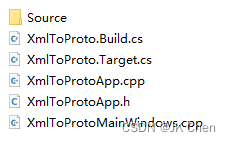
项目目录/Source/Programs下新建文件夹 XmlToProto
内部新建文件夹Source,以及5个文件,文件内容见最下方
-
cmd 运行UBT
..\..\..\..\Engine\Binaries\DotNET\UnrealBuildTool.exe -ProjectFiles XXX\Source\Programs\XmlToProto- 1
-
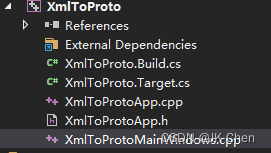
会刷新.sln项目文件,之后重新打开VS就可以看到该工程了
-
可以像正常项目一样引用模块、插件(PublicDependencyModuleNames)
-
把主流程写到 XmlToProtoMainWindows.cpp 内的main函数内即可(RequestEngineExit之前,且这个函数不能跳过)
-
新建的代码文件都放到Source里面,不建议分Private和Public
文件内容
-
XmlToProto.Build.cs
using UnrealBuildTool; using System.IO; using System; public class XmlToProto : ModuleRules { public XmlToProto(ReadOnlyTargetRules Target) : base(Target) { PublicDependencyModuleNames.AddRange( new string[] { "Core", } ); PublicIncludePathModuleNames.AddRange( new string[] { "Launch", "CoreUObject", "Projects", "Json", "ApplicationCore", } ); PublicIncludePaths.Add(ModuleDirectory); bEnableExceptions = true; bUseUnity = false; } }- 1
- 2
- 3
- 4
- 5
- 6
- 7
- 8
- 9
- 10
- 11
- 12
- 13
- 14
- 15
- 16
- 17
- 18
- 19
- 20
- 21
- 22
- 23
- 24
- 25
- 26
- 27
- 28
- 29
-
XmlToProto.Target.cs
using UnrealBuildTool; using System.Collections.Generic; public class XmlToProtoTarget : TargetRules { public XmlToProtoTarget(TargetInfo Target) : base(Target) { Type = TargetType.Program; LinkType = TargetLinkType.Monolithic; DefaultBuildSettings = BuildSettingsVersion.V2; LaunchModuleName = "XmlToProto"; ExtraModuleNames.Add("EditorStyle"); // VS内的分类 SolutionDirectory = "GameTools"; bBuildDeveloperTools = false; // SlateViewer doesn't ever compile with the engine linked in bCompileAgainstEngine = false; // We need CoreUObject compiled in as the source code access module requires it bCompileAgainstCoreUObject = true; // SlateViewer.exe has no exports, so no need to verify that a .lib and .exp file was emitted by // the linker. bHasExports = false; // Make sure to get all code in SlateEditorStyle compiled in bBuildDeveloperTools = true; // UnrealPak is a console application, not a Windows app (sets entry point to main(), instead of WinMain()) bIsBuildingConsoleApplication = true; } }- 1
- 2
- 3
- 4
- 5
- 6
- 7
- 8
- 9
- 10
- 11
- 12
- 13
- 14
- 15
- 16
- 17
- 18
- 19
- 20
- 21
- 22
- 23
- 24
- 25
- 26
- 27
- 28
- 29
- 30
- 31
- 32
- 33
- 34
- 35
- 36
- 37
-
XmlToProtoApp.cpp
#include "XmlToProtoApp.h" #include "RequiredProgramMainCPPInclude.h" IMPLEMENT_APPLICATION(XmlToProto, "XmlToProto");- 1
- 2
- 3
- 4
- 5
-
XmlToProtoApp.h
#pragma once- 1
- 2
- 3
-
XmlToProtoMainWindows.cpp
#include "CoreMinimal.h" int main(int argc, char* argv[]) { RequestEngineExit("Exit normally"); return 0; }- 1
- 2
- 3
- 4
- 5
- 6
- 7
- 8
-
-
相关阅读:
JAVA 泛型、序列化和复制
flink 端到端一致性
使用swagger-typescript-api
【leetcode热题】分割回文串 II
ftp连接服务器报错的终极解决方案 FTP连接再无烦恼!
ctfshow MengXIn misc1
mysql 索引使用与优化
强迫症福音!一个小技巧,让DALLE-3创作排列美学
剑指 Offer II 054. 所有大于等于节点的值之和
UE4蓝图节点不同颜色代表
- 原文地址:https://blog.csdn.net/jk_chen_acmer/article/details/125410371