-
阿里巴巴面试题:多线程相关
一、前言
- 关于线程同步的面试题,凡是从时间角度或者是优先级角度考虑解题思路的,基本全不对
- 凡是从 join sleep 考虑的,99.99%的不对。线程优雅的结束,一般不用 【interrupt:中断 】、【stop:停止】、 【resume:恢复】
二、题目
1、第一题:指出以下两段程序的差别,并分析(从多线程角度考虑)
final class Accumulator { //线程二可能在不停读读取这个值 private double result = 0.0D; public void addAll(double[] values) { for (double value : values) { //线程一在不断地进行累加 result += value; } } } final class Accumulator2 { private double result = 0.0D; public void addAll(double[] values) { double sum = 0.0D; for (double value : values) { sum += value; } result += sum; } }- 1
- 2
- 3
- 4
- 5
- 6
- 7
- 8
- 9
- 10
- 11
- 12
- 13
- 14
- 15
- 16
- 17
- 18
- 19
- 20
- 21
- 22
- 23
- 从题中我们可以 看出如果从多个线程角度考虑,那么第一个方法出现的问题就是:必然有一个线程去读这个 result 值大概率读的是个中间值,并不是最终的结果值,因为for循环还没有结束
- 第二个方法的问题:当线程一在不断读取这:result 的时候那么读是:初始值或最终结果值,永远不会读到中间值。
- 如果从线程安全考虑,第二种写法比第一种安全的多
结论
-
第二种写法比第一种写法出现不一致性的概率要小,因为我们在方法完成之前,读不到中间状态的脏数据
-
尽量少暴露线程计算过程的中间状态
-
能用范围小的变量,不用范围大的变量
2、有了解过:哲学家就餐问题这个案例吗

什么是哲学家就餐问题
- 哲学家就餐问题是在计算机科学中的一个经典问题,用来演示在并行计算中多线程同步(Synchronization)时产生的问题。
- 有五个哲学家,他们共用一张圆桌,分别坐在五张椅子上。在圆桌上有五个碗和五支筷子,平时一个哲学家进行思考,饥饿时便试图取用其左、右最靠近他的筷子,只有在他拿到两支筷子时才能进餐。进餐完毕,放下筷子又继续思考。
解题思路
- 先写个代码模拟一下这题型,先搞两个类:哲学家 、筷子
- 筷子类:具有编号属性
- 哲学家类:左手筷子、右手筷子、编号属性
代码解析
方案一:
public class T01_DeadLock { public static void main(String[] args) { ChopStick cs0 = new ChopStick(); ChopStick cs1 = new ChopStick(); ChopStick cs2 = new ChopStick(); ChopStick cs3 = new ChopStick(); ChopStick cs4 = new ChopStick(); Philosohper p0 = new Philosohper("p0", 0, cs0, cs1); Philosohper p1 = new Philosohper("p1", 1, cs1, cs2); Philosohper p2 = new Philosohper("p2", 2, cs2, cs3); Philosohper p3 = new Philosohper("p3", 3, cs3, cs4); Philosohper p4 = new Philosohper("p4", 4, cs4, cs0); p0.start(); p1.start(); p2.start(); p3.start(); p4.start(); } public static class Philosohper extends Thread { private ChopStick left, right; private int index; public Philosohper(String name, int index, ChopStick left, ChopStick right) { this.setName(name); this.index = index; this.left = left; this.right = right; } /** * 1、先锁定右边,再锁定左边这时就表明有一个人吃完了,因为只有拿到两个筷子才能吃饭 * 2、注意:这个方法是有问题的,一出现死锁,那么谁都拿不到筷子,大家都得饿死 **/ @Override public void run () { //锁定右边筷子 synchronized (left) { Thread.sleep(1 + index); //锁定左边筷子 synchronized (right) { SleepHelper.sleepSeconds(1); //打印出这个表示有一个吃饱了 System.out.println(index + " 号 哲学家已经吃完"); } } } }- 1
- 2
- 3
- 4
- 5
- 6
- 7
- 8
- 9
- 10
- 11
- 12
- 13
- 14
- 15
- 16
- 17
- 18
- 19
- 20
- 21
- 22
- 23
- 24
- 25
- 26
- 27
- 28
- 29
- 30
- 31
- 32
- 33
- 34
- 35
- 36
- 37
- 38
- 39
- 40
- 41
- 42
- 43
- 44
- 45
- 46
- 47
方案一问题:
- 会出现死锁问题
- 概念: 死锁一般具有2把以上的锁,在锁定一把的时候等待另外一把锁
方案二:优化版
- 思路:两把锁合并一把锁(5把, 5把锁合成一把锁,筷子集合,锁定整个对象)
- 混进一个左撇子
- 效率更高的写法,奇数 偶数分开,混进一半的左撇子
public void run() { // try { // Thread.sleep(new Random().nextInt(5)); // } catch (InterruptedException e) { // System.out.println(e); // } if (index == 0) { //左撇子算法 也可以index % 2 == 0 synchronized (left) { try { Thread.sleep(1); } catch (InterruptedException e) { System.out.println(e); } synchronized (right) { try { Thread.sleep(1); } catch (InterruptedException e) { System.out.println(e); } System.out.println(index + " 吃完了!"); } } } else { synchronized (right) { try { Thread.sleep(1); } catch (InterruptedException e) { System.out.println(e); } synchronized (left) { try { Thread.sleep(1); } catch (InterruptedException e) { System.out.println(e); } System.out.println(index + " 吃完了!"); } } } }- 1
- 2
- 3
- 4
- 5
- 6
- 7
- 8
- 9
- 10
- 11
- 12
- 13
- 14
- 15
- 16
- 17
- 18
- 19
- 20
- 21
- 22
- 23
- 24
- 25
- 26
- 27
- 28
- 29
- 30
- 31
- 32
- 33
- 34
- 35
- 36
- 37
- 38
- 39
- 40
- 41
3、交替输出问题
概念
- 一定要保证交替输出,这就涉及到两个线程的同步问题。
- 有人可能会想到,用睡眠时间差来实现,但是只要是多线程里面,线程同步玩sleep()函数的,99.99%都是错的。
- 【交替输出的】问题比较经典,解法也有很多。下面我们就先用:【最简单的方式】实现一下这个问题。
注意:关键函数
- Locksupport.park():阻塞当前线程
- Locksupport.unpark(“”):唤醒某个线程
方式一:LockSupport(锁支持)最简单解法

public class T02_00_LockSupport { static Thread t1 = null, t2 = null; public static void main(String[] args) throws Exception { char[] aI = "1234567".toCharArray(); char[] aC = "ABCDEFG".toCharArray(); t1 = new Thread(() -> { for (char c : aI) { System.out.print(c); LockSupport.unpark(t2); // 叫醒t2 LockSupport.park(); // t1阻塞 当前线程阻塞 } }, "t1"); t2 = new Thread(() -> { for (char c : aC) { LockSupport.park(); // t2挂起 System.out.print(c); LockSupport.unpark(t1); // 叫醒t1 } }, "t2"); t1.start(); t2.start(); } }- 1
- 2
- 3
- 4
- 5
- 6
- 7
- 8
- 9
- 10
- 11
- 12
- 13
- 14
- 15
- 16
- 17
- 18
- 19
- 20
- 21
- 22
- 23
- 24
- 25
- 26
- 27
- 28
- 29
- 30
- 31
- 32
- 执行结果为:1A2B3C4D5E6F7G
方式二:Sync wait notify(同步、等待、通知)优化版
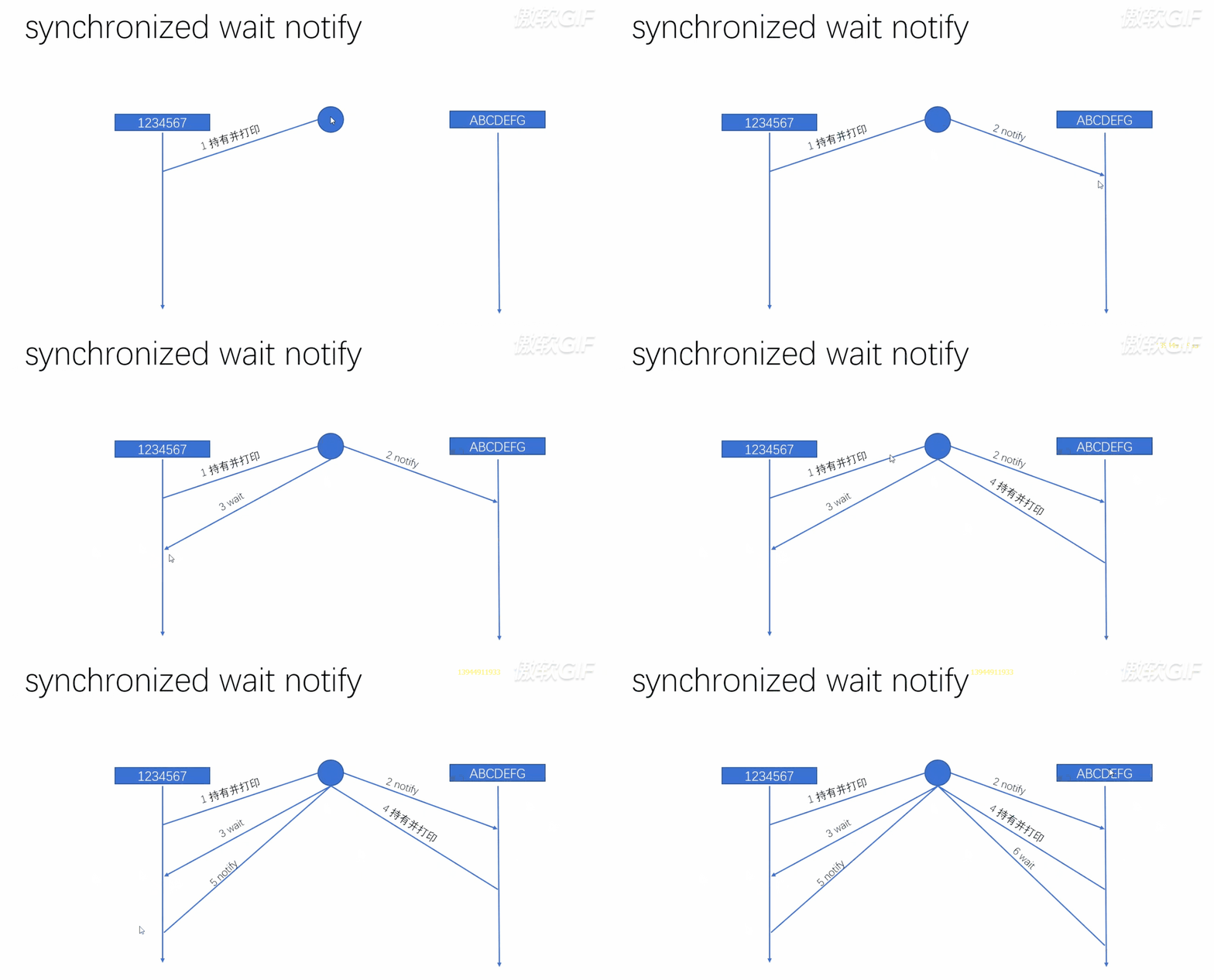
public class T06_00_sync_wait_notify { public static void main(String[] args) { final Object o = new Object(); char[] aI = "1234567".toCharArray(); char[] aC = "ABCDEFG".toCharArray(); new Thread(() -> { // 首先创建一把锁 synchronized (o) { for (char c : aI) { System.out.print(c); try { o.notify(); // 叫醒等待队列里面的一个线程,对本程序来说就是另一个线程 o.wait(); // 让出锁 } catch (InterruptedException e) { e.printStackTrace(); } } o.notify(); // 必须,否则无法停止程序 } }, "t1").start(); new Thread(() -> { synchronized (o) { for (char c : aC) { System.out.print(c); try { o.notify(); o.wait(); } catch (InterruptedException e) { e.printStackTrace(); } } o.notify(); } }, "t2").start(); } }- 1
- 2
- 3
- 4
- 5
- 6
- 7
- 8
- 9
- 10
- 11
- 12
- 13
- 14
- 15
- 16
- 17
- 18
- 19
- 20
- 21
- 22
- 23
- 24
- 25
- 26
- 27
- 28
- 29
- 30
- 31
- 32
- 33
- 34
- 35
- 36
- 37
- 38
- 39
- 40
- 41
- 42
-
从上面这段代码中我们可能会引出一个问题,那么就是:notify() 和 wait() 调用顺序是否会有直接影响?
-
答案:是的,那么下面我们就来看看,notify() 和 wait() 的执行流程
-
这道题曾经也是华为的笔试填空题

-
从上图代码片段中可以看出,如果我们先执行 wait(),会先让自己直接进入等待队列。那么自己和另一个线程都在等待队列中等待,两个线程一直在那傻等,谁也叫不醒对方,也就是根本执行不了notify()
坑一:
- 我们发现,在程序的后面还有一个notify(),而且还是必须有的,为什么是必须呢?我们将它注释掉,输出一下看看:1A2B3C4D5E6F7G
- 我们从输出结果可以看到,执行结果是没有问题的,但是程序不会停止。
- 原理: 我们可以根据动图发现,最后一定是有一个线程是处在 wait() 状态的,没有人叫醒它,它就会永远处在等待状态中,从而程序无法结束,为了避免出现这种情况,我们要在后面加上一个 notify()
坑二:
- 玩过线程的应该早就发现了这个问题,如果第二个线程先抢到了,那么输出的就是A1B2C3 了,怎么保证第一个永远先输出的是数字?
- 我们可以使用 CountDownLatch 这个类,它是 JUC 新的同步工具,这个类可以想象成一个门栓,当我们有线程执行到门这里,它会等待门栓把门打开,线程才会执行。
- 如果 t2 抢先一步,那么它会执行 await() 方法,因为有门栓的存在,它只能在门外等待,所以t1线程会直接执行,执行到 countDown() 方法,使创建的 CountDownLatch(1) 参数置为0,即释放门栓,所以永远都是 t1 线程执行完,t2 线程才会执行
完整代码
- 避坑写法
public class T07_00_sync_wait_notify { private static CountDownLatch latch = new CountDownLatch(1); // 设置门栓的参数为1,即只有一个门栓 public static void main(String[] args) { final Object o = new Object(); char[] aI = "1234567".toCharArray(); char[] aC = "ABCDEFG".toCharArray(); new Thread(() -> { synchronized (o) { for (char c : aI) { System.out.print(c); latch.countDown(); // 门栓的数值-1,即打开门 try { o.notify(); o.wait(); } catch (InterruptedException e) { e.printStackTrace(); } } o.notify(); } }, "t1").start(); new Thread(() -> { try { latch.await(); // 想哪个线程后执行,await()就放在哪个线程里 } catch (InterruptedException e) { e.printStackTrace(); } synchronized (o) { for (char c : aC) { System.out.print(c); try { o.notify(); o.wait(); } catch (InterruptedException e) { e.printStackTrace(); } } o.notify(); } }, "t2").start(); } }- 1
- 2
- 3
- 4
- 5
- 6
- 7
- 8
- 9
- 10
- 11
- 12
- 13
- 14
- 15
- 16
- 17
- 18
- 19
- 20
- 21
- 22
- 23
- 24
- 25
- 26
- 27
- 28
- 29
- 30
- 31
- 32
- 33
- 34
- 35
- 36
- 37
- 38
- 39
- 40
- 41
- 42
- 43
- 44
- 45
- 46
- 47
- 48
- 49
Lock ReentrantLock await signal(等待信号)
- JDK 提供了很多新的同步工具,在 JUC 包下,其中有一个专门替代 synchronized 的锁:Lock
public class T08_00_lock_condition { public static void main(String[] args) { char[] aI = "1234567".toCharArray(); char[] aC = "ABCDEFG".toCharArray(); Lock lock = new ReentrantLock(); Condition condition = lock.newCondition(); new Thread(() -> { lock.lock(); try { for (char c : aI) { System.out.print(c); condition.signal(); // notify() condition.await(); // wait() } condition.signal(); } catch (Exception e) { e.printStackTrace(); } finally { lock.unlock(); } }, "t1").start(); new Thread(() -> { lock.lock(); // synchronized try { for (char c : aC) { System.out.print(c); condition.signal(); // o.notify condition.await(); // o.wait } condition.signal(); } catch (Exception e) { e.printStackTrace(); } finally { lock.unlock(); } }, "t2").start(); } }- 1
- 2
- 3
- 4
- 5
- 6
- 7
- 8
- 9
- 10
- 11
- 12
- 13
- 14
- 15
- 16
- 17
- 18
- 19
- 20
- 21
- 22
- 23
- 24
- 25
- 26
- 27
- 28
- 29
- 30
- 31
- 32
- 33
- 34
- 35
- 36
- 37
- 38
- 39
- 40
- 41
- 42
- 43
- 从上段代码中,我们可以看出:创建锁,调用方法跟 synchronized 没有区别,但是关键点在于 Condition 这个类
- 大家应该知道生产者和消费者这个概念,生产者生产馒头,生产满了进入等待队列,消费者吃馒头,吃光了同样进入等待队列
- 如果我们使用传统的 synchronized ,当生产者生产满时,需要从等待队列中叫醒消费者,但调用 notify 方法时
- 我们能保证一定叫醒的是消费者吗?不能,这件事是无法做到的,那该怎么保证叫醒的一定是消费者呢?
4、生产者消费者问题 ReentantLock Condition
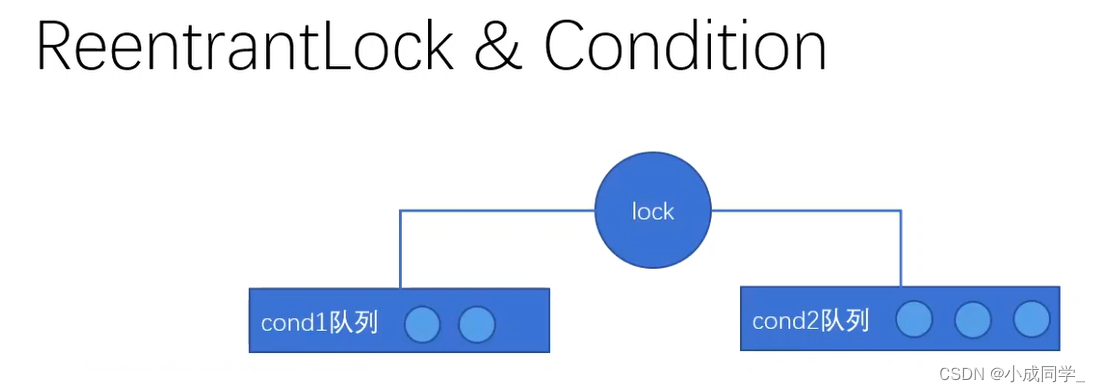
两种解决方案
方案一:
- 如果篮子已经满了,生产者会去等待队列中叫醒一个线程,但如果叫醒的线程还是一个生产者,那么新的生产者起来之后一定要先检查一下篮子是否满了,不能上来就生产,如果是满的,那接着去叫醒下一个线程,这样依次重复,我们一定会有一次叫醒的是消费者
方案二:
- notifyAll()方法: 将等待队列中的生产者和消费者全唤醒,消费者发现篮子是满的,就去消费,生产者发现篮子是满的,就继续回到等待队列。
注意
- 但不管是这两个哪种解决方案,我们唤醒的线程都是不精确的,全都存在着浪费;这就是 synchronized 做同步的问题
代码讲解

-
Lock 本身就可以解决这个问题,靠的就是 Condition,Condition 可以做到精确唤醒
-
Condition 是条件的意思,但我们可以把它当做队列来看待
-
一个 condition 就是一个等待队列
代码演示(优化版)
public class T08_00_lock_condition { public static void main(String[] args) { char[] aI = "1234567".toCharArray(); char[] aC = "ABCDEFG".toCharArray(); Lock lock = new ReentrantLock(); Condition conditionT1 = lock.newCondition(); // 队列1 Condition conditionT2 = lock.newCondition(); // 队列2 CountDownLatch latch = new CountDownLatch(1); new Thread(() -> { lock.lock(); // synchronized try { for (char c : aI) { System.out.print(c); latch.countDown(); conditionT2.signal(); // o.notify() conditionT1.await(); // o.wait() } conditionT2.signal(); } catch (Exception e) { e.printStackTrace(); } finally { lock.unlock(); } }, "t1").start(); new Thread(() -> { try { latch.await(); } catch (InterruptedException e) { e.printStackTrace(); } lock.lock(); // synchronized try { for (char c : aC) { System.out.print(c); conditionT1.signal(); // o.notify conditionT2.await(); // o.wait } conditionT1.signal(); } catch (Exception e) { e.printStackTrace(); } finally { lock.unlock(); } }, "t2").start(); } }- 1
- 2
- 3
- 4
- 5
- 6
- 7
- 8
- 9
- 10
- 11
- 12
- 13
- 14
- 15
- 16
- 17
- 18
- 19
- 20
- 21
- 22
- 23
- 24
- 25
- 26
- 27
- 28
- 29
- 30
- 31
- 32
- 33
- 34
- 35
- 36
- 37
- 38
- 39
- 40
- 41
- 42
- 43
- 44
- 45
- 46
- 47
- 48
- 49
- 50
- 51
- 52
- 53
- 54
- 55
- 56
- 57
- 从上线优化后的代码我们可以看出,第一个线程 t1 先上来持有锁,持有锁之后叫醒第二队列的内容
- 然后自己进入第一队列等待,同理,t2线程叫醒第一队列的内容,自己进入第二队列等待,这样就可以做到精确唤醒
-
相关阅读:
CAS:1620523-64-9_Azide-SS-biotin_生物素-二硫-叠氮
Spring配置
关于 sap.ui.base.Object 的简要介绍
java框架 Mybatis介绍与入门案例
TiDB 6.0 Placement Rules In SQL 使用实践
网络面试题(基础版-国庆水篇)
vuejs - - - - - 移动端设备兼容(pxtorem)
2023年亚马逊云科技中国峰会记录
Blender程序化设置材质【Python】
Python基础
- 原文地址:https://blog.csdn.net/Mango_Bin/article/details/125341274