-
SpringBoot+Vue项目校园博客系统
文末获取源码
开发语言:Java
开发工具:IDEA /Eclipse
数据库:MYSQL5.7
使用框架:springboot+vue
JDK版本:jdk1.8
前言介绍
随着现在网络的快速发展,网上管理系统也逐渐快速发展起来,网上管理模式很快融入到了许多网站的之中,随之就产生了“校园博客系统”,这样就让校园博客系统更加方便简单。
对于本校园博客系统的设计来说,系统开发主要是采用java语言技术,在整个系统的设计中应用MySQL数据库来完成数据存储,具体根据校园博客系统的现状来进行开发的,具体根据现实的需求来实现校园博客系统网络化的管理,各类信息有序地进行存储,进入校园博客系统页面之后,方可开始操作主控界面,主要功能包括管理员:首页、个人中心、博主管理、文章分类管理、文章信息管理、举报投诉管理、系统管理,博主;首页、个人中心、文章信息管理、举报投诉管理、我的收藏管理,前台首页;首页、文章信息、系统公告、个人中心、后台管理、在线客服等功能。
系统功能需求分析
对于一个新的网站来说开发新网站我们就要做出这个系统的任务需求分析,因为对系统分析的质量好坏它可以决定这个网站开发的意义,俗话说得好一个好的开头是成功的一半,对于开发这个校园博客系统来说前期的分析是比较重要的,所以任务分析它可以决定这系统的开展和设计,这样就可以保证博主满意性。
任务的需求它能决定这个系统开发过程当中一个重要环节,所以我们在系统开发过程所用质量是比较重要的,因为我们在系统应用过程当中不一定那会出现问题,所以我们在进行对系统分析是比较重要的,因为它可以决定这个系统功能和需求。
本课题要求实现一套校园博客系统的开发与实现,主要实现功能包括管理员:首页、个人中心、博主管理、文章分类管理、文章信息管理、举报投诉管理、系统管理,博主;首页、个人中心、文章信息管理、举报投诉管理、我的收藏管理。
(1)管理员用例需求如图

博主用例需求如图

系统的功能结构图
通过系统需求分析,本校园博客系统的功能结构设计如图

系统功能实现
前台首页功能实现
校园博客系统,在系统首页可以查看首页、文章信息、系统公告、个人中心、后台管理、在线客服等内容,如图

博主注册,在注册页面通过查看博主账号、密码、博主姓名、性别、年龄、手机、邮箱等内容进行注册,如图

博主登录,在登录页面通过填写账号、密码等信息进行登录,如图

个人中心,在个人中心页面中可以查看博主账号、博主姓名、头像、性别、年龄、手机、邮箱等信息进行更新信息、退出登录,如图

文章信息,在文章信息页面中可以查看文章标题、分类、图片、发布日期、博主账号、邮箱、点击次数等详细信息进行点我收藏,如图

文章信息界面图

系统公告

管理员登录
管理员登录,通过填写用户名、密码、角色等信息,输入完成后选择登录即可进入校园博客系统,如图
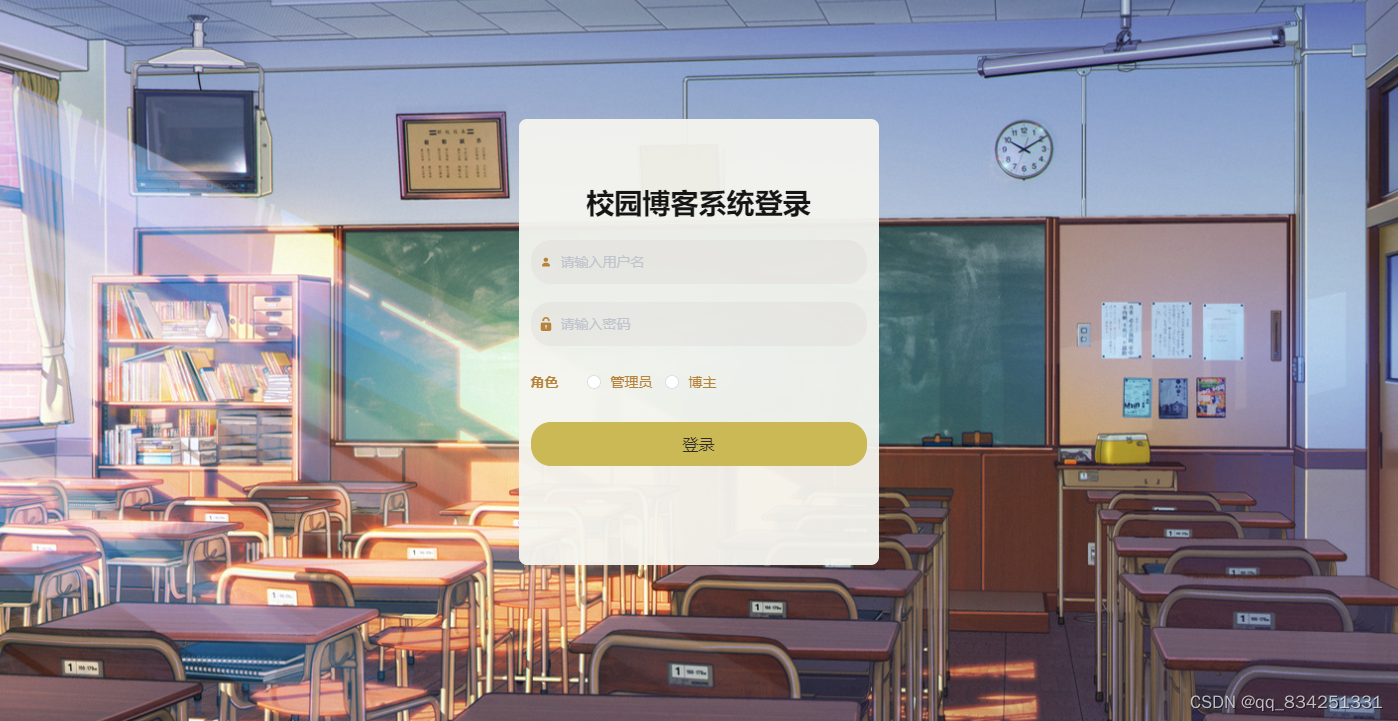
管理员对博主管理获取博主账号、博主姓名、头像、性别、年龄、手机、邮箱并进行详情、删除、修改。博主管理效果图如图

管理员对文章分类管理查看分类等信息进行详情、删除、修改操作。文章分类管理效果图如图

管理员对文章信息管理进行编辑文章标题、分类、图片、发布日期、博主账号、邮箱等信息进行详情、删除、修改操作。文章信息管理效果图如图

管理员对举报投诉管理进行编辑标题、类型、图片、举报内容、举报时间、博主账号、手机、审核回复、审核状态、审核等信息进行详情、删除、修改操作。举报投诉管理效果图如图

轮播图;该页面为轮播图管理界面。管理员可以在此页面进行首页轮播图的管理,通过新建操作可在轮播图中加入新的图片,还可以对以上传的图片进行修改操作,以及图片的删除操作。轮播图管理效果图如图

管理员对系统公告进行编辑标题、简介、图片等信息进行详情、删除、修改操作。系统公告效果图如图

博主功能实现
校园博客系统,在系统可以查看首页、个人中心、文章信息管理、举报投诉管理、我的收藏管理等内容,如图

博主对举报投诉管理进行查看标题、类型、图片、举报内容、举报时间、博主账号、手机、审核回复、审核状态、审核并进行详情、修改操作,如图

我的收藏管理进行查看收藏名称、收藏图片并进行详情、删除操作如图

部分核心代码:
数据库连接信息
- # Tomcat
- server:
- tomcat:
- uri-encoding: UTF-8
- port: 8080
- servlet:
- context-path: /springboot60zv5
- spring:
- datasource:
- driverClassName: com.mysql.jdbc.Driver
- url: jdbc:mysql://127.0.0.1:3306/springboot60zv5?useUnicode=true&characterEncoding=utf-8&useJDBCCompliantTimezoneShift=true&useLegacyDatetimeCode=false&serverTimezone=GMT%2B8
- username: root
- password: 123456
- # driverClassName: com.microsoft.sqlserver.jdbc.SQLServerDriver
- # url: jdbc:sqlserver://127.0.0.1:1433;DatabaseName=springboot60zv5
- # username: sa
- # password: 123456
- servlet:
- multipart:
- max-file-size: 10MB
- max-request-size: 10MB
- resources:
- static-locations: classpath:static/,file:static/
- #mybatis
- mybatis-plus:
- mapper-locations: classpath*:mapper/*.xml
- #实体扫描,多个package用逗号或者分号分隔
- typeAliasesPackage: com.entity
- global-config:
- #主键类型 0:"数据库ID自增", 1:"用户输入ID",2:"全局唯一ID (数字类型唯一ID)", 3:"全局唯一ID UUID";
- id-type: 1
- #字段策略 0:"忽略判断",1:"非 NULL 判断"),2:"非空判断"
- field-strategy: 2
- #驼峰下划线转换
- db-column-underline: true
- #刷新mapper 调试神器
- refresh-mapper: true
- #逻辑删除配置
- logic-delete-value: -1
- logic-not-delete-value: 0
- #自定义SQL注入器
- sql-injector: com.baomidou.mybatisplus.mapper.LogicSqlInjector
- configuration:
- map-underscore-to-camel-case: true
- cache-enabled: false
- call-setters-on-nulls: true
- #springboot 项目mybatis plus 设置 jdbcTypeForNull (oracle数据库需配置JdbcType.NULL, 默认是Other)
- jdbc-type-for-null: 'null'
控制层(controller)
- /**
- * 博主
- * 后端接口
- * @author
- * @email
- * @date 2021-03-15 19:54:47
- */
- @RestController
- @RequestMapping("/bozhu")
- public class BozhuController {
- @Autowired
- private BozhuService bozhuService;
- @Autowired
- private TokenService tokenService;
- /**
- * 登录
- */
- @IgnoreAuth
- @RequestMapping(value = "/login")
- public R login(String username, String password, String captcha, HttpServletRequest request) {
- BozhuEntity user = bozhuService.selectOne(new EntityWrapper<BozhuEntity>().eq("bozhuzhanghao", username));
- if(user==null || !user.getMima().equals(password)) {
- return R.error("账号或密码不正确");
- }
- String token = tokenService.generateToken(user.getId(), username,"bozhu", "博主" );
- return R.ok().put("token", token);
- }
- /**
- * 注册
- */
- @IgnoreAuth
- @RequestMapping("/register")
- public R register(@RequestBody BozhuEntity bozhu){
- //ValidatorUtils.validateEntity(bozhu);
- BozhuEntity user = bozhuService.selectOne(new EntityWrapper<BozhuEntity>().eq("bozhuzhanghao", bozhu.getBozhuzhanghao()));
- if(user!=null) {
- return R.error("注册用户已存在");
- }
- Long uId = new Date().getTime();
- bozhu.setId(uId);
- bozhuService.insert(bozhu);
- return R.ok();
- }
- /**
- * 退出
- */
- @RequestMapping("/logout")
- public R logout(HttpServletRequest request) {
- request.getSession().invalidate();
- return R.ok("退出成功");
- }
- /**
- * 获取用户的session用户信息
- */
- @RequestMapping("/session")
- public R getCurrUser(HttpServletRequest request){
- Long id = (Long)request.getSession().getAttribute("userId");
- BozhuEntity user = bozhuService.selectById(id);
- return R.ok().put("data", user);
- }
- /**
- * 密码重置
- */
- @IgnoreAuth
- @RequestMapping(value = "/resetPass")
- public R resetPass(String username, HttpServletRequest request){
- BozhuEntity user = bozhuService.selectOne(new EntityWrapper<BozhuEntity>().eq("bozhuzhanghao", username));
- if(user==null) {
- return R.error("账号不存在");
- }
- user.setMima("123456");
- bozhuService.updateById(user);
- return R.ok("密码已重置为:123456");
- }
- /**
- * 后端列表
- */
- @RequestMapping("/page")
- public R page(@RequestParam Map<String, Object> params,BozhuEntity bozhu,
- HttpServletRequest request){
- EntityWrapper<BozhuEntity> ew = new EntityWrapper<BozhuEntity>();
- PageUtils page = bozhuService.queryPage(params, MPUtil.sort(MPUtil.between(MPUtil.likeOrEq(ew, bozhu), params), params));
- return R.ok().put("data", page);
- }
- /**
- * 前端列表
- */
- @RequestMapping("/list")
- public R list(@RequestParam Map<String, Object> params,BozhuEntity bozhu, HttpServletRequest request){
- EntityWrapper<BozhuEntity> ew = new EntityWrapper<BozhuEntity>();
- PageUtils page = bozhuService.queryPage(params, MPUtil.sort(MPUtil.between(MPUtil.likeOrEq(ew, bozhu), params), params));
- return R.ok().put("data", page);
- }
- /**
- * 列表
- */
- @RequestMapping("/lists")
- public R list( BozhuEntity bozhu){
- EntityWrapper<BozhuEntity> ew = new EntityWrapper<BozhuEntity>();
- ew.allEq(MPUtil.allEQMapPre( bozhu, "bozhu"));
- return R.ok().put("data", bozhuService.selectListView(ew));
- }
- /**
- * 查询
- */
- @RequestMapping("/query")
- public R query(BozhuEntity bozhu){
- EntityWrapper< BozhuEntity> ew = new EntityWrapper< BozhuEntity>();
- ew.allEq(MPUtil.allEQMapPre( bozhu, "bozhu"));
- BozhuView bozhuView = bozhuService.selectView(ew);
- return R.ok("查询博主成功").put("data", bozhuView);
- }
- /**
- * 后端详情
- */
- @RequestMapping("/info/{id}")
- public R info(@PathVariable("id") Long id){
- BozhuEntity bozhu = bozhuService.selectById(id);
- return R.ok().put("data", bozhu);
- }
- /**
- * 前端详情
- */
- @RequestMapping("/detail/{id}")
- public R detail(@PathVariable("id") Long id){
- BozhuEntity bozhu = bozhuService.selectById(id);
- return R.ok().put("data", bozhu);
- }
- /**
- * 后端保存
- */
- @RequestMapping("/save")
- public R save(@RequestBody BozhuEntity bozhu, HttpServletRequest request){
- bozhu.setId(new Date().getTime()+new Double(Math.floor(Math.random()*1000)).longValue());
- //ValidatorUtils.validateEntity(bozhu);
- BozhuEntity user = bozhuService.selectOne(new EntityWrapper<BozhuEntity>().eq("bozhuzhanghao", bozhu.getBozhuzhanghao()));
- if(user!=null) {
- return R.error("用户已存在");
- }
- bozhu.setId(new Date().getTime());
- bozhuService.insert(bozhu);
- return R.ok();
- }
- /**
- * 前端保存
- */
- @RequestMapping("/add")
- public R add(@RequestBody BozhuEntity bozhu, HttpServletRequest request){
- bozhu.setId(new Date().getTime()+new Double(Math.floor(Math.random()*1000)).longValue());
- //ValidatorUtils.validateEntity(bozhu);
- BozhuEntity user = bozhuService.selectOne(new EntityWrapper<BozhuEntity>().eq("bozhuzhanghao", bozhu.getBozhuzhanghao()));
- if(user!=null) {
- return R.error("用户已存在");
- }
- bozhu.setId(new Date().getTime());
- bozhuService.insert(bozhu);
- return R.ok();
- }
- /**
- * 修改
- */
- @RequestMapping("/update")
- public R update(@RequestBody BozhuEntity bozhu, HttpServletRequest request){
- //ValidatorUtils.validateEntity(bozhu);
- bozhuService.updateById(bozhu);//全部更新
- return R.ok();
- }
- /**
- * 删除
- */
- @RequestMapping("/delete")
- public R delete(@RequestBody Long[] ids){
- bozhuService.deleteBatchIds(Arrays.asList(ids));
- return R.ok();
- }
- /**
- * 提醒接口
- */
- @RequestMapping("/remind/{columnName}/{type}")
- public R remindCount(@PathVariable("columnName") String columnName, HttpServletRequest request,
- @PathVariable("type") String type,@RequestParam Map<String, Object> map) {
- map.put("column", columnName);
- map.put("type", type);
- if(type.equals("2")) {
- SimpleDateFormat sdf = new SimpleDateFormat("yyyy-MM-dd");
- Calendar c = Calendar.getInstance();
- Date remindStartDate = null;
- Date remindEndDate = null;
- if(map.get("remindstart")!=null) {
- Integer remindStart = Integer.parseInt(map.get("remindstart").toString());
- c.setTime(new Date());
- c.add(Calendar.DAY_OF_MONTH,remindStart);
- remindStartDate = c.getTime();
- map.put("remindstart", sdf.format(remindStartDate));
- }
- if(map.get("remindend")!=null) {
- Integer remindEnd = Integer.parseInt(map.get("remindend").toString());
- c.setTime(new Date());
- c.add(Calendar.DAY_OF_MONTH,remindEnd);
- remindEndDate = c.getTime();
- map.put("remindend", sdf.format(remindEndDate));
- }
- }
- Wrapper<BozhuEntity> wrapper = new EntityWrapper<BozhuEntity>();
- if(map.get("remindstart")!=null) {
- wrapper.ge(columnName, map.get("remindstart"));
- }
- if(map.get("remindend")!=null) {
- wrapper.le(columnName, map.get("remindend"));
- }
- int count = bozhuService.selectCount(wrapper);
- return R.ok().put("count", count);
- }
- }
文件上传功能
- /**
- * 上传文件映射表
- */
- @RestController
- @RequestMapping("file")
- @SuppressWarnings({"unchecked","rawtypes"})
- public class FileController{
- @Autowired
- private ConfigService configService;
- /**
- * 上传文件
- */
- @RequestMapping("/upload")
- public R upload(@RequestParam("file") MultipartFile file, String type,HttpServletRequest request) throws Exception {
- if (file.isEmpty()) {
- throw new EIException("上传文件不能为空");
- }
- String fileExt = file.getOriginalFilename().substring(file.getOriginalFilename().lastIndexOf(".")+1);
- String fileName = new Date().getTime()+"."+fileExt;
- File dest = new File(request.getSession().getServletContext().getRealPath("/upload")+"/"+fileName);
- file.transferTo(dest);
- if(StringUtils.isNotBlank(type) && type.equals("1")) {
- ConfigEntity configEntity = configService.selectOne(new EntityWrapper<ConfigEntity>().eq("name", "faceFile"));
- if(configEntity==null) {
- configEntity = new ConfigEntity();
- configEntity.setName("faceFile");
- configEntity.setValue(fileName);
- } else {
- configEntity.setValue(fileName);
- }
- configService.insertOrUpdate(configEntity);
- }
- return R.ok().put("file", fileName);
- }
- /**
- * 下载文件
- */
- @IgnoreAuth
- @RequestMapping("/download")
- public void download(@RequestParam String fileName, HttpServletRequest request, HttpServletResponse response) {
- try {
- File file = new File(request.getSession().getServletContext().getRealPath("/upload")+"/"+fileName);
- if (file.exists()) {
- response.reset();
- response.setHeader("Content-Disposition", "attachment; filename=\"" + fileName+"\"");
- response.setHeader("Cache-Control", "no-cache");
- response.setHeader("Access-Control-Allow-Credentials", "true");
- response.setContentType("application/octet-stream; charset=UTF-8");
- IOUtils.write(FileUtils.readFileToByteArray(file), response.getOutputStream());
- }
- } catch (IOException e) {
- e.printStackTrace();
- }
- }
- }
登陆拦截功能实现
- /**
- * 权限(Token)验证
- */
- @Component
- public class AuthorizationInterceptor implements HandlerInterceptor {
- public static final String LOGIN_TOKEN_KEY = "Token";
- @Autowired
- private TokenService tokenService;
- @Override
- public boolean preHandle(HttpServletRequest request, HttpServletResponse response, Object handler) throws Exception {
- //支持跨域请求
- response.setHeader("Access-Control-Allow-Methods", "POST, GET, OPTIONS, DELETE");
- response.setHeader("Access-Control-Max-Age", "3600");
- response.setHeader("Access-Control-Allow-Credentials", "true");
- response.setHeader("Access-Control-Allow-Headers", "x-requested-with,request-source,Token, Origin,imgType, Content-Type, cache-control,postman-token,Cookie, Accept,authorization");
- response.setHeader("Access-Control-Allow-Origin", request.getHeader("Origin"));
- IgnoreAuth annotation;
- if (handler instanceof HandlerMethod) {
- annotation = ((HandlerMethod) handler).getMethodAnnotation(IgnoreAuth.class);
- } else {
- return true;
- }
- //从header中获取token
- String token = request.getHeader(LOGIN_TOKEN_KEY);
- /**
- * 不需要验证权限的方法直接放过
- */
- if(annotation!=null) {
- return true;
- }
- TokenEntity tokenEntity = null;
- if(StringUtils.isNotBlank(token)) {
- tokenEntity = tokenService.getTokenEntity(token);
- }
- if(tokenEntity != null) {
- request.getSession().setAttribute("userId", tokenEntity.getUserid());
- request.getSession().setAttribute("role", tokenEntity.getRole());
- request.getSession().setAttribute("tableName", tokenEntity.getTablename());
- request.getSession().setAttribute("username", tokenEntity.getUsername());
- return true;
- }
- PrintWriter writer = null;
- response.setCharacterEncoding("UTF-8");
- response.setContentType("application/json; charset=utf-8");
- try {
- writer = response.getWriter();
- writer.print(JSONObject.toJSONString(R.error(401, "请先登录")));
- } finally {
- if(writer != null){
- writer.close();
- }
- }
- // throw new EIException("请先登录", 401);
- return false;
- }
- }
-
相关阅读:
财产清查概述、 全面清查的情况、局部清查的情况、财产清查的方法、财产清查结果的处理
【Spring知识点介绍 | 第二篇】什么是AOP
初识NK-RTU980开发板
面试官:你都工作2年了,这8条查询sql题不会做?
【Vulfocus靶场-初级】Tomcat后台弱口令+War包文件上传Getshell漏洞复现
动态规划 DP 的一些笔记以及解题思路
《uni-app》一个非canvas的飞机对战小游戏实现-子弹模型的实现
基于微信小程序的音乐播放器设计与实现(源码+lw+部署文档+讲解等)
初学者必备——三大类18条Java正则表达式语法
Discrete Mathematics and Its Applications 8th Edition 目录
- 原文地址:https://blog.csdn.net/m0_49113107/article/details/125010474