-
移动端适配vue小练习
移动端Vue适配小练习
项目遇到的问题记录
Navigation aborted from “/center“ to “/login“ via a navigation guard
解决方法:
vue_project\src\router\index.js 路由主入口文件当中添加如下代码
const originalPush = VueRouter.prototype.push //解决重复提交相同链接报错 VueRouter.prototype.push = function push(location, onResolve, onReject) { if (onResolve || onReject) return originalPush.call(this, location, onResolve, onReject) return originalPush.call(this, location).catch((err) => { if (VueRouter.isNavigationFailure(err)) { // resolve err return err } // rethrow error return Promise.reject(err) }) } const originalReplace = VueRouter.prototype.replace VueRouter.prototype.replace = function replace(location, onResolve, onReject) { if (onResolve || onReject){ //回调函数里面会用到this的指向,所以就要使用call return originalReplace.call(this, location, onResolve, onReject) } return originalReplace.call(this, location).catch((err) => { if (VueRouter.isNavigationFailure(err)) { //如果为相同链接引发的错误,返回错误原因,promise状态为resolve // resolve err return err } // rethrow error return Promise.reject(err) }) }- 1
- 2
- 3
- 4
- 5
- 6
- 7
- 8
- 9
- 10
- 11
- 12
- 13
- 14
- 15
- 16
- 17
- 18
- 19
- 20
- 21
- 22
- 23
- 24
- 25
- 26
- 27
- 28
- 29
- 30
- 31
配置代理问题
由于视频的是react,所以配置代理花了一点时间
在
vue.config.js当中,主要是proxy的配置const { defineConfig } = require('@vue/cli-service') module.exports = defineConfig({ lintOnSave:false, transpileDependencies: true, devServer:{ proxy:{ "/dev":{ //转发 target:"http://localhost:5000", changeOrigin:true, //重写,删除/dev前缀 pathRewrite:{ "^/dev":"", } } } } })- 1
- 2
- 3
- 4
- 5
- 6
- 7
- 8
- 9
- 10
- 11
- 12
- 13
- 14
- 15
- 16
- 17
- 18
- 19
注意:这样子写的话所有api请求都需要戴上/dev前缀了,所以一般都是对axios进行二次封装,下面是我的二次封装
import axios from "axios"; import nprogress from "nprogress" import "nprogress/nprogress.css" //创建一个axios的实例化对象 //传入配置对象 const service = axios.create({ //每一个ajax请求都添加/dev前缀 //比如http://localhost:8080/dev/login //http://localhost:8080/dev/home baseURL:"/dev", //请求超时时间 timeout: 2000 }); //请求拦截器 service.interceptors.request.use((config) => { //进度显示(当然,nprogress是假进度条) nprogress.start(); return config; }) //响应拦截器 service.interceptors.response.use((response) => { nprogress.done(); return response.data || response; }, (error) => { nprogress.done(); console.log("未知错误!"); return new Promise(() => {}); }) export default service;- 1
- 2
- 3
- 4
- 5
- 6
- 7
- 8
- 9
- 10
- 11
- 12
- 13
- 14
- 15
- 16
- 17
- 18
- 19
- 20
- 21
- 22
- 23
- 24
- 25
- 26
- 27
- 28
- 29
- 30
- 31
- 32
OAuth认证
OAuth2.0
- OAuth 2.0 是目前最流行的授权机制,用来授权第三方应用,获取用户数据。
- 简单说,OAuth 就是一种授权机制。数据的所有者同意其他应用使用自己存储的用户信息。
授权流程(以GitHub为例)
-
开发流程介绍
- 从A 网站跳转到 GitHub授权页面。
- GitHub 要求校验用户信息,引导用户登录。
- GitHub 询问"A 网站要求获得你的xx数据,你是否同意?"
- 用户同意,GitHub 就会重定向到A网站对应的服务器,同时发回一个授权码。
- A网站服务器使用授权码,向 GitHub 请求令牌。
- GitHub 返回令牌token. A网站服务器使用令牌,向 GitHub 请求用户数据。
-
应用登记
- 一个应用要 OAuth 授权,必须先到对方网站登记,让对方知道是谁在请求。
使用GitHub授权
1.GitHub登记应用
登记地址:https://github.com/settings/applications/new
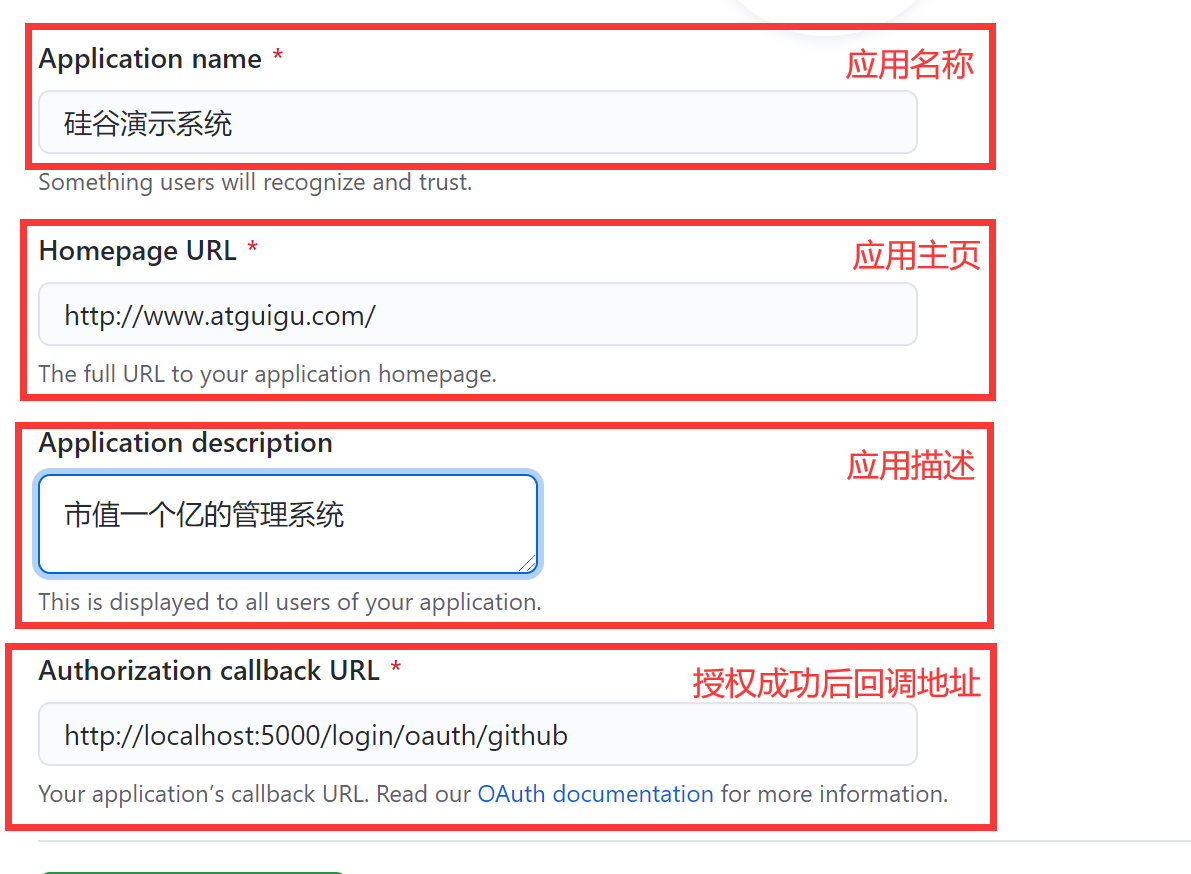
2.获得client_id
查看地址:https://github.com/settings/developers

3.获得Client secrets

4.配置
4.1 前台项目准备好个人中心组件,供授权成功后查看
4.2 将得到的 client_id 、clinet_secret配置到服务器config\index.js中,随后重启服务器。
// github oauth const CLIENT_ID = "xxxxxxxxxxxxxxx"; const CLIENT_SECRET = "xxxxxxxxxxxxxxx";- 1
- 2
- 3

4.3 配置前端请求地址,这里就不写了
4.4 项目中携带网站标识跳转到授权页
loginGithub = ()=>{ window.location.href = AUTH_BASE_URL+'?client_id='+CLIENT_ID }- 1
- 2
- 3
项目启动
1.电脑安装好MongoDB后启动
2.server路径下cmd打开,输入npm start
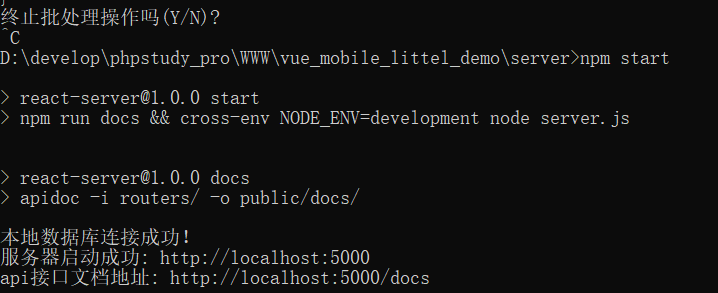
3.项目启动 ,项目路径下cmd打开,输入npm run serve后浏览器进入~

项目的展示
主页登录

获取验证码

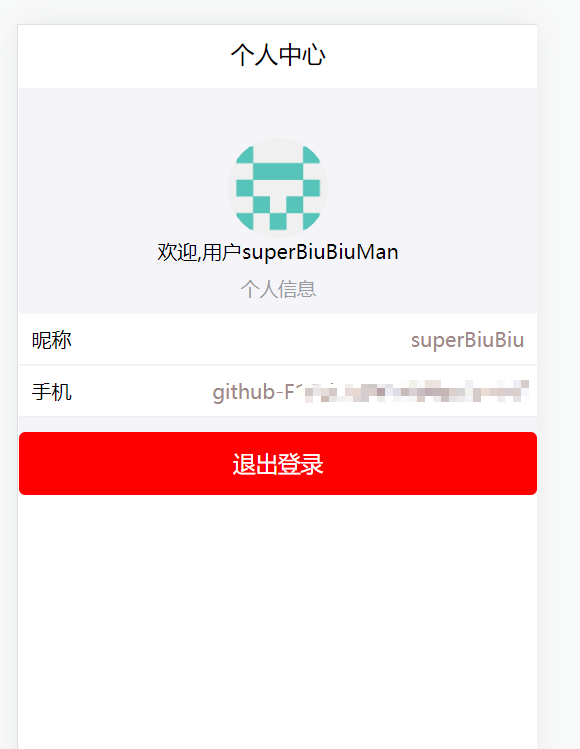
个人中心

github关联

关联后
-
相关阅读:
对于各项生命周期的理解
C# BackgroundWorker用法详解(源码可直接使用)
Worthington核糖核酸酶B历史和化学性质说明
【戴师兄数分】excel基础操作——函数专题(个人笔记)
网络分类面试题
漏洞复现-phpmyadmin_SQL注入 (CVE-2020-5504)
今年计算机考研形势如何,408还是大趋势么?
图像处理-形态学处理
大数据培训MapReduce扩展案例倒排索引案例(多job串联)
斐波那契数
- 原文地址:https://blog.csdn.net/u014582342/article/details/124954189