-
使用 oh-my-posh 美化 windows terminal,让其接近oh-my-zsh
🚀 优质资源分享 🚀
学习路线指引(点击解锁) 知识定位 人群定位 🧡 Python实战微信订餐小程序 🧡 进阶级 本课程是python flask+微信小程序的完美结合,从项目搭建到腾讯云部署上线,打造一个全栈订餐系统。 💛Python量化交易实战💛 入门级 手把手带你打造一个易扩展、更安全、效率更高的量化交易系统 本文旨在快速让你进行美化,少踩一些坑,原文出自我的博客:prettier-windows-terminal-with-oh-my-posh
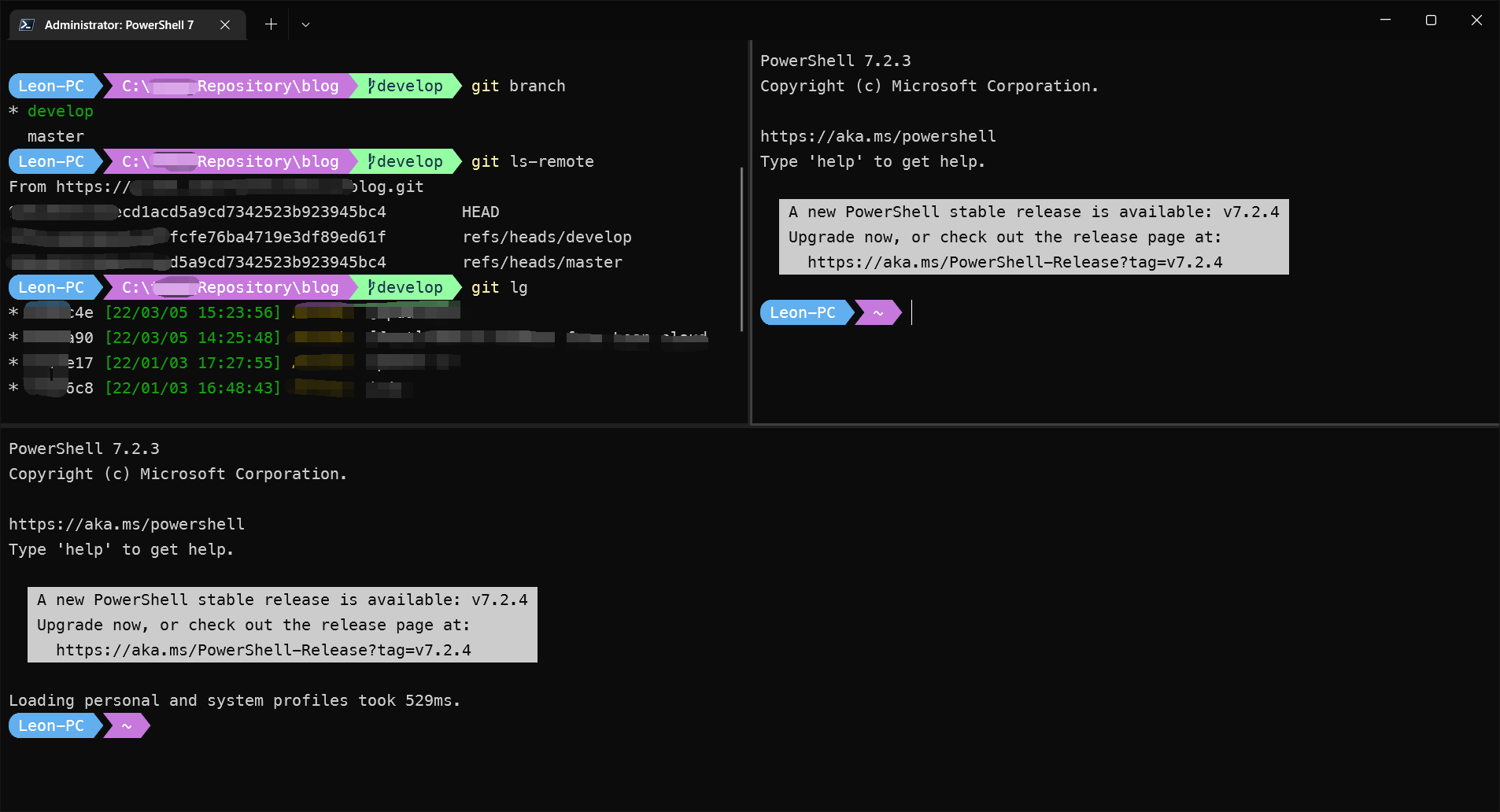
为了同 iterm2 下的 oh-my-zsh 保持基本一致,博主用的是 aliens 主题+一些自定义配置调整,最终效果如下,你也可以根据自己需要进行细调
- 如果你闲麻烦,或者想跟我用一样的,文末会给出主题配置,直接拿去用即可。
- 效果图:
版本说明:
- 本文撰写时:
- oh-my-posh 版本为
v7.87.0 - powershell 的版本为
7.2.3,(最新为 7.2.4) - OS:win10,21H1,19043.1706
- oh-my-posh 版本为
注意事项:
1. 安装时请关闭杀毒软件、各类管家,否则写入注册表时会报错。
2. 有条件的请挂代理,因为源文件在 git 上。
3. 全程在 powershell ,管理员模式下进行。安装 windows terminal:
可直接在 microsoft store 中搜索安装。这里不赘述。
安装 powershell@latest
- 你的系统中,powershell 可能不是新版,一样弄,强烈建议使用最新版本的 powershell。
- 因为新版会增加不少工具包,如 Test-Path 等,可以省去不少自己去各类安装包的麻烦。也可以减少、避免不必要的安装错误。
安装 gsudo
如其名,为了在 windows 下使用 sudo 命令,需要安装该包。
git 地址:https://gerardog.github.io/gsudo/docs/install可以直接在 powershell 中执行以下命令进行安装:
winget install gerardog.gsudo- 1
- 2
- 会自动注册到 path,所以你可以直接在命令行中全局使用:
# 示例:以管理员身份启动 powershell gsudo powershell.exe- 1
- 2
- 3
如果你觉得
gsudo不够直观,希望用sudo,可以通过以下方式重命名:Set-Alias 'sudo' 'gsudo'- 1
- 2
安装 oh-my-posh
官方:https://ohmyposh.dev/
git 地址:https://github.com/jandedobbeleer/oh-my-poshwinget install oh-my-posh- 1
- 2
- 以上命令会安装 oh-my-posh.exe 以及最新的主题。
安装 Nerd Fonts
oh-my-posh 的不少主题都是依赖于该字体,否则部分 icon 会乱码,建议安装。
- Nerd Fonts 官网
- 博主安装的是这套字体,也是官方推荐的字体:Meslo LGM NF。
windows terminal 配置
启动 shell 设置为 powershell 7

以管理员权限启动 shell
在 windows terminal 的设置中,打开JSON文件:

编辑配置:
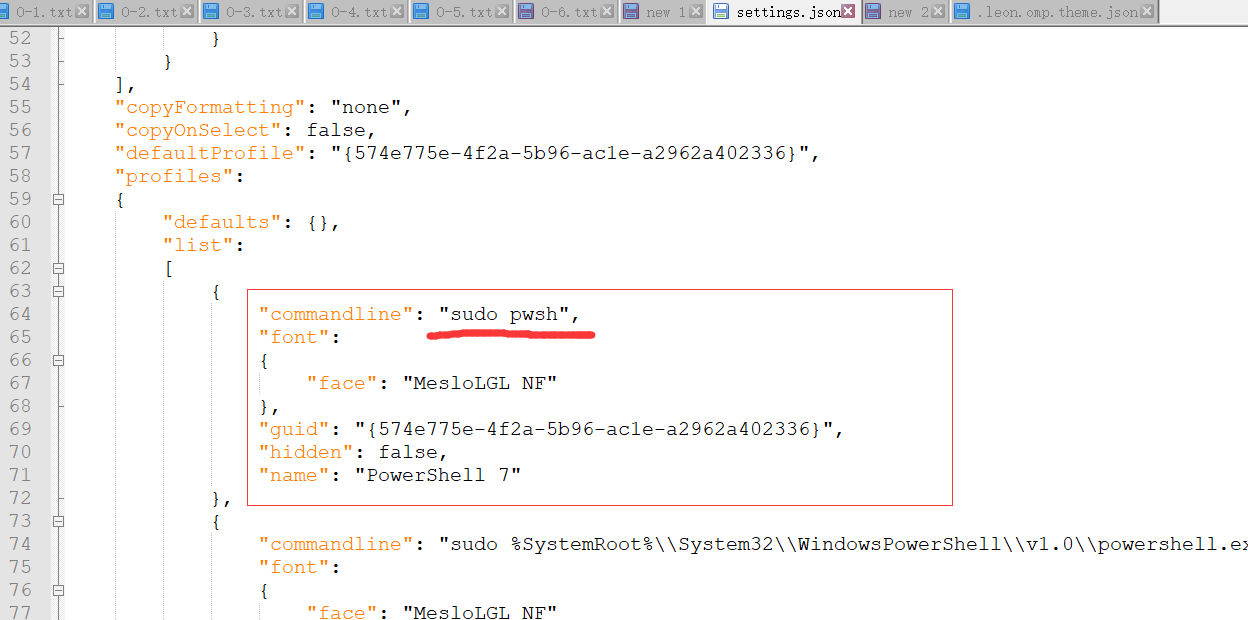
- 只要安装了 powershell 7,默认情况下 pwsh 就会指向 powershell 7。
- 如果你没有给 gsudo 添加
sudo别名的话,这里用gsudo。
设置 powershell 7 字体为 Nerd fonts

配置启动时加载 oh-my-posh
创建 powershell 配置文件:
if (!(Test-Path -Path $PROFILE )) { New-Item -Type File -Path $PROFILE -Force }- 1
- 2
用记事本打开配置文件
notepad $PROFILE- 1
- 2
在记事本中录入以下指令
oh-my-posh init pwsh --config ~/.leon.omp.theme.json | Invoke-Expression- 1
- 2
- 每次启动 shell 时 ,会先执行以上命令以加载主题等配置。
- 其中 “–config ~/.leon.omp.theme.json” 是你的文件和所在路径,文末我会放出我的配置。
- 你可以在 这里 找到不同的主题。
快捷键设置:
习惯了 iterm2 中 CMD+D,SHIFT+CMD+D 来拆分窗口,很庆幸 windows terminal 已经提供了快捷键修改,且针对的就是拆分窗口,直接设置即可,如下:

.leon.omp.theme.json
{ "$schema": "https://raw.githubusercontent.com/JanDeDobbeleer/oh-my-posh/main/themes/schema.json", "blocks": [ { "alignment": "left", "segments": [ { "background": "#61AFEF", "foreground": "#ffffff", "leading\_diamond": "\ue0b6", "style": "diamond", "template": "{{ .HostName }} ", "trailing\_diamond": "\ue0b0", "type": "session" }, { "background": "#C678DD", "foreground": "#ffffff", "powerline\_symbol": "\ue0b0", "properties": { "style": "full" }, "style": "powerline", "template": " {{ .Path }} ", "type": "path" }, { "background": "#95ffa4", "foreground": "#193549", "powerline\_symbol": "\ue0b0", "style": "powerline", "template": " {{ .HEAD }} ", "type": "git" }, { "background": "#FF6471", "foreground": "#ffffff", "leading\_diamond": "\ue0b0", "style": "diamond", "template": " {{ if .Error }}{{ .Error }}{{ else }}{{ if .Venv }}{{ .Venv }} {{ end }}{{ .Full }}{{ end }} ", "trailing\_diamond": "\ue0b4", "type": "python" } ], "type": "prompt" } ], "final\_space": true, "version": 2 }- 1
- 2
- 3
- 4
- 5
- 6
- 7
- 8
- 9
- 10
- 11
- 12
- 13
- 14
- 15
- 16
- 17
- 18
- 19
- 20
- 21
- 22
- 23
- 24
- 25
- 26
- 27
- 28
- 29
- 30
- 31
- 32
- 33
- 34
- 35
- 36
- 37
- 38
- 39
- 40
- 41
- 42
- 43
- 44
- 45
- 46
- 47
- 48
- 49
- 50
- 51
- 属性说明你可以从 这里 了解。
-
相关阅读:
spring 2
关于spring项目中,security 对websocket请求和拦截问题
flume 通过syslog协议读取系统日志
FastDFS文件上传
科研学习|科研软件——SPSS统计的单因素方差分析与单变量方差分析
携职教育:一个暑假的时间,就能拿下这本证书啦
如何选择合适的自动化测试工具?
qt使用QProcess实现进程通信
一个完整的springboot项目所需要导入的依赖合集(方便查找)
Java 集合 - Queue 接口
- 原文地址:https://blog.csdn.net/m0_56069948/article/details/124909176