-
【接口测试】Day7-接口测试框架
今日目标
接口测试框架
- 能够按照接口测试框架的封装思想,实现TPshop登录接口的接口对象封装
- 能够按照接口测试框架的封装思想,使用UnitTest编写测试用例实现接口的测试
- 能够实现接口测试框架项目目录结构的定义
- 能够提取测试脚本中的测试数据,实现测试数据参数化
- 能够使用HTMLTestRunner生成接口测试报告
一、接口测试框架开发
1 框架结构
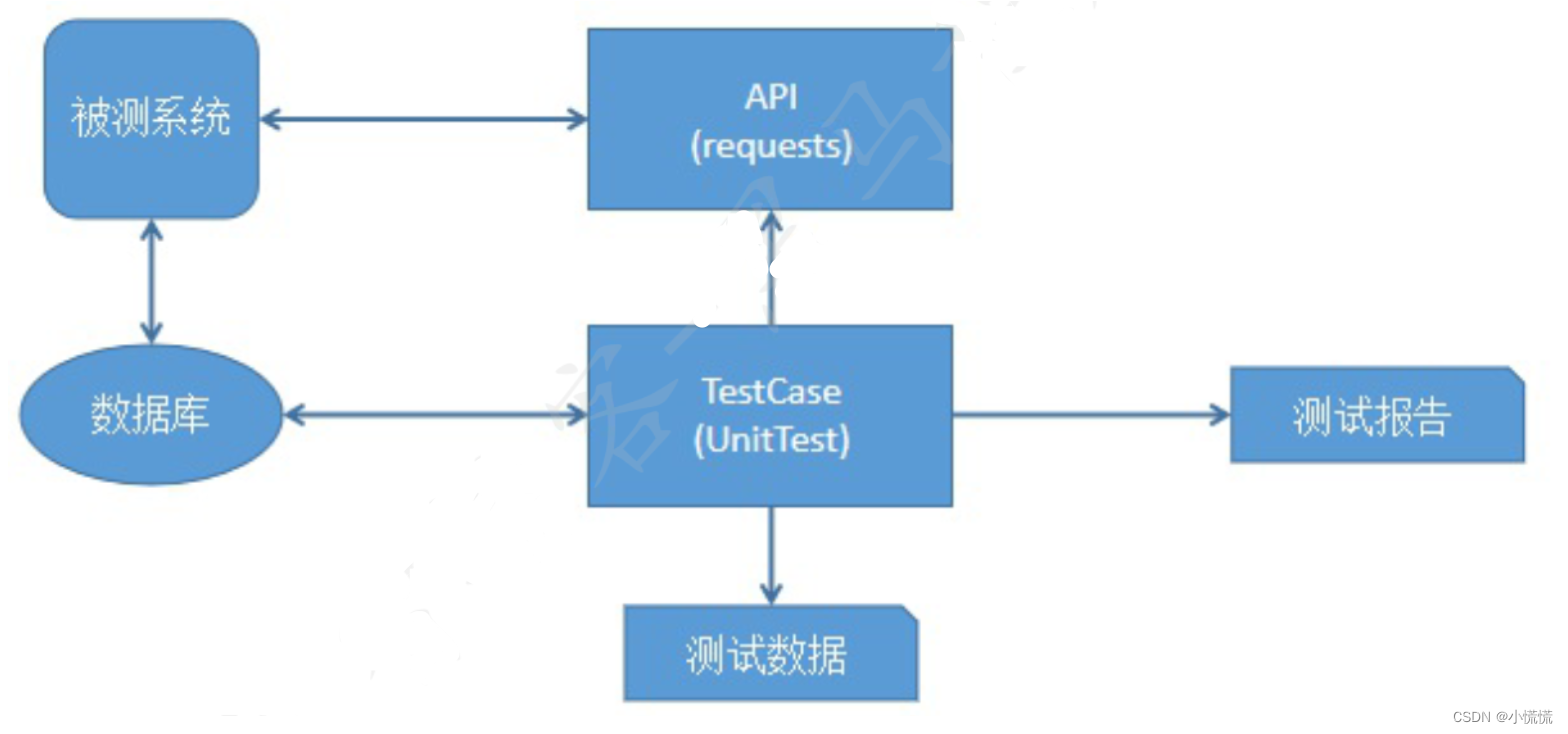
重点说明:
(1)核心在于将测试用例与被测试系统API进行分离,便于后期维护
(2)测试用例是通过unittest进行管理,并提供了丰富的断言(等于、包含等)
(3)可以通过参数化思想测试数据与测试脚本的分离
(4)可以调用数据库进行结果验证或将数据库作为参数化的数据源
(5)借助第三方工具快速的生成HTML报告
2 框架目录结构
tpshop -- 项目代号
- data -- 管理测试数据的文件夹
- report -- 管理测试结果报告的文件夹
- api -- 封装被测试系统的接口
- scripts -- 测试用例脚本
- tools -- 第三方工具包管理
- app.py -- 配置信息文件
- run_suite.py -- 测试用例执行入口
- utils.py -- 自定义工具类
3 封装被测试系统接口
- # 封装被测试系统接口
- # 定义接口类
- class LoginAPI:
- # 初始化
- def __init__(self):
- self.url_verify = "http://localhost/index.php?m=Home&c=User&a=verify"
- self.url_login = "http://localhost/index.php?m=Home&c=User&a=do_login"
- # 获取验证码接口
- def get_verify_code(self, session):
- return session.get(self.url_verify)
- # 登录接口
- def login(self, session, username, password, verify_code):
- login_data = {
- "username": username,
- "password": password,
- "verify_code": verify_code
- }
- return session.post(url=self.url_login, data=login_data)
4 定义接口测试用例
- """
- 定义接口测试用例
- 使用unittest
- 1.导包
- 2.创建测试类
- 2.1 前置处理
- 2.2 后置处理
- 2.3.创建测试方法
- """
- # 1.导包
- import requests
- import unittest
- from api.login import LoginAPI
- # 2.创建测试类
- class TestLogin(unittest.TestCase):
- # 2.1 前置处理
- def setUp(self):
- self.login_api = LoginAPI() # 实例化接口类
- self.session = requests.Session() # 创建session对象
- # 2.2 后置处理
- def tearDown(self):
- if self.session:
- self.session.close()
- # 2.3.创建测试用例
- # 登录成功
- def test01_login_success(self):
- # 调用验证码接口获取验证,并进行断言
- response = self.login_api.get_verify_code(self.session)
- self.assertEqual(200, response.status_code)
- self.assertIn("image", response.headers.get("Content-Type"))
- # 调用登录接口获取登录信息,并进行断言
- response = self.login_api.login(self.session, "13488888888", "123456", "8888")
- print(response.json())
- self.assertEqual(200, response.status_code)
- self.assertEqual(1, response.json().get("status"))
- self.assertIn("登陆成功", response.json().get("msg"))
- # 账号不存在
- def test02_user_is_not_exist(self):
- # 调用验证码接口获取验证,并进行断言
- response = self.login_api.get_verify_code(self.session)
- self.assertEqual(200, response.status_code)
- self.assertIn("image", response.headers.get("Content-Type"))
- # 调用登录接口获取登录信息,并进行断言
- response = self.login_api.login(self.session, "13488888899", "123456", "8888")
- print(response.json())
- self.assertEqual(200, response.status_code)
- self.assertEqual(-1, response.json().get("status"))
- self.assertIn("账号不存在", response.json().get("msg"))
- # 密码错误
- def test03_password_error(self):
- # 调用验证码接口获取验证,并进行断言
- response = self.login_api.get_verify_code(self.session)
- self.assertEqual(200, response.status_code)
- self.assertIn("image", response.headers.get("Content-Type"))
- # 调用登录接口获取登录信息,并进行断言
- response = self.login_api.login(self.session, "13488888888", "error", "8888")
- print(response.json())
- self.assertEqual(200, response.status_code)
- self.assertEqual(-2, response.json().get("status"))
- self.assertIn("密码错误", response.json().get("msg"))
5 集成测试报告
- # 导包
- import time
- import unittest
- from scripts.test01_login import TestLoginAPI
- from tools.HTMLTestRunner import HTMLTestRunner
- # 封装测试套件
- suite = unittest.TestSuite()
- suite.addTest(unittest.makeSuite(TestLoginAPI))
- # 指定报告路径
- report = "./report/report-{}.html".format(time.strftime("%Y%m%d-%H%M%S"))
- # 打开文件流
- with open(report, "wb") as f:
- # 创建HTMLTestRunner执行器
- runner = HTMLTestRunner(f, title="接口测试报告")
- # 执行测试套件
- runner.run(suite)
6 测试数据参数化
6.1 基于json文件实现参数化
- # 导包
- import json
- import requests
- import unittest
- from api.login import LoginAPI
- from parameterized import parameterized
- # 构造测试数据
- def build_data():
- json_file = "../data/login.json"
- test_data = []
- with open(json_file, encoding="utf-8") as f:
- json_data = json.load(f)
- for case_data in json_data:
- username = case_data.get("username")
- password = case_data.get("password")
- verify_code = case_data.get("verify_code")
- status_code = case_data.get("status_code")
- content_type = case_data.get("content_type")
- status = case_data.get("status")
- msg = case_data.get("msg")
- test_data.append((username, password, verify_code, status_code, content_type, status, msg))
- print("test_data = {}".format((username, password, verify_code, status_code, content_type, status, msg)))
- return test_data
- # 定义测试类
- class TestLoginAPI(unittest.TestCase):
- # 前置处理
- def setUp(self):
- self.login_api = LoginAPI()
- self.session = requests.Session()
- # 后置处理
- def tearDown(self):
- if self.session:
- self.session.close()
- # 定义测试方法
- @parameterized.expand(build_data)
- def test01_login(self, username, password, verify_code, status_code,
- content_type, status, msg):
- # 调用验证码接口
- response = self.login_api.get_verify_code(self.session)
- # 断言
- self.assertEqual(status_code, response.status_code)
- self.assertIn(content_type, response.headers.get("Content-Type"))
- # 调用登录接口
- response = self.login_api.login(self.session, username, password, verify_code)
- print(response.json())
- self.assertEqual(status_code, response.status_code)
- self.assertEqual(status, response.json().get("status"))
- self.assertIn(msg, response.json().get("msg"))
6.2 基于数据库实现参数化
- # 导包
- import requests
- import unittest
- from api.login import LoginAPI
- from tools.dbutil import DBUtil
- from parameterized import parameterized
- # 构造测试数据
- def build_data():
- sql = "select * from t_login"
- db_data = DBUtil.exe_sql(sql)
- print(db_data)
- test_data = []
- for case_data in db_data:
- username = case_data[2]
- password = case_data[3]
- verify_code = case_data[4]
- status_code = case_data[5]
- content_type = case_data[6]
- status = case_data[7]
- msg = case_data[8]
- test_data.append((username, password, verify_code, status_code, content_type, status, msg))
- print("test_data = {}".format((username, password, verify_code, status_code, content_type, status, msg)))
- return test_data
- # 定义测试类
- class TestLoginAPI(unittest.TestCase):
- # 前置处理
- def setUp(self):
- self.login_api = LoginAPI()
- self.session = requests.Session()
- # 后置处理
- def tearDown(self):
- if self.session: self.session.close()
- # 定义测试方法
- @parameterized.expand(build_data)
- def test01_login(self, username, password, verify_code, status_code,
- content_type, status, msg):
- # 调用验证码接口
- response = self.login_api.get_verify_code(self.session)
- # 断言
- self.assertEqual(status_code, response.status_code)
- self.assertIn(content_type, response.headers.get("Content-Type"))
- # 调用登录接口
- response = self.login_api.login(self.session, username, password, verify_code)
- print(response.json())
- self.assertEqual(status_code, response.status_code)
- self.assertEqual(status, response.json().get("status"))
- self.assertIn(msg, response.json().get("msg"))
二、IHRM项目实战任务
- 登录
- 员工管理
- 任务
- 搭建IHRM项目接口测试框架
- 封装IHRM登录接口
- 创建登录模块的测试用例
- 普通模式
- 参数化
- 生成HTML测试报告
实战任务见下一篇
-
相关阅读:
【移动端h5常用的几款插件 】
Bert-vits2最终版Bert-vits2-2.3云端训练和推理(Colab免费GPU算力平台)
#卷妹带你回顾Java基础(一)每日更新Day9
尚硅谷Flink(完)FlinkSQL
一个基于.Net高性能跨平台内网穿透工具
vue路由
PackML 学习笔记(2) OPCUA /PackML
【C#学习】button:只显示图片
数据库知识点整合
聊聊数据库连接池 Druid
- 原文地址:https://blog.csdn.net/whowhowhoisimportant/article/details/124907191