-
Android jetpack room 数据库的升级
如果用户设备上数据库版本为1
而当前要安装的App数据库版本为3怎么办
Room会先判断当前有没有直接从1到3的的升级方案,如果有,就直接执行从1到3的升级方案,如果没有,那么Room会按照顺序先后执行 Migration(1,2)、Migration(2,3)以完成升级。
修改dataBase文件
- package com.anguomob.jecpack.database
- import android.content.Context
- import androidx.room.Database
- import androidx.room.Room
- import androidx.room.RoomDatabase
- import androidx.room.migration.Migration
- import androidx.sqlite.db.SupportSQLiteDatabase
- import com.anguomob.jecpack.bean.Student
- import com.anguomob.jecpack.dao.StudentDao
- import okhttp3.internal.Internal.instance
- @Database(entities = [Student::class], version = 3, exportSchema = false)
- abstract class MyDataBase : RoomDatabase() {
- companion object {
- var DATABASE_NAME = "my_db.db"
- private lateinit var instance: MyDataBase
- //数据库从1 到2 版本的升级
- var MIGATION_1_2: Migration = object : Migration(1, 2) {
- override fun migrate(database: SupportSQLiteDatabase) {
- //新增性别
- database.execSQL("ALTER TABLE student ADD COLUMN sex INTEGER NOT NULL DEFAULT 1")
- }
- }
- var MIGATION_2_3: Migration = object : Migration(2, 3) {
- override fun migrate(database: SupportSQLiteDatabase) {
- //新增性别
- database.execSQL("ALTER TABLE student ADD COLUMN `bar_data` INTEGER NOT NULL DEFAULT 1")
- }
- }
- fun getSingle(context: Context): MyDataBase {
- if (::instance.isInitialized.not()) {
- instance = Room.databaseBuilder(
- context.applicationContext,
- MyDataBase::class.java,
- DATABASE_NAME
- )
- // .allowMainThreadQueries()//允许主线程操作数据库
- .addMigrations(MIGATION_1_2, MIGATION_2_3)
- .build();
- }
- return instance;
- }
- }
- abstract fun getStudentDao(): StudentDao
- }


数据库的版本也修改一下。
其中呢数据bean也要跟着变化
- package com.anguomob.jecpack.bean
- import androidx.room.ColumnInfo
- import androidx.room.Entity
- import androidx.room.Ignore
- import androidx.room.PrimaryKey
- @Entity(tableName = "student")
- data class Student(
- @PrimaryKey(autoGenerate = true)
- @ColumnInfo(name = "id", typeAffinity = ColumnInfo.INTEGER)
- var id: Int,
- @ColumnInfo(name = "name", typeAffinity = ColumnInfo.TEXT)
- var name: String,
- @ColumnInfo(name = "age", typeAffinity = ColumnInfo.INTEGER)
- var age: Int,
- @ColumnInfo(name = "sex", typeAffinity = ColumnInfo.INTEGER)
- var sex: Int,
- @ColumnInfo(name = "bar_data", typeAffinity = ColumnInfo.INTEGER)
- var bar_data: Int
- ) {
- @Ignore
- constructor(name: String, age: Int) : this(0, name, age, 1,1)
- @Ignore
- constructor(id: Int) : this(id, "", 0, 1,1)
- }
弄完后可以导出来数据库
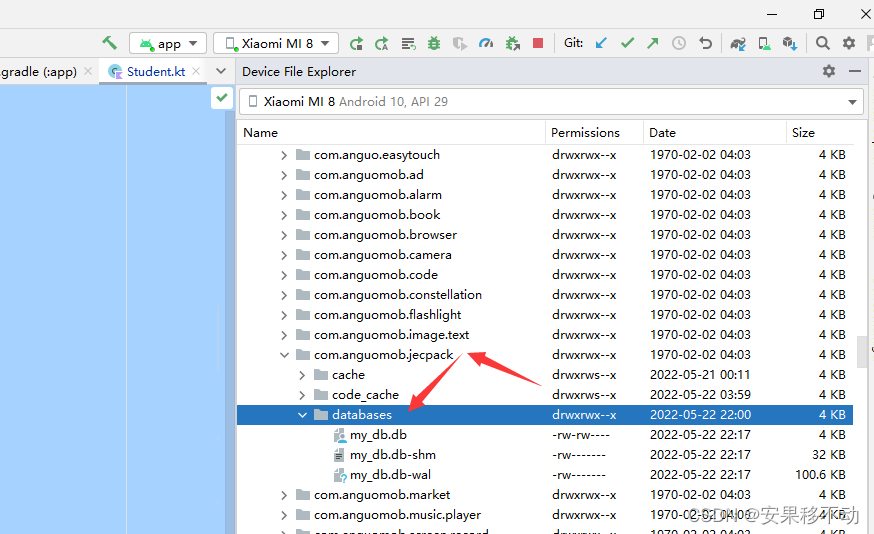
在data/data/包名/database路径下的三个都导出到桌面一个位置
X:\Users\Administrator\Desktop

然后用其他的数据库软件打开

看数据库就存在了sex 与bar_data字段
-
相关阅读:
C++-头文件书写规范(二):头文件中的保护措施【#ifndef #define...#endif 】【防止多个源文件同时包含同一个头文件时产生的声明冲突】
Java中的网络编程是什么?
【linux命令讲解大全】114. 网络状态监测工具iptstate和lnstat的使用
AR编程入门:解锁虚拟与现实交融的新世界
基于SSM的文章管理系统源代码+数据库,基于SSM的CMS内容管理系统源代码+数据库
CuteOneP 一款php的OneDrive多网盘挂载程序 带会员 同步等功能
杨氏矩阵解法
linux下PHP 环境搭建
Java8 CompletableFuture runAsync等使用学习总结 submit() execute()等
大厂设计师力推的14款平面图设计工具!
- 原文地址:https://blog.csdn.net/mp624183768/article/details/124917188