-
基于 Flutter 和 Firebase 实现的小游戏 I/O Pinball - 谷歌 I / O 2022
theme: smartblue
原文链接: https://medium.com/flutter/i-o-pinball-powered-by-flutter-and-firebase-d22423f3f5d
本次 Google I/O 与 Flutter 团队合作,重新构想了一款使用 Flutter 和 Firebase 构建的经典弹球游戏,以下是如何在 Flame 游戏引擎的帮助下在 Web 实现 I/O Pinball。
游戏开发要点
对于 puzzles 或者文字类游戏,基于 Flutter 构建的 2D 游戏引擎Flame 实现会是一个不错的虚啊嗯。
I/O Pinball 使用了 Flame 的开箱即用功能,例如动画、物理、碰撞检测等,同时还利用了 Flutter framework 的基础内容,如果可以使用 Flutter 构建应用程序,那么其实你已经具备使用 Flame 构建游戏所需的基础。

Game loop
在传统 App 中,通常屏幕在视觉上是静态的,直到有来自用户的事件或交互,对于游戏这一情况正好相反——UI 需要不断更新,游戏状态会不断发生变化。
Flame 提供了一个游戏 Widget,它在内部管理游戏的 loop,以便 UI 不断以高性能的方式刷新。
该
Game包含游戏组件和逻辑的实现,它们被传递到GameWidget树中,在 I/O Pinball 中,游戏 loop 对球在赛场上的位置和状态做出反应,是球与物体发生碰撞或脱离比赛时应用必要的效果。@override void update(double dt) { super.update(dt); final direction = -parent.body.linearVelocity.normalized(); angle = math.atan2(direction.x, -direction.y); size = (_textureSize / 45) * parent.body.fixtures.first.shape.radius; }- 1
- 2
- 3
- 4
- 5
- 6
- 7
使用 2D 组件渲染 3D 空间
构建 I/O Pinball 的挑战之一是弄清楚,如何仅使用 2D 元素创建 3D 效果。
组件会通过排序以确定它们在屏幕上的呈现方,例如当球在斜坡上发射时,球的所在的层级顺序增加,因此它看起来在斜坡的顶部。

球、柱塞、触脚和 Chrome Dino 都是具有动态主体的元素,它们受到游戏世界物理效果的影响。
球也会根据其在棋盘上的位置而改变大小。随着球移动到棋盘的顶部,它的大小会缩小,以显得离用户的视角更远。此外,球上的重力根据弹球机的角度进行调整,使球在斜坡上落得更快。
/// Scales the ball's body and sprite according to its position on the board. class BallScalingBehavior extends Component with ParentIsA<Ball> { @override void update(double dt) { super.update(dt); final boardHeight = BoardDimensions.bounds.height; const maxShrinkValue = BoardDimensions.perspectiveShrinkFactor; final standardizedYPosition = parent.body.position.y + (boardHeight / 2); final scaleFactor = maxShrinkValue + ((standardizedYPosition / boardHeight) * (1 - maxShrinkValue));parent.body.fixtures.first.shape.radius = (Ball.size.x / 2) * scaleFactor;final ballSprite = parent.descendants().whereType<SpriteComponent>(); if (ballSprite.isNotEmpty) { ballSprite.single.scale.setValues( scaleFactor, scaleFactor, ); } } }- 1
- 2
- 3
- 4
- 5
- 6
- 7
- 8
- 9
- 10
- 11
- 12
- 13
- 14
- 15
- 16
- 17
Forge 2D 物理
I/O Pinball 十分依赖于 Flame 团队维护的
forge2d包,这个包将开源的Box2D 物理引擎移植到 Dart 中,以便它可以轻松地与 Flutter 集成。forge2d为游戏的物理特性提供动力,例如运动场上物体 (Fixtures) 之间的碰撞检测。forge2D允许在发生碰撞时进行监听Fixtures,然后我们添加ContactCallbacks以便在Fixtures在两个元素之间发生联系时收到通知。例如,当球(带有
Fixture和CircleShape)与保险杠(带有Fixture和EllipseShape)接触时得分会增加,在这些回调中,我们可以准确地设置接触开始和结束的位置,这样当两个元素相互接触时,就会发生碰撞。@override Body createBody() { final shape = CircleShape()..radius = size.x / 2; final bodyDef = BodyDef( position: initialPosition, type: BodyType.dynamic, userData: this, ); return world.createBody(bodyDef) ..createFixtureFromShape(shape, 1); }- 1
- 2
- 3
- 4
- 5
- 6
- 7
- 8
- 9
- 10
Sprite sheet animations
弹球游戏场上有一些元素,如 Android、Dash、Sparky 和 Chrome Dino,它们都是有动画效果。
对于这些,我们使用 sprite sheets,它包含在带有
SpriteAnimationComponent,对于每个元素都有一个文件,其中包含不同方向的图像、文件中的帧数以及帧之间的时间。使用这些数据,
SpriteAnimationComponent在 Flame 内将所有图像循环编译在一起,从而使元素看起来具有动画效果。
final spriteSheet = gameRef.images.fromCache( Assets.images.android.spaceship.animatronic.keyName, );const amountPerRow = 18; const amountPerColumn = 4; final textureSize = Vector2( spriteSheet.width / amountPerRow, spriteSheet.height / amountPerColumn, ); size = textureSize / 10;animation = SpriteAnimation.fromFrameData( spriteSheet, SpriteAnimationData.sequenced( amount: amountPerRow * amountPerColumn, amountPerRow: amountPerRow, stepTime: 1 / 24, textureSize: textureSize, ), );- 1
- 2
- 3
- 4
- 5
- 6
- 7
- 8
- 9
- 10
- 11
- 12
- 13
- 14
- 15
- 16
- 17
带有 Firebase 实时结果的排行榜
I/O Pinball 排行榜实时显示全球玩家的最高分,用户还可以将他们的分数分享到 Twitter 和 Facebook。
这里使用 Firebase Cloud Firestore 来跟踪前十名的分数并获取它们以显示在排行榜上,当新分数写入排行榜时,Cloud Function会按降序排列分数,并删除当前不在前十名中的任何分数。
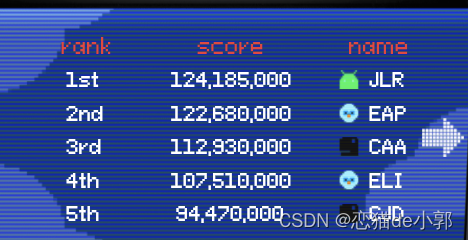
/// Acquires top 10 [LeaderboardEntryData]s. Future<List<LeaderboardEntryData>> fetchTop10Leaderboard() async { try { final querySnapshot = await _firebaseFirestore .collection(_leaderboardCollectionName) .orderBy(_scoreFieldName, descending: true) .limit(_leaderboardLimit) .get(); final documents = querySnapshot.docs; return documents.toLeaderboard(); } on LeaderboardDeserializationException { rethrow; } on Exception catch (error, stackTrace) { throw FetchTop10LeaderboardException(error, stackTrace); } }- 1
- 2
- 3
- 4
- 5
- 6
- 7
- 8
- 9
- 10
- 11
- 12
- 13
- 14
- 15
- 16
Web
与传统 App 相比,构建响应式游戏可能更间谍,其中弹球游戏场只需要缩放到设备的大小,对于 I/O Pinball,我们会根据用户设备的大小以固定比例进行缩放。
这可确保坐标系始终相同,无论显示尺寸如何,这对于确保组件在设备间一致显示和交互非常重要。
I/O Pinball 也适用于 Mobile 或 PC 浏览器:
- 在移动浏览器上用户可以点击启动按钮开始播放,也可以点击屏幕的左右两侧来控制相应的脚蹼;
- 在桌面浏览器上,用户可以使用键盘来发射球并控制脚蹼;
代码库架构
pinball 代码库遵循分层架构,每个功能都在自己的文件夹中,游戏逻辑也与该项目中的视觉组件分离,这确保我们可以独立于游戏逻辑轻松更新视觉元素,反之亦然。
弹球的主题取决于用户在开始游戏之前选择的角色,主题由
CharacterThemeCubit控制,根据角色选择,更新球的颜色、背景和其他元素。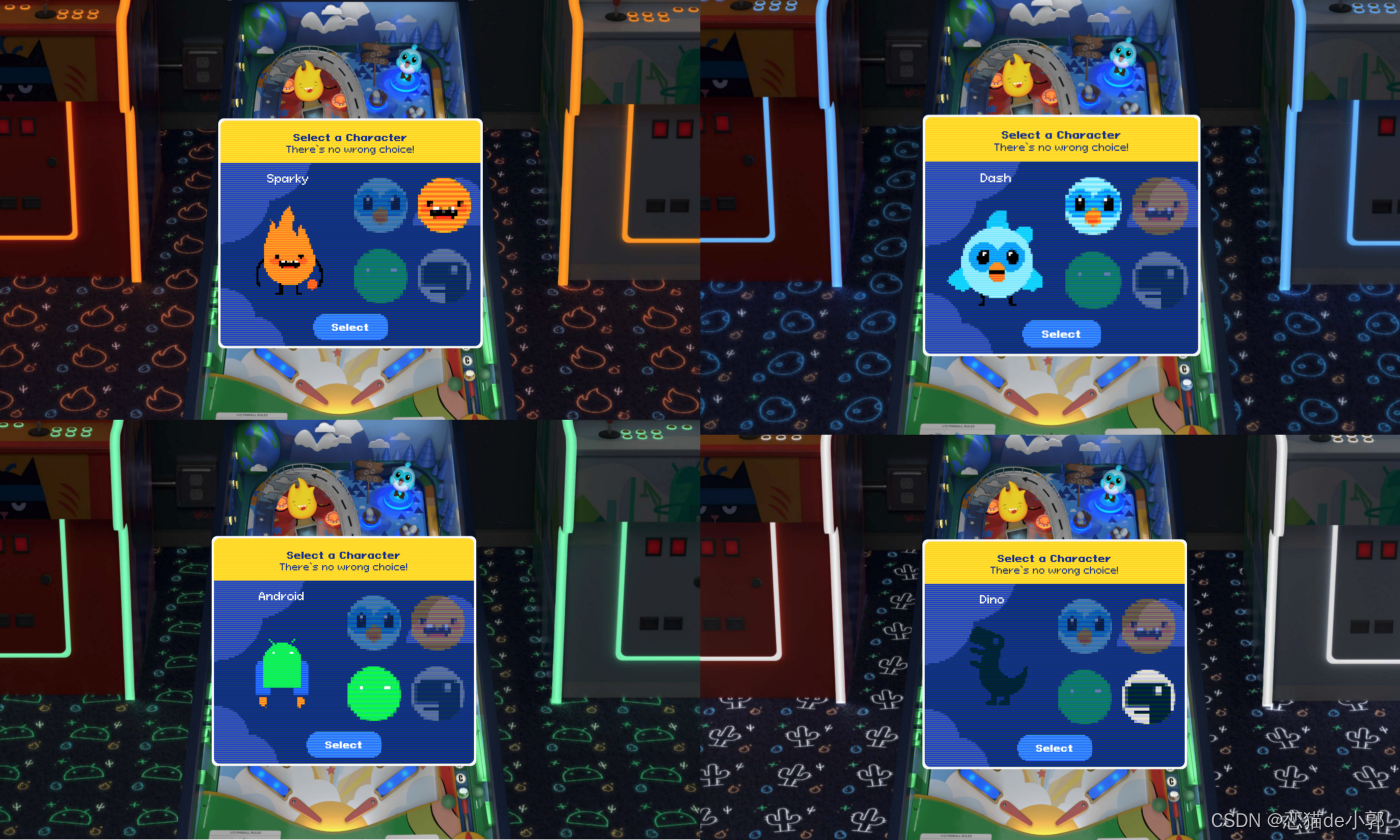
/// {@template character_theme} /// Base class for creating character themes. /// /// Character specific game components should have a getter specified here to /// load their corresponding assets for the game. /// {@endtemplate} abstract class CharacterTheme extends Equatable { /// {@macro character_theme} const CharacterTheme();/// Name of character. String get name;/// Asset for the ball. AssetGenImage get ball;/// Asset for the background. AssetGenImage get background;/// Icon asset. AssetGenImage get icon;/// Icon asset for the leaderboard. AssetGenImage get leaderboardIcon;/// Asset for the the idle character animation. AssetGenImage get animation;@override List<Object> get props => [ name, ball, background, icon, leaderboardIcon, animation, ]; }- 1
- 2
- 3
- 4
- 5
- 6
- 7
- 8
- 9
- 10
- 11
- 12
- 13
- 14
- 15
- 16
- 17
- 18
- 19
- 20
- 21
- 22
- 23
- 24
I/O Pinball 游戏状态由
flame_bloc处理,这是一个将 bloc 与 Flame 组件连接起来的包。例如,我们用
flame_bloc跟踪剩余的游戏轮数、通过游戏获得的任何奖金以及当前的游戏得分。此外, Widget 树的顶部还有一个 Widget ,其中包含加载页面的逻辑,包括如何玩游戏的说明,我们还遵循behavioral pattern,根据其组件封装和隔离游戏功能的某些元素,例如保险杠在被球击中时会发出声音,所以我们实现了
BumperNoiseBehavior类来处理这个问题。class BumperNoiseBehavior extends ContactBehavior { @override void beginContact(Object other, Contact contact) { super.beginContact(other, contact); readProvider<PinballPlayer>().play(PinballAudio.bumper); } }- 1
- 2
- 3
- 4
- 5
- 6
- 7
代码库还包含各种的单元、小部件和测试。有时测试游戏会带来一些新的挑战,因为单个组件可能有多个职责,这使得它们很难单独测试。所以我们对
flame_test包进行了许多改进。组件沙箱
I/O Pinball 十分依赖 Flame 组件来实现弹球体验,代码库附带一个组件沙箱,类似于UI 组件库。在开发游戏时,这是一个有用的工具,因为它允许开发者单独开发游戏组件,并确保它们在将它们集成到游戏中之前的外观和行为符合预期。

下一步是什么
首先看看你能不能在I/O Pinball中获得高分!该代码在此 GitHub 中是开源的,欢迎密切关注排行榜,并在社交媒体上分享你的分数!
-
相关阅读:
还在手动包裹产品吗?—机器已逐步取代人工,导电滑环厂家解析
vue3按钮隐藏显示元素
SQlserver提权方法
多线程与高并发编程
【java学习—八】关键字static(4)
Kotlin学习(二)
C动态内存管理|有张三和如花的故事你心动了吗
【PLC】现场总线和工业以太网汇总
pdf文件如何防篡改内容
【systrace学习】atrace打开各系统层tag开关的原理
- 原文地址:https://blog.csdn.net/ZuoYueLiang/article/details/124729350